
The best capture cards with passthrough for PC let you record or stream gameplay while sending a clean, low-latency signal to your gaming display. The right model depends on your resolution, refresh rate, connection type, and streaming setup.
We’ve selected 10 options ranging from compact USB devices to internal PCIe cards, including models built for 4K, HDR, VRR, and HDMI 2.1 gaming.
Best 10 Capture Cards with Passthrough for PC Picks for 2026
Best Overall

- 4K144 capture and passthrough
- HDMI 2.1 with VRR and HDR10
- Works with major streaming apps
Best For: PC gamers and streamers seeking flexible high-refresh performance
Best for Simple Setup
- Plug-and-play OBS-certified setup
- 1440p60 or 4K30 capture
- HDR passthrough with audio controls
Best For: Windows users who prioritize easy installation and onboard controls
Best Internal Card

- Up to 8K60 passthrough
- 4K60 HDR10 capture
- PCIe design supports dual-PC setups
Best For: Windows desktop builders wanting high-end internal capture
Best for High-Refresh Audio
AVerMedia Live Gamer Ultra 2.1

- 4K144 capture on supported Windows PCs
- 4K144 HDR/VRR passthrough
- Party chat and 5.1-channel audio
Best For: High-refresh players who need flexible gaming audio
Best Internal PCIe Pick
- 1080p60 capture
- True zero-lag passthrough
- Unlimited and Flashback Recording
Best For: Desktop PC streaming setups
Best 4K HDR Passthrough
AVerMedia Live Gamer Extreme 3

- 4K30 capture
- 4K60 HDR passthrough
- VRR support up to 1440p120
Best For: High-refresh gaming and streaming
Best Budget Loop-Out Option

- 4K30 HDMI loop-out
- 2K30 or 1080p60 capture
- USB-A and USB-C connectivity
Best For: Flexible everyday streaming setups
Best for High-Resolution PCIe Streaming
- 4K60 pass-through with 4K30 capture
- VRR and 1080p120 support
- PCIe plug-and-play installation
Best For: Desktop PC gamers seeking high-resolution, high-frame-rate passthrough
Best Flexible USB Option
XIIXMASK 4K HDMI Loop-Out Capture Card

- 4K60 loop-out with 1080p60 capture
- USB-A and USB-C connectivity
- 3.5mm mic-in for commentary
Best For: Multi-device streamers wanting flexible USB connections
Best Simple Plug-and-Play Pick
- Zero-latency HDMI pass-through
- 1080p60 capture from 4K30 input
- Driver-free USB 3.0 setup
Best For: Windows and Mac users who want simple 1080p streaming
Best Overall – Elgato 4K X
The Elgato 4K X is a strong all-around choice among capture cards with passthrough for PC. Its HDMI 2.1 connections support high-refresh gaming, while VRR passthrough and USB 3.2 Gen 2 help keep gameplay smooth and responsive during streaming or recording.
Best For: PC gamers and streamers who want 4K144 passthrough, VRR, and broad software compatibility.
Pros:
- Supports 4K capture and passthrough at up to 144 fps.
- HDMI 2.1 input and output support high-refresh setups.
- VRR passthrough, HDR10, and ultra-low latency.
- Works with OBS, Streamlabs, Twitch Studio, and other listed apps.
Cons:
- Requires a USB 3.2 Gen 2 port for its full capabilities.
- Full compatibility requires a relatively capable Windows or Mac system.
Choose the 4K X if you want a compact external solution that balances high-end passthrough, flexible platform support, and streaming-friendly connectivity.
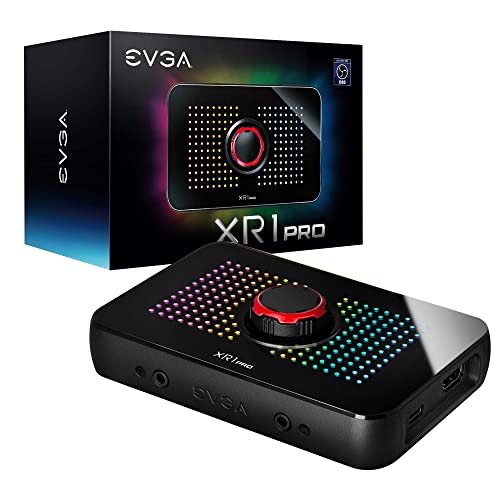
Best for Simple Setup – EVGA XR1 Pro
The EVGA XR1 Pro is a practical pick for shoppers comparing capture cards with passthrough for PC and console use. It offers 1440p or 4K HDR passthrough, plug-and-play operation without driver installation, and useful onboard controls for audio and lighting.
Best For: Windows users who want straightforward setup, HDR passthrough, and built-in streaming controls.
Pros:
- Captures up to 1440p at 60 fps or 4K at 30 fps.
- Supports 1440p at 144 Hz and 4K at 60 Hz HDR passthrough.
- Certified for OBS and designed for plug-and-play setup.
- Includes an audio mixer, control dial, and customizable RGB lighting.
Cons:
- Windows is the listed operating-system platform.
- Capture and passthrough specifications vary by resolution and refresh rate.
The XR1 Pro makes sense when easy installation and hands-on audio controls matter more than the newest HDMI 2.1 feature set.
Best Internal Card – Elgato 4K Pro
The Elgato 4K Pro is an internal PCIe option for PC builders seeking capture cards with passthrough for PC. It pairs HDMI 2.1 connectivity with up to 8K60 passthrough, 4K60 HDR10 capture, VRR support, and compatibility with dual-PC setups.
Best For: Windows desktop users building a high-end internal capture and passthrough setup.
Pros:
- Supports passthrough up to 8K60.
- Captures 4K60 with HDR10.
- HDMI 2.1, VRR support, and up to 1080p240 recording.
- Compatible with dual-PC setups and listed streaming applications.
Cons:
- Requires a Windows 10 PC with an available PCIe slot.
- It is an internal card rather than an external USB device.
For a compatible desktop, the 4K Pro is the most suitable choice here for maximizing passthrough resolution and integrating capture directly into the PC.
Best for High-Refresh Audio – AVerMedia Live Gamer Ultra 2.1
The AVerMedia Live Gamer Ultra 2.1 stands out among capture cards with passthrough for PC by combining HDMI 2.1 high-refresh support with party-chat connections and 5.1-channel audio options. It can capture up to 4K144 on supported Windows PCs and connects through USB-C.
Best For: High-refresh PC and console players who need party chat, flexible audio, and VRR passthrough.
Pros:
- Supports 4K144 capture on supported Windows PCs.
- Passes through 4K144 HDR/VRR, 1440p240, or 1080p360 on compatible displays.
- Includes party-chat connections and 5.1-channel audio support for compatible Windows workflows.
- Works with OBS through the AVerMedia plugin and supports Windows, Mac, and iPad capture.
Cons:
- 4K144 capture and HDR capture depend on supported Windows hardware and workflows.
- Displays using DSC may limit 4K passthrough to 4K120.
- Some advanced audio features are specific to compatible Windows setups.
This is a compelling fit for competitive players and streamers who value high refresh rates alongside integrated headset, party-chat, and multichannel audio support.
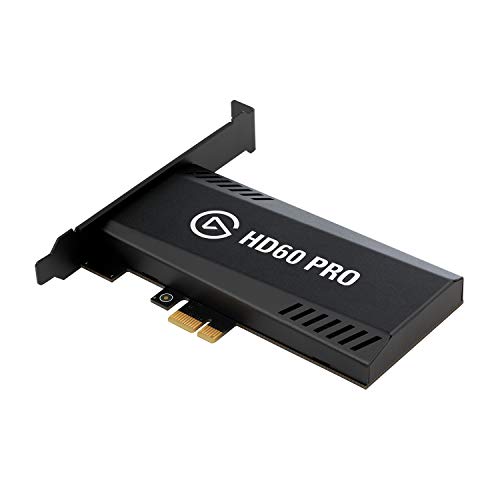
Best Internal PCIe Pick – Elgato HD60 Pro
For shoppers comparing capture cards with passthrough for PC, the Elgato HD60 Pro is an internal PCIe option focused on 1080p60 capture and lag-free console gameplay. Its Instant Gameview, unlimited hard-drive recording, and Flashback Recording features suit established Windows or macOS streaming setups.
Best For: PC users who want an internal capture card for 1080p60 recording and true passthrough.
Pros:
- Captures gameplay at 1080p60.
- True passthrough is designed for zero-lag play.
- Supports unlimited recording directly to a hard drive.
- Flashback Recording can save recent gameplay retroactively.
Cons:
- Requires an available PCI Express x1 slot.
- Designed for internal installation rather than portable use.
- Maximum listed capture resolution is 1080p.
The HD60 Pro is a focused choice for desktop users who prioritize dependable 1080p60 capture and low-latency passthrough over 4K recording or portability.
Best 4K HDR Passthrough – AVerMedia Live Gamer Extreme 3
The AVerMedia Live Gamer Extreme 3 is a strong choice among capture cards with passthrough for PC when high-refresh gaming matters. This USB model captures up to 4K30 while offering 4K60 HDR passthrough, VRR support, and compatibility with Windows, macOS, and iPadOS.
Best For: Gamers and creators who want 4K30 capture with high-refresh, HDR, and VRR passthrough.
Pros:
- Captures up to 4K30 and supports 4K60 HDR passthrough.
- Supports VRR passthrough at 1440p120 or 1080p120.
- Plug-and-play operation requires no extra drivers or external power.
- Includes 3.5mm audio input and output for game chat and commentary.
Cons:
- Requires a USB 3.2 Gen 1 Type-C port and a supported modern operating system.
- Capture resolution is limited to 4K30 rather than 4K60.
- Its broader feature set may be more than needed for basic 1080p streaming.
With high-refresh passthrough, HDR, VRR, and direct audio connections, the Live Gamer Extreme 3 is well suited to advanced console and PC gaming workflows that need smooth monitoring while recording.
Best Budget Loop-Out Option – UGREEN HDMI Capture Card
For a flexible and straightforward option among capture cards with passthrough for PC, the UGREEN HDMI capture card provides 4K30 input and loop-out while recording up to 2K30 or 1080p60. Its USB-A/C connectivity, plug-and-play setup, and broad system support make it practical for common streaming and recording tasks.
Best For: Budget-conscious users who need HDMI loop-out, 1080p60 capture, and USB-A or USB-C connectivity.
Pros:
- Supports 4K30 input and 4K30 HDMI loop-out for low-latency monitoring.
- Captures up to 2K30 or 1080p60.
- Offers both USB 3.0 Type-C and Type-A connections.
- Works with Windows, macOS, Linux, and Android systems.
Cons:
- Does not support 4K capture; 4K is limited to input and loop-out.
- PS4 and PS5 require HDCP to be turned off.
- Not compatible with Fire TV Stick, and iPhone cannot be used as a data-acquisition device.
The UGREEN model is a versatile everyday pick for users who value simple setup and local HDMI monitoring, provided 2K30 or 1080p60 capture meets their needs.
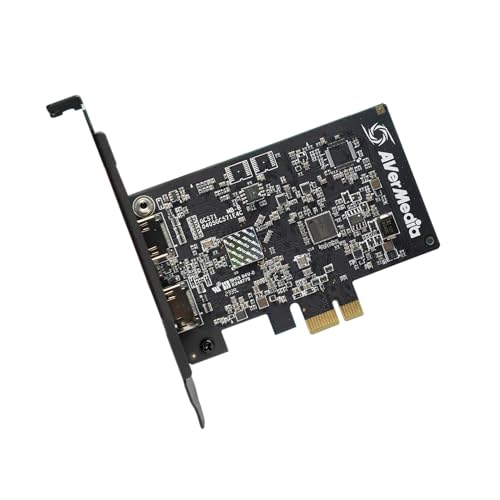
Best for High-Resolution PCIe Streaming – GC571 Live Streamer Ultra HD
If you want capture cards with passthrough for pc and play at high frame rates, the AVerMedia GC571 is a strong PCIe option. It supports 4K60 pass-through, 4K30 capture, VRR, and 1080p120 capture for smooth gameplay and detailed streams.
Best For: PC gamers who want high-resolution passthrough, VRR support, and an internal PCIe installation.
Pros:
- Supports 4K60 HDMI pass-through and 4K30 capture.
- VRR support helps provide a tear-free gaming experience.
- Captures 1080p video at up to 120 fps.
- Works with PCIe x1, x4, x8, and x16 slots without requiring separate drivers.
Cons:
- Requires a compatible desktop PC and PCIe slot.
- Windows 10 64-bit or Windows 11 is required.
The GC571 is the most capable choice here for PC-based setups that prioritize resolution, refresh rate, and VRR. Its internal design is less flexible than a USB capture card, but it offers the feature set suited to demanding gaming streams.
Best Flexible USB Option – XIIXMASK 4K HDMI Loop-Out Capture Card
For a portable setup using capture cards with passthrough for pc, this XIIXMASK model combines USB 3.0 connectivity with 4K60 HDMI loop-out. It captures up to 1080p60 or 2K30 and includes a microphone input for commentary.
Best For: Streamers who need USB-A/USB-C connectivity, broad device compatibility, and a dedicated mic-in port.
Pros:
- Passes through 4K60 HDMI while capturing up to 1080p60 or 2K30.
- Includes both USB-A and USB-C connectivity through the supplied cable.
- Supports a 3.5mm microphone or headset input for commentary.
- Compatible with Windows, macOS, Linux, Android, and iPadOS 17+ according to the supplied details.
Cons:
- It does not record party chat through the microphone input.
- OBS may need to be restarted after audio setup.
- Its maximum listed capture output is below its 4K60 passthrough resolution.
This is a practical choice when connection flexibility matters more than 4K recording. The loop-out preserves a high-resolution display signal, while USB 3.0 handles 1080p60 capture for streaming, meetings, and recording.
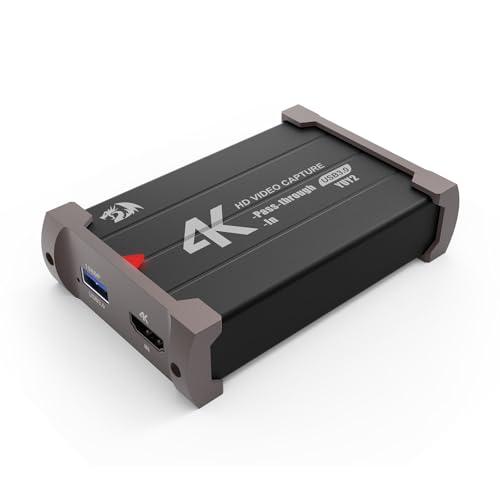
Best Simple Plug-and-Play Pick – Redragon VC321 FLASH
The Redragon VC321 is a straightforward option for capture cards with passthrough for pc. It accepts up to 4K30 input, captures 1080p60 video, and provides zero-latency HDMI pass-through for real-time gameplay.
Best For: Gamers and creators who want an easy USB 3.0 setup for Windows or Mac.
Pros:
- Provides zero-latency HDMI pass-through for real-time play.
- Supports 1080p60 capture from up to 4K30 input.
- Plug-and-play design requires no additional drivers or power source.
- Captures video and audio simultaneously.
Cons:
- Capture resolution is limited to 1080p according to the product details.
- Mac compatibility starts at macOS 10.15, while Windows 7 or later is required.
- It does not offer the higher-resolution capture of the AVerMedia model.
The VC321 keeps setup uncomplicated while covering the core needs of console and camera streaming. Its 1080p60 capture and zero-latency passthrough make it a sensible fit for users who value ease of use over 4K recording.
How We Picked the Best Capture Cards with Passthrough for PC
We focused on the features that matter most in a PC capture setup: passthrough resolution and refresh rate, supported capture quality, latency, connection standard, installation method, and compatibility with common streaming software such as OBS. We also included a range of prices and form factors, from simple USB 3.0 devices to high-bandwidth HDMI 2.1 and PCIe solutions.
Passthrough specifications are especially important because they determine what reaches your gaming monitor or TV. A card may capture at 1080p while still passing through 4K, HDR, or a high-refresh signal, so compare both figures rather than relying on the headline resolution alone.
Quick Comparison
| Best For | What to Look For |
|---|---|
| 4K high-refresh gaming | HDMI 2.1, 4K144 passthrough, and adequate USB or PCIe bandwidth |
| Competitive 1080p gaming | 1080p60 capture, low latency, and dependable passthrough |
| HDR and console streaming | HDR support, console compatibility, and stable audio handling |
| Simple PC setup | Plug-and-play USB 3.0 connectivity and broad software support |
| Permanent desktop installation | Internal PCIe design with direct motherboard connectivity |
Key Buying Factors for Capture Cards with Passthrough for PC
Passthrough Resolution and Refresh Rate
Choose passthrough that matches your display and games. Standard 4K60 is sufficient for many setups, while 4K120 or 4K144 is better for modern gaming PCs and consoles. If you use an ultrawide or high-refresh monitor, verify the exact supported timing rather than assuming it will work.
Capture Resolution and Bandwidth
Capture resolution affects recording and stream quality. A card that captures 1080p60 can be suitable for livestreaming, while 4K capture is useful for high-quality recordings and editing. USB 3.0, USB-C, and PCIe connections provide different bandwidth limits, so use the recommended port and cable.
HDMI, HDR, and VRR Compatibility
HDMI 2.1 is important for 4K high-refresh signals. HDR and variable refresh rate support can improve the gaming experience, but compatibility may depend on the graphics card, console, monitor, operating system, and software. Check the complete signal chain before buying.
Internal or External Design
External USB cards are easier to move between computers and consoles. Internal PCIe cards reduce desk clutter and can provide a direct, stable connection, but they require an available slot and a desktop PC installation.
Who Should Buy Which Capture Cards with Passthrough for PC?
Buy an HDMI 2.1 model if you want 4K at 120Hz or higher, especially with a PS5, Xbox Series console, or modern gaming PC. Choose a PCIe card for a dedicated streaming desktop and a clean permanent installation. A USB 3.0 card is the practical choice for beginners, laptops, secondary PCs, and flexible console setups.
If you mainly stream at 1080p60, prioritize reliable passthrough, low latency, audio compatibility, and software support over maximum resolution. For occasional recording or a lower-cost setup, a basic 4K passthrough card may provide all the performance you need without paying for features your workflow cannot use.