
The right video switcher can make a church service easier to stream, record, and display on in-house screens. The best choice depends on your camera inputs, operator experience, audio workflow, and production goals.
We compared 10 video switchers for church use, including compact HDMI models, multi-format systems, and larger mixers built for expanding production teams.
Best 10 Video Switcher for Church Picks for 2026
Compact Streaming Hub
Blackmagic Design ATEM Mini Pro

- Four HDMI inputs with multiview
- Built-in streaming and recording
- Transitions, keying, and audio mixing
Best For: Small church livestreams with up to four HDMI sources
Eight-Source Production Desk

- Eight HDMI inputs
- Built-in monitor and AUX output
- 18-channel audio mixer with effects
Best For: Larger HDMI-based church productions and broadcasts
All-in-One Worship Mixer

- Four HDMI inputs and dual HDMI outputs
- Streams to three platforms
- Recording, playback, overlays, and audio tools
Best For: Church livestreams needing integrated streaming and graphics
Built-In Monitor Switcher

- Integrated 4.5-inch multiview LCD
- PTZ control and production effects
- USB 3.0 UVC streaming for OBS
Best For: Four-source church productions with built-in monitoring
Most Capable Hybrid Production Hub

- Four HDMI and four SDI inputs
- Records eight ISO feeds plus program
- Built-in XLR audio and triple streaming
Best For: Growing churches with mixed camera systems and advanced production needs
Best Simple Budget Switcher

- Four 1080p HDMI inputs
- USB 3.0 webcam-style streaming output
- Compact and suitable for one operator
Best For: Small church teams using HDMI cameras and computer streaming software
Best Compact 4K Touchscreen Option
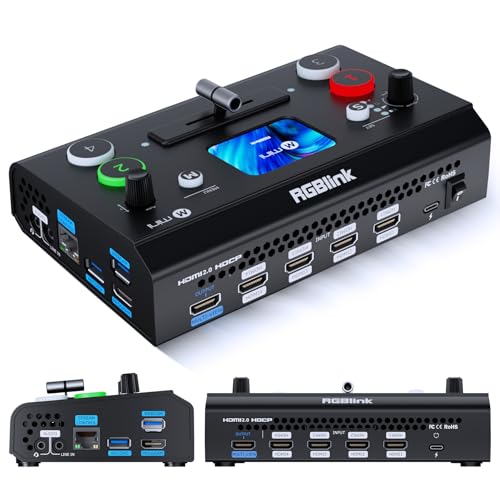
- Four HDMI inputs with touchscreen control
- Dual HDMI output and UVC webcam mode
- Optional recording and creative effects
Best For: Portable church setups that want HDMI switching with upgradeable features
Best Flexible Hybrid Pick

- Four SDI and four HDMI inputs plus USB-C and NDI HX
- Advanced keying, transitions, PIP, and DSK tools
- Streams to up to three platforms
Best For: Churches needing flexible SDI, HDMI, and network-source support
Best Portable Monitoring Pick

- Four HDMI inputs with a built-in 4-inch multiview screen
- 30 transitions and four scene presets
- VISCA-over-IP PTZ control for up to four cameras
Best For: Compact HDMI-based church productions with on-device monitoring
Best Integrated Production Pick

- Four HDMI, four SDI, USB, and NDI|HX3 input support
- Integrated recording, streaming, PTZ control, and monitoring
- Supports two simultaneous streams and multiple protocols
Best For: Larger church services needing an integrated production system
Compact Streaming Hub – Blackmagic Design ATEM Mini Pro
The Blackmagic Design ATEM Mini Pro is a practical video switcher for church teams that need four HDMI camera inputs, built-in streaming, recording, and multiview monitoring in a compact unit. Its integrated controls support common live-production transitions and keying effects without requiring a separate switcher for basic productions.
Best For: Churches running four-camera livestreams, presentations, education, or other productions that need direct Ethernet streaming and USB-C recording or webcam output.
Pros:
- Four HDMI inputs with multiview support for monitoring sources.
- Built-in streaming, recording, and Ethernet connectivity.
- Includes transitions, upstream and downstream keying, and a six-input audio mixer.
Cons:
- Limited to four HDMI video inputs.
- Does not include the larger input capacity or integrated display of more advanced switchers.
For a small worship production team, the ATEM Mini Pro combines essential switching, audio, streaming, and recording features in a lightweight design. It is especially appealing when a straightforward four-camera workflow is enough.
Eight-Source Production Desk – Roland V-8HD
The Roland V-8HD is a video switcher for church productions that need room to connect up to eight HDMI sources. It adds a built-in preview monitor, AUX output, automated switching tools, still storage, and an 18-channel digital audio mixer for more involved services and broadcasts.
Best For: Churches managing larger HDMI-based productions, multiple cameras, presentations, graphics, and separate video destinations.
Pros:
- Supports up to eight HDMI sources in a compact design.
- Built-in multiview monitor and AUX output provide flexible monitoring and routing.
- Offers five-layer effects and keying, still storage, automation, and an 18-channel audio mixer.
Cons:
- Heavier and larger than smaller four-input switchers.
- Its HDMI-only workflow may not suit setups using other video connection types.
The V-8HD is a strong fit when a church expects its production needs to grow beyond a basic four-camera setup. Its monitoring, routing, automation, and audio features support repeatable live-event workflows.
All-in-One Worship Mixer – Osee GoStream Deck HDMI Pro
The Osee GoStream Deck is a versatile video switcher for church teams that want switching, streaming, recording, playback, and graphics tools in one control surface. It provides four HDMI inputs, dual HDMI outputs, Ethernet streaming, USB-C connectivity, and dedicated controls for hands-on production.
Best For: Churches producing livestreams with graphics, lower thirds, playback clips, portrait content, or simultaneous streaming to multiple platforms.
Pros:
- Four HDMI inputs and two HDMI outputs support source connection and multiview monitoring.
- Can stream to three platforms through Ethernet and record to an SD card or USB SSD.
- Includes audio processing, macros, chroma key, picture-in-picture, and downstream overlays.
Cons:
- Four HDMI inputs may limit larger camera deployments.
- Its broad feature set may require more setup and operator familiarity.
With its physical control panel and integrated production features, the GoStream Deck is suited to worship teams that want more than basic source switching. It is particularly useful when a church also needs playback, overlays, flexible streaming modes, and recording.
Built-In Monitor Switcher – Mixer Plus 4-Channel HDMI
The Mixer Plus 4-Channel HDMI Video Switcher is a practical video switcher for church teams that want source monitoring and production controls without adding a separate multiview display. Its integrated 4.5-inch LCD shows inputs, program, preview, resolution, and audio levels while USB 3.0 UVC sends video to compatible computer software.
Best For: Churches using up to four HDMI sources that want PTZ control, portrait production, OBS-compatible streaming, and built-in multiview monitoring.
Pros:
- Integrated 4.5-inch display monitors four inputs, program, preview, and audio levels.
- Supports PTZ control, chroma key, luma key, PIP, DSK, and logo overlays.
- USB 3.0 UVC streaming works with OBS and other compatible software without a separate capture card.
Cons:
- Limited to four HDMI video sources.
- Computer-based streaming requires compatible UVC software and a connected computer.
This switcher offers a compact workflow for churches that value immediate monitoring and direct computer streaming. Its PTZ support and portrait mode add flexibility for worship broadcasts and vertical social content.
Most Capable Hybrid Production Hub – GoStream Duet 8 ISO
For churches building a flexible video switcher for church setup, the Osee GoStream Duet 8 ISO is designed to combine HDMI and SDI sources in one production workflow. Its extensive recording, audio, streaming, and graphics features suit services that need room to grow.
Best For: Churches running multi-camera productions with mixed HDMI and SDI equipment, isolated recording needs, and professional audio requirements.
Pros:
- Combines four HDMI 2.0 and four 3G-SDI inputs.
- Records eight ISO feeds plus the program output.
- Includes XLR audio connections, processing tools, and phantom power.
- Supports NDI|HX, SRT, RTMP, USB UVC, and streaming to up to three RTMP destinations.
Cons:
- Its broad feature set may require more setup and training than a basic switcher.
- It outputs at up to 1080p despite accepting 4K HDMI input.
The GoStream Duet 8 ISO is the strongest choice here for a church that wants an expandable production center rather than a simple camera switcher. ISO recording and built-in audio processing add useful protection for live services and post-production.
Best Simple Budget Switcher – FEELWORLD LIVEPRO L1 V1
The FEELWORLD LIVEPRO L1 V1 is a compact video switcher for church teams that need straightforward multi-camera switching without a large production footprint. Four HDMI inputs, USB 3.0 output, and computer control make it practical for smaller services and volunteer-led streaming.
Best For: Small churches and single-operator setups using up to four 1080p HDMI sources.
Pros:
- Provides four HDMI inputs for cameras, computers, or other sources.
- USB 3.0 output works like a webcam with streaming software.
- Compact design supports tripod mounting and single-person operation.
- Offers preview, program, transitions, and remote XPOSE control.
Cons:
- It is limited to 1080p HDMI workflows.
- The supplied notes do not indicate built-in XLR audio connections or ISO recording.
This model keeps the core switching workflow accessible and portable. It is a sensible starting point for a church that primarily needs reliable HDMI camera switching and computer-based streaming rather than advanced broadcast features.
Best Compact 4K Touchscreen Option – RGBlink Mini V3
The RGBlink Mini V3 is a compact video switcher for church teams that want four HDMI inputs, hands-on T-bar control, and a built-in touchscreen. It also supports dual HDMI output and UVC webcam mode, while recording and some advanced effects depend on optional TAO Cloud activation.
Best For: Churches seeking a portable HDMI switcher with touchscreen control, 4K input support, and upgradeable production features.
Pros:
- Offers four HDMI inputs and a 2.1-inch touchscreen.
- Provides dual HDMI outputs for program and preview.
- Supports UVC webcam mode for compatible streaming platforms.
- Can add recording, PTZ control, chroma key, and logo overlays through TAO Cloud activation.
Cons:
- Recording and selected advanced functions require optional licensing.
- Stable operation calls for a 35W or higher USB-C power adapter.
- It is an HDMI-focused design rather than a mixed HDMI/SDI switcher.
The Mini V3 offers a useful middle ground between a basic HDMI switcher and a more feature-heavy production system. Confirm the licensing requirements and camera compatibility before choosing it for recurring church services.
Best Flexible Hybrid Pick – Osee GoStream Duet
Osee GoStream Duet Multiple Camera SDI and HDMI Live Stream Video Mixer Switcher
Check Price On AmazonFor churches building a video switcher for church setup around mixed cameras and network sources, the Osee GoStream Duet is a flexible option. It accepts four SDI inputs, four HDMI inputs, USB-C, NDI HX sources, and SD/SSD playback, while supporting both landscape and portrait production.
Best For: Churches that need broad input compatibility, multiple control options, and direct or software-based streaming.
Pros:
- Supports four SDI, four HDMI, USB-C, NDI HX, and media playback sources.
- Offers MIX, DIP, WIPE, T-Bar, PIP, DSK, chroma key, luma key, and pattern key tools.
- Can stream to up to three platforms through Ethernet or a smartphone hotspot.
- Supports control through its built-in GUI, Mac or Windows software, and Bitfocus Companion.
Cons:
- Its wide feature set may require more setup time than a simpler HDMI-only switcher.
- The free NDI HX license requires downloading the latest firmware to unlock it.
The GoStream Duet stands out when a church wants room to expand beyond standard HDMI cameras. Its combination of SDI, HDMI, NDI HX, playback, keying, and multistreaming makes it a capable choice for more involved worship productions.
Best Portable Monitoring Pick – Mixer Plus Compact Switcher
The Mixer Plus is a practical video switcher for church teams that value portability and on-device monitoring. Its four HDMI inputs, built-in 4-inch display, multiview mode, and zero-latency switching make it suited to compact multi-camera productions.
Best For: Small church production teams that want an all-in-one HDMI switcher with a built-in preview screen.
Pros:
- Combines four HDMI inputs with a built-in 4-inch multiview display.
- Includes 30 transition effects and four user-defined scene presets.
- Provides PTZ camera control through VISCA over IP for up to four cameras.
- Offers chroma key, luma key, PIP, DSK, logo overlay, and configurable AUX output.
Cons:
- Inputs and connections are HDMI-only, limiting compatibility with SDI camera systems.
- The compact display is useful for monitoring, but smaller than a separate production monitor.
For a church using HDMI cameras and needing a portable control surface, the Mixer Plus keeps monitoring and switching in one compact unit. Its PTZ support and scene presets add useful flexibility without requiring a larger external multiview setup.
Best Integrated Production Pick – Tenveo PC500
The Tenveo PC500 is a powerful video switcher for church productions that need switching, streaming, recording, and PTZ control in one system. It combines four HDMI and four SDI inputs with NDI|HX3, a 5.5-inch display, USB recording, and multiple streaming protocols.
Best For: Churches running larger multi-camera services that need PTZ management, recording, and integrated streaming.
Pros:
- Supports four HDMI inputs, four SDI inputs, USB input, and NDI|HX3 sources.
- Includes SDI, HDMI, AUX, and USB 3.0 UVC outputs, with customizable output assignments.
- Streams to two platforms simultaneously using UVC, SRT, RTMP, RTSP, or NDI|HX3.
- Supports PTZ control for up to four cameras, presets, cruise tracks, and camera settings.
Cons:
- Its professional feature set may be more equipment than a small church service requires.
- Although it accepts 4K60 input on designated HDMI connections, output is specified at 1080p60.
The PC500 is the most integrated option of the three, especially for churches that want to reduce the number of separate devices in the production chain. Its recording, streaming, PTZ, SDI, HDMI, and NDI capabilities make it well suited to complex or recurring live services.
How We Picked the Best Video Switcher for Church
We evaluated these models against the practical demands of worship production: input capacity, HDMI and SDI compatibility, output resolution, streaming support, audio integration, monitoring, portability, and ease of operation. A useful church switcher should support the cameras and displays you already own while leaving enough room for future upgrades.
We also considered features that matter during live services, including multiview monitoring, physical controls, built-in screens, recording or ISO options, transition tools, and dependable output connections. More advanced features are valuable only when they fit your team’s workflow and technical skills.
Quick Comparison
| Best For | Look For | Recommended Type |
|---|---|---|
| Small worship teams | Simple setup and low operating complexity | Compact HDMI switcher |
| Multi-camera streaming | Four or more inputs and multiview | HDMI or hybrid switcher |
| Long cable runs | Reliable signal transmission over distance | SDI-equipped model |
| Recording and editing | ISO recording or separate source capture | Advanced production switcher |
| Portable events | Built-in display and compact controls | Portable switcher with LCD |
Key Buying Factors for a Video Switcher for Church
Inputs and Camera Compatibility
Count the cameras, presentation computers, playback devices, and spare sources you expect to connect. HDMI works well for short cable runs and consumer or prosumer cameras. SDI is usually better for permanent installations or cameras positioned far from the control area. Hybrid HDMI/SDI models provide the most flexibility.
Resolution and Frame Rate
Choose a switcher that matches your cameras, projectors, confidence monitors, and streaming platform. A 1080p workflow is often the simplest and most reliable choice for church services. Consider 4K support if your cameras and displays already use it, but verify that every connected device supports the same formats.
Streaming, Recording, and Audio
Built-in USB streaming can simplify online services by reducing the need for a separate capture device. Check whether the switcher supports your preferred streaming computer or platform. For audio, confirm whether you can bring in a feed from the church’s mixing console and adjust it independently from camera audio.
Monitoring and Operator Controls
A multiview output or integrated screen helps operators see all sources, preview the next shot, and monitor the program feed. Physical buttons are often easier to use during a fast-moving service, while touchscreen and software controls can provide deeper configuration.
Who Should Buy Which Video Switcher for Church?
Small churches and volunteer-led teams should prioritize a compact HDMI switcher with straightforward controls, USB streaming, and minimal setup. Churches with several cameras or presentation sources should choose a four-input or larger model with multiview and dependable transitions.
If cameras are installed across a sanctuary or worship campus, an SDI-capable switcher is the safer long-term choice. For churches producing edited sermons, conferences, or multiple camera recordings, select a model with ISO recording or advanced capture features. Portable teams should favor an integrated screen, compact design, and flexible inputs over features they will rarely use.