
If you need a coin microscope review that focuses on mint marks, doubled dies, and close detail checks, this model has a clear purpose.
It is built for small, specific inspection tasks rather than full-coin presentation.
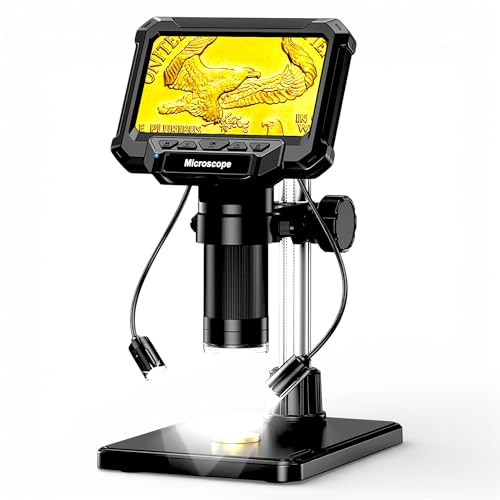
Coin Microscope Review Summary
The 4.3-inch LCD digital coin microscope is best for collectors who care about detail visibility more than whole-coin viewing.
The listing positions it around error checking, scratch inspection, and documentation, with side lighting intended to reduce shadows on raised features.
That makes it a sensible fit for users who want a compact bench tool for identifying small areas on coins, photographing close-up surfaces, or connecting to a computer for live viewing.
It is less suitable for anyone expecting a broad, field-wide view of larger coins, because the manufacturer explicitly says it cannot show the entire view of large pieces like Morgan dollars or Silver Eagles.
Review Scorecard
| Category | Score | Editorial take |
|---|---|---|
| Close-detail inspection | 9/10 | Built around tiny features such as DDO, RPM, scratches, and other surface marks. |
| Lighting control | 8/10 | 8 LEDs plus 2 detachable side lamps should help reveal relief and reduce shadowing. |
| Documentation features | 8/10 | 1080P video and 10M photos support record keeping and sharing. |
| Computer workflow | 8/10 | USB Type-C live view on Windows and Mac adds flexibility for larger-screen analysis. |
| Ease of focus setup | 7/10 | The listing explains the height knobs and focus wheel, but proper setup still matters. |
| Whole-coin usefulness | 5/10 | The product is openly limited for large coins and is more of a detail tool than an all-purpose scope. |
| Value for collectors | 8/10 | Stronger as a specialized inspection aid than as a general camera replacement. |
Key Features and Specifications of Coin Microscope
The core appeal here is straightforward: a 4.3-inch LCD digital microscope meant for coin collectors who need to inspect very small features.
The listing specifically calls out doubled dies, repunched mint marks, scratches, and other microscopic details, so the product is aimed at diagnostic work rather than casual viewing.
It also supports 1080P video and 10MP photos, which makes it useful for documenting a collection or capturing evidence before an auction listing, forum post, or private sale.
If your goal is to save images directly on the device, note that the listing says a Micro SD/TF card is required and not included, with support up to 32GB.
The illumination setup is one of the more important parts of the design.
The scope includes 8 built-in LEDs plus 2 detachable auxiliary side lamps, and the listing says the side lighting is meant to bring out high-relief elements and hairline scratches.
For coin work, that is more relevant than a flat, even light that hides texture.
There is also a practical workflow angle for users who want a bigger display.
The microscope can connect by USB Type-C and be used in PC Camera mode on Windows or Mac, with the listing naming Camera/HiView and Photo Booth as viewing options.
That makes it easier to inspect details on a larger monitor when you do not want to rely only on the built-in screen.
The viewing limits matter just as much as the feature list.
The manufacturer states that due to the 4.3-inch screen size and focal length limitations, it cannot capture the entire view of large coins.
In practice, that means the product is better for examining a section of a coin than for a full-face beauty shot.
Pros and Cons of Coin Microscope
Pros
- The listing is clearly tuned for coin detail work, including mint marks, doubled dies, and scratch inspection.
- Side lamps should help reveal relief and surface texture better than basic ring-light-only setups.
- The 1080P video and 10MP photo support make documentation easier.
- USB Type-C PC view is useful if you want a larger analysis screen.
- The setup guidance in the listing suggests the device is designed to be used, not guessed at.
Cons
- It is not a full-coin viewing tool for larger coins, which limits its role.
- A memory card is required for saving media and is not included.
- The image quality depends on careful focus and height adjustment, so it is not a grab-and-go scanner.
- The 4.3-inch screen is functional, but it is still a small display for extended sessions.
Who Should Buy Coin Microscope?
This is a good buy for coin collectors, error hunters, and sellers who need a compact microscope for specific detail checks.
If you spend time looking for surface flaws, repunched mint marks, or doubled die indicators, the product’s lighting and close-range design line up well with that workflow.
It also makes sense for hobbyists who want to document coins with photos or short videos without setting up a full desktop imaging station.
The PC live view feature adds value for users who prefer to inspect on a larger monitor while keeping the microscope itself near the coin.
Buyers who should skip it are the ones who want a single tool for every coin task.
If your priority is broad, edge-to-edge framing of large coins, this model is not the right category.
The listing itself says it cannot show the entire view of larger pieces, so that is not a minor limitation; it is a core design boundary.
People who want a simple general-purpose magnifier for mixed household tasks may also be happier with a more flexible digital microscope or a handheld loupe.
This product is best when the work is specifically numismatic and small-scale.
Coin Microscope for Detail Inspection and Cataloging
Side Lighting for Raised Surfaces
The side lamps are the feature that most directly supports coin evaluation.
By pushing light across the surface instead of only flooding it from above, the scope should make high-relief areas and fine scratches easier to see.
That matters when you are trying to separate normal wear from more meaningful marks.
Focus and Height Adjustment
The listing says clear images depend on adjusting the bracket height and then using the focus wheel carefully.
That is not unusual for a digital microscope, but it does mean the tool rewards patience.
Collectors who are willing to set it up properly should get better results than users expecting instant results at any distance.
Documentation and PC Workflow
The built-in photo and video capture options are useful for keeping records of coins you inspect.
For users who prefer a more stable workspace, the PC camera mode can turn a computer into a live inspection station, which is handy for comparisons, sharing, and archive building.
Where It Fits in a Coin Desk
This is not a replacement for every collector tool.
It fits best as a close-up diagnostic station next to a loupe, scale, and reference books.
That combination is useful when you want to confirm a detail, save an image, and move on quickly without setting up more complex photography gear.
Alternatives to Coin Microscope
If you want a more established coin-imaging workflow, consider a Dino-Lite digital microscope.
Search Amazon for Dino-Lite digital microscope if you want a premium closer-look option with a strong accessory ecosystem.
For buyers who want a broader hobby microscope with a more traditional bench setup, a Celestron digital microscope is worth comparing.
Search Amazon for Celestron digital microscope if you want a familiar brand with a wider microscope lineup.
If your goal is inexpensive close inspection rather than a dedicated coin station, a handheld digital microscope may be enough.
Search Amazon for handheld digital microscope if you want portability and a lower-commitment setup.
Collectors who mainly want a simple visual aid might also prefer a jeweler’s loupe.
Search Amazon for jeweler’s loupe if you want something smaller, faster, and easier to carry.
Is Coin Microscope Worth It?
Yes, if you want a dedicated close-detail tool for coin inspection. The evidence in the listing points to a microscope designed around the real problems collectors care about: tiny mint marks, subtle die varieties, scratch detection, and image capture for records.
It is also worth it if you value the side-lighting approach and the option to move inspection onto a computer monitor.
Those two features make it more practical for careful, repeatable analysis than a basic screen-only microscope.
No, if you need full-coin framing or a general all-purpose magnifier. The manufacturer’s own limitation on large-coin viewing is important.
In that case, a different microscope class or a simpler hand tool will be a better fit.
For the right buyer, this is a focused and sensible purchase.
For the wrong buyer, it will feel too specialized.
The decision comes down to whether your workflow is detail-first or full-view-first.