
A useful home office gift can make everyday work more comfortable, organized, or focused. This collection includes larger workspace upgrades alongside smaller accessories for different routines and desk setups.
18 Home Office Gifts to Consider
1. Universal Desk Privacy Panel, 60 × 24 in
2. INNOCN 34-Inch Ultrawide WQHD Monitor
A Wider View for Multitasking
INNOCN 34-Inch Ultrawide WQHD Monitor

- The 21:9 screen supports side-by-side documents and wide editing timelines.
- Picture-in-picture and picture-by-picture modes can display two devices.
- The stand offers height adjustment and tilt.
Best For: A multitasker who works across several windows
3. Anker Prime 14-in-1 USB-C Docking Station
A Hub for a Laptop Desk
Anker Prime 14-in-1 USB-C Docking Station

- Provides 14-in-1 connectivity, including dual HDMI ports.
- Offers up to 160 W total output and data speeds up to 10 Gbps.
- Supports USB-C, USB4, and Thunderbolt connections; check laptop and display compatibility.
Best For: A laptop user with multiple desk peripherals
4. Blueair Mini Max Auto Air Purifier
Small-Space Air Care
Blueair Mini Max Auto Air Purifier

- Designed for small rooms including home offices.
- Auto mode uses a particle sensor to adjust fan speed.
- The compact unit has a washable fabric pre-filter and three fan speeds.
Best For: A home office worker seeking a dedicated air purifier
5. TRALT Mesh Office Chair with Adjustable Lumbar Support
A Supportive Seat for Workdays
TRALT Mesh Office Chair with Adjustable Lumbar Support
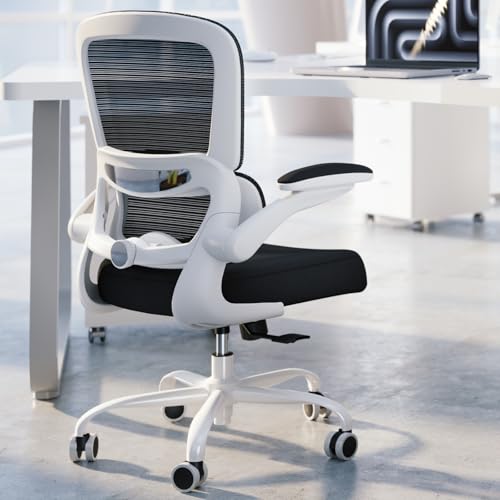
- The lumbar support adjusts in depth.
- A mesh backrest promotes airflow, according to the product notes.
- The seat uses high-density molded foam.
Best For: A remote worker who spends long periods at a desk
6. Adjustable Under-Desk Footrest, Walnut
A More Comfortable Place for Feet
Adjustable Under-Desk Footrest, Walnut

- Seven angle settings let the user adjust foot support.
- Made with solid wood and carbon steel.
- Non-skid strips and rubber pads help keep it in place.
Best For: Someone whose feet do not rest comfortably while seated
7. ErGear Electric Height-Adjustable Standing Desk
A Sit-Stand Workspace Upgrade
ErGear Electric Height-Adjustable Standing Desk

- Electric height adjustment ranges from 28.35 to 46.46 inches.
- Four memory presets store preferred desk heights.
- The steel-frame desk has a 48 × 24-inch work surface.
Best For: A home worker who wants to alternate between sitting and standing
8. HUANUO Fully Adjustable Dual Monitor Stand
Two Screens, More Desk Space
HUANUO Fully Adjustable Dual Monitor Stand

- Fits two 13–32-inch monitors weighing 4.4–19.8 pounds each with compatible VESA holes.
- Offers tilt, swivel, rotation, and height adjustment.
- Desk fit is limited to specified wooden desks; check thickness and clearance before gifting.
Best For: A dual-monitor user with a compatible desk
9. VASAGLE Rolling File Cabinet with Locking Drawers
Tidy Storage for Work Materials
VASAGLE Rolling File Cabinet with Locking Drawers

- Has two lockable drawers and an open shelf.
- The bottom drawer fits A4 or letter-size files, according to the notes.
- Five swivel wheels include two that lock.
Best For: A worker organizing files and office supplies
10. THERUN Under-Desk Walking Pad
Movement Between Desk Tasks

- Offers walking and under-desk treadmill modes.
- The listed speed range is 0.6–3.8 mph.
- Built-in transport wheels and a 4.96-inch height aid moving and storage.
Best For: A desk worker interested in walking during routine tasks
11. EMEET NOVA 4K Webcam
A Clearer Setup for Video Calls

- Features PDAF autofocus and dual built-in microphones.
- Includes a physical privacy cover and a USB-A connection.
- Video defaults to 1080p; 4K must be selected in compatible software.
Best For: A remote worker who joins regular video meetings
12. Redragon K689 Hot-Swap Mechanical Keyboard
A Customizable Typing Feel
Redragon K689 Hot-Swap Mechanical Keyboard

- The wired keyboard has 108 keys and four extra shortcut keys.
- Its switch sockets accept 3-pin or 5-pin switches, according to the notes.
- RGB lighting includes preset modes and customizable effects through software.
Best For: A frequent typist who enjoys customizing a keyboard
13. AFIING Extra-Large PU Leather Desk Mat
A Roomier Desk Surface
AFIING Extra-Large PU Leather Desk Mat

- The 55 × 24-inch mat accommodates a keyboard, mouse, laptop, and accessories.
- Its waterproof surface is described as easy to wipe clean.
- A suede backing helps the mat stay in place.
Best For: Someone who wants a broad surface for writing and mouse use
14. Honeywell Dimmable LED Desk Lamp
Adjustable Light for Late Work
Honeywell Dimmable LED Desk Lamp

- Four color modes range from 2700K to 5700K with stepless touch dimming.
- The adjustable, foldable design helps direct light and save desk space.
- The base has USB-A and USB-C charging ports; the lamp itself needs plug-in power.
Best For: A worker who reads or works after dark
15. ProtoArc EM11 NL Wireless Vertical Mouse
A Different Grip for Daily Computing
ProtoArc EM11 NL Wireless Vertical Mouse

- The vertical design is intended for small to medium hands under 7.5 inches long.
- Connects by Bluetooth or USB-A receiver and can pair with up to three devices.
- It is rechargeable by USB-C; the included cable is for charging.
Best For: A computer user curious about a vertical mouse grip
16. Marsrock Desktop Weekly Whiteboard Planner
A Visible Plan for the Week
Marsrock Desktop Weekly Whiteboard Planner

- One side is a whiteboard and the other a weekly planner.
- The adjustable stand can position the board upright or flat.
- The kit includes markers, magnets, an eraser, and a pen clip.
Best For: Someone who prefers visible schedules and priorities
17. Gaiatop USB-C Rechargeable Desktop Fan
Personal Airflow at the Desk
Gaiatop USB-C Rechargeable Desktop Fan

- Six speed settings are controlled with buttons and shown on an LED display.
- The fan tilts vertically to direct airflow.
- The rechargeable battery is listed for up to 20 hours of use.
Best For: A home office worker who wants a personal desk fan
18. Bose QuietComfort Wireless Noise-Canceling Headphones
A Focus Aid for Busy Homes
Bose QuietComfort Wireless Noise-Canceling Headphones

- Quiet and Aware modes switch between noise cancellation and awareness of surroundings.
- The over-ear headphones support Bluetooth multipoint and wired listening.
- Battery life is listed at up to 24 hours per charge.
Best For: A home worker who needs to focus around household noise
Choosing a Gift for a Home Office Worker
Start with the part of the workday that could use the most help. A person who works in a shared room may appreciate the privacy panel or headphones. Someone who keeps several documents open could benefit from the ultrawide monitor, dual monitor stand, or docking station. For comfort, consider the chair, footrest, desk, mouse, lamp, or desk fan. A whiteboard, file cabinet, or desk mat can help make a workspace easier to organize without changing its main equipment.
Think about what the recipient already owns and uses. A monitor arm is useful only if the screens and desk meet its mounting requirements. A docking station needs a compatible laptop connection, and the product notes list different display behavior on macOS. A webcam’s 4K setting needs to be selected in software. For a larger upgrade such as a monitor, desk, or chair, room dimensions and the recipient’s preferences matter as much as the feature list. A small accessory is easier to fit into an established setup.
Set a Budget That Fits the Gift
Desk gifts span a wide range of costs. A whiteboard planner, footrest, desk mat, or lamp can be a modest standalone present. A keyboard, mouse, webcam, fan, or headphones may suit a mid-sized gift budget, depending on current prices. Larger items such as a chair, standing desk, monitor, and air purifier are substantial workspace upgrades. Prices can change, so check the current listing before deciding and consider whether the gift will require additional equipment or a place in the room.
If several people are contributing, a larger item may be easier to plan as a shared gift. For a solo present, look for an item that solves a specific daily annoyance and fits the amount you have in mind. Avoid assuming that a premium-looking accessory will be useful if it duplicates something the recipient already has.
Check Compatibility and Personalization
Compatibility is especially important for desk hardware. Before choosing the dual monitor arm, check each monitor’s screen size, weight, and VESA mounting pattern, then confirm the desk material, thickness, and underside clearance. For the docking station, verify that the laptop supports the required USB-C, USB4, or Thunderbolt features and that its operating system works with the intended display setup. The product notes also flag Linux incompatibility and identical external displays on macOS.
For ergonomic gifts, fit is personal. The vertical mouse is designed for smaller to medium hands, so measuring the recipient’s hand can help avoid a poor fit. A chair or footrest may depend on body proportions and preferred posture. Ask discreetly about size, color, or desk dimensions when needed. Personalization can also mean choosing an item that suits their habits: a weekly planner for someone who likes writing tasks by hand, or a large desk mat for someone who spreads out papers and devices.
Plan Timing and Last-Minute Choices
For larger furniture and electronics, decide early enough to check measurements, connections, and setup needs. Some items require assembly or a clear spot near the desk. Confirm the retailer’s current delivery estimate and return terms before ordering; do not assume any particular delivery date. If the schedule is tight, a compact accessory with fewer compatibility constraints—such as a desk mat, planner, or adjustable lamp—may be simpler to choose.
A practical last-minute gift can still feel personal when paired with a short note about why it fits the recipient’s routine. Explain that the lamp might help with evening reading, or that the planner could keep weekly priorities in view. For gifts that need a specific connection or mounting setup, include the product details and make it easy for the recipient to confirm fit. The best home office Christmas gift ideas are grounded in how someone actually works, with enough attention to space, compatibility, comfort, and timing.