
USB duplicators with erase functions can copy multiple flash drives or external storage devices while also helping remove sensitive data before reuse or disposal.
Our 2026 shortlist covers compact standalone units and high-capacity duplicators, with options for occasional users, IT teams, educators, repair shops, and production environments.
Best 10 USB Duplicators with Erase Functions Picks for 2026
Best for Mixed Drive Workflows
4-Bay SATA Duplicator and Eraser

- 1:3 standalone SATA cloning
- Quick and NIST-aligned secure erase modes
- Supports 2.5-inch and 3.5-inch drives
Best For: IT teams working with SATA HDDs and SSDs
Best for High-Volume USB Copying
1:15 USB Duplicator and Sanitizer

- Copies one drive to 15 targets
- Standalone operation with no PC
- Synchronous and asynchronous modes
Best For: Batch USB production and deployment
Best for Flexible USB Erasure

- Copies to up to 31 USB drives
- Four copy and four erase modes
- Supports asynchronous copying and capacity checks
Best For: Large USB batches with selectable wipe modes
Best Portable USB Cloner

- Standalone duplication for up to seven targets
- Smart, Raw, and error-skipping copy modes
- DoD 5220.22-M erasure and USB-C PD power
Best For: Portable field duplication and secure USB wiping
Best Compact Sanitizer

- Copies up to seven Type-A USB drives
- Offers four erase modes, including DoD 7-pass
- Standalone copy-and-compare operation
Best For: Small-batch Type-A duplication and sanitization
Best for High-Volume USB Jobs

- Handles up to 15 USB targets
- Supports four copy and four erase modes
- Works with flash drives and external HDDs
Best For: Batch duplication and sanitization of USB storage
Best Large-Capacity Workstation

- Duplicates to as many as 39 USB targets
- Supports asynchronous, Smart Copy, and Raw Mode
- Includes secure erase and HDD/SSD support
Best For: High-volume professional duplication and erasure
Touchscreen USB Eraser
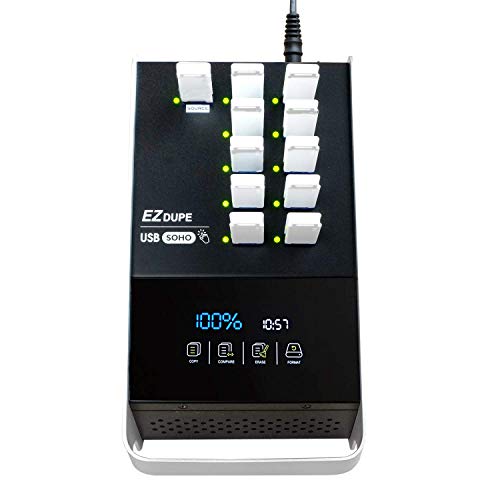
- Touchscreen controls for copy, compare, format, and erase
- Supports USB 2.0/3.0/3.1 flash media
- Duplicates at up to 35MB per second
Best For: Routine USB flash-media copying and erasing
Versatile Drive Sanitizer

- Clones and erases USB and SATA HDD/SSD drives
- Four copy modes and five erase modes
- LCD controls with Copy-and-Compare verification
Best For: Mixed-interface duplication and drive sanitization
Dual-Target USB Copier

- Copies or erases two USB drives simultaneously
- Operates standalone without a computer
- Supports asynchronous drive replacement
Best For: Small-batch USB flash-drive duplication and erasure
Best for Mixed Drive Workflows – 4-Bay SATA Duplicator and Eraser
For IT teams that handle both hard-drive duplication and secure disposal, this StarTech.com unit combines a 1:3 standalone copier with a four-bay SATA docking station. It is a strong option among USB duplicators with erase functions, especially when support for 2.5-inch and 3.5-inch SATA drives matters.
Best For: IT professionals duplicating, sanitizing, docking, or transferring data from multiple SATA HDDs and SSDs.
Pros:
- Supports standalone sector-by-sector cloning at up to 4.2 GB/min.
- Offers Quick Erase and Secure Erase rated to NIST SP 800-88 Rev. 1 Purge.
- Works with 2.5-inch and 3.5-inch SATA drives, with included IDE adapters.
- Can also function as a USB 3.2 Gen 1 or eSATA-connected drive dock.
Cons:
- The target drive must be equal to or larger than the source drive for duplication.
- Its four-bay design is larger and less specialized for high-volume USB flash-drive copying.
This is the most versatile choice for mixed storage-media work, pairing drive cloning and recognized secure-erasure modes with convenient desktop docking. Its hardware-based operation also avoids requiring a host computer for standalone duplication and erasure.
Best for High-Volume USB Copying – 1:15 USB Duplicator and Sanitizer
The Systor SYS-USB30100-15 is designed for batch production, duplicating one USB 3.0 or 3.1 flash drive to as many as 15 targets without a computer or software. It suits buyers comparing USB duplicators with erase functions who prioritize throughput and large copy batches.
Best For: Businesses and production teams creating many identical USB drives in a standalone workflow.
Pros:
- Copies to up to 15 USB targets simultaneously.
- Operates as a complete standalone system without a computer or software.
- Supports synchronous and asynchronous copy modes.
- Advertised copy speed is up to 6 GB per minute, or 100 MB per second.
Cons:
- The supplied notes identify it as a duplicator and sanitizer but do not specify particular erase standards or modes.
- USB Type-C drives require an adapter.
Choose this model when the number of simultaneous USB copies is more important than broader drive compatibility or detailed erase controls. Its consistent stated speed and asynchronous mode are useful for keeping a batch line moving.
Best for Flexible USB Erasure – 1:31 Xtreme USB Duplicator
The EZ Dupe Xtreme is built for very large USB flash-drive batches, copying to up to 31 targets at 35 MB per second. Its four copy modes and four erase modes make it a practical contender among USB duplicators with erase functions for users who need both flexible duplication and selectable wiping intensity.
Best For: Organizations producing large USB batches and choosing between quick, full, DoD 3-pass, or DoD 7-pass erasure.
Pros:
- Duplicates one source to as many as 31 USB drives.
- Provides System and Files, Whole HDD, partitioned-area, and percentage copy modes.
- Includes Full, Quick, DoD 3-pass, and DoD 7-pass erase modes.
- Supports asynchronous copying and capacity checks for target media.
Cons:
- Its stated speed of 35 MB/s is slower than the faster models listed here.
- External USB hard drives require their own power source.
- The supplied warranty is one year.
This model stands out for control rather than maximum speed. The combination of selective copy modes, capacity verification, and multiple DoD-labeled erase options gives operators more ways to tailor a USB duplication or disposal task.
Best Portable USB Cloner – 1:7 Standalone USB Eraser
The Vinpower USBMINIDUP-7 is a compact standalone unit for duplicating up to seven USB drives at once, with Smart Copy, Raw Copy, and data-recovery-oriented error skipping. It is a useful choice among USB duplicators with erase functions when portability and flexible copying are priorities.
Best For: Field service, events, schools, IT departments, and other users who need on-site USB duplication and DoD-standard erasure.
Pros:
- Requires no computer or software for USB duplication.
- Supports Smart Copy, Raw Copy, and Read Error Skip for aging or damaged drives.
- Includes USB erasure using DoD 5220.22-M standards.
- Can run from a compatible USB-C PD power bank and supports daisy-chaining.
Cons:
- Handles seven targets per unit, fewer than the higher-capacity batch duplicators.
- The daisy-chain cable is not included.
- The supplied notes do not specify an erase speed.
Its portable design and USB-C PD power option make it particularly practical away from a fixed workstation. Buyers who need recovery-aware copying as well as routine duplication and erasure get more flexibility than a basic batch copier provides.
Best Compact Sanitizer – 1-to-7 USB Duplicator
This standalone 1-to-7 unit is a practical choice for organizations seeking USB duplicators with erase functions. It supports Type-A flash drives, offers copy-and-compare verification, and includes four erase modes, including DoD 3-pass and 7-pass options.
Best For: Small-batch Type-A USB duplication and secure media sanitization without a computer.
Pros:
- Copies up to seven USB drives at speeds of up to 35MB/sec., depending on the media.
- Includes quick, full, DoD 3-pass, and DoD 7-pass erase modes.
- Standalone operation, LCD status display, and copy-and-compare verification.
- Supports FAT32 and exFAT formatting and a broad range of USB generations.
Cons:
- Supports USB Type-A media only; Type-C drives require an adapter.
- Not compatible with hardware-encrypted or protected USB memory devices.
Choose this model when seven target ports are sufficient and Type-A compatibility matches your workflow. Its selectable erase modes and verification features provide useful control for routine duplication and data sanitization.
Best for High-Volume USB Jobs – USB Cyclone 1-to-15
For higher-volume workflows, this USB Cyclone is one of the more capable USB duplicators with erase functions. It handles up to 15 USB targets, supports external USB HDDs, and provides four copy modes alongside four erase modes.
Best For: Businesses and technicians duplicating or sanitizing larger batches of flash drives and external USB storage.
Pros:
- Supports up to 15 USB flash drives or compatible external HDDs.
- Offers quick, full, DoD 3-pass, and DoD 7-pass erase modes.
- Provides essential-files, full, partitioned, and percentage copy modes.
- Independent bandwidth design helps maintain speed across channels.
Cons:
- Its listed maximum speed is up to 45MB/sec., depending on the connected USB media.
- The unit weighs about 7 pounds, making it less convenient for frequent relocation.
This is a strong fit when 15 target connections and broader copy controls matter more than portability. Its standalone design also keeps duplication, comparison, erasing, and formatting independent of a computer.
Best Large-Capacity Workstation – USBDupeBoxES 1-to-39
The Vinpower Digital USBDupeBoxES is designed for demanding production environments that need USB duplicators with erase functions. Its 39-target capacity, asynchronous operation, secure erase feature, and support for external HDDs and SSDs make it suited to large duplication jobs.
Best For: High-volume media production, IT operations, and facilities that need independent copying across many targets.
Pros:
- Copies to up to 39 USB flash drives or external USB storage devices.
- Asynchronous duplication lets targets copy independently without requiring identical data sizes.
- Smart Copy and bit-by-bit Raw Mode support different duplication needs.
- Secure erase removes USB-device content, and a 600-watt power supply supports connected devices.
Cons:
- At approximately 26 pounds, it is less portable than smaller duplicators.
- Alternative SD, Micro SD, and CF formats require corresponding add-on interface modules.
This model makes the most sense for users who can take advantage of its unusually high port count and asynchronous workflow. The log export utility and external HDD/SSD support add useful operational flexibility for professional environments.
Touchscreen USB Eraser – EZ Dupe SOHO Touch 1:10
For users seeking USB duplicators with erase functions, the EZ Dupe SOHO Touch offers a straightforward touchscreen workflow for copying, comparing, formatting, and erasing flash media. It supports USB 2.0, 3.0, and 3.1 drives and duplicates at speeds up to 35MB per second.
Best For: Daily USB flash-drive duplication and erasure with an easy touchscreen interface.
Pros:
- Touchscreen menu simplifies copy, compare, format, and erase tasks.
- Supports all file formats, file sizes, and USB flash-media capacities.
- Works with USB-compatible devices running Windows, Linux, or macOS.
- Designed for daily operation with a lightweight yet durable construction.
Cons:
- Its stated 35MB-per-second duplication speed may be slower than some specialized systems.
- Designed for USB flash media rather than SATA hard drives or SSDs.
The SOHO Touch is a practical choice when simple controls matter more than broad drive-interface support. Its one-touch erase feature and independent interface design make recurring USB workflows easier to manage.
Versatile Drive Sanitizer – StarTech.com 1:1 SATA/USB
This StarTech.com unit is one of the more versatile USB duplicators with erase functions, combining standalone cloning and data wiping for USB flash drives and 2.5- or 3.5-inch SATA HDDs and SSDs. Its LCD menu provides access to four copy modes and five erase modes without requiring a computer.
Best For: IT and service-desk workflows that need both USB and SATA drive duplication and sanitization.
Pros:
- Supports USB flash drives plus 2.5- and 3.5-inch SATA HDDs and SSDs.
- Offers four duplication modes, including sector-by-sector and percentage copy.
- Provides five erase modes, including secure, cryptographic, and three-pass overwrite options.
- Copy-and-Compare can verify the cloned drive after duplication.
Cons:
- Additional interfaces such as IDE, mSATA, and M.2 SATA require separately sold adapters.
- Its push-button LCD interface is more utilitarian than a touchscreen.
Choose this model when drive-format flexibility and multiple sanitization options are priorities. The standalone design, toolless drive support, and verification feature make it well suited to repeatable technical workflows.
Dual-Target USB Copier – StarTech.com 1:2 USBDUP12
The StarTech.com USBDUP12 is a compact option for shoppers comparing USB duplicators with erase functions for flash-drive work. It can duplicate or erase two USB drives at the same time without connecting to a computer, while asynchronous duplication lets you replace one drive while the other continues copying.
Best For: Small-scale USB flash-drive duplication and erasure where simultaneous two-drive operation saves time.
Pros:
- Duplicates two target flash drives simultaneously.
- Erases two USB drives simultaneously without a computer.
- Supports copying to flash media, HDDs, or SSDs through a compatible USB dock, enclosure, or card reader.
- Asynchronous operation allows one drive to be replaced while the other continues copying.
Cons:
- Supports USB flash-drive workflows rather than direct SATA drive connections.
- Its 1:2 capacity is less suited to larger batch duplication than higher-port systems.
With its lightweight design and two-target output, the USBDUP12 is a sensible fit for occasional or small-batch flash-media work. It is especially useful when standalone operation and flexible drive replacement are more important than maximum scale.
How We Picked the Best USB Duplicators with Erase Functions
We compared these models by duplication capacity, supported media, stated transfer speed, erasure and sanitization features, interface compatibility, and ease of standalone operation. We also considered whether each unit is better suited to USB flash drives, SATA HDDs and SSDs, or both.
Specifications such as port count and maximum speed are useful for narrowing the field, but real-world throughput depends on the source drive, target media, file size, and duplication mode. Secure-erasure claims should also be checked against your organization’s policy before use with regulated data.
Quick Comparison
| Best For | Recommended Capacity | What to Look For |
|---|---|---|
| Occasional home or office use | 1:1 or 1:2 | Simple controls, broad USB support, compact design |
| Small IT departments | 1:7 to 1:15 | Higher throughput, standalone operation, verification |
| Large-scale deployment | 1:31 to 1:39 | Many simultaneous targets, cooling, sustained performance |
| Drive recycling and repair | USB plus SATA | Multiple wipe modes, drive compatibility, status feedback |
Key Buying Factors for USB Duplicators with Erase Functions
Port Count and Workflow
A larger 1-to-15, 1-to-31, or 1-to-39 unit can reduce labor when preparing many identical drives, but it costs more and takes up more space. Choose capacity based on your typical batch size rather than the maximum number of ports alone.
Media Compatibility
Confirm whether the duplicator supports USB 2.0, USB 3.0, USB 3.1, Type-A media, external hard drives, SSDs, and SATA connections. A USB-only model may be ideal for flash-media production, while a USB-and-SATA unit offers more flexibility for technicians.
Speed and Verification
Advertised speeds are usually maximums. Check whether the device supports asynchronous copying, sector-by-sector duplication, file-system-aware copying, and post-copy verification. Verification is especially valuable when producing bootable or deployment media.
Erase and Sanitization Controls
Look for clearly documented erase methods, including DoD-style options where required, and determine whether wiping can be performed independently of duplication. For confidential data, confirm the supported patterns, completion reporting, and whether the process generates an auditable result.
Controls and Maintenance
A touchscreen or straightforward menu can reduce training time. Also consider cooling, power requirements, firmware support, warranty coverage, and how easily failed target drives can be identified during a batch.
Who Should Buy Which USB Duplicators with Erase Functions?
Home users and small offices typically need a compact 1:1 or 1:2 unit for occasional cloning and secure reuse. IT departments, schools, and repair businesses should consider 1:7 to 1:15 models that balance throughput with manageable cost and workspace. Organizations provisioning large numbers of identical USB drives will benefit from 1:31 or 1:39 systems, provided they can supply enough compatible target media.
Choose a model with SATA support if your workflow includes internal drives, SSD upgrades, or equipment recycling. If sanitization is the main objective, prioritize documented erase modes and verification over the highest advertised copy speed.