
USB-C hard drive duplicators make it easier to clone drives, migrate operating systems, and access bare SATA or NVMe storage without installing it in a computer. The right dock can save time while reducing the need for extra adapters and enclosures.
We selected 10 models covering dual-bay SATA docking, high-speed USB-C connections, M.2 NVMe cloning, and larger-capacity storage setups. Use the guide below to match features, compatibility, and performance to your workflow.
Best 10 USB C Hard Drive Duplicators Picks for 2026
Best USB-C SATA Cloner

- Offline SATA cloning without a computer
- Fits 2.5-inch and 3.5-inch drives
- Dual-bay USB drive access
Best For: SATA drive upgrades and backups
Best Professional Duplicator
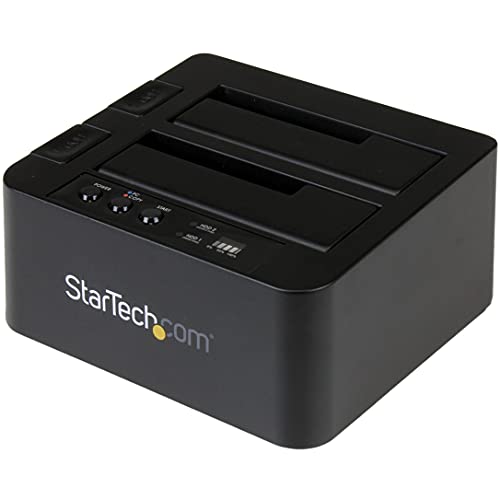
- Standalone sector-by-sector cloning
- Supports SATA drives of any capacity
- USB 3.2 Gen 2 and 4Kn support
Best For: IT workflows and drive imaging
Best Value Dual-Bay Cloner

- Offline cloning without drivers
- Supports 2.5-inch and 3.5-inch SATA drives
- Handles drives up to 10TB
Best For: Basic home SATA cloning
Best NVMe Duplicator

- Standalone M.2 NVMe cloning
- Up to 90GB per minute
- USB 3.2 Gen 2x2 host connection
Best For: M-Key PCIe NVMe upgrades
Best Plug-and-Play Dock

- Single-bay dock for 2.5- and 3.5-inch SATA drives
- Up to 10Gbps USB-C connectivity
- Tool-free, hot-swappable design
Best For: Quick access, backups, and transfers from one SATA drive
Best Multi-Format Cloner
FIDECO 3-Bay NVMe and SATA Duplicator

- Supports NVMe plus 2.5- and 3.5-inch SATA drives
- Offline cloning requires no software
- Built-in foldable fan helps manage heat
Best For: Mixed-format storage setups and flexible offline cloning
Best Dual-Bay SATA Cloner
UGREEN Dual-Bay Hard Drive Dock

- Offline clones two SATA drives without a computer
- Supports up to 32TB per drive
- Works with 2.5- and 3.5-inch SATA HDDs and SSDs
Best For: Large-capacity SATA cloning and dual-drive access
Best High-Capacity Pick
Dual-Bay USB-C SATA Cloner Dock

- Offline one-key cloning with progress LEDs
- Supports two SATA drives up to 40TB total
- 5Gbps USB-C connectivity with UASP
Best For: High-capacity SATA drive cloning and backups
Best Proven Value
WAVLINK USB-C Dual-Bay Drive Dock

- Offline cloning without drivers
- Supports 2.5-inch and 3.5-inch SATA drives
- UASP support and automatic sleep mode
Best For: Everyday cloning on Windows, Linux, or Intel Macs
Best Plug-and-Play Option
ICY BOX Dual-Bay SATA Duplicator

- Tool-free offline cloning and drive access
- Supports 2.5-inch and 3.5-inch SATA drives
- Up to 30TB support with Windows, macOS, and Linux
Best For: Simple, frequent SATA drive swapping and backups
Best USB-C SATA Cloner – Sabrent Dual-Bay Dock
The SABRENT EC-CH2B is a practical choice among usb c hard drive duplicators if you need a straightforward way to clone SATA drives without connecting a computer. It handles bare 2.5-inch and 3.5-inch SATA HDDs and SSDs, while also working as a dual-drive dock over USB-C.
Best For: Users upgrading or duplicating standard SATA drives who want offline cloning and computer-based file access in one compact dock.
Pros:
- Offline 1-to-1 cloning requires no computer.
- Supports both 2.5-inch and 3.5-inch SATA HDDs and SSDs.
- Both bays can mount as separate drives over USB.
- Includes a USB Type-C cable and power adapter.
Cons:
- Does not support IDE/PATA, M.2, or NVMe drives.
- The target drive must be the same size as or larger than the source.
- Offline cloning is limited to up to 60MBps.
Choose this model when your drives are SATA and you value simple, tool-free operation. Its USB 3.0 connection is rated up to 5Gbps, but actual file-transfer performance depends on the installed drives.
Best Professional Duplicator – StarTech Dual-Bay SATA Dock
The StarTech SDOCK2U313R is a robust option among usb c hard drive duplicators, combining standalone sector-by-sector cloning with a dual-bay SATA docking station. It is designed for 2.5-inch and 3.5-inch SATA HDDs and SSDs and does not require a computer for duplication.
Best For: IT professionals and advanced users who need sector-by-sector copying, 4Kn support, TRIM, and flexible USB connectivity.
Pros:
- Copies complete drives, including empty sectors, without a computer.
- Supports 2.5-inch and 3.5-inch SATA drives of any capacity.
- Offers SATA III, USB 3.2 Gen 2, 4Kn, and TRIM support.
- Includes USB-C/A cables and a universal power adapter.
Cons:
- The target disk must be equal to or larger than the source.
- IDE drives require a separately sold adapter.
- Sector-by-sector duplication copies empty sectors as well as data.
Its tool-free, top-loading design and status indicators suit repeat cloning and drive-recovery workflows. The two-year warranty and lifetime multilingual technical assistance add useful support for professional environments.
Best Value Dual-Bay Cloner – Sabrent USB 3.0 Dock
The SABRENT EC-HD2B offers an affordable, uncomplicated entry among usb c hard drive duplicators for standard SATA hardware. Its two bays accept 2.5-inch and 3.5-inch SATA hard drives or SSDs, and its offline cloning mode works without drivers or a computer.
Best For: Home users who need basic SATA drive cloning, drive reading, or temporary dual-drive access.
Pros:
- Supports 2.5-inch and 3.5-inch SATA HDDs and SSDs.
- Provides offline cloning at up to 60Mbps.
- Works as a plug-and-play hard drive dock.
- Supports drives up to 10TB and includes a USB 3.0 cable.
Cons:
- Uses USB 3.0 rather than USB-C for the computer connection.
- The supplied notes do not list support for M.2, NVMe, or IDE drives.
- Offline cloning is limited to up to 60Mbps.
This dock makes sense if you want essential cloning and SATA access without paying for advanced professional features. Its USB 3.0 connection can reach up to 5Gbps, while real-world speeds depend on the drives and connection.
Best NVMe Duplicator – StarTech M.2 Cloner Dock
The StarTech M2-HDD-DUPLICATOR-N1 targets a different category of usb c hard drive duplicators: M.2 NVMe SSDs rather than SATA hard drives. It provides standalone, sector-by-sector cloning and a USB 3.2 Gen 2×2 connection for using NVMe drives as external storage.
Best For: Users cloning M-Key PCIe M.2 NVMe SSDs for upgrades, backups, system imaging, or IT maintenance.
Pros:
- Clones M.2 NVMe SSDs without a computer.
- Supports M-Key PCIe drives, including models with pre-installed heatsinks.
- Offers duplication rates up to 90GB per minute.
- Includes USB-C and USB-A cables plus a universal power adapter.
Cons:
- It is designed for M.2 NVMe drives, not standard 2.5-inch or 3.5-inch SATA drives.
- The target disk must be equal to or larger than the source.
- Its high-speed USB 3.2 Gen 2×2 performance depends on compatible host hardware.
Choose this compact dock if your upgrade path uses PCIe M.2 NVMe storage. SMART indicators, audible completion confirmation, and active and passive cooling make it particularly suitable for repeated cloning tasks.
Best Plug-and-Play Dock – SABRENT USB-C SATA Drive Dock
If you need usb c hard drive duplicators mainly for quick drive access, backups, or transfers, the SABRENT DS-UC1B is a straightforward single-bay option. It supports both 2.5-inch and 3.5-inch SATA HDDs and SSDs, connects at up to 10Gbps, and requires no drivers.
Best For: Users who want a tool-free USB-C dock for swapping and accessing one SATA drive at a time.
Pros:
- Supports 2.5-inch and 3.5-inch SATA HDDs and SSDs.
- USB 3.2 Gen 2 connection offers up to 10Gbps transfer rates.
- Tool-free, hot-swappable design with USB-C and USB-A cable support.
- Works with Windows, macOS, and Linux and supports drives up to 20TB or larger.
Cons:
- Supports only one drive at a time.
- It is a docking station rather than a standalone offline duplicator.
The DS-UC1B is a practical choice for everyday SATA drive management, especially when convenience and broad compatibility matter more than direct drive-to-drive cloning.
Best Multi-Format Cloner – FIDECO 3-Bay NVMe and SATA Duplicator
Among usb c hard drive duplicators, the FIDECO MS02 stands out for handling both M.2 NVMe and 2.5/3.5-inch SATA drives. Its three bays allow access to two NVMe SSDs and one SATA drive simultaneously, while the offline cloning function works without computer software.
Best For: Professionals and enthusiasts managing mixed NVMe and SATA storage who want flexible offline cloning and drive access.
Pros:
- Supports M-Key or M+B Key PCIe NVMe SSDs plus 2.5-inch and 3.5-inch SATA drives.
- Three-bay layout can access two NVMe SSDs and one SATA drive simultaneously.
- Offline cloning supports NVMe-to-NVMe and SATA-to-NVMe workflows without software.
- USB 3.2 Gen 2 reaches up to 10Gbps and includes a foldable cooling fan.
Cons:
- Offline cloning requires the target drive to be equal to or larger than the source.
- Cloning must be started with a three-to-five-second button press, and failed clones are indicated by flashing lights.
- It has a one-year manufacturer warranty.
The MS02 offers the broadest format support in this group, making it especially useful when your storage collection includes both NVMe SSDs and traditional SATA drives.
Best Dual-Bay SATA Cloner – UGREEN Dual-Bay Hard Drive Dock
The UGREEN CM198 is a useful option among usb c hard drive duplicators when you need to clone or access two SATA drives. Its dual-bay design supports 2.5-inch and 3.5-inch drives, offers standalone offline cloning, and accepts up to 32TB per drive.
Best For: Users who need a dual-bay SATA dock for offline cloning, large-capacity drives, and routine file transfers.
Pros:
- Supports simultaneous use of two 2.5-inch or 3.5-inch SATA drives.
- Offline cloning works without connecting to a computer.
- Supports up to 32TB per drive and is backward compatible with SATA II and SATA I.
- Includes 360-degree cooling, a dust cover, anti-slip pads, and a USB-C cable.
Cons:
- USB 3.0 transfer speeds are limited to up to 5Gbps.
- The target drive must have capacity equal to or greater than the source.
- It supports SATA drives but not M.2 NVMe SSDs.
Choose the CM198 if dependable two-drive SATA cloning is more important than maximum USB speed or NVMe support. Its high capacity rating and protective design add practical value for frequent drive handling.
Best High-Capacity Pick – Dual-Bay USB-C SATA Cloner Dock
If you need usb c hard drive duplicators for fast backups, drive migration, or offline cloning, this SUITOK dual-bay dock combines USB-C connectivity with a standalone one-key cloning mode. It accepts both 2.5-inch and 3.5-inch SATA drives and provides progress indicators during a clone.
Best For: Users who want a high-capacity, tool-free duplicator for SATA HDD and SSD backups, system migration, or media storage expansion.
Pros:
- Offline cloning works without a computer, with 25%, 50%, 75%, and 100% progress indicators.
- Supports two 2.5-inch or 3.5-inch SATA drives and up to 40TB total capacity.
- USB 3.2 Gen 1 delivers up to 5Gbps, with UASP, TRIM, and S.M.A.R.T. support.
- Tool-free vertical insertion works across Windows, macOS, Linux, Chrome OS, and Android OTG.
Cons:
- USB transfer performance is limited to 5Gbps rather than faster USB standards.
- The notes do not specify support for cloning to a smaller-capacity target drive.
This is the most feature-rich option of the three for capacity and cross-platform use. Its offline cloning controls and dual-bay design make it a practical choice for frequent drive work, while the open-air layout helps with quick, tool-free swapping.
Best Proven Value – WAVLINK USB-C Dual-Bay Drive Dock
This WAVLINK dock is a straightforward option among usb c hard drive duplicators, supporting 2.5-inch and 3.5-inch SATA HDDs and SSDs. Its offline clone function works without drivers, while USB 3.0 and USB-C connectivity support everyday file transfers.
Best For: Windows, Linux, or Intel-based Mac users seeking a dual-bay SATA dock with offline cloning and UASP support.
Pros:
- Supports SATA-I, SATA-II, and SATA-III 2.5-inch and 3.5-inch drives.
- Offline cloning is available without a computer, provided the target drive is at least as large as the source.
- UASP support enables transfer speeds up to 6Gbps, with USB 3.0 speeds up to 5Gbps.
- Includes hot-swapping, tool-free installation, a power switch, and automatic sleep after 30 minutes.
Cons:
- Not compatible with M1- or M2-based Macs according to the supplied notes.
- The listed offline cloning speed is up to 60Mbps, which may be slower than computer-based transfers.
WAVLINK’s dock emphasizes practical features rather than maximum capacity. It is a sensible choice for compatible systems when you want offline cloning, hot-swapping, and a dedicated power control, but Apple-silicon Mac users should look elsewhere.
Best Plug-and-Play Option – ICY BOX Dual-Bay SATA Duplicator
The ICY BOX dual-bay station is a simple choice for usb c hard drive duplicators when easy drive access matters. Its tool-free design accepts 2.5-inch and 3.5-inch SATA HDDs and SSDs, supports offline cloning, and requires no drivers on Windows, macOS, or Linux.
Best For: Home users and professionals who regularly swap SATA drives for backups, data access, or recovery work.
Pros:
- Tool-free plug-and-play design makes drive insertion and removal simple.
- Supports two 2.5-inch or 3.5-inch SATA drives, including large-capacity HDDs up to approximately 30TB.
- USB 3.0 provides up to 5Gbps transfer speeds, with UASP support for smoother SSD transfers.
- Works with Windows, macOS, and Linux without driver installation.
Cons:
- Uses USB 3.0 rather than a faster USB generation.
- The supplied notes do not provide a specific offline-cloning speed or target-drive capacity requirement.
- The enclosure is plastic rather than metal.
ICY BOX is a good fit when convenience and broad operating-system compatibility are priorities. It offers the core functions needed for drive duplication and routine backups without adding a complicated setup process.
How We Picked the Best USB C Hard Drive Duplicators
We compared these USB C Hard Drive Duplicators by drive compatibility, cloning functionality, connection speed, bay design, stated capacity support, and ease of use. Offline cloning is especially important because it allows a source drive to copy directly to a target drive without relying on cloning software or a host computer.
We also considered whether each dock supports 2.5-inch and 3.5-inch SATA drives, M.2 NVMe SSDs, or multiple drive formats. Features such as UASP support, tool-free access, LED indicators, included power supplies, and USB-C connectivity can make a noticeable difference in everyday use.
Quick Comparison
- Best for general SATA cloning: Dual-bay docks from SABRENT, StarTech, UGREEN, WAVLINK, and ICY BOX.
- Best for NVMe SSD migration: StarTech’s M.2 NVMe duplicator or the FIDECO multi-format cloner.
- Best for high-speed computer access: Models with USB 3.2 Gen 2 or 20Gbps USB-C connections.
- Best for larger desktop drives: Dual-bay docks that support 3.5-inch SATA HDDs and higher stated capacities.
Key Buying Factors for USB C Hard Drive Duplicators
Drive Compatibility
Confirm the dock supports your source and target drives before buying. Most models here handle SATA I, II, and III drives, but M.2 NVMe SSDs require a dedicated NVMe slot or a model specifically designed for that format. SATA M.2 and NVMe M.2 are not interchangeable.
Cloning Method
For simple drive replacement, choose a dock with true offline 1:1 cloning. Check whether the target drive must be equal to or larger than the source and whether the process erases existing data. A computer-connected dock may be preferable if you need partition management, file transfers, or cloning software controls.
Speed and Connection Type
USB-C does not guarantee a particular speed. Compare the advertised USB standard, such as 5Gbps, 10Gbps, or 20Gbps, and verify that your computer supports it. Actual transfer rates also depend on the drives, cables, and file workload.
Capacity and Physical Design
Check the maximum supported capacity if you plan to use modern high-capacity HDDs or SSDs. A stable dual-bay design, adequate cooling, clear status lights, and a reliable power adapter matter more for sustained cloning than peak interface speed alone.
Who Should Buy Which USB C Hard Drive Duplicators?
Choose a basic dual-bay SATA model if you routinely clone laptop SSDs, desktop HDDs, or older drives. Pick a faster USB-C or USB 3.2 dock if you also use it as an external reader for frequent backups. NVMe users should choose a dedicated M.2 duplicator, while mixed-format users will benefit from a multi-bay model such as the FIDECO. For professional or repeated migration work, prioritize clear cloning controls, broad compatibility, and strong warranty support over the lowest price.