
Replacing, upgrading, or deploying Windows drives is easier with the right hard drive duplicator. These devices can clone SATA and, in some cases, M.2 drives without relying entirely on desktop software.
We selected 10 options for different workloads, including home upgrades, mixed-drive compatibility, IT service work, and simultaneous multi-drive duplication.
Best 10 Hard Drive Duplicators for Windows Picks for 2026
Best Plug-and-Play Pick
Sabrent Dual-Bay SATA Dock and Cloner

- Supports 2.5-inch and 3.5-inch SATA drives
- Offline cloning with no drivers required
- USB 3.0 connectivity and up to 10TB drive support
Best For: Home users needing a simple SATA dock and cloner
Best Professional SATA Duplicator
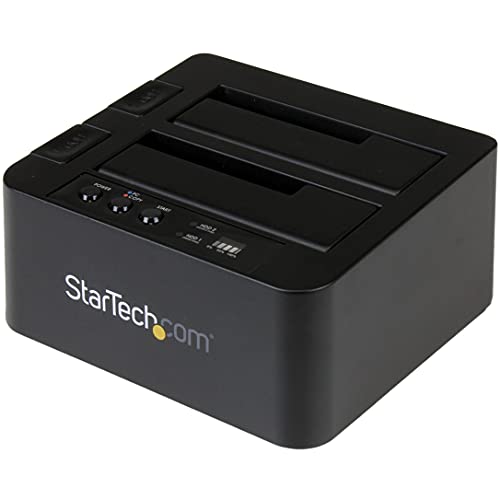
- Sector-by-sector cloning up to 28GB per minute
- Supports SATA drives of any capacity and 4Kn
- Works standalone or as a USB drive dock
Best For: IT professionals handling routine SATA drive duplication
Best for Drive Sanitization
Systor Standalone HDD/SSD Duplicator

- Standalone operation needs no computer or software
- Copies 2.5-inch and 3.5-inch SATA drives
- Includes DoD 5220.22-M-compliant erasure
Best For: Technicians combining drive copying with sanitization
Best Multi-Format Option
StarTech M.2 and SATA Duplicator

- Supports M.2 NVMe, M.2 SATA, and SATA drives
- Includes configurable duplication modes
- Provides five erase modes and NIST SP 800-88 Rev. 1 secure erase
Best For: Professionals handling mixed M.2 and SATA media
Best Standalone 1:3 Duplicator
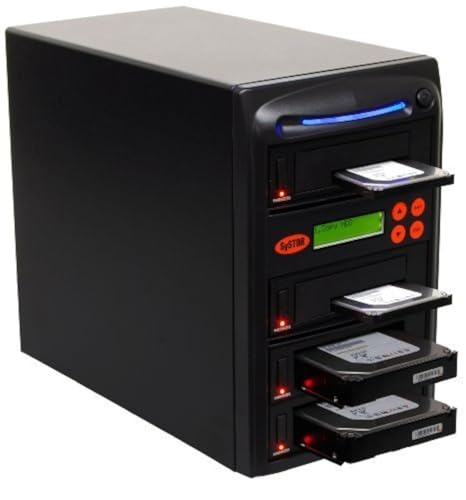
- Standalone copying and erasing
- Supports 2.5-inch and 3.5-inch SATA drives
- Up to 90MB/s with DoD-compliant sanitization
Best For: Technicians handling recurring SATA drive duplication and erasure
Best Dual-Bay Dock

- Offline one-key cloning
- 40TB total two-bay capacity
- 5Gbps USB-C connectivity and broad OS support
Best For: Home users and technicians needing a flexible two-drive SATA dock
Best High-Volume Duplicator

- 1:5 standalone duplication
- Up to 90MB/s sustained copying
- Whole-drive copying and DoD-compliant erasure
Best For: Repair shops and IT teams duplicating several SATA drives at once
Best with Extra Features
ICY BOX Dual-Bay SATA Drive Dock

- Supports 2.5-inch and 3.5-inch SATA drives
- Tool-free offline cloning and plug-and-play access
- USB 3.0 with UASP; works without drivers
Best For: Windows users needing a flexible two-drive SATA dock
Best 1:7 Production Choice
Systor SYS107HS-DP HDD/SSD Duplicator

- Duplicates up to seven drives simultaneously
- Standalone operation with no computer or software
- Includes DoD 5220.22-M-compliant drive erasure
Best For: Technicians and businesses handling batch SATA drive copies
Best Simple Pick

- Copies up to eleven SATA drives simultaneously
- No computer or software required
- Supports whole-drive copying and DoD-compliant erasure
Best For: Professional batch duplication and drive sanitization
Best Plug-and-Play Pick – Sabrent Dual-Bay SATA Dock and Cloner
For shoppers comparing hard drive duplicators for windows, the Sabrent EC-HD2B is a straightforward dual-bay option for standard 2.5-inch and 3.5-inch SATA hard drives or SSDs. It works as both a USB 3.0 docking station and an offline cloner, with no drivers required.
Best For: Home users who need an accessible SATA drive dock with offline cloning.
Pros:
- Supports 2.5-inch and 3.5-inch SATA HDDs and SSDs.
- Offline cloning requires no computer or drivers.
- Supports drives up to 10TB and USB 3.0 transfer speeds up to 5Gbps.
Cons:
- Supports SATA drives rather than M.2 NVMe drives.
- Offline cloning is rated up to 60Mbps, slower than its USB connection speed.
The Sabrent is a practical choice when ease of use and broad SATA compatibility matter more than advanced sanitization features or the fastest standalone duplication speeds.
Best Professional SATA Duplicator – StarTech Dual-Bay Drive Dock
The StarTech SDOCK2U313R is a capable choice among hard drive duplicators for windows, although its standalone cloning works without a computer and is operating-system independent. It supports 2.5-inch and 3.5-inch SATA drives of any capacity, with sector-by-sector copying and 4Kn compatibility.
Best For: IT professionals who need a standalone SATA duplicator that also functions as a USB drive dock.
Pros:
- Copies SATA drives sector by sector at speeds up to 28GB per minute.
- Supports 2.5-inch and 3.5-inch SATA HDDs and SSDs, including 4Kn drives.
- Offers USB 3.2 Gen 2 connectivity, TRIM, tool-free loading, and eject buttons.
Cons:
- The target drive must be equal to or larger than the source.
- IDE drives require a separately sold adapter.
With its combination of standalone duplication, USB docking, and professional-oriented features, this StarTech model is well suited to repeatable drive-copying tasks and service-desk workflows.
Best for Drive Sanitization – Systor Standalone HDD/SSD Duplicator
The Systor SYS101HS-DP is a standalone option for shoppers evaluating hard drive duplicators for windows, with no computer or software required. It handles 2.5-inch and 3.5-inch SATA drives and adds DoD 5220.22-M-compliant erasure for drive reuse or disposal.
Best For: Small businesses and technicians who need duplication plus basic drive sanitization.
Pros:
- Copies HDDs or SSDs without a computer or software.
- Supports both 2.5-inch and 3.5-inch drives without an adapter.
- Provides data-only or whole-drive copying and DoD 5220.22-M-compliant erasure.
Cons:
- Its stated transfer rate is up to 90MB per second, or 5.4GB per minute.
- Compatibility is focused on SATA drives rather than M.2 formats.
The Systor stands out when secure retirement is part of the workflow. Its hot-swappable design and simultaneous copying support make it useful for recurring duplication and sanitization tasks.
Best Multi-Format Option – StarTech M.2 and SATA Duplicator
For buyers seeking versatile hard drive duplicators for windows, the StarTech SM2DUPE11 supports M.2 NVMe, M.2 SATA, and 2.5-inch or 3.5-inch SATA drives. It operates without a PC or software and combines duplication with configurable erasure and on-screen controls.
Best For: IT departments and technicians working with both M.2 SSDs and conventional SATA drives.
Pros:
- Duplicates between M.2 NVMe, M.2 SATA, and 2.5-inch or 3.5-inch SATA drives.
- Supports system/file, partition, whole-drive, and percentage duplication modes.
- Offers five erase modes, including secure erase aligned with NIST SP 800-88 Rev. 1.
Cons:
- Its broad feature set and 2.6-pound metal design may be more than casual users need.
- IDE and mSATA support requires separately sold adapters.
- Supports specific M.2 key and size configurations, so drive compatibility should be checked.
This is the most flexible model in the group for mixed-media workflows. Its adjustable HPA settings, error reporting, and upgradeable firmware make it particularly appealing for professional duplication and sanitization work.
Best Standalone 1:3 Duplicator – Systor SYS103HS-DP
For buyers comparing hard drive duplicators for windows, the Systor SYS103HS-DP is a standalone option for copying or sanitizing SATA hard drives and SSDs without a computer or software. It supports 3.5-inch and 2.5-inch drives and maintains up to 90MB per second, even when multiple drives are loaded.
Best For: IT teams and technicians who need simultaneous drive duplication, whole-drive copying, data-only copying, or DoD 5220.22-M-compliant erasure.
Pros:
- Standalone operation requires no computer or software.
- Supports both 3.5-inch and 2.5-inch SATA drives without an adapter.
- Copies multiple drives at up to 90MB per second.
- Includes lifetime technical support, with three years of labor and one year of parts coverage.
Cons:
- Designed for SATA drives rather than a broad range of interfaces.
- Its 1:3 configuration is less suited to larger duplication batches.
The SYS103HS-DP is a practical fit when repeatable, computer-free duplication and drive sanitization matter more than a compact desktop docking station.
Best Dual-Bay Dock – SUITOK 40TB SATA Cloner
Among hard drive duplicators for windows, this SUITOK dual-bay dock combines offline cloning with USB 3.2 Gen 1 connectivity. It accepts 2.5-inch and 3.5-inch SATA drives, supports up to 20TB per bay, and includes LED progress indicators for standalone cloning.
Best For: Home offices, PC users, and technicians who want a flexible two-bay dock for offline cloning, backups, and high-capacity storage access.
Pros:
- One-key offline cloning works without a connected computer.
- Supports up to 40TB total capacity across two bays.
- Offers 5Gbps USB 3.2 Gen 1 transfers with UASP support.
- Works with Windows, macOS, Linux, Chrome OS, and Android OTG.
Cons:
- It is a two-bay dock, not a multi-target duplicator for larger batches.
- Offline cloning is intended for compatible SATA drives.
This model is a versatile choice if you want both standalone disk cloning and ordinary USB-connected drive access, especially when high-capacity drives and broad operating-system compatibility are priorities.
Best High-Volume Duplicator – Systor SYS105HS-DP
For demanding hard drive duplicators for windows workloads, the Systor SYS105HS-DP provides standalone copying and erasing for multiple SATA HDDs and SSDs. Its 1:5 design is suited to larger duplication runs, while its stated speed remains up to 90MB per second as the number of loaded drives increases.
Best For: IT departments, repair shops, and deployment workflows that need to duplicate several drives simultaneously without relying on a computer or software.
Pros:
- Five-target configuration supports higher-volume duplication.
- Standalone operation simplifies repeatable copying tasks.
- Handles 3.5-inch and 2.5-inch drives without an adapter.
- Supports whole-drive or data-only copying and DoD 5220.22-M-compliant erasure.
Cons:
- Its 26-pound weight makes it less portable than a compact dock.
- Connectivity is focused on SATA drives.
The SYS105HS-DP is the stronger Systor choice when capacity for multiple target drives is more important than portability or a small desktop footprint.
Best with Extra Features – ICY BOX Dual-Bay SATA Drive Dock
For users comparing hard drive duplicators for Windows, the ICY BOX is a flexible dual-bay dock for accessing, backing up, and cloning SATA drives without tools. It supports both 2.5-inch and 3.5-inch HDDs and SSDs, connects over USB 3.0, and requires no drivers.
Best For: Windows users who want a simple dock for mixed-size SATA drives, backups, file transfers, and offline cloning.
Pros:
- Accepts both 2.5-inch and 3.5-inch SATA HDDs and SSDs without extra adapters.
- Tool-free plug-and-play design simplifies frequent drive access.
- USB 3.0 with UASP supports transfer rates up to 5 Gbps.
- Works with Windows, macOS, and Linux without driver installation.
Cons:
- Its two-bay design is less suited to copying many drives simultaneously than a multi-target duplicator.
- The supplied notes describe support for SATA drives, not other interfaces.
The ICY BOX is a practical choice when convenience and broad SATA compatibility matter more than high-volume duplication. Its offline clone function and dual-bay layout make it useful for personal storage and routine drive maintenance.
Best 1:7 Production Choice – Systor SYS107HS-DP HDD/SSD Duplicator
The Systor SYS107HS-DP is a standalone option for hard drive duplicators for Windows when you need to copy several drives at once without a computer or software. Its 1:7 configuration can duplicate HDDs or SSDs simultaneously and also provides drive-erasing functions.
Best For: Businesses, technicians, and deployment workflows that need up to seven simultaneous SATA drive copies.
Pros:
- Standalone operation requires no computer or software.
- Copies multiple 2.5-inch or 3.5-inch HDDs and SSDs at up to 90 MB per second.
- Supports data-only or whole-drive duplication.
- Includes erasure compliant with DoD 5220.22-M data sanitization.
Cons:
- The listed 90 MB-per-second speed is slower than the 5 Gbps interface rate of the ICY BOX, though the devices serve different purposes.
- Its SATA-focused design does not indicate support for non-SATA drive interfaces.
With seven target bays, the SYS107HS-DP is designed for repeatable batch work rather than occasional home backups. Hot-swappable support, sanitization, and standalone operation add useful workflow flexibility for professional users.
Best Simple Pick – Systor SYS1011HS-DP 1:11
For larger deployment or service workloads, the Systor SYS1011HS-DP is a high-capacity choice among hard drive duplicators for Windows. It operates independently of a computer, accepts 2.5-inch and 3.5-inch SATA drives, and can copy up to eleven drives simultaneously.
Best For: Professional technicians and organizations that need the largest simultaneous duplication capacity in this lineup.
Pros:
- 1:11 configuration supports copying multiple drives at the same time.
- Standalone design needs no computer or software.
- Handles both 2.5-inch and 3.5-inch HDDs and SSDs without an adapter.
- Can duplicate data only or an entire drive and erase media using DoD 5220.22-M sanitization.
Cons:
- The 90 MB-per-second listed transfer speed may be limiting for very large batches.
- Its greater capacity is likely unnecessary for occasional personal drive copying.
- The supplied specifications identify SATA connectivity rather than broader interface support.
The SYS1011HS-DP prioritizes throughput by quantity: it offers four more target bays than the 1:7 Systor model while retaining standalone duplication and erasure functions. It is the better fit when minimizing batch time matters more than compactness.
How We Picked the Best Hard Drive Duplicators for Windows
We focused on the features that matter when cloning or duplicating Windows storage: drive compatibility, independent offline operation, advertised transfer speed, connection type, target-drive capacity support, and the number of copies each unit can create at once. The list includes simple dual-bay docks as well as standalone duplicators designed for repeated or high-volume work.
Compatibility deserves special attention. Most products here support 2.5-inch and 3.5-inch SATA HDDs or SSDs, while selected models also support M.2 SATA or NVMe drives. A duplicator may clone a Windows disk sector by sector, but it does not automatically solve encryption, bad sectors, incompatible partition layouts, or a drive that is larger than the target.
Quick Comparison
- Best for occasional upgrades: A USB docking station with a simple one-to-one clone function.
- Best for faster SATA workflows: A dual-bay duplicator with a higher advertised copy rate and USB 3 connectivity.
- Best for mixed drive types: A model supporting both M.2 and 2.5/3.5-inch SATA storage.
- Best for technicians: Standalone 1:3, 1:5, 1:7, or 1:11 duplicators for multiple simultaneous copies.
- Best for flexible desktop access: A USB-C dock that also works as an external drive reader after cloning.
Key Buying Factors for Hard Drive Duplicators for Windows
Drive Type and Physical Format
Confirm whether your source and destination drives are SATA, M.2 SATA, or M.2 NVMe. M.2 is a physical shape, not a single interface, so an M.2 SATA-only dock will not necessarily accept an NVMe drive. Also check support for both 2.5-inch laptop drives and 3.5-inch desktop drives.
Offline Cloning Versus Computer-Based Copying
Standalone cloning is convenient because the source and target drives connect directly to the duplicator. USB docks can be more versatile when you want to manage partitions, verify files, or use Windows software. For protected or unusual Windows installations, software-assisted cloning may provide better control.
Speed, Capacity, and Target Sizing
Advertised speeds are maximums and depend on the drive, interface, data type, and thermal conditions. Check the duplicator’s maximum supported capacity and make sure the destination is at least as large as the source—or use cloning software that can shrink partitions when appropriate.
Copy Count and Data-Erasure Features
A 1:1 unit suits personal upgrades, while 1:3 through 1:11 systems make more sense for repair shops, system deployment, and repeat installations. If the device includes erasing modes, treat them as destructive operations: verify the selected source and targets before starting.
Who Should Buy Which Hard Drive Duplicators for Windows?
Home users and occasional PC upgraders should choose a straightforward dual-bay dock with USB 3 or USB-C connectivity. It can clone a SATA Windows drive and later serve as an external reader.
IT technicians and small repair businesses should consider a standalone multi-bay duplicator. More simultaneous targets can reduce labor and make repeat deployments substantially faster, provided the workflow uses compatible SATA drives.
Users working with newer compact SSDs should select a model that explicitly supports the required M.2 interface, especially NVMe. If you regularly handle both M.2 and SATA drives, a combination duplicator avoids buying separate hardware.
Before purchasing, confirm the exact drive interface, capacity limit, cloning direction, and Windows workflow you need. That final compatibility check is more important than the headline transfer speed.