
The best robotics sets for middle school students turn screen time into hands-on problem solving. These kits let kids build, program, test, and improve working robots while developing practical skills in coding, electronics, engineering, and design.
This roundup covers beginner-friendly building kits, sensor-based robot cars, app-controlled projects, and more advanced Arduino- and Scratch-compatible systems. Use the guide below to match the kit’s complexity, programming options, and project variety to the student’s age and experience.
Best 10 Robotics Sets for Middle School Students Picks for 2026
Best Starter Robot

- Quick 15-minute assembly
- Scratch and Arduino support
- Line-following and obstacle avoidance
Best For: Beginners learning robotics and coding step by step
Best Camera Robot

- FPV camera and Wi-Fi module
- Arduino IDE programming
- Line tracking and obstacle avoidance
Best For: Sensor-focused makers ready for more involved builds
Best Project Variety
ButterflyEdufields 40-in-1 Robotics Kit

- 40-plus guided projects
- 100-plus electronic components
- No soldering or coding required
Best For: Exploratory STEM learning at home or in group activities
Best Build-and-Play Set
Sillbird 5-in-1 Programmable Robot

- Five buildable model styles
- 488-piece construction set
- App, remote, and basic programming control
Best For: Hands-on builders who want variety and rechargeable play
Best Mechanical Coding Build

- Mechanical coding wheel teaches programming basics
- Performs throwing, lifting, kicking, and drawing actions
- Detailed build designed for ages 10 and up
Best For: Hands-on learners interested in mechanical engineering and coding
Best Connected Building Set
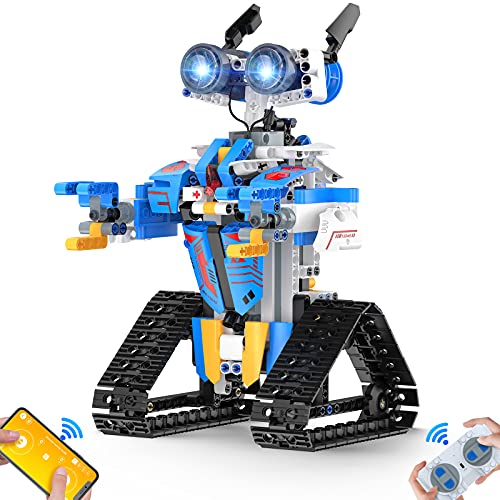
- Includes 468+ construction pieces
- Offers app, remote, voice, path, and programming modes
- Moves in multiple directions with lights and flexible joints
Best For: Students who want building variety and interactive controls
Best Multi-Model Value

- Builds into five robot and vehicle models
- Includes remote control and four app modes
- 408 pieces support engineering and creative thinking
Best For: Students who enjoy rebuilding and experimenting with RC controls
Best Multilingual Learning Path

- Supports Scratch, Arduino, and Python
- Includes 16 story-based tutorials
- Works with computers and mobile devices
Best For: Students progressing from beginner block coding to text-based programming
Best Mechanical Engineering Project

- Builds a motorized wooden robot arm
- Introduces circuits and mechanical movement
- No soldering required
Best For: Hands-on engineering projects and classroom STEM activities
Best Advanced Multi-Build Option

- Offers four modular robot configurations
- Includes a programmable 5DOF robotic arm
- Supports Scratch and Arduino coding
Best For: Older students seeking a deeper, multi-stage robotics project
Best Starter Robot – Makeblock mBot Coding Robot
For shoppers comparing robotics sets for middle school students, the Makeblock mBot is a straightforward entry point. It combines guided assembly with Scratch and Arduino programming, while its line-following and obstacle-avoidance modes add hands-on ways to test what students build and code.
Best For: Beginners who want a quick-build robot with a gradual path from block coding to Arduino.
Pros:
- Can be assembled in about 15 minutes with clear instructions.
- Supports Scratch and Arduino learning through tutorials, coding cards, and lessons.
- Offers remote-control, line-following, and obstacle-avoidance activities.
- Open-source design works with Makeblock add-ons and LEGO-compatible parts.
Cons:
- AA batteries for the robot and a CR2025 battery for the remote are not included.
- Its entry-level design may feel limited for students seeking more advanced builds immediately.
The mBot is a practical choice when ease of assembly and structured programming resources matter more than a large collection of projects. Its expandable platform also gives students room to continue experimenting.
Best Camera Robot – ELEGOO UNO R3 Smart Robot Car
The ELEGOO UNO R3 Smart Robot Car is one of the more feature-rich robotics sets for middle school students who are ready to connect coding with sensors, movement, and video. Students assemble the car, program it with Arduino IDE, and explore app or remote control, FPV video, line tracking, and obstacle avoidance.
Best For: Students interested in Arduino programming, sensor experiments, and camera-enabled robot-car projects.
Pros:
- Includes an onboard camera for live FPV video.
- Supports line tracking, obstacle avoidance, auto-follow, app control, and IR control.
- Keyed connectors and illustrated tutorials help reduce wiring mistakes.
- Includes a rechargeable 2000 mAh lithium-ion battery.
Cons:
- The manufacturer recommends adult guidance for first-time builders.
- Its wiring, sensors, camera, and Arduino programming create a more involved learning curve than simpler robot kits.
This kit is a strong fit for learners who want more than a remote-control vehicle. The camera and sensor package creates plenty of opportunities to modify example programs and investigate how a robot responds to its surroundings.
Best Project Variety – ButterflyEdufields 40-in-1 Robotics Kit
The ButterflyEdufields kit stands out among robotics sets for middle school students by emphasizing project variety. With more than 100 components, reusable sensors, and 40-plus project ideas, it lets students move from simple plug-and-play builds to experiments involving motion, light, touch, flame, and magnetic detection.
Best For: Homeschooling, STEM activities, or families seeking many guided electronics and robotics projects in one kit.
Pros:
- Includes more than 100 parts and over 40 project concepts.
- Projects include a line-following car, drawing robot, fan controller, and flame extinguisher robot.
- Plug-and-play design requires no soldering, special tools, or prior coding knowledge.
- Detailed instructions and concept manuals explain how components work.
Cons:
- The manufacturer specifies using AA batteries other than Duracell for the included holder.
- The large number of parts and projects may require organization and adult help during setup.
This is a versatile option for students who learn best by trying many different builds. It prioritizes accessible, reusable experiments over a single deep programming platform, making it especially useful for structured home or classroom activities.
Best Build-and-Play Set – Sillbird 5-in-1 Programmable Robot
The Sillbird 5-in-1 set brings a construction-toy approach to robotics sets for middle school students. Its 488 pieces can be used to build a robot, dinosaur, car, tank, and other configurations, then students can control the finished models through an app or remote while exploring basic programming and movement.
Best For: Builders who want multiple physical models, progressive difficulty, and both app and remote control.
Pros:
- Offers five buildable model styles with varying difficulty.
- Includes 488 pieces and clear, colorful step-by-step instructions.
- Supports Bluetooth app control, remote control, path programming, and precise movement.
- Rechargeable design provides up to 40 minutes of play on a charge.
Cons:
- Rebuilding multiple models can require considerable assembly time.
- Its focus is on guided building and interactive play rather than a Scratch- or Arduino-based coding curriculum.
This set works well when variety and hands-on construction are the main priorities. The progressive models can help sustain interest, while app control and basic programming add an interactive layer beyond ordinary building blocks.
Best Mechanical Coding Build – Mech-5 Coding Robot
For families comparing robotics sets for middle school students, the TEACH TECH Mech-5 stands out as a hands-on mechanical engineering project. Students assemble the robot, then use a coding wheel and snap-on coding buttons to program actions such as throwing, lifting, kicking, and drawing.
Best For: Future engineers ages 10 and up who enjoy detailed building projects and introductory coding concepts.
Pros:
- Mechanical coding wheel introduces programming basics without requiring an app.
- Robot can perform several engaging actions, including throwing, lifting, kicking, and drawing.
- Step-by-step assembly provides an in-depth, learn-by-doing STEM experience.
Cons:
- Assembly may take multiple hours and requires careful attention to the instructions.
- Uses two AAA batteries, which are not listed as included.
This is a strong choice when the building process matters as much as the final robot. Its mechanical approach offers a focused introduction to coding and engineering, though it may be less suitable for students seeking quick, app-based play.
Best Connected Building Set – Programmable App Robot Kit
This 468-piece kit is a versatile option among robotics sets for middle school students, combining brick-style construction with app and remote-control operation. After building, students can explore driving, path, voice-control, gravity-sensor, and STEM programming modes.
Best For: Students ages 8 and up who want a buildable robot with multiple control methods and interactive features.
Pros:
- Includes more than 468 building pieces and a step-by-step assembly manual.
- Supports Bluetooth app control, a 2.4GHz remote, path mode, voice control, and programming mode.
- Robot moves in multiple directions, rotates 360 degrees, and includes glowing eyes and flexible joints.
Cons:
- The many control modes may feel more play-focused than a structured coding curriculum.
- The listing gives conflicting age details, describing the kit for ages 8 and up while also showing a manufacturer age of 8.
- Requires a lithium-ion battery, though the included-components list does not clearly identify battery inclusion.
The combination of construction, remote control, and app features gives this kit broad appeal. It is a practical pick for students who want to build first and then experiment with several ways to operate the robot.
Best Multi-Model Value – Opmind 5-in-1 RC Robot Kit
The Opmind 5-in-1 kit gives students a reusable building challenge by converting 408 pieces into five models, including a robot, racing tank, and tracked cars. For shoppers comparing robotics sets for middle school students, its combination of construction, remote control, and app programming offers several ways to extend play.
Best For: Ages 8 to 14 who enjoy rebuilding projects, remote-controlled movement, and beginner-friendly programming modes.
Pros:
- Five model options encourage repeated building and creative experimentation.
- Remote control supports forward, backward, left, right, and 360-degree stunt movement.
- Bluetooth app includes driving, path, gravity-sensor, and programming modes.
- Educational objectives include engineering, logical thinking, patience, and hand-eye coordination.
Cons:
- Its 408 pieces and multiple configurations may require patience during assembly and rebuilding.
- The remote control is intended for smooth, flat floors, limiting the stated driving environment.
This kit is especially appealing when variety is a priority. Students can return to the project to create different vehicles and try different control modes, making it a flexible introduction to engineering and programming concepts.
Best Multilingual Learning Path – ACEBOTT Smart Robot Car Kit
For shoppers comparing robotics sets for middle school students, the ACEBOTT Smart Robot Car Kit offers a flexible way to progress from block coding to text-based programming. Its ESP32 controller, 16 story-based tutorials, and mobile-device support make it suitable for guided classroom work or independent practice.
Best For: Middle school students who want to build a robot car and advance from Scratch to Arduino or Python.
Pros:
- Supports Scratch, Arduino, and Python for different skill levels.
- Includes illustrated instructions, HD videos, and 16 guided tutorials.
- Can be programmed on computers, tablets, and smartphones.
- Offers app and IR remote control for immediate hands-on feedback.
Cons:
- Batteries are not included.
- The broad age range may require selecting the right programming level for the student.
This is a strong all-around choice when the goal is continued learning rather than a single build. The Scratch-to-Python progression gives students room to develop coding skills as their confidence grows.
Best Mechanical Engineering Project – DIY Wooden Robot Arm Kit
Among robotics sets for middle school students, this DIY robot arm emphasizes construction, circuits, and mechanical movement rather than software coding. Its wooden components and motorized control provide a hands-on project for students who enjoy assembling physical systems.
Best For: Students who prefer a challenging build focused on circuits, motors, mechanics, and problem-solving.
Pros:
- Combines wooden assembly with motors, wiring, and a PCB controller.
- Introduces basic electrical circuits and mechanical movement.
- Requires no soldering and includes assembly components and instructions.
- Can work as a classroom science project or family STEM activity.
Cons:
- Six AA batteries are required but not included.
- It does not list Scratch, Arduino, or other software programming support.
- The detailed wooden assembly may be demanding for younger or less patient builders.
This kit is best viewed as a physical engineering challenge. It can build patience, motor skills, and confidence through assembly, but students seeking app-based coding may prefer a programmable robot kit instead.
Best Advanced Multi-Build Option – ACEBOTT 4-in-1 Robot Arm Tank
For middle school students ready for a more advanced project, this ACEBOTT set combines a 5DOF robotic arm with a tank-car platform and modular expansions. It supports Scratch and Arduino, while its guided tutorials cover assembly, movement, grabbing, and navigation.
Best For: Students ages 12 and up who want multiple robot configurations and a deeper introduction to coding and robotics.
Pros:
- Supports four build configurations, including a robotic arm car, tank robot, and arm tank.
- Includes a programmable 5DOF arm for grabbing, lifting, and placing objects.
- Provides 16 tutorials, HD assembly videos, and app or IR remote control.
- Tank treads are designed for grass, gravel, slopes, and carpet.
Cons:
- Its manufacturer-recommended age is 12 and up, so it may be too advanced for younger middle school students.
- The notes specify Scratch and Arduino compatibility but do not mention Python support.
- The multi-part build may require more time and troubleshooting than a basic robot car.
This is the most versatile option of the three for students who want to keep experimenting after the first build. Its modular designs and robotic arm functions offer more variety, while the tutorials provide structure for beginners.
How We Picked These Robotics Sets for Middle School Students
We focused on kits that combine construction with meaningful STEM learning rather than simple push-button toys. The selection includes programmable cars, robot arms, tracked vehicles, sensor projects, and modular building systems. We also considered stated age ranges, coding support, included components, project variety, assembly demands, and whether the kit can remain useful as a student’s skills grow.
Because product specifications and included parts can vary, check the current listing before buying. Some advanced kits may require a computer, smartphone, batteries, tools, or separate electronic components.
Quick Comparison
| Best For | Look For | Suitable Kit Style |
|---|---|---|
| First robotics project | Guided builds and simple controls | Beginner coding robot or remote-control kit |
| Learning Arduino | Open hardware and expandable programming | Arduino-compatible robot car or arm |
| Creative experimentation | Many parts, sensors, and project ideas | Multi-in-one robotics kit |
| Mechanical engineering | Gears, joints, movement, and precise assembly | Robot arm or tracked vehicle |
| Independent building | Clear instructions and manageable wiring | Structured STEM building kit |
Key Buying Factors
Age, Experience, and Build Complexity
Age labels are useful starting points, but hands-on experience matters just as much. A younger or beginner student may benefit from a guided kit with fewer wiring steps, while an experienced middle schooler may prefer a more demanding Arduino robot, five-degree-of-freedom arm, or multi-project set.
Programming and Compatibility
Check whether the kit uses block-based Scratch-style coding, a dedicated app, Arduino programming, or a combination. Scratch is often easier for beginners; Arduino compatibility offers more flexibility for students ready to modify code and experiment with sensors. Confirm device, operating-system, and connection requirements before purchase.
Project Variety and Expandability
A kit with multiple builds or sensors can provide better long-term value than a single-purpose robot. Look for ultrasonic or light sensors, motors, servos, cameras, remote controls, and reusable structural parts. Expandability is especially valuable when a student already owns basic robotics hardware.
Support and Practical Requirements
Clear manuals, tutorials, downloadable code, and replacement-part availability can make the difference between a successful project and a frustrating one. Also verify whether batteries, a USB cable, tools, or adult assistance are needed.
Who Should Buy Which Robotics Sets for Middle School Students?
Choose a guided mBot-style or remote-control building kit for a first-time learner who needs a quick, confidence-building project. Pick an Arduino-compatible robot car for students interested in coding, sensors, and modifying programs. Multi-in-one sets are a strong choice for families or classrooms that want several projects from one purchase.
Robot arms suit students drawn to mechanical movement, precision, and engineering challenges. A camera-equipped, app-enabled, or tank-style kit is better for older or more experienced builders who want advanced features and a steeper learning curve. For classroom use, prioritize durable parts, repeatable builds, documentation, and enough project flexibility to support different skill levels.