
Affordable resin printers now deliver impressive detail, faster curing, and easier setup without requiring a professional-grade budget. This roundup compares 10 options priced under $300, including compact beginner models and larger, higher-resolution MSLA machines.
Use the buying guide below to narrow your choice by print size, detail, automation, connectivity, operating costs, and the type of models you plan to create.
Best 10 Resin Printers Under 300 Picks for 2026
Best Detail Value

- 7-inch 10K display with 17 μm XY pixel size
- Uniform LighTurbo matrix lighting
- Power-failure recovery and improved platform adhesion
Best For: Beginners and detail-focused hobbyists
Best Large-Format Detail

- 10-inch 12K mono LCD
- Large 218.88 × 122.88 × 250 mm build volume
- Uniform COB/Fresnel light source
Best For: Large, detailed models and batch printing
Best Easy-Start 10K Printer
- Factory-assembled and calibrated
- 10K display with 17 μm pixel precision
- 1.5-second exposures and power recovery
Best For: First-time users seeking a simple setup
Best Beginner Safety Features
- One-click automatic leveling
- Self-check and residue detection features
- 4K mono LCD with COB light source
Best For: Beginners who want automated setup and safeguards
Best High-Resolution Pick

- 9K LCD with 18μm XY resolution
- Pre-leveled platform for easier setup
- USB, WiFi, and Creality Cloud support
Best For: Detailed miniatures and flexible desktop workflows
Best Safety-Focused Pick

- Intelligent mechanical print sensors
- Automatic leveling with spring-assisted platform
- 4K monochrome LCD and up to 70mm/h speed
Best For: Beginners seeking guided setup and monitoring
Best Compact Starter

- Compact 115 × 65 × 110 mm build area
- One-click auto-calibration and leveling
- Magnetic build plate for easier removal
Best For: Small models and space-conscious beginners
Best High-Detail Pick

- 10K monochrome LCD for fine detail
- Uniform LighTurbo lighting and 1.5-second exposure times
- Large 6.04 × 3.42 × 6.49-inch build area
Best For: Detailed everyday printing with a beginner-friendly setup
Best Smart Features

- Prints at speeds up to 150 mm/h
- Automatic leveling, sensors, and AI camera
- Wi-Fi transfer and cluster printing support
Best For: Fast, monitored printing with minimal manual setup
Best Resin Supply

- 500g of 405nm grey UV-curing resin
- Low-shrinkage formula for precise, smooth models
- Compatible with LCD and DLP printers
Best For: Routine detailed prints and general-purpose resin stock
Best Detail Value – ANYCUBIC Photon Mono 4 10K
For shoppers comparing resin printers under 300, the ANYCUBIC Photon Mono 4 stands out with a 7-inch 10K screen, compact footprint, and a build volume suited to everyday models and detailed projects.
Best For: Beginners and hobbyists who want high-resolution prints without a complicated setup.
Pros:
- 10K resolution with 17 × 17 μm pixel size for fine detail.
- LighTurbo matrix lighting helps produce smoother, more consistent surfaces.
- Laser-engraved platform improves adhesion while keeping print removal manageable.
- Power-failure recovery can reduce wasted resin and print time.
Cons:
- The Anycubic app service is not supported.
- The 4-point leveling process still requires an initial manual setup.
With strong resolution, a practical 153.4 × 87 × 165 mm build volume, and beginner-friendly leveling, this Photon Mono 4 is a well-rounded choice for detailed home printing.
Best Large-Format Detail – ELEGOO Saturn 3 12K
Among resin printers under 300, the ELEGOO Saturn 3 is designed for users who need both high detail and a notably spacious build area for larger models or batch printing.
Best For: Experienced hobbyists making large, intricate models or multiple parts in one print.
Pros:
- 10-inch 12K mono LCD delivers detailed 19 × 24 μm XY resolution.
- Generous 218.88 × 122.88 × 250 mm build volume supports ambitious projects.
- COB and Fresnel optics provide uniform 405 nm light for consistent curing.
- Laser-carved build plate is designed for reliable adhesion.
Cons:
- Its 33-pound weight makes it less convenient to move.
- The larger format may be more printer than beginners need.
The Saturn 3 is the strongest option here for size and fine detail, though its heavier chassis and broader capabilities favor a dedicated workspace and more involved projects.
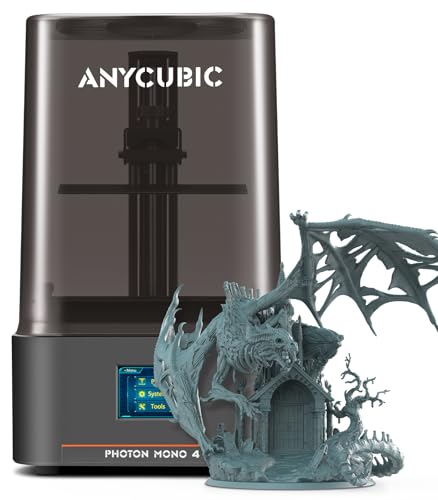
Best Easy-Start 10K Printer – ANYCUBIC Photon Mono 4
If you are searching for resin printers under 300 that are quick to get running, this Photon Mono 4 combines 10K detail with factory calibration, a short setup process, and useful recovery features.
Best For: First-time users who want a nearly ready-to-print machine with detailed output.
Pros:
- 7-inch 10K screen provides 17 × 17 μm pixel precision.
- Factory-assembled and calibrated for a fast start.
- 1.5-second exposures can support quicker printing.
- Power-failure recovery helps preserve interrupted jobs.
Cons:
- A quick 4-point leveling check is still required.
- The supplied notes do not list a build volume.
This version is a practical pick when setup simplicity matters as much as resolution, offering a straightforward path into detailed resin printing without sacrificing core convenience features.
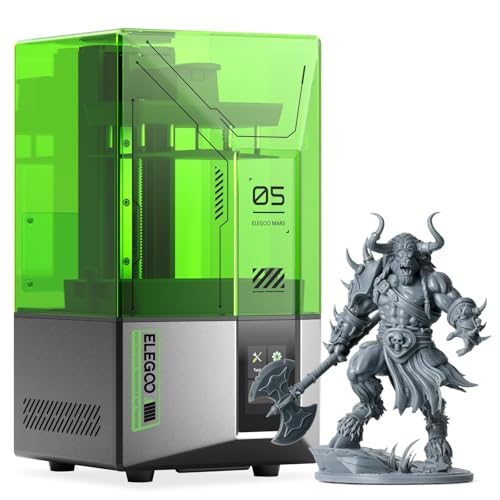
Best Beginner Safety Features – ELEGOO Mars 5
For buyers evaluating resin printers under 300, the ELEGOO Mars 5 focuses on reducing setup and monitoring hassles with automatic leveling, self-checks, and safeguards designed to protect prints and hardware.
Best For: Beginners who prioritize automated setup, error alerts, and dependable routine operation.
Pros:
- One-click automatic leveling simplifies initial preparation.
- Self-check function verifies key components before printing.
- Residue detection and resin-shortage alerts can help limit waste.
- 4K mono LCD and COB lighting reproduce intricate details.
Cons:
- Its 4K display offers less stated resolution than the 10K and 12K alternatives.
- The supplied notes do not specify the build volume.
The Mars 5 is especially appealing for new users who want more assistance during setup and printing, while its 4K system remains suited to detailed everyday models.
Best High-Resolution Pick – Creality HALOT-X1 Neo
If you want resin printers under 300 with especially fine detail, the Creality HALOT-X1 Neo stands out with its 9K LCD and 18μm XY resolution. Its pre-leveled platform and multiple file-transfer options also make it approachable for newer users.
Best For: Miniature makers, tabletop gamers, and creators who prioritize fine detail and flexible connectivity.
Pros:
- 9K LCD with 18μm XY resolution for detailed miniatures and intricate models.
- Factory pre-leveled build platform supports a simpler setup.
- Supports USB, 2.4GHz WiFi, and Creality Cloud file transfers.
- AI-powered 2D-to-3D model generation adds a creative workflow option.
Cons:
- Its 153.36 × 77.76 × 160 mm build volume is geared toward smaller desktop models.
- AI model generation may take as long as 3.5 hours for a model.
The HALOT-X1 Neo is a strong choice when resolution and convenience matter more than large-format printing. Its beginner-friendly setup and broad slicing compatibility make it versatile for hobby projects.
Best Safety-Focused Pick – ELEGOO Mars 5 MSLA
Among resin printers under 300, the ELEGOO Mars 5 is a practical option for users who want guided setup and built-in monitoring. Its automatic leveling, mechanical sensor, and 4K monochrome LCD are designed to make routine printing more predictable.
Best For: Beginners and hobbyists who value automatic leveling, print monitoring, and straightforward operation.
Pros:
- Intelligent sensor checks for low resin, foreign objects, film replacement, and overheating.
- Automatic leveling simplifies initial setup.
- 6.6-inch 4K monochrome LCD provides 35μm XY resolution.
- COB light source and cooling system support consistent operation.
Cons:
- Successful results still depend on correct machine settings and model supports.
- The supplied notes do not specify the printer’s build volume.
The Mars 5 emphasizes ease of use and maintenance awareness rather than advanced creative features. Its automatic leveling and built-in checks make it a sensible fit for users learning resin-printing routines.
Best Compact Starter – MALYAN S100 Mini
For shoppers comparing resin printers under 300 for a small workspace, the MALYAN S100 Mini offers a compact entry point. Its auto-calibration, magnetic build plate, and 5.5-inch 2K LCD focus on accessible operation for smaller models.
Best For: Beginners, compact workspaces, and hobbyists printing small models with an emphasis on easy platform handling.
Pros:
- Compact 115 × 65 × 110 mm printing area suits smaller projects.
- One-click auto-calibration and leveling simplify starting a print.
- Magnetic build plate is designed for easier removal and cleanup.
- Parallel LED array and laser-engraved plate support detailed prints and adhesion.
Cons:
- The small build volume limits the size of models you can print.
- Users should match printing parameters to the resin being used.
The S100 Mini is best viewed as a compact, beginner-friendly resin printer rather than a high-capacity machine. Its automatic leveling and removable magnetic plate can reduce friction for first-time users.
Best High-Detail Pick – Photon Mono 4
If you’re comparing resin printers under 300, the ANYCUBIC Photon Mono 4 stands out for detailed models, dependable everyday printing, and a straightforward setup. Its 10K monochrome LCD, uniform LighTurbo lighting, and 1.5-second exposure times are geared toward sharp results without sacrificing efficiency.
Best For: Beginners and experienced users who want high-resolution prints and a generous build area.
Pros:
- 10K 7-inch monochrome LCD with 17 × 17 μm XY pixel size
- LighTurbo matrix light source helps produce smooth, even exposure
- 6.04 × 3.42 × 6.49-inch build volume supports larger projects
- Pre-tested assembly, power-loss resume, one-year warranty, and lifetime technical support
Cons:
- Requires an initial leveling step before printing
- Its 11-pound weight and 20 × 10 × 15-inch dimensions may require dedicated space
The Photon Mono 4 is a strong all-around choice in this category, particularly if fine detail and an easy transition from unboxing to printing matter most.
Best Smart Features – ELEGOO Mars 5 Ultra
Among resin printers under 300, the ELEGOO Mars 5 Ultra is aimed at users who value speed, automation, and remote monitoring. Its 9K monochrome LCD pairs with tilt-release printing for speeds up to 150 mm/h, while automatic leveling, an AI camera, and Wi-Fi connectivity reduce hands-on setup and oversight.
Best For: Users who want fast resin printing with automatic checks, camera monitoring, and wireless file transfer.
Pros:
- Print speeds up to 150 mm/h with fast and slow modes
- 9K 7-inch LCD produces detailed models
- Automatic leveling and smart sensors monitor several printing conditions
- Built-in AI camera and Wi-Fi cluster printing support remote monitoring and control
Cons:
- At 24.6 pounds, it is substantially heavier than the Photon Mono 4
- Its feature-rich design may be more than users seeking a basic printer need
The Mars 5 Ultra is the more automation-focused option here. Choose it when speed, wireless operation, and active print monitoring are more important than keeping the machine especially light.
Best Resin Supply – ANYCUBIC Standard UV Resin
For shoppers building a resin-printing setup, this 500g bottle of ANYCUBIC standard resin is a practical companion to resin printers under 300. The 405nm UV-curing formula is designed for low shrinkage, quick curing, smooth surfaces, and compatibility with LCD and DLP printers.
Best For: LCD or DLP printer owners who need a general-purpose grey resin for detailed models.
Pros:
- Low shrinkage supports precise prints with smooth surfaces
- Good fluidity helps shorten forming time
- Balances rigidity and toughness for easier model removal
- Universal compatibility with 405nm LCD and DLP printers
Cons:
- The bottle contains 500g, rather than being a larger bulk supply
- Requires thorough shaking before use to avoid uneven coloring
- Resin printing still requires suitable handling and post-processing practices
This is a sensible standard material for routine projects, especially when you want grey resin with a balance of detail, curing speed, and print stability.
How We Picked the Best Resin Printers Under 300
We focused on the features that have the greatest effect on print quality and day-to-day usability: LCD resolution, XY detail, build volume, leveling system, curing speed, connectivity, safety features, and overall value. The selection includes established models from Anycubic, Elegoo, Creality, and Malyan, plus resin suitable for compatible 405nm LCD and MSLA printers.
Because advertised prices can change, check the current listing before purchasing. Also confirm whether a printer includes a build plate, resin vat, tools, or resin; starter bundles vary considerably.
Quick Comparison
| Priority | Look For | Best Fit |
|---|---|---|
| Fine detail | 9K or 10K monochrome LCD and a low XY resolution | Miniatures, jewelry prototypes, and display models |
| More print space | A larger build plate and taller Z-axis capacity | Figures, batches, and larger parts |
| Easy setup | Automatic or assisted leveling and sensors | First-time resin users |
| Faster workflow | High-speed exposure settings and Wi-Fi support | Frequent printing and multiple machines |
Key Buying Factors for Resin Printers Under 300
Resolution and Print Quality
Higher pixel counts can produce sharper edges, but resolution is only part of the result. XY resolution, accurate exposure settings, stable mechanics, quality resin, and proper washing and curing all matter. A 9K or 10K screen is attractive for small details, while a well-calibrated lower-resolution printer can still produce excellent models.
Build Volume and Printer Size
Compact printers save desk space and use less resin per failed test, but their smaller platforms limit batch size and large figures. Measure your available workspace, including room for the wash-and-cure process and ventilation, before choosing a larger machine.
Leveling, Speed, and Connectivity
Automatic leveling, mechanical sensors, and pre-leveled platforms can reduce setup friction, especially for beginners. Speed claims depend on resin, layer height, and model geometry, so treat maximum figures as best-case estimates. Wi-Fi or USB transfer is convenient, but reliable slicing software and easy file handling are equally important.
Running Costs and Safety
Budget for resin, replacement FEP films, gloves, filters, cleaning alcohol or an alternative wash solution, and post-curing equipment. Uncured resin can irritate skin and should be handled with gloves in a ventilated area. Keep the printer away from living spaces, protect the work surface, and follow the resin manufacturer’s curing and disposal instructions.
Who Should Buy Which Resin Printers Under 300?
Choose a compact beginner model if you have limited space, want to learn the workflow, or mainly print small miniatures and prototypes. Choose a higher-resolution 9K or 10K model if surface detail and crisp text are more important than maximum build size.
Choose a larger Saturn-style printer for batch printing or sizable models, provided you have adequate ventilation and post-processing space. Choose a faster, connected model if you print frequently and value remote file transfer or automated setup. Finally, match your resin to the printer’s wavelength and exposure profile, and consider buying a small quantity first so you can calibrate before committing to larger bottles.