
The best laser engraver can turn a small workshop into a capable personalization and production business. The right machine should match your materials, workspace, safety requirements, and expected order volume—not just advertise the highest wattage or fastest speed.
We selected 10 laser engravers for small business across several price and capability levels, including enclosed desktop models, compact beginner machines, rotary-ready options, and larger work-area engravers. Use the guide below to narrow the list based on what you plan to make and sell.
Best 10 Laser Engravers for Small Business Picks for 2026
Best Dual-Laser Pick
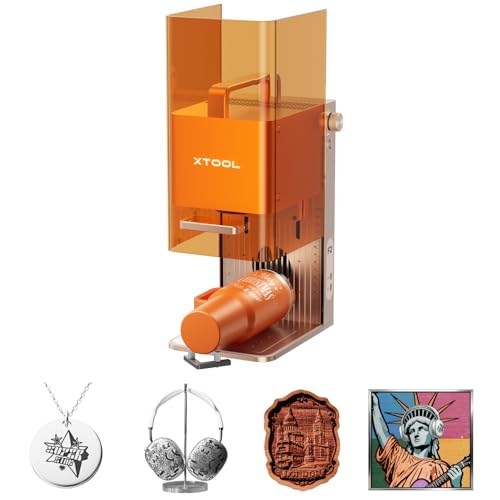
- 15W diode and 5W IR laser combination
- 50MP camera with precise alignment
- Up to 6000mm/s for fast batch work
Best For: On-site customization and mixed-material small-batch production
Best for Drinkware

- Integrated rotary roller for cylindrical items
- 3.5-inch touchscreen with AlgoOS
- Supports 2–150mm engraving diameters
Best For: Tumblers, bottles, mugs, and personalized drinkware
Best Work Area Value

- 300 x 300mm engraving area
- 10W diode for several common materials
- Computer and TF-card workflows
Best For: Flat products such as coasters, keychains, and small signage
Best Compact Starter

- 99% preassembled for quick setup
- Compact 130 x 130mm work area
- Compatible with major operating systems and software
Best For: Home-based craft businesses and small personalized products
Best Enclosed Upgrade Path

- Class 1 enclosed design with safety features
- Camera positioning and automatic focus
- Quick-swap support for multiple laser modules
Best For: Small businesses wanting guided operation and future module flexibility
Best Portable Value

- Lightweight 4.7-pound design
- 300 × 300 mm engraving area
- LightBurn and LaserGRBL compatibility
Best For: Mobile makers and beginners creating personalized crafts
Best for Batch Custom Orders

- 20,000 mm/min maximum engraving speed
- 300 × 300 mm work area
- Enclosure with multiple safety controls
Best For: Small businesses producing repeat personalized orders
Most Versatile Enclosed Pick

- Dual cameras help with accurate placement and previews
- Class 1 enclosed design for home crafting
- Optional modules add color and metal-marking capabilities
Best For: Home-based makers and small businesses planning to expand their capabilities
Best Ready-to-Use Bundle

- Includes camera, enclosure, honeycomb bed, tools, and materials
- Compatible with LightBurn, LaserGRBL, and CutLabX
- Class 1 safety system with automatic protection features
Best For: Beginners and small studios wanting a bundled setup
Best for Growing Side Hustles
Carverall K15 Pro Laser Engraver

- App, offline, LightBurn, and LaserGRBL control options
- One-touch focus and repeat-job memory simplify production
- Optional IR head enables bare-metal marking
Best For: Beginners and side-hustle owners building a flexible workflow
Best Dual-Laser Pick – xTool F2
For small businesses needing broad material flexibility and quick turnaround, the xTool F2 stands out among laser engravers for small business. Its 15W diode and 5W infrared lasers support different engraving tasks, while the built-in camera helps position small pieces accurately.
Best For: On-site personalization, small-batch production, and businesses working with both metal and nonmetal materials.
Pros:
- Dual lasers handle metal color marking, 3D embossing, and cutting.
- Built-in 50MP camera provides up to 0.1 mm alignment accuracy.
- Speeds up to 6000mm/s support rapid batch work.
- Fully enclosed, portable design is suitable for workshops, stores, fairs, and markets.
Cons:
- The work area and accessory options may require additional purchases for expanded batch production.
- Its Class 4 laser classification requires careful operation and appropriate safety practices.
The xTool F2 is a strong choice when speed, portability, camera-assisted alignment, and metal marking matter more than a basic entry-level setup. It arrives assembled and includes material presets, helping reduce setup time.
Best for Drinkware – Pixi 10W
The Pixi 10W is designed for businesses focused on customized drinkware and cylindrical products. Its integrated rotary roller, touchscreen controls, and enclosed Class 1 design make it a convenient option among laser engravers for small business.
Best For: Tumblers, cups, bottles, mugs, personalized gifts, and beginner-friendly batch customization.
Pros:
- Built-in rotary kit supports cylindrical items out of the box.
- 3.5-inch touchscreen enables editing and engraving without a computer.
- Adjustable 2–150mm engraving range accommodates various object sizes.
- Supports offline operation, Wi-Fi, USB-C, mobile devices, LightBurn, and LaserGRBL.
Cons:
- Its feature set is especially focused on cylindrical objects rather than large flat workpieces.
- Designs and files still require preparation when using external software or supported file formats.
Choose the Pixi when drinkware is central to your product line and you want an integrated rotary setup with minimal computer dependence. Its enclosed safety features, warranty, and lifetime technical support add reassurance for new operators.
Best Work Area Value – Twotrees TTS-10 Pro
The Twotrees TTS-10 Pro offers a 300 x 300mm work area and a 10W blue diode laser, making it a practical candidate for laser engravers for small business that need room for coasters, keychains, phone cases, and small signs.
Best For: Flat-product personalization, wood and acrylic work, and operators who want both computer and TF-card workflows.
Pros:
- 300 x 300mm engraving area supports a variety of small-business products.
- 10W optical power is suited to wood, bamboo, acrylic, leather, dark glass, and coated metal.
- Supports LightBurn, LaserGRBL, web, mobile, and offline TF-card engraving.
- Includes an air-assist pump, tubing, TF card, card reader, and assembly tools.
Cons:
- Bare stainless steel and uncoated metal are not recommended without surface preparation or marking spray.
- Assembly is required, unlike fully preassembled alternatives.
- Projects larger than approximately 12 inches exceed the stated work area.
The TTS-10 Pro is a sensible middle ground for businesses that prioritize a generous desktop work area and flexible file-transfer options. Confirm your material list and product dimensions before buying, particularly if you plan to mark bare metals or larger pieces.
Best Compact Starter – ACMER S1
The ACMER S1 is a lightweight, compact option for entrepreneurs starting with wood, acrylic, leather, and craft products. Its mostly preassembled design and included software make it approachable for small businesses seeking a simple desktop laser engraver.
Best For: Home-based businesses, small craft products, and beginners working within a 130 x 130mm area.
Pros:
- 99% preassembled with a one-minute laser-head installation.
- Compact 2kg aluminum-alloy design is easy to carry and store.
- Supports engraving and cutting across wood, acrylic, leather, ceramics, and other listed materials.
- Works with Acmerstudio, LightBurn, and LaserGRBL on macOS, Windows, and Linux.
Cons:
- The 130 x 130mm working area limits the size of products it can handle.
- Its 2500mW laser is less powerful than the higher-powered machines in this roundup.
- It is a Class 4 laser, so safe operating practices are essential.
The ACMER S1 makes the most sense when space, portability, and easy setup are priorities. It can cover detailed craft work and thin-material cutting, but businesses should verify that its compact work area matches their intended products.
Best Enclosed Upgrade Path – Creality Falcon A1C 10W
For small businesses seeking laser engravers for small business use, the Creality Falcon A1C combines a 10W diode laser, enclosed Class 1 design, automatic focusing, and camera-assisted positioning. Its quick-swap module system also leaves room to expand into additional laser capabilities later.
Best For: Small businesses and makers who want an enclosed, portable machine with guided setup and upgrade flexibility.
Pros:
- 15-second quick-swap design supports compatible 5W, 10W, and optional 1.2W IR modules.
- Smart camera, visual positioning, and autofocus can simplify alignment and setup.
- Speeds up to 15,000 mm/min and support for more than 300 materials.
- Class 1 enclosure includes flame detection, tilt protection, and a USB safety lock.
Cons:
- Additional laser modules are sold separately.
- The included 10W diode module is intended for listed compatible materials rather than every material category.
- At 31.2 pounds, it is portable but not especially lightweight for frequent transport.
The Falcon A1C is a practical choice when safety, ease of alignment, and future expandability matter more than a large open-frame work area. Its camera and software features may be especially useful for repeatable custom orders.
Best Portable Value – ELIDOR 12W Laser Engraver
The ELIDOR 12W is a compact option for laser engravers for small business projects, with a 300 × 300 mm work area, a claimed 10,000 mm/min maximum speed, and compatibility with LightBurn and LaserGRBL. Its light 4.7-pound build suits mobile work and smaller workshops.
Best For: Craft sellers, beginners, and mobile makers who need a lightweight machine for personalized projects and craft-fair work.
Pros:
- 12W laser module and 0.04 × 0.14 mm spot support detailed engraving.
- 300 × 300 mm working area accommodates common custom products.
- Works with LaserGRBL and LightBurn on Windows, macOS, and Linux.
- At 4.7 pounds, it is easy to move between a workshop, classroom, or event.
Cons:
- The work area is smaller than machines designed for larger batch layouts.
- The supplied notes do not specify an enclosed Class 1 safety design.
- Some material claims, including metal and glass, depend on the specific material and setup.
Choose the ELIDOR when portability and broad software support are priorities. It offers a straightforward platform for keychains, gifts, décor, and other personalized products without taking up much workspace.
Best for Batch Custom Orders – L2 MAX 10W Enclosed Engraver
For small businesses handling repeated custom orders, the L2 MAX 10W focuses on throughput with a 300 × 300 mm work area and speeds up to 20,000 mm/min. Its enclosed design, modular assembly, and multiple control options add practical flexibility for workshop use.
Best For: Small businesses producing personalized signs, gifts, accessories, and other repeat custom items.
Pros:
- 20,000 mm/min maximum speed can help reduce engraving time.
- 300 × 300 mm area supports larger designs or multiple smaller pieces.
- 360° enclosure is designed to contain fumes, dust, and operating noise.
- Supports LightBurn, LaserGRBL, CutLabX, Wi-Fi, USB, app, and TF-card control.
Cons:
- The 10W laser may require an optional Air Assist or rotary roller for specialized workflows.
- At about 9.1 kg, it is less convenient to move than the lightweight ELIDOR.
- Its larger enclosure requires more dedicated workspace.
The L2 MAX is a strong fit when production speed and enclosure features are more important than portability. Its larger work area and offline or wireless control options can help streamline repeat personalized orders.
Most Versatile Enclosed Pick – xTool M2 10W Laser Engraver
For small businesses that want room to expand beyond basic engraving, the xTool M2 combines a 10W diode laser, dual-camera positioning, and an enclosed Class 1 design. It can work with materials such as wood, leather, felt, fabric, paper, and cardstock, while optional modules add color printing or fine engraving on metal and plastic.
Best For: Home-based makers and small businesses seeking an enclosed, upgradeable machine for personalized gifts, décor, and craft products.
Pros:
- Dual cameras support real-time previews and more accurate material placement.
- Class 1 enclosed design with real-time monitoring suits home workspaces.
- xTool Studio includes templates and an AI image generator for easier design work.
- Optional CMYK and 3W IR modules broaden its capabilities.
Cons:
- The CMYK inkjet module and RA3 Lite Rotary are sold separately.
- The 3W IR laser module is also an optional purchase.
- The included laser output is 10W, so cutting performance depends on the material and project.
The M2 is a strong choice when safe enclosure, camera-assisted workflow, and future expandability matter more than getting every capability in the base package. Be sure to budget for add-ons if your business needs color printing, rotary work, or metal marking.
Best Ready-to-Use Bundle – BlazeX M3 10W Laser Engraver
The BlazeX M3 is a practical option for small businesses that want a starter package rather than a bare machine. Its 10W laser supports engraving and cutting, while the included smart camera, enclosure, honeycomb bed, tool kit, and 13 materials help reduce the setup work for first projects.
Best For: Beginners and small creative studios that want camera-guided positioning, included accessories, and compatibility with popular laser software.
Pros:
- Smart camera enables on-material previews and more accurate placement.
- Bundle includes an enclosure, honeycomb bed, tools, and 13 engraving materials.
- Works with LightBurn, LaserGRBL, and CutLabX across several platforms.
- Class 1 safety features include lid and tilt-triggered automatic stops.
Cons:
- Rotary engraving, air assist, and air purification require optional accessories.
- The product’s broad material claims do not specify cutting settings for each material.
- Businesses wanting a more complete production setup may need additional upgrades.
With its included vision kit and safety features, the BlazeX M3 offers a relatively approachable entry point for product personalization. Its accessory ecosystem also leaves room to add rotary and air-management tools as order volume grows.
Best for Growing Side Hustles – Carverall K15 Pro Laser Engraver
The Carverall K15 Pro is aimed directly at beginners and small businesses that need a flexible desktop laser for recurring projects. It offers app control, a 4K design, 0.01mm stated precision, offline file support, and compatibility with more than 150 listed materials, with an optional IR head for bare-metal marking.
Best For: New business owners who want mobile-friendly control, quick setup, repeat engraving features, and a path to expand into additional materials.
Pros:
- CutLabX supports computers, tablets, and phones, with LightBurn and LaserGRBL compatibility.
- One-touch focus, smart memory, and a stated speed of 15,000mm/min streamline repeat jobs.
- Optional IR head supports bare-metal engraving without buying a second machine.
- Includes safety glasses, test materials, tools, and a one-year warranty with lifetime technical support.
Cons:
- The IR head, honeycomb plate, air pump, rotary roller, and air purifier are optional add-ons.
- The stated 6W power rating may require multiple passes for thicker materials.
- Some cutting claims, including 8mm plywood and 5mm black acrylic, depend on multiple passes.
The K15 Pro stands out for accessible controls and business-oriented workflow features such as offline operation and repeat-job memory. It is most compelling if you value upgradeability, but plan for extra accessories as your product range and production needs expand.
How We Picked the Best Laser Engravers for Small Business
We evaluated these machines according to the factors that matter most in a commercial hobby or small production setting: laser type and power, usable work area, engraving speed, material compatibility, focusing method, camera or alignment features, software support, enclosure design, and expansion options such as rotary attachments. We also considered whether each model is practical for beginners and whether its features can support repeatable customer orders.
Product specifications can vary by configuration, accessory bundle, and seller, so verify the exact working size, supported materials, included safety equipment, and warranty before purchasing. A machine’s advertised wattage does not guarantee equal cutting performance across all materials.
Quick Comparison
| Best For | Features to Prioritize | Models in This Roundup |
|---|---|---|
| Personalized gifts and craft products | Camera alignment, enclosed design, simple software | xTool M2, Creality Falcon A1C, K15 Pro |
| Cups, tumblers, and cylindrical items | Rotary compatibility or included roller kit | Pixi 10W |
| Faster batch work | Higher speed, larger workspace, reliable focusing | xTool F2, 300×300mm 10W model, Twotrees TTS-10 Pro |
| Budget experimentation | Low entry price, open-frame access, basic controls | ACMER S1, ELIDOR 12000mW, BlazeX M3 |
Key Buying Factors for Laser Engravers for Small Business
Laser Type and Material Range
Diode lasers are popular for wood, leather, paper, cardboard, and some dark or coated materials. IR lasers can improve marking on certain metals and plastics, while CO2 systems are generally better for clear acrylic and glass. Confirm material compatibility before accepting paid orders, and never assume a laser can safely cut a material based only on a product listing.
Work Area and Production Speed
A compact bed saves space, but a larger work area reduces repositioning when making signs, batches of ornaments, or multiple small products. Speed ratings are useful for comparison, although real output also depends on power, image density, material, and the number of passes required.
Safety and Ventilation
Enclosed, Class 1 designs are often easier to use in a home studio because they can help contain light and smoke when properly installed. Open-frame machines require more active safety controls, including suitable laser eyewear, restricted access, and effective ventilation. Use manufacturer-approved settings and inspect every material for hazardous coatings or fumes.
Workflow Features
Built-in cameras, autofocus, air assist, limit switches, reliable software, and resume functions can reduce setup time and failed jobs. Rotary support is especially valuable if you plan to engrave tumblers, glasses, bottles, or other cylindrical products.
Who Should Buy Which Laser Engravers for Small Business?
Choose an enclosed camera-equipped model if you prioritize a cleaner workflow, easier alignment, and use in a shared or home workspace. The xTool M2 and Creality Falcon A1C are suited to makers who want a more guided desktop experience, while the xTool F2 is the stronger fit when speed, advanced marking, and broader production capability matter.
Pick the Pixi 10W if cylindrical drinkware is central to your product line. Consider the larger 300×300mm machine or Twotrees TTS-10 Pro for batches that need more bed space or faster movement. ACMER S1, ELIDOR, BlazeX M3, and the K15 Pro are better starting points for buyers who want to test demand at a lower initial cost, provided their workspace can meet the safety and ventilation requirements.
Before ordering, calculate your full setup cost: machine, enclosure, ventilation, rotary hardware, air assist, materials, software, and replacement parts. The best Laser Engravers for Small Business are not necessarily the most powerful; they are the ones that produce your target products consistently, safely, and profitably.