
Finding the best laptops under $1,000 means balancing processor performance, memory, storage, display quality, and long-term usability—not simply choosing the newest model.
This roundup compares 10 budget-friendly laptops for school, remote work, productivity, browsing, and everyday entertainment, with options ranging from compact business machines to large-screen family laptops.
Best 10 Laptops Under 1000 Picks for 2026
Business-Ready Value

- 16GB RAM and 512GB NVMe SSD
- 15.6-inch Full HD display
- Windows 11 Pro with numeric keypad
Best For: Business productivity and multitasking
Lightweight Everyday Pick

- Intel N150 quad-core processor
- 3.24-pound portable design
- Microsoft 365 and Copilot included
Best For: Students and everyday portable computing
Upgradeable Student Value
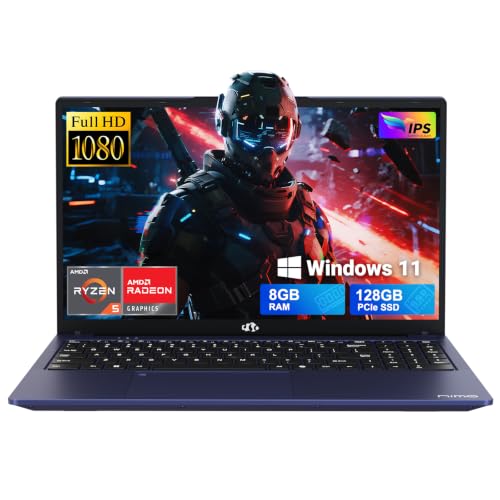
- Upgradeable RAM and storage
- Backlit keyboard and fingerprint reader
- Two-year warranty and 65W USB-C PD
Best For: Students and upgrade-minded users
Best Balanced Performance
Dell 15.6-inch Core Ultra 5 Laptop

- 16GB DDR5 RAM and 512GB SSD
- 15.6-inch Full HD matte display
- Backlit keyboard and numeric keypad
Best For: Multitasking, work, study, and everyday home use
Best Lightweight Value

- 15.6-inch Full HD IPS display
- Thin design with up to 11-hour battery life
- Wi-Fi 6 and noise-reducing webcam features
Best For: Students, browsing, streaming, and basic family computing
Best Everyday Dell Value

- 512GB SSD for everyday storage
- Full HD display with listed 120Hz refresh rate
- Numeric keypad and one-year onsite service
Best For: Office work, school tasks, web use, and home computing
Big-Screen Everyday Pick
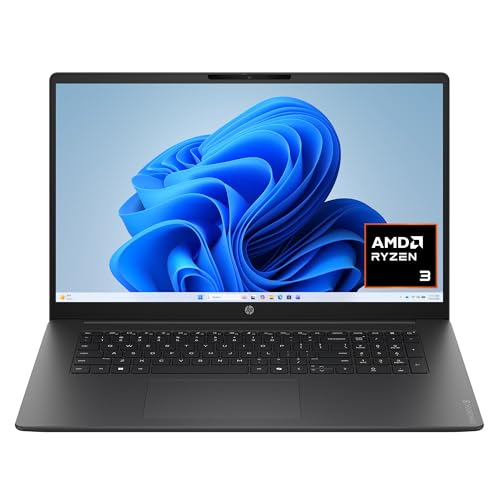
- 17.3-inch FHD IPS display
- 512GB SSD with 8GB RAM
- FHD HDR camera and Wi-Fi 6
Best For: Home users who prioritize screen size and everyday versatility
Business Refurbished Value

- 16GB RAM for multitasking
- 11th Gen Core i5 processor
- 14-inch FHD matte display
Best For: Mobile office work and productivity on a renewed laptop
Student Productivity Pick

- 15.6-inch FHD IPS display
- 16GB RAM and 256GB NVMe SSD
- Numeric keypad and Wi-Fi 6
Best For: Schoolwork, office tasks, and everyday family computing
Business-Ready Value – Lenovo V15 Ryzen 5 Laptop
For shoppers comparing laptops under 1000, the Lenovo V15 stands out as a practical business and productivity option with a capable six-core Ryzen 5 processor, generous memory, and Windows 11 Pro.
Best For: Business users, multitasking, spreadsheets, document work, and users who want a numeric keypad.
Pros:
- 16GB RAM and a 512GB PCIe NVMe SSD support responsive multitasking and fast file access.
- 15.6-inch Full HD display provides a spacious 1920-by-1080 workspace.
- Includes HDMI, USB-C, Ethernet, Wi-Fi 6, and a numeric keyboard.
- Windows 11 Pro adds business-focused management and security features.
Cons:
- Integrated Radeon graphics are intended for everyday use rather than demanding gaming.
- The traditional clamshell design weighs 3.8 pounds.
The Lenovo V15 is a strong value when memory, storage, wired connectivity, and business features matter more than premium styling or dedicated graphics.
Lightweight Everyday Pick – HP 14-Inch Intel Laptop
Among laptops under 1000, this HP model is designed for straightforward everyday computing, combining a lightweight 14-inch form factor with Windows 11, Copilot integration, and a Microsoft 365 subscription.
Best For: Students, web browsing, email, online classes, video calls, and basic document work.
Pros:
- Intel N150 quad-core processor handles browsing, streaming, video calls, and productivity tasks.
- At 3.24 pounds and 0.71 inches thin, it is easy to carry.
- Wi-Fi 6, Bluetooth 5.4, USB-C, HDMI, USB-A ports, and an SD card reader offer useful connectivity.
- Includes a one-year Microsoft 365 Personal subscription and Copilot access.
Cons:
- 4GB RAM and 128GB UFS storage are modest for demanding multitasking or large files.
- The 14-inch display is HD rather than Full HD.
This HP is best viewed as a portable essentials laptop: a sensible choice for schoolwork and routine tasks, but not the ideal fit for heavy creative software or extensive local storage.
Big Touchscreen Choice – HP OmniBook 3 16
For buyers seeking laptops under 1000 with a larger display, the HP OmniBook 3 pairs a 16-inch 2K touchscreen with a 512GB SSD, modern wireless connectivity, and a battery rated for up to 14 hours and 15 minutes.
Best For: Home users, premium everyday computing, streaming, casual gaming, and touch-based productivity.
Pros:
- 16-inch 1920-by-1200 IPS touchscreen offers extra vertical workspace and wide viewing angles.
- 512GB PCIe NVMe SSD provides fast storage for apps and files.
- FHD camera with HDR auto-switch and AI noise reduction supports clearer video calls.
- Includes Wi-Fi 6, Bluetooth 5.4, USB-C connectivity, and a Copilot key.
Cons:
- 8GB onboard RAM may be limiting for heavier multitasking.
- Integrated Radeon 610M graphics are aimed at everyday visuals and casual use.
The OmniBook 3 makes sense if screen size and touch interaction are priorities. Its combination of a high-resolution display, fast SSD, and long rated battery life gives it a more comfortable everyday experience than many basic laptops.
Upgradeable Student Value – NIMO Ryzen 5 Laptop
This NIMO model is a flexible contender among laptops under 1000, offering a Ryzen 5 processor, a backlit keyboard, fingerprint reader, and upgrade paths for both memory and storage.
Best For: College students, coding coursework, remote office work, light content creation, and buyers planning future upgrades.
Pros:
- Four-core Ryzen 5 processor with up to 3.7GHz boost supports everyday productivity.
- Two SO-DIMM slots allow memory expansion up to 32GB.
- M.2 storage support is listed for upgrades up to 4TB, with a MicroSD slot for additional files.
- Backlit keyboard, fingerprint reader, 65W USB-C PD charging, and a two-year warranty add practical value.
Cons:
- The included 8GB RAM and 256GB SSD are more limited out of the box.
- The 15.6-inch display is Full HD but lacks the higher resolution and touch features of premium models.
The NIMO is particularly appealing to students and home-office buyers who want a usable starting configuration with room to grow. Its upgradeable design and included support coverage help offset the more modest initial memory and storage.
Best Balanced Performance – Dell 15.6-inch Core Ultra 5 Laptop
For shoppers comparing laptops under 1000, this Dell 15 offers a strong everyday setup with an Intel Core Ultra 5 225U processor, 16GB of DDR5 memory, and a 512GB SSD. Its 15.6-inch Full HD matte display, backlit keyboard, and numeric keypad make it a practical choice for work, study, and general entertainment.
Best For: Multitasking, business tasks, students, and home users who want ample memory and storage.
Pros:
- 16GB DDR5 RAM and a 512GB SSD provide a capable everyday foundation.
- 15.6-inch Full HD display offers up to 300 nits brightness and a matte finish.
- Includes a backlit keyboard, numeric keypad, Wi-Fi 6, and a dedicated Copilot key.
- ComfortView, lifted hinges, and a one-year basic onsite service plan add practical convenience.
Cons:
- Integrated Intel graphics are intended for everyday use rather than demanding graphics workloads.
- The listed 41Wh battery may be modest for users who spend long periods away from an outlet.
Among laptops under 1000, this model stands out for its combination of 16GB memory, generous SSD capacity, business-friendly features, and newer Core Ultra platform. It is a well-rounded option when productivity matters more than dedicated graphics.
Best Lightweight Value – Acer Aspire 3 Ryzen 3 Laptop
This Acer Aspire 3 is a sensible entry in the laptops under 1000 category for basic schoolwork, browsing, streaming, and family use. It combines a thin design with a 15.6-inch Full HD IPS display, an AMD Ryzen 3 7320U processor, and a rated battery life of up to 11 hours.
Best For: Students and families seeking an affordable, portable laptop for everyday tasks.
Pros:
- Thin, light design is convenient for moving between home, school, or work.
- Full HD IPS display provides sharp detail with narrow bezels and a matte finish.
- Wi-Fi 6, a backlit keyboard, and a front camera with temporal noise reduction support daily use.
- Acer PurifiedVoice with AI noise reduction is designed to improve online meeting audio.
Cons:
- 8GB of onboard memory cannot be expanded according to the supplied specifications.
- 128GB of SSD storage is limited for large media libraries or many applications.
- Windows 11 S may restrict software installation compared with standard Windows 11 Home.
This Aspire 3 makes the most sense when portability and everyday affordability outweigh storage capacity. Its display, connectivity, camera features, and stated battery life give it a useful student-and-home profile, but heavier users may quickly encounter the 128GB storage limit.
Best Everyday Dell Value – Dell 15.6-inch Core 3 Laptop
For buyers exploring laptops under 1000 for routine computing, this Dell 15 pairs an Intel Core 3 100U processor with 8GB of RAM and a 512GB SSD. The 15.6-inch Full HD display, numeric keypad, Wi-Fi 6, and ergonomic hinge design suit common office, school, and home tasks.
Best For: Everyday productivity, web use, document work, and users who appreciate a numeric keypad.
Pros:
- 512GB SSD provides useful space for documents, applications, and media.
- 15.6-inch Full HD matte display has a listed 120Hz refresh rate.
- Roomy keyboard includes a separate numeric keypad and calculator hotkey.
- ComfortView, Express Charge support, Wi-Fi 6, and one-year onsite service add convenience.
Cons:
- 8GB RAM is less suitable for demanding multitasking than configurations with 16GB.
- Integrated Intel UHD Graphics are aimed at everyday visuals rather than intensive graphics work.
- There is no fingerprint reader or touchscreen.
This Dell is a practical choice among laptops under 1000 when dependable everyday features matter more than premium extras. Its large SSD, Full HD screen, keyboard layout, and onsite support make it especially appealing for office and household use.
Big-Screen Everyday Pick – HP OmniBook 3 17.3-inch
For shoppers comparing laptops under 1000, the HP OmniBook 3 stands out with a spacious 17.3-inch Full HD IPS display and a practical mix of everyday performance, storage, and connectivity. Its AMD Ryzen 3 processor, 8GB of RAM, and 512GB SSD are suited to home computing, streaming, casual gaming, and photo editing.
Best For: Home users who want a large screen for multitasking, entertainment, and everyday work.
Pros:
- Large 17.3-inch FHD IPS display with wide viewing angles and anti-glare treatment.
- 512GB PCIe NVMe SSD provides responsive storage and useful capacity.
- FHD camera with HDR auto-switch and advanced AI noise reduction supports clearer calls.
- Includes Wi-Fi 6, Bluetooth 5.4, multiple USB ports, HDMI 2.1, and a Copilot key.
Cons:
- 8GB of onboard RAM offers less headroom than many 16GB configurations.
- Integrated Radeon 610M graphics are intended for entertainment and casual gaming rather than demanding graphics work.
- The 17.3-inch chassis is less convenient for frequent travel.
The OmniBook 3 is a sensible large-format choice when screen space matters more than maximum portability. Its battery, fast charging, camera features, and modern wireless connectivity round out a capable everyday package.
Business Refurbished Value – Dell Latitude 5420
Among laptops under 1000, this renewed Dell Latitude 5420 offers a business-focused configuration with an 11th Gen Intel Core i5 processor, 16GB of RAM, and Windows 11 Pro. Its 14-inch matte Full HD display and approximately 3-pound weight make it a practical option for office work and mobile productivity.
Best For: Students, remote workers, and business users who value memory capacity, portability, and Windows 11 Pro.
Pros:
- 16GB of RAM supports multitasking across office apps and browser tabs.
- 11th Gen Intel Core i5-1145G7 processor reaches up to 4.2GHz.
- Compact 14-inch FHD anti-glare display and approximately 3-pound weight suit commuting.
- Offers HDMI, Ethernet, USB, Bluetooth, Wi-Fi, and two listed Thunderbolt ports.
Cons:
- 256GB SSD provides less storage than several newer budget configurations.
- As a renewed 2021 model, it may show more age than a new laptop.
- The listed warranty is limited to 30 days.
The Latitude 5420 emphasizes productivity rather than flashy extras. Its 16GB memory, business-oriented Windows 11 Pro setup, matte display, and broad port selection make it a compelling refurbished work laptop, provided the shorter warranty and smaller SSD fit your needs.
Student Productivity Pick – Acer Aspire Lite 15
For shoppers seeking laptops under 1000 for school or home office use, the Acer Aspire Lite combines a 15.6-inch FHD IPS display with 16GB of RAM and a 256GB NVMe SSD. Its Intel N150 processor is designed for office tasks, streaming, study tabs, video calls, and other routine workloads.
Best For: Students, remote staff, and families needing a lightweight everyday notebook with a numeric keypad.
Pros:
- 15.6-inch FHD anti-glare IPS panel offers wide viewing angles.
- 16GB RAM supports multiple study, office, and browsing tasks.
- Includes Wi-Fi 6, Bluetooth 5.2, USB-C, dual USB-A ports, and HDMI 2.1.
- Full-size keyboard with numeric keypad is useful for data entry and spreadsheets.
Cons:
- 256GB SSD may fill quickly with large media collections and projects.
- Intel N150 is aimed at everyday computing, not demanding creative or gaming workloads.
- The listing specifies no mouse is included.
The Aspire Lite is a straightforward productivity notebook with generous memory, a comfortable Full HD screen, and useful ports. It is best matched with routine work, learning, streaming, and communication rather than intensive performance demands.
How We Picked the Best Laptops Under 1000
We focused on the specifications that matter most at this price: processor capability, RAM, SSD storage, screen resolution, operating system, connectivity, and practical upgrade potential. Models with at least 8GB of memory and solid-state storage received preference because they offer a more responsive experience for multitasking and everyday applications.
We also considered use case. A business-oriented Dell Latitude may be a better fit for office work than a newer entry-level machine, while a 16- or 17.3-inch HP laptop can be more comfortable for spreadsheets, streaming, and home use. Because specifications and pricing can change, verify the current configuration before purchasing.
Quick Comparison
| Best For | What to Prioritize | Recommended Configuration |
|---|---|---|
| School and general use | Balanced performance and portability | Ryzen 5 or Core 5, 8GB RAM, 256GB or larger SSD |
| Office productivity | Multitasking and connectivity | 16GB RAM, SSD storage, HDMI, USB-C, and a comfortable keyboard |
| Large-screen home use | Readable workspace and media viewing | 15.6- or 17.3-inch Full HD display |
| Long-term value | Upgradeability and storage headroom | Replaceable or expandable storage and at least 16GB RAM when possible |
Key Buying Factors for Laptops Under 1000
Processor and Everyday Speed
AMD Ryzen 5 and Intel Core 5-class processors are strong all-around choices for browsing, Office applications, video calls, and moderate multitasking. Entry-level Ryzen 3 and Intel Core 3 systems can still work well for basic tasks, but they are less suitable for demanding workloads.
Memory and Storage
Choose 8GB of RAM as a practical minimum, and favor 16GB if you regularly keep many browser tabs and applications open. A 256GB SSD is usable for light workloads, while 512GB provides more comfortable room for documents, applications, and media. Be cautious with 128GB drives unless your needs are modest or cloud storage is part of your plan.
Display, Size, and Portability
Full HD resolution is preferable for text clarity and workspace. Larger 16- and 17.3-inch models improve visibility but are less convenient to carry. A 14-inch business laptop is generally easier to transport.
Ports, Software, and Expansion
Check for HDMI, USB-C, USB-A, Wi-Fi, and an SD card reader if you need accessories or external displays. Bundled Microsoft 365 or Office can add value, but confirm whether the software is a trial or a full subscription. Also review whether RAM and storage can be upgraded.
Who Should Buy Which Laptops Under 1000?
Students: Look for a lightweight model with a Ryzen 5 or comparable Intel processor, 8GB or more RAM, and at least a 256GB SSD. A good webcam and reliable battery life may matter more than premium graphics.
Remote workers and office users: Prioritize 16GB RAM, a comfortable keyboard, Full HD display, strong port selection, and business features. A refurbished or renewed business laptop can offer excellent value when condition and warranty are clear.
Families and home users: A 15.6- or 17.3-inch screen is useful for shared browsing, streaming, and household documents. Favor 512GB storage if several people will use the laptop.
Power users on a budget: Choose the strongest available Ryzen 5 or Intel Core Ultra option with 16GB RAM and SSD storage. These laptops are suitable for productivity and light creative work, but dedicated gaming or professional video-editing needs may require a higher budget.