
The best compact laptops make everyday computing easier to carry without taking over your bag or desk. This roundup covers small Windows laptops, Chromebooks, and convertible 2-in-1 models suited to schoolwork, travel, browsing, streaming, and light productivity.
Because compact designs vary widely in performance and storage, the right choice depends on how you work. Use the guide below to compare portability, processing power, display size, battery expectations, and long-term value before buying.
Best 10 Compact Laptops Picks for 2026
Best Convertible Value

- 11.6-inch touchscreen convertible
- 128GB SSD with Windows 11 Pro
- Up to 11 hours of listed battery life
Best For: Students needing a compact Windows touchscreen laptop
Best Ultra-Light Budget Pick
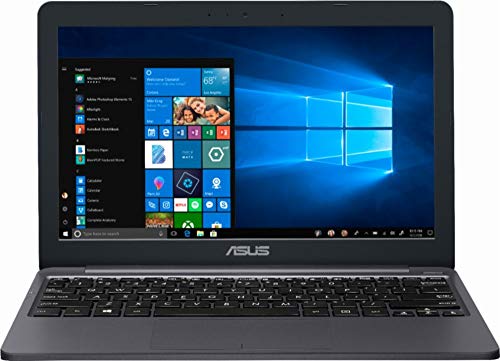
- About 2.2 pounds and 0.7 inches thin
- Up to 10 hours of listed battery life
- USB-C, USB 3.0, and HDMI connectivity
Best For: Casual users and travelers seeking minimal weight
Best for ChromeOS Simplicity

- ChromeOS with an 11.6-inch HD display
- Up to 14 hours of listed battery life
- Bluetooth and Wi-Fi connectivity
Best For: Browser-based schoolwork and everyday web use
Best Modern Everyday Option

- 14-inch anti-glare display with Windows 11
- Wi-Fi 6 and a useful selection of ports
- Full-size keyboard with numeric keypad
Best For: Everyday productivity and business use on a larger portable screen
Best Ultra-Portable 2-in-1
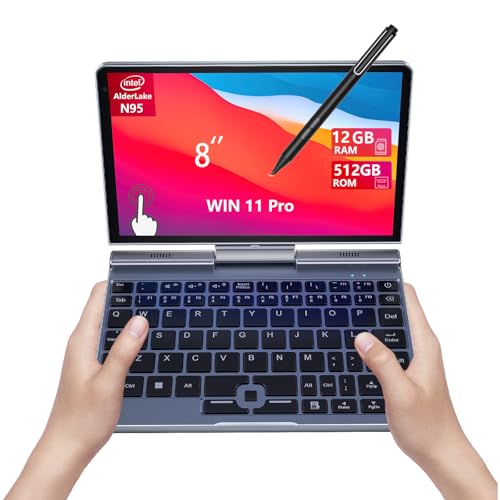
- 0.78 kg 2-in-1 touchscreen design
- 12GB RAM and 512GB NVMe SSD
- Wi-Fi 6, HDMI, and stylus support
Best For: Travelers and mobile creatives
Best Everyday Value

- Portable 14-inch anti-glare display
- Wi-Fi 6, USB-C, HDMI, and SD reader
- Windows 11 Home with Microsoft 365 trial
Best For: Students and basic home productivity
Best Silent Mini Convertible
8-Inch Intel N95 2-in-1 Laptop
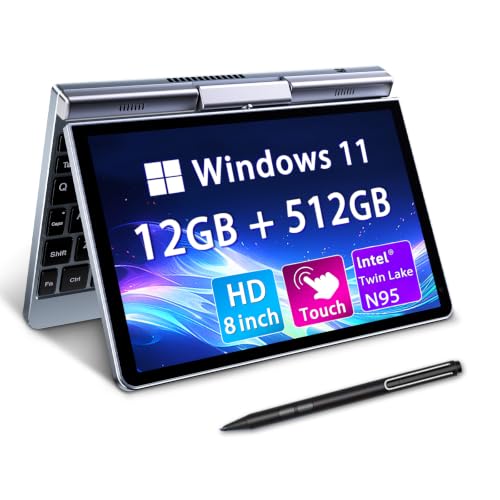
- 1.72-pound convertible touchscreen design
- 12GB RAM and 512GB SSD
- Fanless operation with stylus support
Best For: Mobile users and light Windows tasks
Best Budget Everyday Pick

- 3.2-pound 14-inch design
- Up to 11.5 hours of listed battery life
- Includes Office 365 and accessories
Best For: Students and basic everyday computing
Best Touchscreen Convertible
Dell 11-Inch Touchscreen Laptop

- 360-degree convertible hinge
- 8GB RAM with a 128GB SSD
- Wi-Fi 6 and versatile ports
Best For: Light productivity and flexible touchscreen use
Best Lightweight 2-in-1
Lenovo Flex 11 Convertible Laptop
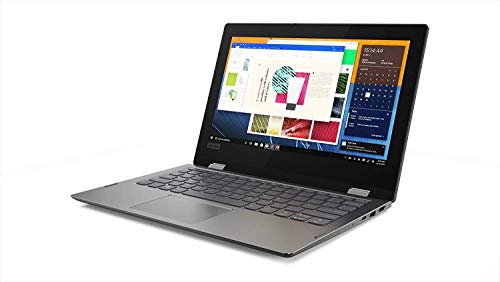
- About 2.75 pounds
- 11.6-inch anti-glare touchscreen
- USB-C, HDMI, and card reader included
Best For: Travelers and casual convertible-laptop users
Best Convertible Value – Dell Latitude 3190 2-in-1
The renewed Dell Latitude 3190 is one of the more flexible compact laptops for students who want a small touchscreen device that can switch between laptop and tablet-style use. Its 11.6-inch display, Windows 11 Pro, and SSD storage suit everyday schoolwork and basic productivity.
Best For: Students who want a compact Windows convertible with touch support.
Pros:
- 2-in-1 design with an 11.6-inch capacitive touchscreen
- Windows 11 Pro and 128GB SSD storage
- HDMI and two USB 3.1 Gen 1 ports
- Listed battery life of up to 11 hours
Cons:
- 4GB of RAM is modest for demanding multitasking
- Intel Celeron N5030 is intended for basic workloads
- Renewed condition and a listed 90-day warranty may not suit every buyer
This Latitude is a practical pick when touch capability and Windows compatibility matter more than high performance. The compact form factor is convenient, but the modest memory and processor make it better suited to browsing, documents, and classroom tasks than intensive applications.
Best Ultra-Light Budget Pick – ASUS VivoBook E203MA
The ASUS VivoBook E203MA is a lightweight option among compact laptops, weighing about 2.2 pounds and measuring 0.7 inches thin. It combines an 11.6-inch HD screen with Windows 10, 4GB of RAM, and eMMC storage for straightforward everyday tasks.
Best For: Travelers and casual users who prioritize low weight and basic portability.
Pros:
- Lightweight 2.18-pound design
- Listed battery life of up to 10 hours
- Includes USB-C, USB 3.0, HDMI, and 802.11ac Wi-Fi
- 11.6-inch HD LED-backlit display
Cons:
- 64GB eMMC storage offers limited capacity
- Intel Celeron N4000 and 4GB RAM are aimed at basic use
- Runs Windows 10 rather than Windows 11
This VivoBook makes sense for users who want an especially light computer for web browsing, email, streaming, and documents. Its limited storage and entry-level hardware favor simple workloads, while the selection of ports adds useful flexibility for a small laptop.
Best for ChromeOS Simplicity – Dell Chromebook 11 3100
The renewed Dell Chromebook 11 3100 is a straightforward choice among compact laptops for users comfortable with ChromeOS. Its 11.6-inch HD display, 4GB of RAM, Bluetooth, and listed 14-hour battery life support web-based work and everyday browsing.
Best For: Students and business users who mainly work in browser-based apps.
Pros:
- ChromeOS offers a simple web-focused experience
- Listed battery life reaches up to 14 hours
- 11.6-inch 1366 x 768 display in a compact netbook form factor
- Supports Bluetooth and Wi-Fi connectivity
Cons:
- 16GB of flash storage is very limited
- Not suited to software that requires full Windows or macOS
- Renewed condition and a listed 90-day limited warranty may be considerations
The Chromebook 11 3100 is most appealing when your work happens primarily online and long battery life is a priority. Its storage capacity is restrictive, so buyers should plan to rely on cloud services or compatible external storage.
Best Modern Everyday Option – HP 14 Slim Laptop
The HP 14 Slim Laptop offers a larger 14-inch display while remaining thin and portable, making it a practical alternative to smaller compact laptops. It includes Windows 11, an Intel N150 processor, SSD storage, Wi-Fi 6, and a full-size keyboard with a numeric keypad.
Best For: Everyday business, home, and productivity use where a larger screen is helpful.
Pros:
- 14-inch anti-glare LED display
- Windows 11 with listed Microsoft 365 inclusion
- USB-C, two USB-A ports, HDMI, SD card reader, and headphone jack
- Wi-Fi 6, Bluetooth, 720p camera, and dual-array microphones
Cons:
- 1366 x 768 resolution is modest for a 14-inch laptop
- Listed memory and storage specifications are inconsistent, so buyers should verify the exact configuration
- Integrated graphics are intended for general use rather than demanding graphics work
This HP is a sensible everyday choice for shoppers who want a portable Windows laptop without moving down to an 11.6-inch screen. Its broad port selection and video-call features add convenience, while the stated specification inconsistencies make configuration verification important before purchase.
Best Ultra-Portable 2-in-1 – KOOFORWAY 8-Inch Mini Laptop
The KOOFORWAY BP8 is one of the most compact laptops for buyers who prioritize portability and flexible input. Its 8-inch touchscreen, 360-degree 2-in-1 design, included stylus support, and Windows 11 Pro make it suitable for lightweight work, note-taking, drawing, and travel. The Intel N95 processor, 12GB of RAM, and 512GB NVMe SSD provide a capable foundation for everyday multitasking.
Best For: Travelers, students, and professionals who want a tiny Windows laptop with touch and stylus support.
Pros:
- Very compact 0.78 kg design with an 8-inch touchscreen
- 12GB LPDDR5 RAM and 512GB NVMe SSD
- Wi-Fi 6, Bluetooth 5.2, HDMI, and backlit keyboard
- Includes stylus support and a 2MP front camera
Cons:
- The 1280 x 800 screen is small for extended productivity
- Listed battery life is approximately 5 hours
- Small keyboard may require an adjustment period
This KOOFORWAY stands out among compact laptops for its unusually small footprint and creative-friendly touchscreen features. It is best suited to portable, focused tasks rather than replacing a larger primary workstation.
Best Everyday Value – HP 14-Inch Essential Laptop
The HP Essential is a practical choice for shoppers seeking compact laptops for school, remote learning, home use, and everyday productivity. Its 14-inch anti-glare HD display provides more working room than an ultra-small mini laptop, while the Intel N150 processor, 4GB RAM, and 128GB UFS storage target browsing, documents, email, streaming, and video calls.
Best For: Students, home users, and remote learners who need an affordable Windows laptop for basic daily computing.
Pros:
- Portable 3.24-pound design with a 14-inch micro-edge display
- Wi-Fi 6, Bluetooth 5.4, USB-C, USB-A, HDMI, and SD card reader
- Up to 11 hours of video playback according to the supplied specifications
- Includes Windows 11 Home and a one-year Microsoft 365 Personal subscription
Cons:
- 4GB of RAM limits demanding multitasking
- 128GB of UFS storage is modest
- HD resolution is less sharp than Full HD
The HP offers a balanced mix of screen space, portability, battery claims, and useful ports. It is a sensible compact-laptop option for straightforward tasks, but buyers with heavier workloads should consider a configuration with more memory and storage.
Best Silent Mini Convertible – 8-Inch Intel N95 2-in-1 Laptop
This 8-inch convertible is designed for buyers who want compact laptops that can also function as tablets. It combines Windows 11 Pro, an Intel N95 processor, 12GB of LPDDR5 memory, and 512GB of M.2 SSD storage with a rotatable touchscreen, stylus support, and a fanless design. That combination suits travel, presentations, light productivity, and entertainment.
Best For: Mobile users, children, and students who want a lightweight Windows convertible for basic work and media.
Pros:
- Lightweight 1.72-pound form factor with an 8-inch touchscreen
- 12GB RAM and 512GB SSD provide useful everyday capacity
- 360-degree hinge supports laptop and tablet modes
- Fanless construction enables silent operation
Cons:
- Listed battery life is approximately 4–6 hours
- 8-inch, 1280 x 800 display limits workspace
- Compact keyboard may not suit long typing sessions
With its silent operation and convertible hinge, this mini laptop offers flexibility that many compact laptops lack. Its small display and keyboard make it more appropriate as a portable secondary computer than as a full-time desktop replacement.
Best Budget Everyday Pick – HP 14-Inch Ultralight Laptop
For shoppers seeking compact laptops for schoolwork, remote learning, and everyday browsing, this HP model offers a lightweight 14-inch design with useful bundled extras. Its Celeron processor and 4GB of RAM are best suited to basic tasks rather than demanding workloads.
Best For: Students, home users, online classes, video calls, and basic office work.
Pros:
- Light 3.2-pound design with a 14-inch HD micro-edge display.
- Up to 11.5 hours of listed battery life.
- Includes 192GB of combined storage, Office 365 for one year, and several accessories.
Cons:
- 4GB of RAM limits multitasking capacity.
- 1366 x 768 glossy display is modest for detailed or creative work.
- Windows 11 S Mode may restrict app installation unless changed.
This is a practical entry-level choice when portability, battery life, and included accessories matter more than high-end performance. Consider it for straightforward productivity and entertainment tasks.
Best Touchscreen Convertible – Dell 11-Inch Touchscreen Laptop
This renewed Dell is one of the most flexible compact laptops for buyers who want a small touchscreen device. Its 360-degree hinge supports convertible use, while 8GB of RAM and a 128GB SSD provide a balanced setup for everyday student, business, and entertainment tasks.
Best For: Buyers who want a compact touchscreen convertible for light productivity, browsing, and media use.
Pros:
- 11-inch IPS touchscreen with a 360-degree hinge.
- 8GB of RAM and a 128GB SSD.
- Includes Wi-Fi 6, USB-C, two USB-A ports, and HDMI.
Cons:
- Renewed condition may not appeal to buyers seeking a new laptop.
- 1366 x 768 resolution provides limited workspace.
- Listed warranty coverage is a 30-day warranty.
The Dell stands out for its touchscreen flexibility and comparatively generous memory in a very small format. Its compact screen and renewed status are trade-offs, but the convertible design is useful for travel and casual two-in-one use.
Best Lightweight 2-in-1 – Lenovo Flex 11 Convertible Laptop
The Lenovo Flex 11 is a particularly portable option among compact laptops, weighing about 2.75 pounds and combining an 11.6-inch touchscreen with a convertible design. Its Pentium processor, 4GB of RAM, and 64GB of eMMC storage are aimed at basic daily computing.
Best For: Travelers, casual users, and students who prioritize a light convertible touchscreen.
Pros:
- Lightweight 2.75-pound convertible design.
- Anti-glare HD touchscreen with Dolby Audio Premium.
- Offers USB 3.0, USB-C, HDMI, and a 4-in-1 card reader.
Cons:
- 4GB of RAM and 64GB of eMMC storage are limited.
- Listed battery life is approximately six hours.
- Runs Windows 10, an older operating system version.
This Flex 11 makes sense when low weight and convertible convenience are the priorities. It is best for browser-based work, media, and simple productivity, while storage and memory limitations make it less suitable for intensive multitasking.
How We Picked These Compact Laptops
We selected these models across several common compact-laptop categories, including 8-inch mini notebooks, 11.6-inch ultraportables, 14-inch entry-level laptops, Chromebooks, and convertible 2-in-1 designs. We considered processor class, memory, storage, operating system, screen format, portability, and the types of tasks each configuration can realistically handle.
Specifications and availability can vary by seller, especially for renewed or marketplace listings. Check the current configuration, included accessories, warranty, and return policy before ordering.
Quick Comparison
| Type | Best suited to | Typical strengths | Watch for |
|---|---|---|---|
| 8-inch 2-in-1 | Extreme portability | Touchscreens, compact size, modern storage | Small keyboard and display |
| 11.6-inch Windows laptop | Basic school and office work | Portable design and familiar Windows software | Limited performance on entry-level CPUs |
| 11.6-inch Chromebook | Web-based work and education | Simple interface and efficient operation | Chrome OS app and offline limitations |
| 14-inch entry-level laptop | Everyday home productivity | More comfortable screen and keyboard | Less compact than smaller models |
Key Buying Factors for Compact Laptops
Processor and Memory
Intel Celeron, N-series, and older Pentium processors are generally appropriate for browsing, email, documents, video calls, and streaming, but they are not designed for demanding games, professional editing, or heavy multitasking. Aim for at least 8GB of RAM when possible. Configurations with 4GB are best for lighter workloads and fewer open applications.
Storage and Operating System
An SSD usually feels faster and is more durable than eMMC storage. A 64GB or 128GB drive can work for cloud-first users, but local media, large applications, and Windows updates require more room. Chromebooks run Chrome OS and work especially well with browser-based services; Windows models provide broader desktop software compatibility.
Screen, Keyboard, and Portability
An 8-inch screen maximizes portability but can make typing and multitasking difficult. An 11.6-inch display is a practical middle ground, while a 14-inch model offers better viewing comfort. For frequent travel, also check weight, charger size, hinge durability, touchscreen support, and whether the keyboard layout suits your needs.
Battery and Condition
Battery life depends on brightness, workload, connectivity, and battery age. Renewed laptops can offer strong value, but confirm the seller’s battery-health policy and warranty. Treat advertised battery figures as estimates rather than guarantees.
Who Should Buy Which Compact Laptops?
Choose an 8-inch 2-in-1 if maximum portability, touch input, and occasional short typing sessions matter most. An 11.6-inch Windows laptop or convertible is a better fit for students and travelers who need a familiar desktop interface in a small package. A Chromebook is ideal for users who primarily work in Google Docs, web apps, email, and streaming.
For home users who want a more comfortable keyboard and larger workspace, a 14-inch model is usually the better compromise, even though it is less pocketable. Prioritize 8GB of RAM and an SSD for smoother everyday multitasking, and select Windows when specific desktop applications are essential.