
Choosing among the best laptops for video editing means balancing processor performance, graphics power, display quality, memory, storage, and portability. The right model depends on whether you edit occasional social clips, high-resolution footage, or demanding professional projects.
We compared 10 capable options, including creator-focused laptops, renewed Dell Precision workstations, and newer systems with generous RAM and fast SSD storage.
Best 10 Laptops for Video Editing Picks for 2026
Best Color-Accurate Pick
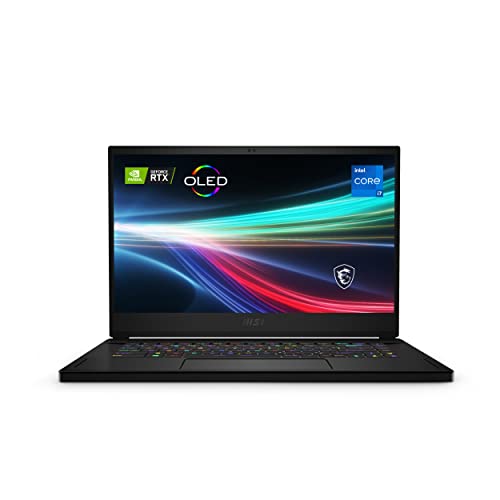
- 4K OLED panel with 100% DCI-P3
- Core i7 and RTX 3060 performance
- Thunderbolt 4 and Wi-Fi 6E
Best For: Editors who prioritize display color and resolution
Best Workstation Value

- 14-core Core i7 processor
- 32GB DDR5 RAM and 1TB SSD
- Dedicated RTX A1000 graphics
Best For: Multitasking editors seeking workstation hardware
Best Upgradeable Battery Pick
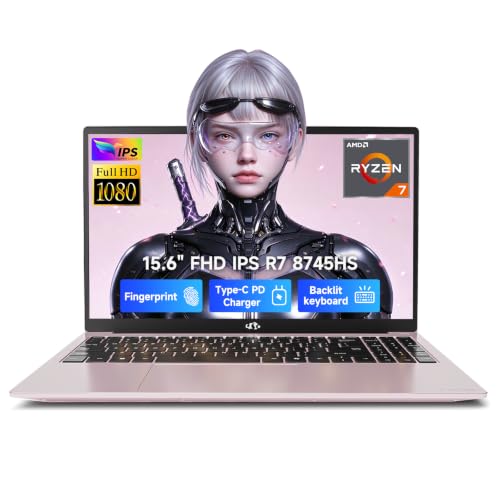
- Ryzen 7 8745HS with 32GB DDR5
- Upgradeable RAM and dual M.2 storage
- 75Wh battery and USB4 connectivity
Best For: Mobile editors who value expandability and battery capacity
Best Budget Workstation Option

- 32GB RAM and 1TB SSD
- Core i7-10850H processor
- Dedicated Nvidia Quadro graphics
Best For: Editors wanting a capable renewed workstation configuration
Best Portable Mac

- M5 chip with 16GB unified memory
- Up to 18 hours of battery life
- 13.6-inch Liquid Retina display
Best For: Students and mobile creators
Best Workstation Power

- RTX 2000 Ada 8GB dedicated graphics
- 32GB RAM and 1TB SSD
- Up to four external 4K displays
Best For: Professional editors and demanding creative workflows
Best Upgradeable Value

- Ryzen 7 8745HS with Radeon 780M graphics
- 1TB SSD and expandable RAM
- USB4 supports external GPU expansion
Best For: Budget-conscious creators planning future upgrades
Best 4K Editing Workstation

- 17.3-inch 4K display with 100% Adobe coverage
- Quadro RTX 4000 GPU with 8GB VRAM
- 32GB RAM and 512GB NVMe SSD
Best For: Editors who prioritize a large, high-resolution display
Best High-Memory Workstation
Dell Precision 7780 with 2TB SSD

- 24-core Core i9 processor up to 5.5GHz
- 128GB DDR5 RAM for heavy multitasking
- 2TB SSD and RTX 3500 Ada graphics
Best For: Professional editors managing demanding projects and large files
Best Balanced Pro Configuration
Dell Precision 7780 with 1TB SSD
- Core i9 processor with 24 cores
- 128GB DDR5 RAM and RTX 3500 Ada GPU
- Windows 11 Pro with HDMI and USB-C
Best For: Editors who prioritize performance and use external storage
Best Color-Accurate Pick – MSI Creator 15 OLED 4K
For creators prioritizing color and resolution, this MSI Creator 15 is a compelling choice among laptops for video editing. Its 15.6-inch 4K OLED display covers 100% of DCI-P3, while the Core i7 processor and RTX 3060 target demanding creative workflows.
Best For: Video editors, designers, and creators who value a high-resolution, wide-color-gamut display.
Pros:
- 4K OLED display with 100% DCI-P3 coverage
- Eight-core Intel Core i7-11800H processor with boost speeds up to 4.6GHz
- Dedicated NVIDIA GeForce RTX 3060 graphics with 6GB GDDR6
- Thunderbolt 4, HDMI, Wi-Fi 6E, and five USB ports
Cons:
- 512GB SSD may be limiting for large video libraries
- At 5.4 pounds, it is less portable than some thinner laptops
- Runs Windows 10 out of the box, though a Windows 11 upgrade is available
The standout feature is the color-focused 4K OLED panel, backed by capable processing and graphics hardware. Consider adding external storage if your editing projects regularly involve large source files.
Best Workstation Value – Dell Precision 5570 Renewed
This renewed Dell Precision 5570 takes a workstation-oriented approach to laptops for video editing, pairing a 14-core Intel processor with 32GB of DDR5 memory and a 1TB SSD. Its RTX A1000 graphics card is suited to professional applications and GPU-assisted tasks.
Best For: Editors who need substantial multitasking memory, storage, and professional workstation graphics.
Pros:
- 14-core Intel Core i7 processor with turbo speeds up to 4.7GHz
- 32GB DDR5 RAM and a 1TB SSD
- NVIDIA RTX A1000 dedicated graphics with 4GB memory
- Windows 11 Pro and 1920×1200 display resolution
Cons:
- The renewed model includes a 90-day limited warranty
- Display is limited to 60Hz and does not support touch input
- Listed weight is 8 pounds
With its high core count, generous memory, and 1TB of storage, this Precision 5570 is configured for demanding multitasking. Its renewed status and shorter warranty are important considerations when comparing it with new systems.
Best Upgradeable Battery Pick – NIMO Ryzen 7 32GB Laptop
The NIMO 15.6-inch model combines a Ryzen 7 8745HS processor, 32GB of DDR5 RAM, and a 1TB PCIe 4.0 SSD in a flexible package for laptops for video editing. Its Radeon 780M integrated graphics, large battery, and upgradeable design suit mobile creators who also handle general productivity work.
Best For: Mobile editors and remote professionals who want upgradeable memory and storage without a dedicated GPU.
Pros:
- Eight-core Ryzen 7 8745HS processor with speeds up to 4.9GHz
- 32GB DDR5 RAM and 1TB PCIe 4.0 SSD included
- Dual SODIMM and dual M.2 slots support expansion up to 64GB RAM and 4TB SSD
- 75Wh battery, 100W USB-C PD charging, and USB4 connectivity
Cons:
- Radeon 780M graphics are integrated rather than dedicated
- Display is 1080p rather than 4K
- Battery-life figures vary by workload, with heavy gaming listed at about 2.5 hours
This NIMO stands out for expandable hardware, modern connectivity, and a large battery. It is a practical choice for 1080p-focused editing and mobile workflows, while editors needing dedicated GPU power may prefer another option.
Best Budget Workstation Option – Dell Precision 5550 Renewed
This renewed Dell Precision 5550 offers a straightforward workstation configuration for laptops for video editing: a Core i7-10850H processor, 32GB of RAM, a 1TB SSD, and dedicated Nvidia Quadro graphics. Its 15.6-inch FHD display keeps the system practical for everyday editing and office use.
Best For: Editors seeking a renewed workstation with ample RAM and storage for general editing projects.
Pros:
- 32GB RAM and a 1TB SSD provide useful working capacity
- Core i7-10850H processor reaches up to 5.1GHz
- Dedicated Nvidia Quadro graphics with 4GB graphics memory
- Windows 11 Pro with HDMI, DisplayPort, USB, and Ethernet connectivity
Cons:
- Older 10th-generation processor platform
- FHD display offers less workspace than a 4K panel
- Renewed listing does not specify a warranty duration
The Precision 5550 is appealing when memory and storage matter more than having the newest platform or highest-resolution screen. As a renewed workstation, verify the seller’s condition and warranty details before purchase.
Best Portable Mac – Apple MacBook Air M5
The Apple MacBook Air with the M5 chip is a highly portable option among laptops for video editing, especially for students and creators who value battery life. Its 16GB unified memory, 512GB SSD, Liquid Retina display, and macOS support a range of creative workflows, while the lightweight 2.71-pound design makes it easy to carry.
Best For: Students and mobile creators who want a thin, quiet-feeling macOS laptop for everyday editing and creative work.
Pros:
- M5 chip and 16GB unified memory are designed for responsive multitasking and creative workflows.
- Liquid Retina display supports 1 billion colors for detailed photo and video viewing.
- Up to 18 hours of battery life and a 2.71-pound design suit mobile work.
Cons:
- 512GB of built-in storage may fill quickly with large video projects.
- Integrated graphics are less specialized than the dedicated GPU in the Dell Precision.
- Only two Thunderbolt 4 ports are listed, so a hub may be useful for a larger setup.
This MacBook Air is a strong fit when portability, battery endurance, and a high-quality display matter more than workstation-class expansion. Consider external storage for larger media libraries.
Best Workstation Power – Dell Precision 7680
The Dell Precision 7680 is the workstation-oriented choice among laptops for video editing. Its Intel Core i7-13850HX processor, 32GB DDR5 memory, NVIDIA RTX 2000 Ada 8GB graphics, and 1TB SSD are suited to demanding professional workloads, while extensive ports support a multi-monitor studio setup.
Best For: Professional editors, designers, engineers, and other users running demanding creative or technical applications.
Pros:
- Dedicated NVIDIA RTX 2000 Ada GPU with 8GB GDDR6 memory targets professional creative workloads.
- 32GB DDR5 memory and a 1TB PCIe NVMe SSD support large projects and multitasking.
- Supports up to four external 4K displays and offers Thunderbolt 4, HDMI, USB, and Ethernet.
- ISV certifications and MIL-STD-810H testing support professional and mobile work environments.
Cons:
- At 5.9 pounds, it is considerably less portable than the MacBook Air.
- The 16-inch display is FHD+ with 45% NTSC coverage, which may not suit color-critical finishing.
- The computer has been resealed for an SSD upgrade, so buyers should review the warranty details.
The Precision 7680 offers the strongest dedicated-graphics platform in this group and is the better choice for heavier editing, rendering, and multi-display workflows. Its weight and display specifications are the main trade-offs.
Best Upgradeable Value – NIMO Ryzen 7 Creator Laptop
The NIMO 15.6-inch AI Creator Laptop is a flexible choice among laptops for video editing, pairing an AMD Ryzen 7 8745HS processor with Radeon 780M integrated graphics, 16GB DDR5 memory, and a 1TB PCIe 4.0 SSD. Its upgradeable design and USB4 port provide room to expand as projects become more demanding.
Best For: Budget-conscious creators who want a large screen, generous storage, and upgrade options for growing workloads.
Pros:
- Ryzen 7 8745HS and RDNA 3 Radeon 780M graphics support mainstream creative software and 4K rendering tasks.
- 1TB PCIe 4.0 SSD provides useful space for video files and fast program loading.
- RAM can be upgraded to 64GB, and dual SSD slots support future expansion.
- USB4 enables external GPU expansion, while 100W USB-C PD supports fast charging.
Cons:
- Radeon 780M is integrated graphics, so it is less capable for demanding effects than a dedicated workstation GPU.
- The supplied notes do not specify display color coverage or refresh rate for the FHD screen.
- 16GB RAM may be limiting for heavier projects before an upgrade.
This NIMO balances current capability with upgrade potential. It makes sense for general editing and content creation, particularly if you appreciate the option to add memory, storage, or an external GPU later.
Best 4K Editing Workstation – Dell Precision 7750
For editors who prioritize screen resolution and workstation-class graphics, this Dell Precision 7750 is a strong choice among laptops for video editing. Its 17.3-inch 4K display, 32GB of RAM, Core i7 processor, and Quadro RTX 4000 GPU are suited to demanding creative and professional workflows.
Best For: Video editors who want a large, color-focused 4K display and dedicated professional graphics.
Pros:
- 17.3-inch UHD resolution with 100% Adobe coverage, 500-nit brightness, and an anti-glare finish.
- Quadro RTX 4000 graphics with 8GB of GDDR6 VRAM for GPU-accelerated creative applications.
- 32GB DDR4 RAM and a 512GB PCIe NVMe SSD provide a capable editing foundation.
- Includes Windows 10 Pro and onsite/in-home service after remote diagnosis.
Cons:
- At about 6 pounds, it is less convenient for frequent travel.
- The 512GB SSD may fill quickly with high-resolution footage.
- The listed configuration uses a 10th-generation processor and Windows 10 Pro.
The Precision 7750 makes the most sense when accurate, spacious 4K viewing matters more than portability. Consider adding external storage if your projects involve large video libraries.
Best High-Memory Workstation – Dell Precision 7780 with 2TB SSD
This Precision 7780 is built for demanding multitasking and professional content creation. With a 24-core Core i9 processor, 128GB of DDR5 RAM, a 2TB NVMe SSD, and RTX 3500 Ada graphics, it is a powerful option among laptops for video editing.
Best For: Professional editors handling complex projects, large media libraries, and intensive multitasking.
Pros:
- Core i9-13950HX processor reaches up to 5.5GHz and has 24 cores.
- 128GB of DDR5 RAM supports extensive multitasking and demanding applications.
- 2TB NVMe SSD offers substantial room for active projects and media files.
- NVIDIA RTX 3500 Ada graphics include 12GB of GDDR6 VRAM and ISV-certified workstation support.
Cons:
- The 17.3-inch display is Full HD rather than 4K.
- Its workstation configuration and roughly 4.99kg weight are not ideal for lightweight travel.
- The listed configuration has no optical drive.
This is the most generously configured option in the group for memory and storage. Its Full HD panel may be better suited to users who plan to connect an external high-resolution display for detailed finishing work.
Best Balanced Pro Configuration – Dell Precision 7780 with 1TB SSD
The Dell Precision 7780 combines high-end processing power with a more focused 1TB storage configuration. Its Core i9 processor, 128GB of DDR5 RAM, and RTX 3500 Ada GPU make it a capable choice among laptops for video editing, especially for users who rely on fast external storage or networked media.
Best For: Editors who need workstation performance and abundant memory without the larger 2TB internal drive.
Pros:
- 24-core Intel Core i9-13950HX processor reaches up to 5.5GHz.
- 128GB DDR5 RAM is well suited to demanding editing and multitasking workloads.
- RTX 3500 Ada graphics provide 12GB of GDDR6 VRAM for intensive content creation.
- Windows 11 Pro, HDMI, USB-C, Wi-Fi, Bluetooth, and a manufacturer warranty are included.
Cons:
- The 17.3-inch screen is 1920×1080 rather than 4K.
- The 1TB SSD provides less internal workspace than the comparable 2TB configuration.
- Its large workstation form factor is less portable than a typical laptop.
This configuration is a practical fit if processing power and memory are the priority. Plan for external or network storage when working with extensive 4K or higher-resolution footage.
How We Picked These Laptops for Video Editing
We focused on the components that most directly affect editing, playback, rendering, and export performance. The selection includes laptops with modern multi-core processors, dedicated NVIDIA graphics or capable integrated Radeon graphics, at least 16GB of memory, and SSD storage. We also considered screen resolution, color coverage, upgrade potential, portability, and value.
Because workloads vary, this list includes both lightweight everyday systems and larger mobile workstations. Renewed models can offer strong specifications for less money, but buyers should verify the seller’s warranty, battery condition, and return policy.
Quick Comparison
| Best For | Recommended Type | What to Prioritize |
|---|---|---|
| Portable editing | Apple MacBook Air | Battery life, quiet operation, efficient performance |
| Color-sensitive projects | MSI Creator 15 | 4K OLED display, wide color coverage, dedicated GPU |
| Professional workstation work | Dell Precision 7680 or 7780 | High-end CPU, RTX graphics, abundant RAM |
| Budget-conscious editing | Renewed Dell Precision models | Core count, display condition, warranty, upgradeability |
| General creator use | NIMO AI Creator laptops | 32GB memory option, 1TB SSD, integrated graphics |
Key Buying Factors for Laptops for Video Editing
Processor and GPU
Video editing benefits from a fast multi-core CPU, while effects, color grading, and accelerated exports can benefit substantially from a dedicated GPU. NVIDIA RTX graphics are particularly useful in applications that support CUDA or GPU-accelerated effects. Integrated graphics can handle basic 1080p editing but may struggle with complex 4K timelines.
Memory and Storage
Choose at least 16GB of RAM for basic editing; 32GB is a better target for 4K footage, multitasking, and larger projects. A 1TB SSD provides more practical working space than a 512GB drive, especially when video files, cache data, and applications share the internal storage.
Display Quality
A bright, sharp display with accurate color is valuable for editing and grading. A 4K panel can provide extra detail, while a well-calibrated 1080p or 1600p screen may offer better battery life. Look for strong color coverage, suitable brightness, and a matte finish if you often work in bright rooms.
Portability, Thermals, and Battery
Large workstations usually provide stronger sustained performance but weigh more and may have shorter battery life. Slim laptops are easier to carry, yet their performance can drop under prolonged rendering. Check port selection, charger size, fan noise, and whether the laptop supports external monitors or fast media storage.
Who Should Buy Which Laptops for Video Editing?
Choose the MacBook Air for quiet, portable editing and efficient everyday work, particularly if you already use Apple software and accessories. The MSI Creator 15 suits creators who want a high-resolution, color-focused display alongside dedicated RTX graphics.
Choose a Dell Precision 7680 or 7780 for demanding professional timelines, effects, 3D work, or large projects where CPU, GPU, and memory headroom matter most. The Precision 7750 and renewed 5550 or 5570 are worth considering when workstation features and value matter more than having the newest platform.
The NIMO models are practical choices for students, freelancers, and creators handling 1080p work, short 4K projects, and general productivity. Before buying any model, confirm software compatibility, display specifications, upgrade options, and the return policy—especially for renewed laptops.