
The best laptops for photo editing combine a sharp, color-consistent display with enough processor, memory, and storage performance for large RAW files, layered projects, and export-heavy workflows.
Our 2026 roundup includes creator-focused laptops with 100% sRGB panels, modern AI-capable processors, generous RAM, and more affordable everyday models. Use the guide below to match screen quality and performance to the way you edit.
Best 10 Laptops for Photo Editing Picks for 2026
Best Large-Screen Creator Laptop

- 17.3-inch IPS touch display with 100% sRGB
- 32GB RAM and 2TB SSD
- Intel Arc graphics with Thunderbolt 4
Best For: Large-screen photo editing and desktop-style creative work
Best Portable AI Photo-Editing Laptop
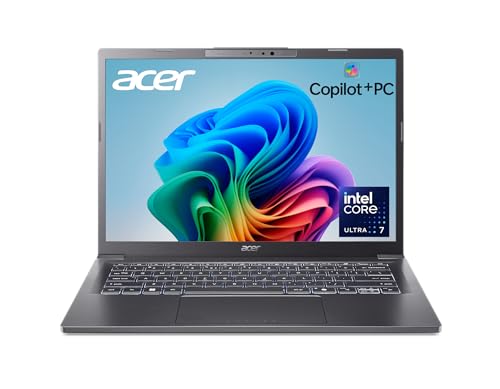
- 3.1-pound aluminum chassis
- Core Ultra 7 with Intel Arc 140V graphics
- 1TB SSD and up to 22-hour battery claim
Best For: Portable photo editing and travel-focused creative work
Best High-Memory Touchscreen Laptop

- 16-inch 1920x1200 IPS touchscreen
- 32GB RAM and 1TB SSD
- Ryzen AI 7 with Radeon 840M graphics
Best For: Multitasking photo editors and connected home-office setups
Best Touchscreen Workhorse
HP i7 15.6-inch Touchscreen Laptop

- 10-core Intel Core i7 processor
- 16GB RAM and 512GB SSD
- Touchscreen with USB-C and HDMI
Best For: Touch-focused photo editing and multitasking
Best Memory and Storage Value

- 32GB DDR5 RAM for heavy multitasking
- 1TB SSD for large media libraries
- Ryzen 7 with Radeon 780M graphics
Best For: Creators managing large photo libraries and multiple apps
Practical Value Pick

- 16GB RAM and 1TB SSD
- 15.6-inch Full HD display
- Broad port selection
Best For: Students, office users, and casual photographers
Color-Focused Creator Choice

- 100% sRGB 17.3-inch IPS touch display
- 32GB RAM and 1TB SSD
- Intel Arc integrated graphics
Best For: Creators wanting a large, color-conscious editing workspace
Balanced Touchscreen Workhorse

- Ryzen 7 with 32GB RAM
- 1TB NVMe SSD
- Lightweight 3.52-pound design
Best For: Casual photographers and multitasking professionals
Best Large-Screen Creator Laptop – HP OmniBook 7 17.3-inch Touch
For shoppers comparing laptops for photo editing, the HP OmniBook 7 stands out with a spacious 17.3-inch touch display, 100% sRGB coverage, 32GB of RAM, and a 2TB SSD. Its integrated Intel Arc graphics and Ultra 7 processor suit photo workflows, multitasking, and external-display setups.
Best For: Photo editors who want a large, color-focused touchscreen and generous built-in memory and storage.
Pros:
- 17.3-inch FHD IPS touchscreen with 400-nit brightness and 100% sRGB coverage
- 32GB DDR5 RAM and a spacious 2TB SSD
- Intel Ultra 7 processor, integrated Intel Arc 140V graphics, and extensive USB connectivity
- Includes Thunderbolt 4, HDMI 2.1, Wi-Fi 6E, and Windows 11 Pro
Cons:
- Integrated graphics use shared memory rather than dedicated video memory
- At 5.2 pounds, it is less travel-friendly than smaller options
- Its 1920×1080 resolution offers less workspace than higher-resolution editing displays
The OmniBook 7 is a strong fit when screen size, color coverage, RAM, and storage matter more than portability. It is especially appealing for desktop-style editing and users who connect several peripherals.
Best Budget Photo-Editing Pick – HP OmniBook 3 16-inch Touch
The HP OmniBook 3 is a practical entry in the laptops for photo editing category, pairing a 16-inch 1920×1200 IPS touchscreen with a lightweight 3.6-pound design. Its Ryzen 5 processor, 512GB SSD, and Radeon 610M graphics are suited to everyday photo work and general multitasking.
Best For: Casual photo editors and students who want a portable touchscreen laptop for basic editing and everyday use.
Pros:
- 16-inch 1920×1200 IPS touchscreen with anti-glare treatment
- Lightweight 3.6-pound chassis and claimed battery life of up to 14 hours 15 minutes
- 512GB PCIe NVMe SSD and Wi-Fi 6 connectivity
- FHD HDR camera and a useful selection of USB-C, USB-A, and HDMI ports
Cons:
- 8GB of onboard LPDDR5 RAM is modest for heavier editing workloads
- Display coverage is listed at 62.5% sRGB
- AMD Radeon 610M integrated graphics are aimed at everyday use rather than demanding graphics work
This model makes the most sense for light editing, organizing photos, and occasional creative projects. More demanding users may prefer a laptop with 32GB RAM and wider-gamut color coverage.
Best Portable AI Photo-Editing Laptop – Acer Aspire 14 AI
For mobile users seeking laptops for photo editing, the Acer Aspire 14 AI combines a 3.1-pound aluminum chassis with an Intel Core Ultra 7 processor, Intel Arc 140V graphics, 16GB of LPDDR5X memory, and a 1TB SSD. Its 14-inch 1920×1200 display provides a practical 16:10 workspace for editing on the go.
Best For: Photographers and creators who prioritize portability, long battery life, and modern integrated graphics.
Pros:
- Lightweight 3.1-pound aluminum design with a 180-degree hinge
- Intel Arc 140V graphics and Core Ultra 7 processor support creative multitasking
- 16GB LPDDR5X RAM and a 1TB SSD
- Claimed battery life of up to 22 hours under specified video-playback testing
Cons:
- 14-inch screen is smaller than larger editing-oriented laptops
- Display brightness is listed at 300 nits
- Graphics memory is shared rather than dedicated
The Aspire 14 AI is a well-balanced travel option for photographers who edit away from a desk. Its compact build and battery claim are compelling, while the 16:10 resolution gives more vertical room than a standard 1080p panel.
Best High-Memory Touchscreen Laptop – HP OmniBook 16 Ryzen AI
The HP OmniBook 16 is a capable choice among laptops for photo editing, offering a 16-inch 1920×1200 IPS touchscreen, 32GB of DDR5 RAM, and a 1TB PCIe NVMe SSD. Its Ryzen AI 7 processor and integrated Radeon 840M graphics support multitasking, creative applications, and connected workstation setups.
Best For: Photo editors who need substantial memory, a roomy 16:10 touchscreen, and strong peripheral connectivity.
Pros:
- 16-inch 2K-class 1920×1200 IPS touchscreen with a 16:10 aspect ratio
- 32GB DDR5 RAM and 1TB PCIe NVMe SSD
- Ryzen AI 7 445 processor with a dedicated NPU rated at 50 TOPS
- Includes USB-C with DisplayPort, HDMI 2.1, USB-A, Wi-Fi 6, and an IR privacy camera
Cons:
- Integrated Radeon 840M graphics use shared memory
- The supplied specifications do not list a wide-gamut color rating or brightness figure
- At 3.6 pounds, it is portable but not as light as the Acer Aspire 14 AI
This OmniBook balances a generous workspace with ample RAM and storage, making it a sensible option for multitasking photo editors. For color-critical work, confirm the display characteristics or plan to use an external calibrated monitor.
Best Touchscreen Workhorse – HP i7 15.6-inch Touchscreen Laptop
For shoppers comparing laptops for photo editing, this HP model offers a practical mix of processing power, memory, storage, and touch input. Its 10-core Intel Core i7 processor, 16GB of RAM, 512GB SSD, and integrated Intel Iris Xe graphics suit everyday editing workflows, office work, and light creative projects.
Best For: Creators who want a larger touchscreen display, strong multitasking, and a Windows 11 Pro business laptop.
Pros:
- 10-core Intel Core i7 processor with speeds up to 5GHz
- 16GB RAM supports creative applications and background tasks
- 512GB SSD provides quick storage for photo libraries and project files
- Touchscreen, USB-C, HDMI, and Wi-Fi 6 support flexible editing setups
Cons:
- Integrated graphics are less suited to demanding GPU-heavy work than a dedicated graphics card
- Full HD resolution provides less workspace than higher-resolution displays
- 720p camera is functional but basic for video calls
This HP is a sensible choice for photo editors who value touch controls, familiar Windows Pro features, and useful connectivity. It is better suited to general creative work and moderate editing than intensive professional rendering.
Best Memory and Storage Value – NIMO 15.6-inch Creator Laptop
For laptops for photo editing that prioritize headroom for large libraries and multiple applications, the NIMO N158 stands out with 32GB of DDR5 memory and a 1TB SSD. Its AMD Ryzen 7 8745HS processor and Radeon 780M integrated graphics also support video editing, streaming, and light gaming.
Best For: Photo editors and content creators who need generous memory, storage, and long stated battery life.
Pros:
- 32GB DDR5 RAM is well suited to demanding multitasking
- 1TB SSD offers ample room for photos, videos, and applications
- AMD Ryzen 7 8745HS processor has eight cores and speeds up to 4.9GHz
- Backlit keyboard, fingerprint reader, HDMI, and 100W USB-C PD charging add convenience
Cons:
- 1920×1080 LCD display may offer less detail and workspace than higher-resolution panels
- Radeon 780M graphics are integrated and use shared memory
- Glossy screen finish can be less convenient in bright surroundings
The NIMO is appealing when RAM and storage matter more than a high-resolution display. It provides a strong specification foundation for editing and creator workloads, though users seeking maximum color or display detail should verify the panel characteristics before buying.
Best Portable AI Editing Laptop – Acer Aspire Ultra 7 Touchscreen
This Acer Aspire is one of the more mobile laptops for photo editing, combining a 14-inch 1920×1200 IPS touchscreen with 32GB of LPDDR5X RAM and a 1TB PCIe SSD. Its Intel Core Ultra 7 258V, dedicated NPU, and Intel Arc 140V graphics are designed for local AI features and GPU-assisted creative applications.
Best For: Photographers and mobile creators who want a lightweight touchscreen system with modern AI and graphics acceleration.
Pros:
- Intel Core Ultra 7 processor includes a dedicated 47-TOPS NPU for local AI features
- Intel Arc 140V graphics support photo editing and 1080p video workflows
- 32GB RAM and 1TB PCIe SSD provide substantial performance and storage headroom
- Lightweight 3.09-pound design, touchscreen, and included multiport hub suit mobile work
Cons:
- 14-inch display is smaller than the 15.6-inch alternatives in this roundup
- Integrated graphics are not a substitute for a dedicated GPU in especially demanding workloads
- 60Hz display refresh rate is standard rather than geared toward high-refresh use
The Acer offers the most portable and forward-looking configuration here, especially for editors interested in local AI tools and a responsive touchscreen workflow. Its 1920×1200 IPS panel adds useful vertical workspace, while the included hub helps connect displays, storage, and peripherals.
Practical Value Pick – Lenovo V15 G4
For shoppers seeking laptops for photo editing on a practical budget, the Lenovo V15 G4 offers 16GB of memory, a 1TB SSD, and a 15.6-inch Full HD display. Its integrated AMD Radeon graphics are better suited to light photo work and everyday productivity than demanding professional editing.
Best For: Students, office users, and casual photographers editing smaller projects while prioritizing storage and connectivity.
Pros:
- 16GB DDR5 RAM and a 1TB SSD support responsive multitasking and ample file storage.
- 15.6-inch 1920 x 1080 display provides clear workspace for basic editing.
- Includes USB-C, two USB-A ports, HDMI, Ethernet, and a numeric keypad.
Cons:
- Integrated graphics are not designed for demanding photo or video workloads.
- Supplied specifications identify a 60Hz display but do not list wide-gamut color coverage.
- At 6 pounds, it is less portable than lighter alternatives.
The Lenovo V15 G4 is a sensible entry-level choice for organizing and adjusting photos, especially when storage and office features matter more than color-critical performance.
Color-Focused Creator Choice – HP OmniBook 7 AI
The HP OmniBook 7 is one of the more creator-oriented laptops for photo editing in this group. Its 17.3-inch IPS touchscreen covers 100% sRGB, while 32GB of memory, a 1TB SSD, and Intel Arc graphics provide a stronger foundation for editing and managing larger photo libraries.
Best For: Creators who want a large, touch-enabled workspace and dependable color coverage for web and general photo projects.
Pros:
- 17.3-inch Full HD IPS display offers 100% sRGB coverage, 400 nits, and touch input.
- 32GB LPDDR5x memory and a 1TB SSD support sizable editing workflows.
- Intel Core Ultra 7 processor and integrated Intel Arc 140V graphics provide capable everyday creator performance.
- Thunderbolt 4, additional USB ports, HDMI 2.1, Wi-Fi 6E, and a backlit keyboard add flexibility.
Cons:
- The large 17.3-inch chassis may be less convenient for frequent travel.
- It uses integrated rather than dedicated graphics.
- Windows 11 Home may offer fewer business-management features than Pro.
With its stated 100% sRGB coverage and generous display size, the OmniBook 7 is the strongest fit here for photographers who want a comfortable editing screen without moving to a dedicated-GPU laptop.
Balanced Touchscreen Workhorse – HP 15.6-inch Ryzen 7
For buyers comparing laptops for photo editing with general-purpose work, this HP combines a Ryzen 7 processor, 32GB of RAM, and a 1TB NVMe SSD in a relatively light 15.6-inch design. The Full HD IPS touchscreen is useful for reviewing and organizing images, though the listed 45% color gamut makes it less appropriate for color-critical finishing.
Best For: Students, remote workers, and casual photographers who need strong multitasking, portability, and Windows 11 Pro.
Pros:
- Ryzen 7 7730U with 8 cores and 16 threads handles demanding multitasking.
- 32GB RAM and a 1TB NVMe SSD provide responsive application switching and substantial storage.
- 15.6-inch Full HD IPS touchscreen offers wide viewing angles and touch control.
- At 3.52 pounds, it is easier to carry than the larger or heavier options.
Cons:
- Integrated AMD Radeon graphics are best suited to light and moderate editing.
- The listed 45% color gamut limits suitability for color-critical photo work.
- The supplied display specifications list 300-nit brightness and 60Hz refresh.
This HP is a capable everyday laptop for organizing photos, making routine adjustments, and managing multiple applications. Photographers who need accurate final color should plan to use an external calibrated display.
How We Picked These Laptops for Photo Editing
We evaluated the selected models against the needs of photographers using applications such as Adobe Lightroom, Photoshop, Capture One, and similar editing tools. Key considerations included display resolution and color coverage, processor capability, memory, SSD capacity, integrated graphics, portability, and overall value.
Because photo-editing requirements vary, this list includes premium creator systems, large-screen desktop replacements, balanced midrange laptops, and budget models for lighter catalog work. Specifications should be confirmed before purchase, especially display color coverage, because similarly named configurations may differ.
Quick Comparison
| Best For | What to Look For | Recommended Type |
|---|---|---|
| Professional color work | 100% sRGB or wider gamut, high brightness, 32GB RAM | Creator-focused HP OmniBook 7 models |
| Large Lightroom libraries | 1TB or 2TB SSD, fast processor, upgrade-friendly storage | High-capacity creator laptops |
| Balanced editing | 16GB or 32GB RAM, modern Core Ultra or Ryzen processor | Acer Aspire and HP OmniBook models |
| Portable editing | 14-inch display, efficient processor, USB-C charging | Acer Aspire 14 AI Copilot+ PC |
| Budget photo work | At least 8GB RAM, SSD storage, Full HD display | Entry-level HP or Lenovo models |
Key Buying Factors for Laptops for Photo Editing
Display Quality and Color
The display is often more important than headline processor speed. Look for IPS or comparable panel technology, at least Full HD resolution, strong brightness, and verified color coverage. A 100% sRGB panel is a useful baseline for web and general photography; photographers preparing work for print or professional delivery may benefit from a wider-gamut display and hardware calibration support.
Processor and Graphics
Modern Intel Core Ultra and AMD Ryzen processors provide responsive performance for RAW previews, masking, batch exports, and multitasking. Integrated graphics are usually sufficient for still photography, but a dedicated GPU can help with GPU-accelerated filters, AI tools, and high-resolution workflows.
RAM and Storage
Choose 16GB of RAM for comfortable everyday editing and 32GB for large files, extensive layers, AI features, or long-term headroom. An SSD is essential for fast application launches and catalog access. A 1TB drive is a practical starting point, while 2TB is better for photographers who keep active projects locally. External SSDs and cloud backups remain important regardless of internal capacity.
Size, Ports, and Battery
A 14-inch laptop is easier to carry, while 15.6- to 17.3-inch models provide more workspace and can reduce the need for an external monitor. Check for USB-C, USB-A, HDMI, an SD or microSD card reader, and reliable charging options. Battery life varies with screen brightness and export workloads, so treat manufacturer estimates as best-case figures.
Who Should Buy Which Laptops for Photo Editing?
- Choose a creator-focused HP OmniBook 7 if accurate color, a large display, 32GB RAM, and substantial SSD capacity are priorities.
- Choose an Acer Aspire AI or HP OmniBook 16 for a balanced combination of current processor performance, memory, and everyday portability.
- Choose the NIMO creator laptop if you want strong multicore performance, 32GB RAM, and Radeon integrated graphics at a potentially competitive price.
- Choose an HP 15.6-inch Ryzen or Intel model for general photo editing, schoolwork, and home use without paying for a premium creator configuration.
- Choose the Lenovo V15 or HP OmniBook 3 for light editing, organization, and basic adjustments when budget matters more than maximum export speed or color coverage.
Before ordering, verify the exact display specification, RAM configuration, operating system, warranty, and return policy. Those details can make a major difference when selecting among otherwise similar Laptops for Photo Editing.