
Video editing is easier when your timeline, preview window, bins, scopes, and effects controls have room to stay visible. The best laptop screen extenders for video editing add usable workspace without requiring a full desktop monitor setup.
We selected 10 portable models with common 14- to 16-inch designs, Full HD or higher-class resolutions, and USB-C or HDMI connectivity. Use the guide below to match screen size, connection requirements, weight, and display features to your editing workflow.
Best 10 Laptop Screen Extenders for Video Editing Picks for 2026
Best for Three-Screen Travel Workstations

- Dual 15.6-inch FHD IPS panels
- Clip-free mounting design
- Includes cables, bag, and power adapter
Best For: Video editors needing generous portable multitasking space
Best for Flexible Mobile Editing

- Rotates 0-180 degrees and folds compactly
- Tool-free attachment with adjustable kickstand
- Supports Type-C, HDMI, and USB-A connections
Best For: Traveling editors who value flexible positioning
Best for Vertical Editing Space

- Dual 16-inch 1920x1200 IPS screens
- 16:10 aspect ratio adds vertical room
- Two-cable, no-driver setup
Best For: Editors who need larger timelines and panel space
Best for Secure Laptop Mounting
Blackview 14.1-inch FHD Extender

- Lightweight 1.8-pound design
- Six-point mount with adjustable stand
- TÜV SÜD eye-care and FHD IPS display
Best For: Traveling editors seeking a stable, compact setup
Best Lightweight Pick
Ultra-Portable 14.2-inch Dual Monitor

- 1.87-pound, 0.27-inch-thin travel design
- 1080p IPS panel with 300-nit brightness
- Extend, mirror, and portrait modes
Best For: Editors and travelers prioritizing low weight and easy setup
Best Color-Focused Triple-Screen Pick
14-inch FHD IPS Triple-Screen Extender

- 100% sRGB, 300-nit FHD IPS display
- Triple-screen modes for editing multitasking
- 3-pound design with adjustable stable stand
Best For: Creators needing extra displays and stated wide color coverage
Best Large-Screen Travel Setup
15.6-inch One-Cable Triple-Screen Extender

- Larger 15.6-inch 1080p IPS display
- Triple-screen workspace for multitasking
- One-cable USB-C connection after driver setup
Best For: Editors wanting a larger portable screen and included travel accessories
Best for Color-Focused Editors
APILDELLA 15.6-inch Triple Screen Extender
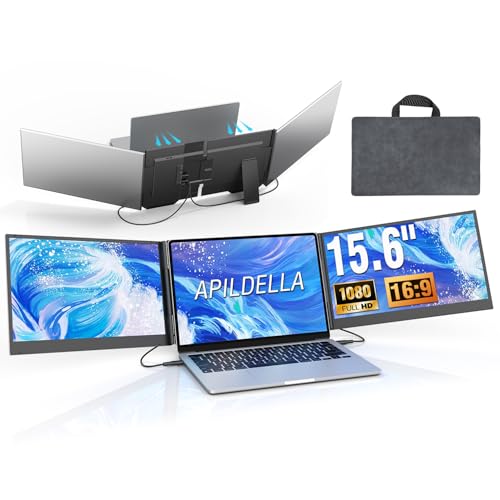
- Two 15.6-inch 1080p IPS displays
- HDR and claimed 120% sRGB gamut
- Two-cable setup with travel bag
Best For: Editors wanting a large, color-focused portable workspace
Best for Three-Screen Travel Workstations – 15.6-inch FHD Triple Extender
For shoppers comparing laptop screen extenders for video editing, this 15.6-inch model stands out for its clip-free mounting design, dual FHD IPS panels, and broad operating-system support. It creates a three-screen workspace while remaining portable enough for travel.
Best For: Video editors and multitaskers who want a large, portable triple-screen setup for timelines, media panels, and supporting applications.
Pros:
- Two 15.6-inch 1920×1080 IPS displays provide substantial workspace.
- Clip-free design avoids pressure on the laptop display.
- Includes USB-C, USB-A, HDMI, carrying-bag, and power-adapter accessories.
- Matte finish, 300-nit brightness, and 178-degree viewing angles suit varied workspaces.
Cons:
- At 1.82 kg, it is heavier than many single portable monitors.
- M1-M4 MacBooks require a separately obtained H5 cable according to the listing.
- Its 63% sRGB gamut may be limiting for color-critical editing.
This is a practical choice when screen area matters more than absolute portability. Its FHD resolution is suitable for arranging editing controls and reference material, but color-focused creators should account for the listed color gamut.
Best for Flexible Mobile Editing – KEFEYA 14.2-inch FHD Extender
This KEFEYA model is a flexible option among laptop screen extenders for video editing, with rotating screens, a compact folding design, and support for Type-C, HDMI, and USB-A connections. Its FHD IPS display is suited to mobile editing and general multitasking.
Best For: Editors who travel frequently and need a foldable extender that can also connect with consoles and other supported devices.
Pros:
- 0-180-degree rotating screens fold compactly for storage.
- 1920×1080 IPS display offers wide viewing angles and adjustable settings.
- Tool-free attachment and a 0-90-degree kickstand support ergonomic positioning.
- Works with Windows, Mac, Switch, PS4, and Xbox One using the listed connections.
Cons:
- The 2.77 kg listed weight is relatively substantial for a travel monitor.
- MacBook models with M1 through M4 Pro chips require a dedicated H5-T cable for full triple-screen functionality.
- The glossy finish may reflect more ambient light than a matte panel.
KEFEYA emphasizes portability and setup flexibility rather than a slim, lightweight build. It makes sense for creators who want adjustable viewing angles and broad device compatibility, provided their laptop has the required ports.
Best for Vertical Editing Space – 16-inch 1200P Triple Extender
For video editors comparing laptop screen extenders for video editing, this model offers dual 16-inch IPS panels with a 16:10 1920×1200 resolution. The extra vertical space can help keep more timeline rows, project panels, documents, or browser content visible.
Best For: Content creators and editors who prioritize larger panels and additional vertical workspace for timelines and media-management tools.
Pros:
- Dual 16-inch IPS screens provide a larger working area than typical 14-inch extenders.
- 1920×1200 resolution and 16:10 aspect ratio add vertical space over standard 1080p.
- 350-nit brightness and a listed 2 ms response time support clear general use.
- Two USB-C cables and a no-driver setup can reduce cable clutter.
Cons:
- The laptop must have two full-featured USB-C ports for the stated two-cable setup.
- At 4.6 pounds, it is less convenient for lightweight travel.
- The listed glossy finish can be more reflective in bright environments.
This is the strongest fit for creators who want maximum workspace from a portable extender. Its larger 16:10 panels are useful for editing interfaces, though the size and two-port requirement make it better for compatible laptops and planned mobility than casual carry.
Best for Secure Laptop Mounting – Blackview 14.1-inch FHD Extender
The Blackview DCM5 is a compact choice among laptop screen extenders for video editing, combining a 14.1-inch FHD IPS panel with a six-point mounting system and adjustable stand. Its connectivity options support extended, mirrored, and portrait modes on compatible devices.
Best For: Mobile editors who want a lighter, securely mounted extender with eye-care features for work in offices, cafés, or travel settings.
Pros:
- At 1.8 pounds, it is notably portable for travel workflows.
- Six-point mounting, non-slip pads, and a 90-degree stand are designed for stability.
- FHD IPS visuals, 300-nit brightness, and TÜV SÜD eye-care certification support long sessions.
- Supports USB-C and HDMI, plus Windows, Mac, ChromeOS, Android, and Linux according to the listing.
Cons:
- Its 14.1-inch screen offers less workspace than the 15.6- and 16-inch alternatives.
- Dual-screen use works best with two full-featured USB-C ports or USB-C plus HDMI.
- The listing describes a clamp-based fit for 13-17.3-inch laptops, so compatibility should be checked carefully.
Blackview is a sensible pick when portability and mounting stability are more important than maximum screen size. For editing, the FHD panel can handle timelines and support windows, while the connection requirements remain the main buying consideration.
Best Lightweight Pick – Ultra-Portable 14.2-inch Dual Monitor
For shoppers comparing laptop screen extenders for video editing, this 14.2-inch FHD IPS model emphasizes portability and a simple setup. Its extend, mirror, and portrait modes can keep editing tools, reference footage, or other apps visible without constant tab switching.
Best For: Video editors, remote workers, and travelers who want a lightweight second screen for 14- to 17.3-inch laptops.
Pros:
- Lightweight 1.87-pound, 0.27-inch-thin design for travel.
- 1080p IPS display with 300 nits of brightness and a matte finish.
- Supports extend, mirror, and portrait modes with no driver required.
- Includes USB-C, HDMI, and USB-A connection options and supports multiple operating systems.
Cons:
- The 14.2-inch display may provide less workspace than larger 15.6-inch options.
- USB-C direct connection requires a full-function USB-C port.
This is a practical choice when portability matters as much as added editing space. Its 60Hz 1080p panel is suited to multitasking and timeline support, while the compact build keeps travel weight down.
Best Color-Focused Triple-Screen Pick – 14-inch FHD IPS Triple-Screen Extender
Among laptop screen extenders for video editing, this triple-screen attachment stands out for its stated 100% sRGB coverage and 14-inch 1080p IPS panel. It is designed to expand a compatible laptop into a multi-display workstation for timelines, tools, and reference windows.
Best For: Creators and multitaskers who want triple-screen flexibility with a portable 14-inch display.
Pros:
- Triple-screen setup supports extended, mirrored, and portrait display modes.
- FHD IPS display lists 100% sRGB coverage, 300 nits, and a 178-degree viewing angle.
- Lightweight 3-pound, 0.3-inch-thin construction fits 13- to 17.3-inch laptops.
- Includes essential cables and a reinforced, adjustable stand designed for stability.
Cons:
- M1, M2, and M3 MacBook models support only a single screen without a DisplayLink adapter.
- Some setups may require a dedicated 5V/3A-or-higher power adapter for flicker or brightness issues.
The color specification and three-screen configuration make this a compelling productivity-oriented option for editing workflows. Check your laptop’s display support and available power before buying, especially for M-series MacBooks.
Best Large-Screen Travel Setup – 15.6-inch One-Cable Triple-Screen Extender
This 15.6-inch model is a larger-screen option among laptop screen extenders for video editing. It can create a triple-screen workspace and supports a one-cable connection through a full-featured USB-C port, though driver installation is required before use.
Best For: Editors and professionals who prefer a larger portable display for multitasking on 13- to 17-inch laptops.
Pros:
- Large 15.6-inch 1080p IPS screen with a matte finish and 178-degree viewing angle.
- Triple-screen design helps keep multiple windows open simultaneously.
- One full-featured USB-C cable can connect both screens after driver installation.
- Includes cables, power adapter, quick guide, and carrying bag.
Cons:
- Requires driver installation before operation.
- The complete unit weighs 4 pounds, making it heavier than the other listed options.
- A separate power supply may be needed if the laptop cannot provide enough power.
The larger panel can be useful for keeping editing controls and supporting windows visible, but the driver and power requirements make setup less immediate. It is best suited to buyers who value screen size and a supplied travel kit over minimum weight.
Best for Color-Focused Editors – APILDELLA 15.6-inch Triple Screen Extender
For video editors who need more timeline, preview, and project-panel space, the APILDELLA is one of the more color-oriented laptop screen extenders for video editing. Its two 15.6-inch 1080p IPS displays offer HDR, 60Hz refresh, and a claimed 120% sRGB gamut, while the two-cable design helps keep a mobile editing setup manageable.
Best For: Editors who prioritize a large dual-monitor workspace, vibrant color, and portable triple-display productivity.
Pros:
- Two 15.6-inch 1080p IPS screens with HDR and 120% sRGB.
- Uses two connection cables instead of a more cumbersome four- or five-cable setup.
- Aluminum construction, included travel bag, and 0.16-inch stated thickness support mobile use.
- Supports expansion, mirroring, and second-screen modes with 0–180-degree folding.
Cons:
- Compatibility depends on having two full-featured USB-C ports or one full-featured USB-C port plus HDMI.
- M1–M4 MacBooks require the separately referenced H5-T solution.
- At 4 pounds, it is heavier than some smaller portable extenders.
The APILDELLA stands out when editing benefits from spacious 15.6-inch panels and stronger stated color coverage. Confirm your laptop ports before buying, especially for newer MacBook models.
Best Ultra-Slim Choice – Macsecor 14-inch Triple Laptop Monitor
The Macsecor is a practical option for editors seeking laptop screen extenders for video editing without adding as much bulk to a travel kit. It combines two 14-inch 1080p IPS panels with a dual-line plug-and-play design, adjustable aluminum support, and multiple display orientations.
Best For: Mobile editors who value a lightweight, slim triple-screen setup with flexible viewing modes.
Pros:
- Two 14-inch 1080p IPS displays with HDR, blue-light filtering, and anti-glare technology.
- Ultra-slim design weighs about 3 pounds and includes a built-in stand adjustable up to 90 degrees.
- Supports extended, mirrored, duplicate, portrait, and landscape modes.
- Works with 13- to 17.3-inch laptops and supports Windows, macOS, Chrome OS, Android, and Linux according to the notes.
Cons:
- A laptop needs a full-featured USB-C port or HDMI connection for video output.
- M1/M2/M3 MacBooks and laptops without full-featured USB-C may require the separately referenced H5-T cable.
- The 14-inch panels provide less viewing area than larger 15.6-inch alternatives.
With its lower weight and broad stated operating-system compatibility, the Macsecor is well suited to editing on the road. Its 14-inch screens may be the better trade-off when portability matters more than maximum panel size.
Best for Built-In Audio – CIDETTY 14-inch Dual/Triple Monitor Extender
The CIDETTY offers a compact way to add workspace for editing applications, bins, and reference material. Among laptop screen extenders for video editing, it is notable for built-in speakers, a protective case, and 14-inch 1080p IPS viewing with blue-light filtering and anti-glare features.
Best For: Editors who want a portable 14-inch extender with built-in audio and straightforward dual- or triple-display flexibility.
Pros:
- 14-inch 1080p IPS display with 178-degree viewing angle, blue-light filtering, and anti-glare technology.
- Built-in speakers add audio convenience for mobile work.
- Includes a protective case and cables for USB-C and HDMI-based connections.
- Supports mirror and extended display modes with Windows, macOS, Linux, and selected gaming devices.
Cons:
- Not compatible with MacBooks using M1, M2, or M3 chips according to the product notes.
- Requires two full-featured USB-C ports or one full-featured USB-C port plus HDMI for typical operation.
- The supplied details do not describe two separate extender panels, so verify the intended dual/triple configuration before purchase.
The CIDETTY is a sensible choice for editors who appreciate built-in speakers and a travel-friendly case. Its compatibility restrictions make checking your laptop model and available video-capable ports especially important.
How We Picked the Best Laptop Screen Extenders for Video Editing
We focused on the specifications that affect real editing work: display size, resolution, panel type, connection options, laptop-size compatibility, weight, and setup simplicity. Most models in this roundup use IPS panels and 1080p-class resolution, which can provide useful side-by-side workspace for timelines, media bins, scopes, or messaging apps.
We also considered portability. A screen extender is most useful when it fits your laptop bag and attaches securely without making the computer difficult to carry. Because compatibility varies by laptop, connection standards and supported operating systems should be verified before purchase.
Quick Comparison
| What to Compare | Typical Options | Why It Matters for Editing |
|---|---|---|
| Screen size | 14 to 16 inches | Larger panels provide more workspace; smaller models are easier to travel with. |
| Resolution | 1080p or 1200p-class | Higher pixel counts make timelines, text, and controls appear sharper. |
| Display count | Dual or triple-screen setups | More screens can separate editing controls, footage, and reference material. |
| Connections | USB-C, HDMI, and USB power | Your laptop must support the required video-output method. |
| Weight | About 1.8 to 3 pounds | Lower weight is preferable for commuting and location work. |
Key Buying Factors for Laptop Screen Extenders for Video Editing
Check Video-Output Compatibility First
USB-C does not automatically mean video output. Your laptop’s USB-C port may need DisplayPort Alt Mode or Thunderbolt support. Some extenders also require HDMI for video and a separate USB connection for power. Confirm the included cables, port requirements, operating-system support, and whether drivers are needed.
Choose Resolution and Size for Your Software Layout
A 1080p display is generally sufficient for panels, bins, chat, and timeline controls. A 1200p-class screen offers additional vertical space, which can help when reviewing longer timelines or stacking interface panels. A 15.6-inch screen is easier to read, while a 14-inch model may be more practical with smaller laptops and tighter bags.
Think About Color Work Separately
Portable extenders are primarily productivity displays. If you perform color-critical grading, check the panel’s color coverage, calibration options, brightness, and viewing-angle performance rather than relying on resolution alone. For many editors, the laptop’s main display remains the reference screen.
Account for Weight, Hinges, and Desk Space
Dual and triple-screen attachments can add considerable leverage to a laptop. Check the supported laptop-size range and use a stable surface when possible. A lighter model is better for travel, but a larger screen may be worth the extra weight for long editing sessions.
Who Should Buy Which Laptop Screen Extenders for Video Editing?
- Frequent travelers: Choose a lightweight 14-inch extender with a slim profile and straightforward plug-and-play setup.
- Editors who prioritize workspace: Consider a 15.6-inch or 16-inch model, especially if you keep timelines and preview windows open together.
- Multitasking creators: A triple-screen design can suit editors who also manage scripts, reference footage, communication, or production notes.
- Users with modern USB-C laptops: Look for one-cable operation, but verify that the port supports display output and enough power.
- Mixed-device households: Favor models with both HDMI and USB-C support, provided your laptop and operating system meet the manufacturer’s requirements.