
A tablet with tilt support can make digital drawing feel more natural by responding to the angle of your stylus for shading, broad strokes, and expressive line work. The right choice depends on whether you want an integrated display, a compact screenless tablet, or a portable standalone device.
We compare 10 drawing tablets with tilt support across active area, shortcut controls, pen performance, display design, and overall workflow value so you can choose confidently for illustration, note-taking, animation, or photo editing.
Best 10 Drawing Tablets with Tilt Support Picks for 2026
Best Screened Precision

- 11.6-inch fully laminated anti-glare display
- 60° tilt and 8,192 pressure levels
- Red dial and eight customizable keys
Best For: Artists who want a compact pen display with direct-on-screen control
Best Shortcut Flexibility

- 10-by-6-inch working area
- 60° tilt with 8,192 pressure levels
- Eight side keys plus 16 programmed shortcuts
Best For: Beginners and educators needing flexible drawing and annotation controls
Best Large Color Display

- 15.6-inch fully laminated pen display
- ±60° tilt and 8,192 pressure levels
- 120% sRGB color gamut and 10 shortcut keys
Best For: Creators wanting a spacious, color-focused screen tablet
Best Beginner Screenless Pick

- 10-by-6.25-inch drawing area
- 16,384 pressure levels with 60° tilt
- Eight ambidextrous customizable shortcut keys
Best For: Beginners seeking a portable, screenless tablet
Spacious Control

- 11 x 6.87-inch active drawing area
- Battery-free pen with 60° tilt support
- Touch strip plus 26 customizable keys
Best For: Artists who want a large, highly customizable pen tablet
Direct-to-Screen Pick
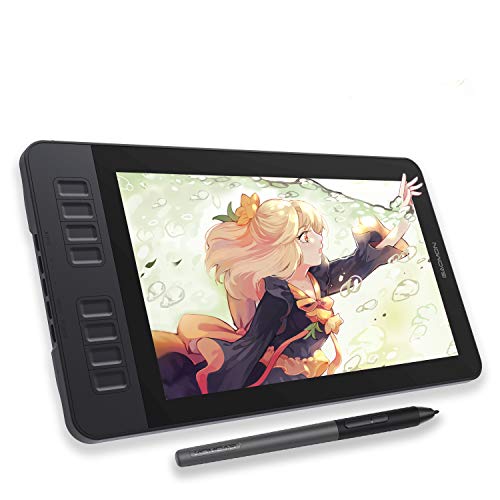
- 11.6-inch Full HD drawing display
- Battery-free stylus with tilt functionality
- Eight programmable shortcut keys
Best For: Beginners and artists who prefer drawing directly on screen
Compact Tilt Value

- 9 x 6-inch working area
- Battery-free pen with 60° tilt support
- Works across Windows, Mac, Android, Linux, and Chrome OS
Best For: Users wanting a compact, broadly compatible drawing tablet
Best Portable Pen Tablet

- 60° tilt support with a battery-free 8192-pressure pen
- 10 x 6.25-inch work area and extensive programmable controls
- Compatible with Windows, macOS, and Android
Best For: Portable digital art, teaching, and design setups
Best Standalone Note-Taking Tablet

- Standalone Android 14 tablet with a 10.95-inch color display
- 16,384-pressure battery-free Pencil 2
- Paper-like surface, 90Hz refresh rate, and anti-glare display
Best For: Sketching, notes, reading, and PDF annotation on the go
Best Screen Tablet for Natural Shading

- 11.6-inch fully laminated 1080p drawing display
- 60° tilt support and 8192-pressure battery-free stylus
- Red dial, eight shortcuts, and broad OS compatibility
Best For: On-screen illustration, animation, and natural brush shading
Best Screened Precision – XP-Pen Artist12 Pro
The XP-Pen Artist12 Pro is a strong choice for shoppers seeking drawing tablets with tilt support and an integrated screen. Its fully laminated 11.6-inch display, battery-free stylus, and tactile controls make it suited to detailed work while keeping the cursor close to the pen tip.
Best For: Digital artists, illustrators, teachers, and users who prefer drawing directly on a connected display.
Pros:
- 60-degree tilt support and 8,192 pressure levels enable natural shading and line variation.
- Fully laminated, anti-glare screen helps reduce parallax and reflections.
- Red dial plus eight customizable shortcut keys can speed up common commands.
- Supports Windows, macOS, ChromeOS, and Linux.
Cons:
- It is a drawing monitor, not a standalone tablet, so it must connect to a host device.
- The 11.6-inch screen may feel compact for users who prefer a larger canvas.
The Artist12 Pro stands out when direct-on-screen drawing accuracy matters. Its tilt-enabled stylus and laminated display offer a paper-like workflow, while the shortcut controls are useful for painting, editing, and digital annotation.
Best Shortcut Flexibility – Artisul A1201
The Artisul A1201 is a practical pick among drawing tablets with tilt support, especially for beginners and students. Its 10-by-6-inch working area, battery-free pen, and extensive programmable controls support drawing, writing, teaching, and remote-work tasks.
Best For: Beginners, students, teachers, and creators who want a screenless tablet with many customizable shortcuts.
Pros:
- 60-degree tilt support and 8,192 pressure levels help produce smooth shading and lines.
- Includes eight customizable side keys and 16 programmed shortcut keys.
- Works with Windows, macOS, ChromeOS, Android, and major creative software.
- Supports left- and right-handed use and includes a one-year warranty.
Cons:
- The tablet has no built-in display, so users draw while viewing a separate screen.
- Mobile use reduces the active area to approximately 161.5 by 90.8 mm.
With its unusually large number of shortcut controls, the A1201 is geared toward efficient workflows. It offers useful tilt performance without requiring a rechargeable pen and can also serve as a writing or annotation tool.
Best Large Color Display – Huion Kamvas 16 (2021)
The Huion Kamvas 16 (2021) is designed for users comparing drawing tablets with tilt support and wanting a larger on-screen workspace. Its 15.6-inch fully laminated display, battery-free pen, adjustable stand, and wide color gamut make it suitable for illustration, photo editing, and comics.
Best For: Artists and designers who want a spacious pen display for longer creative sessions and color-focused work.
Pros:
- Battery-free pen provides 8,192 pressure levels and ±60-degree tilt support.
- 15.6-inch fully laminated display helps minimize parallax.
- 120% sRGB color gamut and 178-degree viewing angle support vibrant visuals.
- Includes 10 customizable keys, an adjustable stand, and multiple connection cables.
Cons:
- It is not a standalone product and must connect to a computer, laptop, or Android device.
- The larger display may be less convenient to carry than a compact tablet.
The Kamvas 16 combines tilt-sensitive pen control with a roomy, color-oriented display. It is a compelling option for creators who value workspace and built-in ergonomics more than the smallest portable footprint.
Best Beginner Screenless Pick – XP-Pen Deco 01 V3
The XP-Pen Deco 01 V3 is an approachable option for shoppers seeking drawing tablets with tilt support without adding a built-in screen. Its 10-by-6.25-inch surface, battery-free 16K stylus, and ambidextrous shortcut layout provide a straightforward setup for digital art and note-taking.
Best For: Beginners and amateur artists who want a lightweight, portable tablet for computers or compatible Android devices.
Pros:
- 16,384 pressure levels and up to 60-degree tilt support provide detailed stroke control.
- Eight customizable shortcut keys work for both right- and left-handed users.
- Supports Windows, macOS, ChromeOS, Linux, and Android 10 or later.
- USB-C connectivity, adapters, and an 8 mm-thin design simplify setup and portability.
Cons:
- It has no display, so artwork appears on the connected device rather than the tablet.
- Android compatibility requires Android 10 or later and may require the XP-Pen Tools app for aspect-ratio mapping.
The Deco 01 V3 emphasizes ease of use and portability while offering the highest pressure level count in this group. It is a sensible starting point for learners who are comfortable drawing on a separate screen.
Spacious Control – HUION H1161
For artists seeking drawing tablets with tilt support, the HUION Inspiroy H1161 combines a generous 11 x 6.87-inch active area with a battery-free stylus supporting up to 60° of tilt. Its programmable touch strip and extensive shortcut options are useful for detailed drawing, painting, and paperless work.
Best For: Artists, designers, teachers, and anyone who wants a spacious non-display tablet for drawing, annotating PDFs, or taking digital notes.
Pros:
- Large active area supports comfortable, precise pen movements.
- Battery-free PW100 stylus offers 8192 pressure levels and 60° tilt support.
- Touch strip, 10 hard keys, and 16 soft keys enable extensive workflow customization.
- Works with Windows, macOS, Linux, and Android 6.0 or later.
Cons:
- It is a pen tablet without a built-in display, so you draw while viewing a separate screen.
- Android cursor support has limitations on Samsung devices outside the Note series.
The H1161 is a strong choice when working space and shortcut flexibility matter more than portability. Its tilt-capable, battery-free pen makes it particularly practical for long creative sessions.
Direct-to-Screen Pick – GAOMON PD1161
The GAOMON PD1161 is a pen display for shoppers comparing drawing tablets with tilt support and wanting to draw directly on screen. Its 11.6-inch Full HD display, matte film, and battery-free tilt-enabled stylus provide a more immediate sketching experience, though it must connect to a computer.
Best For: Beginners, students, and artists who prefer drawing directly on a Full HD display for illustration, image editing, and digital note-taking.
Pros:
- 11.6-inch Full HD IPS screen lets you draw directly on the image.
- Matte film reduces glare and provides a paper-like surface feel.
- Battery-free AP50 pen includes 8192 pressure levels and tilt functionality.
- Eight programmable side keys and two pen buttons support customized shortcuts.
Cons:
- Not standalone; it requires a Windows or macOS computer.
- Connection requires available HDMI and USB ports, or an appropriate converter.
- May need the included power adapter if the computer cannot provide enough power.
Choose the PD1161 if the direct-on-screen workflow is more important than cable-free portability. Its display and anti-glare surface make it an approachable option for artists transitioning from traditional sketching.
Compact Tilt Value – XP-Pen Star G960S
The XP-Pen Star G960S is a straightforward choice among drawing tablets with tilt support, offering a 9 x 6-inch working area and a battery-free stylus with up to 60° tilt. Its compact control layout and broad operating-system compatibility suit everyday digital drawing without the complexity of a screen.
Best For: Digital artists, teachers, and students who want an affordable-feeling, compact pen tablet for drawing, instruction, and creative software.
Pros:
- 9 x 6-inch working area provides room for natural drawing movements.
- Battery-free stylus supports 8192 pressure levels and up to 60° tilt.
- Compatible with Windows, macOS, Android, Linux, and Chrome OS.
- Four customizable shortcut keys streamline common actions.
Cons:
- It has no built-in display, so a separate computer or compatible device is required for viewing.
- Only four tablet shortcut keys are provided.
The G960S is a practical fit for users who want tilt effects and wide compatibility in a simpler tablet. It offers the essential pen features without adding a display or a large shortcut panel.
Best Portable Pen Tablet – GAOMON M106K PRO
For artists seeking drawing tablets with tilt support, the GAOMON M106K PRO combines a 10 x 6.25-inch work area with a battery-free pen that supports up to 60° of tilt. Its programmable controls and broad computer and Android compatibility make it a practical choice for digital art, design, and online teaching.
Best For: Artists, students, teachers, and creators who want a large, portable non-display tablet with extensive shortcut controls.
Pros:
- Battery-free AP32 pen supports ±60° tilt and 8192 pressure levels.
- Offers 12 programmable hot keys plus 16 soft express keys.
- Large 10 x 6.25-inch active area while weighing about 695–780g according to the supplied specifications.
- Works with Windows, macOS, and Android 6.0 or later.
Cons:
- No built-in display, so drawing requires viewing a connected device.
- Connects through USB rather than operating as a standalone tablet.
The M106K PRO is a strong fit when customizable controls and portability matter more than an integrated screen. Its tilt-enabled, pressure-sensitive pen provides useful brush control for compatible creative software.
Best Standalone Note-Taking Tablet – XPPen Magic Note Pad
The XPPen Magic Note Pad stands apart from many drawing tablets with tilt support because it runs Android 14 as a standalone device. Its 10.95-inch color display, 16,384 pressure levels, paper-like surface, and included battery-free Pencil 2 are designed for sketching, handwritten notes, and annotations on the go.
Best For: Students, professionals, and artists who want a self-contained tablet for drawing, notes, reading, and PDF annotation.
Pros:
- 10.95-inch X-Paper display uses AG nano-etching for a paper-like drawing texture.
- Included X3 Pro battery-free Pencil 2 offers 16,384 pressure levels.
- Android 14 and Google Play support enable standalone creative and productivity apps.
- 90Hz refresh rate, anti-glare technology, and low-blue-light certification support extended use.
Cons:
- The supplied notes identify stylus support but do not specify a tilt-angle range.
- Its listed weight is 1.61 kg, making it less lightweight than some compact tablets.
Choose the Magic Note Pad if standalone operation is a priority. It is more of an all-in-one Android creative notebook than a conventional computer-connected pen tablet, with a display suited to both color work and written annotations.
Best Screen Tablet for Natural Shading – XPPen Artist 12 Pro Lite
For shoppers comparing drawing tablets with tilt support, the XPPen Artist 12 Pro Lite offers an 11.6-inch screen where you draw directly on the canvas. Its fully laminated 1080p display, battery-free stylus, and 60° tilt support are geared toward natural shading and reduced parallax.
Best For: Artists, animators, designers, and students who prefer a compact pen display with built-in shortcut controls.
Pros:
- Fully laminated 11.6-inch IPS display helps reduce parallax.
- Battery-free stylus supports up to 60° tilt and 8192 pressure levels.
- Red dial and eight shortcut keys provide customizable controls.
- Supports Windows, macOS, ChromeOS, and Linux, along with numerous creative applications.
Cons:
- Requires a connected laptop or desktop rather than operating independently.
- The 3-in-1 cable setup may be less convenient than a wireless connection.
The Artist 12 Pro Lite is a sensible option for users who want the immediacy of drawing on-screen without moving to a larger display. Its tilt support and laminated panel make it particularly appealing for brushwork, shading, and illustration.
How We Picked the Best Drawing Tablets with Tilt Support
We selected tablets that explicitly support stylus tilt recognition and offer a practical combination of drawing area, pressure sensitivity, shortcut controls, compatibility, and pen convenience. The lineup includes screen-based pen displays, traditional graphics tablets that connect to a computer, and a standalone model for users who want greater portability.
We also considered how each format fits a real workflow. A display tablet can reduce hand-eye separation, while a screenless model is often lighter, easier to position, and more affordable. Battery-free pens are preferred for low-maintenance everyday use, but the tablet’s driver support and shortcut layout matter just as much as headline pressure levels.
Quick Comparison
| Tablet type | Best for | Main advantage | What to check |
|---|---|---|---|
| Pen display | Illustrators and digital painters | Draw directly on the image | Computer connection, stand, and screen size |
| Screenless tablet | Students, editors, and budget-conscious artists | Lower cost and simple desktop setup | Available desk space and hand-eye coordination |
| Standalone tablet | Portable sketching and note-taking | Greater independence from a computer | Operating system, storage, and battery life |
Key Buying Factors for Drawing Tablets with Tilt Support
Tilt Performance and Pen Design
Tilt support is useful for shading and angled brush effects, but it is not the only pen specification that matters. Look for consistent tracking, low activation force, comfortable shape, and a battery-free design if you want fewer charging interruptions. Software must also recognize tilt for the feature to affect brushes.
Display Size and Drawing Area
For pen displays, 11.6-inch models are compact and desk-friendly, while 15.6-inch screens provide more room for panels and detailed work. On screenless tablets, compare the active area with your monitor setup. A larger area can feel more natural for broad strokes but may require more desk space.
Controls and Workflow
Shortcut keys, touch strips, and programmable buttons can speed up zooming, undoing, changing brush size, and rotating the canvas. Prioritize controls that match your software and working hand. Ambidextrous layouts are especially useful in shared studios or classroom environments.
Compatibility and Connectivity
Confirm support for your operating system and preferred applications before buying. Check whether the tablet uses USB-C, a proprietary cable, or multiple connections for power and video. A full-laminated display can reduce parallax, but calibration still affects cursor accuracy.
Who Should Buy Which Drawing Tablets with Tilt Support?
Choose a Pen Display If You Want Direct Drawing
Artists transitioning from traditional media or anyone who values a more immediate workflow should consider a screen-based model. These tablets are particularly suitable for illustration, painting, and animation, provided your desk and computer setup can accommodate the extra cables.
Choose a Screenless Tablet for Value and Flexibility
A screenless option is a strong fit for beginners, students, retouchers, and experienced artists who already use a monitor comfortably. It usually offers more active area or shortcut controls for the price and is easier to store or transport.
Choose a Standalone Model for Portability
A standalone drawing tablet makes sense for sketching away from a desk, taking handwritten notes, or working without a separate computer. Verify its app ecosystem and storage limits, especially if you plan to use professional drawing software.