
Choosing a logic analyzer is mostly about matching your debugging needs to the right mix of channels, sample rate, memory depth, and software compatibility.
This roundup focuses on budget logic analyzers that can handle common protocols like I2C, SPI, UART, and CAN without paying for features you may never use.
Best 10 Budget Logic Analyzers Picks for 2026
Budget Starter
HiLetgo USB Logic Analyzer Device with EMI Ferrite Ring

- 8 channels with up to 24MHz sampling
- Works for UART, I2C, and SPI debugging
- USB Type-A design with wide input range
Best For: Beginners needing a low-cost general-purpose analyzer
High-Channel Value
LA1010 16-Channel USB Logic Analyzer

- 16 channels with claimed 100MHz sampling
- Decodes 30+ protocols like I2C, SPI, UART, and CAN
- Compatible with Windows, macOS, and Linux
Best For: Users needing more channels and protocol decoding on a budget
Premium Budget Pick

- 8 digital/analog inputs with flexible use
- Digital up to 100MS/s and analog up to 10MS/s
- Works on Mac, Windows, and Linux
Best For: Advanced users who want analog and digital capture in one tool
Accessory-Rich Starter
LONELY BINARY 8-Channel 24MHz Logic Analyzer Kit

- 8 channels with up to 24MHz capture
- Includes breakout board, clips, cables, and case
- USB-A and Type-C support for easier setup
Best For: Breadboard users who want an all-in-one starter kit
High-Performance 16-Channel Capture

- 16 channels at 200MHz sampling
- 1Gbit memory with 20+ protocol decoding
- Windows, macOS, and Linux support
Best For: Mixed-signal debugging with lots of channels and protocol needs
Dual-Mode Capture Flexibility
DSLogic Plus USB Logic Analyzer

- Dual stream and buffer capture modes
- Up to 400MHz buffer-mode sampling
- DSView software with nearly 100 decoders
Best For: Long captures, flexible sampling, and clean signal analysis
Portable 16-Channel Debugger

- 16 channels with 2 PWM outputs
- 100MHz max sampling rate
- Supports major protocols on Windows, macOS, and Linux
Best For: Portable digital debugging and protocol analysis
Premium High-Speed Pick
DSLogic U3Pro16 16-Channel USB 3.0 Analyzer

- 16 channels with stream and buffer modes
- Up to 1GHz sampling in supported configurations
- DSView software supports major OS platforms
Best For: Users who want a fast 16-channel analyzer with broad software support
Best Value USB 2.0 Option
DSLogic Plus 16-Channel Logic Analyzer
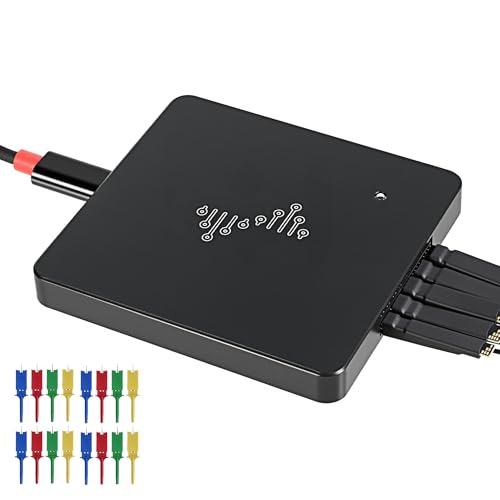
- 16 channels with stream and buffer modes
- 400MHz sampling and 16G sample depth
- USB 2.0 Type-C with broad OS compatibility
Best For: Buyers who want a lower-cost 16-channel analyzer with flexible capture modes
Top Channel Count Choice
DSLogic U3Pro32 32-Channel USB 3.0 Analyzer

- 32 channels for larger digital capture jobs
- USB 3.0 Type-C with dual-mode capture
- Up to 1GHz sampling in supported configurations
Best For: Users who need the most channels in this group
Budget Starter – HiLetgo USB Logic Analyzer Device with EMI Ferrite Ring
If you want a straightforward option in budget logic analyzers, this HiLetgo 8-channel model focuses on the basics: digital signal capture, common protocol debugging, and USB convenience. Its 24MHz per-channel sampling is enough for many everyday embedded tasks, especially when you need a simple tool for UART, I2C, or SPI work.
Best For: Hobbyists and beginners who need an inexpensive 8-channel analyzer for general embedded debugging.
Pros:
- 8 channels with up to 24MHz sampling per channel
- Supports common debugging uses like UART, I2C, and SPI
- Wide input range from -0.5V to 5.25V
- USB Type-A connection keeps setup simple
Cons:
- Lower sampling rate than higher-end analyzers
- Channel count is limited to 8
- Best suited to general-purpose work rather than heavy protocol analysis
Overall, this is a practical low-cost choice when you need a basic logic analyzer without extra complexity. It covers the common signals most makers run into and keeps the interface simple.
High-Channel Value – LA1010 16-Channel USB Logic Analyzer
Among budget logic analyzers, the LA1010 stands out by offering 16 input channels and a claimed 100MHz sampling rate per channel. That makes it a stronger pick when you need more signal visibility, protocol decoding, and cross-platform support for embedded debugging and digital system testing.
Best For: Makers and developers who want more channels and faster capture for protocol-heavy projects.
Pros:
- 16 input channels for broader signal capture
- Claims 100MHz sampling rate per channel
- Supports 30+ protocols including I2C, SPI, UART, and CAN
- Works with Windows, macOS, and Linux
Cons:
- More complex than entry-level 8-channel units
- Uses USB 2.0, so it is still a compact PC-tethered tool
- May be more analyzer than casual users need
This is a strong value option if you routinely work across multiple buses or need to monitor more lines at once. The channel count and protocol support make it especially useful for practical debugging.
Premium Budget Pick – Saleae Logic 8 Black
If your budget stretches further, the Saleae Logic 8 brings a more capable feature set to logic analyzers with 8 digital/analog inputs, high sampling rates, and deep capture memory. It is built for users who want a compact tool that can handle both digital and analog work across Mac, Windows, and Linux.
Best For: Advanced hobbyists and developers who want an 8-channel analyzer with digital and analog capture.
Pros:
- 8 digital/analog inputs for more flexible testing
- Digital sampling up to 100MS/s and analog up to 10MS/s
- Supports SPI, I2C, and 23+ analyzers
- Cross-platform support for Mac, Windows, and Linux
Cons:
- Not as budget-friendly as basic USB analyzers
- Only 8 inputs, despite broader analog/digital flexibility
- Best value depends on whether you need analog capture
For users who want more capability without moving into a large lab instrument, this is a well-rounded upgrade. The mix of high sample rates, analog support, and broad OS compatibility makes it versatile.
Accessory-Rich Starter – LONELY BINARY 8-Channel 24MHz Logic Analyzer Kit
This LONELY BINARY kit is a practical choice in budget logic analyzers if you care about setup convenience as much as capture specs. It offers 8-channel, 24MHz analysis plus a base module, breakout board, clips, cables, and a storage case, which helps you get started quickly on breadboards and microcontroller projects.
Best For: Hobbyists and students who want a complete starter kit for breadboard-based debugging.
Pros:
- 8 channels with up to 24MHz capture speed
- Includes base module, breakout board, clips, jumper wires, and case
- Supports USB-A and Type-C connections
- Designed for breadboards, Arduino, ESP32, and similar setups
Cons:
- 24MHz is modest compared with faster analyzers
- 8 channels may be limiting for larger projects
- Accessory-heavy kit may be more than some users need
Its main advantage is convenience: the bundled adapters and cables reduce the need for extra purchases. If you want a ready-to-use kit for common embedded and STEM tasks, it is an easy entry point.
High-Performance 16-Channel Capture – LA2016 USB Logic Analyzer
If you’re comparing budget logic analyzers for mixed-signal debugging, the LA2016 stands out for its 16-channel capture and 200MHz sampling rate. It pairs deep 1Gbit memory with automatic protocol decoding, making it a practical pick for users who want more visibility without stepping into a higher-priced bench setup.
Best For: Engineers and hobbyists who need a portable, cross-platform analyzer with strong channel count and protocol support.
Pros:
- Captures 16 digital signals at up to 200MHz with 1Gbit deep memory.
- Automatically decodes more than 20 protocols, including I2C, SPI, UART, CAN, and JTAG.
- English PC software includes waveform compression, export/save tools, and a built-in PWM generator.
- Works with Windows, macOS, and Linux, and includes probes, hook clips, and a USB cable.
Cons:
- The software-heavy workflow may be more than basic users need for simple signal checks.
- Although portable, it is still a USB analyzer dependent on a PC for operation.
This model is a strong value if your priority is channel count, memory depth, and broad protocol coverage in a compact package. It makes sense for more complex debugging tasks where budget logic analyzers often run out of capture depth too quickly.
Dual-Mode Capture Flexibility – DSLogic Plus USB Logic Analyzer
For buyers focused on budget logic analyzers that still offer advanced capture options, the DSLogic Plus is a versatile choice. Its dual-mode design lets you trade off between long real-time captures and high-speed buffered captures, while DSView software adds a large protocol-decoding library across major operating systems.
Best For: Users who want flexible capture modes, high sample depth, and a more polished hardware feel.
Pros:
- Dual-mode operation supports stream mode for long captures and buffer mode for high sample rates.
- Up to 16 channels with 400MHz buffer-mode sampling and 256Mbits on-board SDRAM.
- USB 2.0 Type-C interface with adjustable threshold and shielded fly wires.
- DSView works on Windows, macOS, and Linux and supports nearly a hundred protocol decoders.
Cons:
- Maximum speed depends heavily on how many channels you use at once.
- Some users may not need the extra flexibility if they only perform occasional basic decoding.
Overall, this is a strong option when you want a step up in capture flexibility and software maturity. It fits well for users who value clean signals, long sessions, and the ability to switch between depth and speed as the job requires.
Portable 16-Channel Debugger – LA1010 USB Logic Analyzer
The LA1010 is aimed at users shopping for budget logic analyzers that can still handle broader digital debugging jobs. It offers 16 channels, two dedicated PWM channels, and a 100MHz maximum sampling rate, plus PC software that helps correlate waveform windows with analysis results.
Best For: Portable protocol debugging and general-purpose digital signal work on a budget.
Pros:
- Supports up to 16 channels, including 2 dedicated PWM channels.
- Compatible with Windows, macOS, and Linux for broad PC support.
- PC software includes linked positioning to match waveform windows and analysis results.
- Decodes many protocols, including UART, I2C, SPI, CAN, JTAG, LIN, USB1.1, and more.
Cons:
- 100MHz maximum sampling rate is lower than some higher-end alternatives.
- The notes recommend using a sampling rate 5-10 times higher than the signal frequency, which can limit practical headroom.
If you need a compact analyzer for microcontroller, ARM, FPGA, and communication-protocol troubleshooting, this model covers the essentials well. It is most appealing when portability and broad software compatibility matter more than chasing the highest possible sampling rate.
Premium High-Speed Pick – DSLogic U3Pro16 16-Channel USB 3.0 Analyzer
If you need one of the more capable budget logic analyzers with room to grow, the DSLogic U3Pro16 brings 16 channels, up to 1GHz sampling, and dual-mode capture for both long-duration work and high-rate bursts. Its USB 3.0 Type-C connection, on-board DDR3 memory, and support for DSView make it a practical option for deeper protocol work across Windows, macOS, and Linux.
Best For: Users who want a fast 16-channel analyzer with strong capture flexibility and broad software support.
Pros:
- 16 digital channels with dual-mode support for stream and buffer capture
- Up to 1GHz sampling in supported channel configurations
- 2Gbits on-board DDR3 memory plus up to 16G sample depth in stream mode
- DSView works on Windows, macOS, and Linux and supports nearly 100 protocol decoders
Cons:
- Higher-end feature set may be more than casual users need
- Fastest sampling rates depend on how many channels are active
- Premium hardware features are likely outside the tightest budget tier
This model makes sense if you want a budget logic analyzer that still leans into speed, memory, and channel flexibility rather than the simplest entry-level setup.
Best Value USB 2.0 Option – DSLogic Plus 16-Channel Logic Analyzer
For shoppers comparing budget logic analyzers, this 16-channel DSLogic Plus stands out with dual-mode capture, a USB 2.0 Type-C connection, and a quoted 400MHz sampling rate. It is built for practical PC-based analysis, with stream mode for longer captures and buffer mode for higher-rate snapshots, plus compatibility across Windows, macOS, and Linux.
Best For: Buyers who want a lower-cost 16-channel analyzer with flexible capture modes and broad OS support.
Pros:
- 16 channels with stream mode and buffer mode
- 400MHz sampling rate and up to 16G sample depth in stream mode
- 256Mbits on-board SDRAM memory for temporary capture storage
- Compatible with WinXP-Win10, macOS, and Linux, with nearly 100 protocol decoders
Cons:
- USB 2.0 interface is slower than USB 3.0 alternatives
- Lower sampling rate than the higher-end DSLogic models here
- Best fit is more practical than performance-focused
If you want a budget logic analyzer with a more approachable connection standard and solid feature coverage, this one balances price-conscious design with useful capture flexibility.
Top Channel Count Choice – DSLogic U3Pro32 32-Channel USB 3.0 Analyzer
Among budget logic analyzers that prioritize breadth, the DSLogic U3Pro32 is the standout if you need 32 channels and still want dual-mode capture. It offers a USB 3.0 Type-C interface, up to 1GHz sampling in select channel counts, 2Gbits of on-board DDR3 memory, and DSView software support for Windows, macOS, and Linux.
Best For: Users who need the most channels in this group and want a flexible analyzer for larger digital systems.
Pros:
- 32 digital channels for wider bus and system capture
- Dual-mode design with stream mode and buffer mode
- Up to 1GHz sampling in supported low-channel configurations
- DSView compatibility across Windows, macOS, and Linux with many protocol decoders
Cons:
- Highest channel count here may exceed simple hobby projects
- Maximum sampling rates drop as more channels are enabled
- More analyzer than some budget buyers will realistically use
If your priority is channel coverage rather than the lowest spec sheet price, this model is the most expansive choice in the lineup and keeps the same software ecosystem as the smaller DSLogic options.
How We Picked These Budget Logic Analyzers
We looked for models that offer the best practical value for hobbyists, students, and engineers doing protocol debugging. Priority went to channel count, sampling performance, capture memory, and software reliability, since those factors have the biggest impact on real-world use.
We also considered connectivity, supported operating systems, included accessories, and whether a device is better suited to simple serial sniffing or more demanding timing analysis.
Quick Comparison: What Matters Most
If you mainly debug UART, I2C, or SPI, an 8-channel unit may be enough. If you work with parallel buses, multiple control lines, or mixed signals, 16 or 32 channels provide much more flexibility. Higher sample rates help capture fast edges and short pulses, while deeper memory lets you record longer sessions without missing the event that caused the problem.
Software matters too. Even strong hardware can feel frustrating if the app is unstable, lacks decoding tools, or only works on a narrow set of systems. For Budget Logic Analyzers, the best choice is often the one with the most dependable software experience, not just the highest specs on paper.
Key Buying Factors for Budget Logic Analyzers
Channel Count
Choose 8 channels for basic embedded debugging and simple bus work. Move to 16 channels if you need more visibility into clock, data, reset, chip select, and auxiliary lines at the same time. 32 channels is best for complex digital systems or wider buses.
Sampling Rate and Memory Depth
A higher sample rate helps preserve timing detail, but only if the memory is deep enough to store meaningful captures. For Budget Logic Analyzers, balance both specs instead of chasing one headline number. Fast sampling with shallow memory can still leave you missing the failure point.
Protocol Support
Make sure the analyzer supports the protocols you actually use. I2C, SPI, and UART are the most common, while CAN and other buses are useful if you work on automotive or industrial projects.
Software and Platform Compatibility
Check whether the included software works well on your operating system and whether it supports decoding, triggers, and export options. Stable software can matter more than raw hardware speed for everyday debugging.
Who Should Buy Which Budget Logic Analyzers?
Beginners and casual makers should look at simpler 8-channel options that are easy to set up and inexpensive. If you are working on modern embedded systems or need more decoding flexibility, a 16-channel model is usually the sweet spot.
Advanced users who regularly capture high-speed signals or need longer recordings should prioritize higher sampling rates, deeper memory, and stronger desktop software. For the most demanding labs, premium options with USB 3.0 and broader channel counts are worth the extra cost.
In short, the best Budget Logic Analyzers are the ones that match your protocol needs, signal speed, and workflow today, with enough headroom for the projects you plan to tackle next.