
The best 3D printers for office use make it easier to create prototypes, fixtures, teaching aids, replacement parts, and presentation models without outsourcing every project. The right choice depends on more than print speed: reliability, noise, material compatibility, ease of maintenance, and workspace requirements all matter.
Our roundup includes ready-to-use FDM printers for beginners, enclosed machines suited to shared workspaces, and multi-color models for polished visual prototypes. Use the guide below to compare the most important features before choosing a printer for your office.
Best 10 3d Printers for Office Use Picks for 2026
Fast Enclosed Workhorse

- 500mm/s printing and 20,000mm/s² acceleration
- Enclosed design with automatic bed leveling
- AMS required for multi-color printing
Best For: Fast, automated office prototyping
Compact Four-Color Producer

- Four-color printing with Intelligent Filament System
- Up to 600mm/s with auto leveling
- Compact 22-pound CoreXY design
Best For: Space-conscious teams making colorful prototypes
Quiet Beginner-Friendly Choice

- Automatic calibration and flow rate compensation
- Quiet operation with simple touchscreen controls
- AMS lite required for multi-color printing
Best For: Beginner-friendly office and classroom printing
Filtered High-Speed Professional

- 600mm/s CoreXY printing with auto leveling
- Enclosure, dual filtration, and under-50dB operation
- 280°C extruder supports engineering materials
Best For: Enclosed professional office and classroom printing
Top Multi-Color Pick
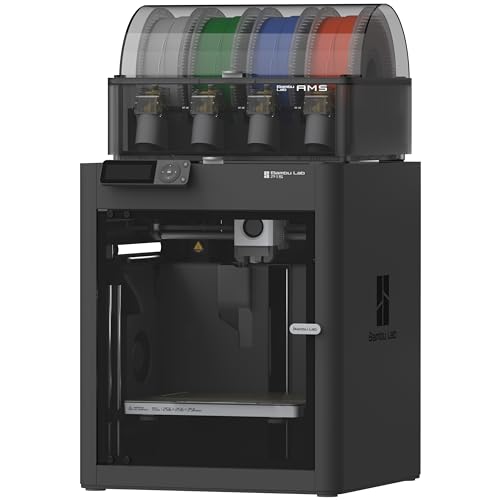
- Up to 16-color printing with AMS
- Speeds up to 500 mm/s
- Enclosed design and auto leveling
Best For: Colorful prototypes and presentation models
Best for Simple Workflows

- Automatic calibration and pre-print checks
- CoreXY speeds up to 500 mm/s
- Remote monitoring via ELEGOO Matrix
Best For: Beginner-friendly office prototyping
Best Advanced Office Pick

- Up to 600 mm/s high-speed precision
- AMS 2 Pro drying and multi-color printing
- AI detection and adaptive airflow
Best For: Detailed prototypes and varied materials
Best Beginner Pick

- Fully assembled and ready to start in as little as 8 minutes
- Auto-leveling with WiFi and TF card printing
- Compact, quiet design with a 3.9-inch build volume
Best For: Small offices, beginners, STEM activities, and compact projects
Best for Multicolor Prototyping

- Up to 600mm/s printing with a 260mm cubed build volume
- Four colors standard, expandable to up to 19 colors
- AI camera monitoring and 49-point automatic leveling
Best For: Design teams, larger prototypes, classrooms, and multicolor projects
Best Compact CoreXY Option

- Four-color printing with no complicated upgrades
- 500mm/s CoreXY speed and automatic leveling
- Print safeguards for runout, tangles, power loss, and failures
Best For: Home offices, classrooms, makerspaces, and fast multicolor projects
Fast Enclosed Workhorse – Bambu Lab P1S
For teams comparing 3d printers for office use, the Bambu Lab P1S is a practical ready-to-use option with fast print speeds, automatic bed leveling, and an enclosed design. It can be set up in about 15 minutes and supports common materials such as PLA, PETG, and TPU.
Best For: Offices that want quick setup, dependable automation, and an enclosed printer for a range of everyday prototypes.
Pros:
- Print speeds up to 500mm/s with 20,000mm/s² acceleration.
- Enclosed body helps improve performance with advanced filaments.
- Automatic bed leveling simplifies print preparation.
- Optional AMS support enables multi-color and multi-material printing.
Cons:
- Multi-color printing requires connecting the Bambu Lab AMS.
- Carbon- and glass-fiber-reinforced polymers are not recommended.
- At 38.9 pounds, it is less convenient to move between work areas.
The P1S is a strong office choice when speed and ease of use matter more than portability. Its enclosure and automation make it especially suitable for repeat printing, while AMS compatibility leaves room for more advanced presentation models.
Compact Four-Color Producer – FLASHFORGE AD5X
The FLASHFORGE AD5X stands out among 3d printers for office use for its combination of four-color printing, high speed, and compact placement options. Its CoreXY structure, automatic leveling, and filament backup features are designed to reduce hands-on intervention during production.
Best For: Small offices and creative teams that need compact multi-color printing with flexible material support.
Pros:
- Supports four-color and multi-material printing through the Intelligent Filament System.
- Reaches speeds up to 600mm/s with 20,000mm/s² acceleration.
- Full-auto leveling helps produce a consistent first layer.
- Compact 22-pound design saves workspace and simplifies placement.
Cons:
- Four-spool operation depends on the included Intelligent Filament System setup.
- Its broad material list may require more planning than a basic PLA-only workflow.
With its space-saving layout and color-focused workflow, the AD5X is well suited to offices creating visual models, labels, or presentation pieces. The rigid CoreXY design and vibration compensation also support cleaner results at high speed.
Quiet Beginner-Friendly Choice – Bambu Lab A1
The Bambu Lab A1 is an approachable option for 3d printers for office use, combining automatic calibration, a simplified touchscreen, and quiet operation. It is designed to make routine printing straightforward while still offering high-speed precision and optional multi-color capability.
Best For: Offices, classrooms, and beginner users who value simple setup, quiet operation, and automated calibration.
Pros:
- Full-auto calibration handles Z-offset, bed leveling, and related adjustments.
- Active flow rate compensation supports smooth, consistent prints.
- Quiet motor noise canceling helps limit workplace disruption.
- One-clip nozzle swapping simplifies maintenance.
Cons:
- AMS lite is required for multi-color printing and is not included unless purchasing the Combo.
- The supplied notes do not identify an enclosed design for the printer.
- Its 21.76-inch depth and 20.83-inch width require substantial desk space.
The A1 makes a compelling case for shared workspaces where ease of use and noise control are priorities. It is particularly attractive for teams that want automated calibration without giving up the option to add multi-color printing later.
Filtered High-Speed Professional – FLASHFORGE Adventurer 5M Pro
For offices needing fast, enclosed 3d printers for office use, the FLASHFORGE Adventurer 5M Pro combines a CoreXY frame with automatic leveling, dual filtration, and quiet operation. Its high-temperature extruder supports standard and several engineering-oriented materials, while the built-in camera enables remote progress monitoring.
Best For: Professional offices and classrooms that need fast enclosed printing, broader material compatibility, and convenient monitoring.
Pros:
- Prints at up to 600mm/s with 20,000mm/s² acceleration.
- Fully enclosed chamber and dual filtration support a cleaner printing environment.
- 280°C extruder and 110°C heated bed support ABS, ASA, PETG-CF, PLA, and PETG.
- Built-in camera, filament detection, and power-loss recovery add workflow convenience.
Cons:
- Its 16 x 14 x 18-inch footprint may require dedicated desk space.
- The broad engineering-material capability may be unnecessary for simple office prints.
- Multi-color printing is not identified among the supplied features.
The Adventurer 5M Pro is a well-rounded choice when an office needs speed without giving up enclosure, filtration, or monitoring features. Its quick-swap nozzle and one-click leveling further reduce routine maintenance between jobs.
Top Multi-Color Pick – Bambu Lab P1S Combo
For offices seeking versatile 3d printers for office use, the Bambu Lab P1S Combo combines high-speed printing with an enclosed design and included AMS support for multi-color or multi-material projects.
Best For: Teams producing colorful prototypes, presentation models, and general office projects.
Pros:
- Supports multi-color and multi-material printing with the connected AMS, with up to 16 colors.
- Prints at speeds up to 500 mm/s with 20,000 mm/s² acceleration.
- Enclosed design, automatic bed leveling, and a setup time of about 15 minutes simplify operation.
Cons:
- The AMS is required for the advertised multi-color capability.
- Carbon- and glass-fiber-reinforced polymers are not recommended.
- At 47.5 pounds, it is relatively heavy to relocate.
The P1S Combo is a strong office choice when color flexibility and fast turnaround matter. Its enclosure and automatic leveling reduce day-to-day setup demands, while its filament support covers many common materials.
Best for Simple Workflows – ELEGOO Centauri 2
The ELEGOO Centauri 2 is a practical option among 3d printers for office use, pairing automatic calibration and pre-print checks with a fast CoreXY platform and remote workflow tools.
Best For: Offices that want beginner-friendly printing for prototypes, models, and recurring everyday projects.
Pros:
- Automatic calibration and smart pre-print checks reduce setup work.
- Reaches speeds up to 500 mm/s with 20,000 mm/s² acceleration.
- Supports remote monitoring through the ELEGOO Matrix app and file preparation with ElegooSlicer.
- A 5-inch touchscreen and maintenance-focused features simplify daily use.
Cons:
- The supplied notes do not specify an enclosed chamber or multi-color printing system.
- Its workflow depends on ELEGOO software and app tools for the described remote features.
With calibration, preflight checks, and accessible controls, the Centauri 2 is well suited to shared office environments where several users may need to start jobs quickly. Its remote monitoring adds convenience for teams managing prints during the workday.
Best Advanced Office Pick – Bambu Lab P2S Combo
For demanding 3d printers for office use applications, the Bambu Lab P2S Combo offers high-speed precision, AI failure detection, adaptive airflow, and AMS 2 Pro multi-color printing with filament drying.
Best For: Offices producing detailed prototypes and models across a broad range of materials.
Pros:
- Prints at speeds up to 600 mm/s with active flowrate compensation for consistent detail.
- AMS 2 Pro enables multi-color and multi-material printing and dries filament at up to 65 °C.
- Automatic calibration, quick-swap nozzles, and AI failure detection support easier operation.
- Adaptive airflow can cool overhangs or maintain a chamber temperature of 50 °C for engineering-grade materials.
Cons:
- Multi-color printing requires the Combo version with AMS 2 Pro.
- The printer weighs 46.3 pounds and measures 18 by 22 by 18 inches, so it needs a stable permanent location.
- The supplied notes do not identify which specific engineering filaments are supported.
The P2S Combo is the most feature-rich choice here for offices balancing speed, surface quality, material flexibility, and workflow automation. Its airflow control and filament-drying system make it particularly appealing for teams with varied printing requirements.
Best Beginner Pick – Entina Tina2C
For offices introducing 3D printing to beginners, the Entina Tina2C emphasizes a quick, low-friction setup. This compact option for 3d printers for office use includes guided app support, automatic leveling, WiFi printing, and a small footprint suited to shared workspaces.
Best For: Small office teams, beginners, STEM activities, and compact creative workspaces.
Pros:
- Fully assembled design can be ready to print in as little as 8 minutes.
- Auto-leveling, power-loss recovery, and a flexible magnetic build plate simplify operation.
- Supports app-based WiFi printing, TF card printing, and a library of more than 3,500 models.
- Compact, quiet design works well in offices where space and noise matter.
Cons:
- The 3.9 × 3.9 × 3.9-inch print volume limits larger office prototypes.
- Its feature set and compact size are geared more toward small projects than demanding production work.
The Tina2C is a practical starting point when ease of use, quiet operation, and a small footprint matter more than build volume. It is best suited to quick models, learning projects, and light office creativity.
Best for Multicolor Prototyping – Anycubic Kobra X
The Anycubic Kobra X is a strong choice for offices that need larger, faster, and more visually versatile prints. Among 3d printers for office use, it stands out with high-speed printing, expandable multicolor capability, automatic leveling, and support for several materials.
Best For: Design teams, classrooms, offices producing larger prototypes, and multicolor model work.
Pros:
- Prints at speeds up to 600mm/s with a 260 × 260 × 260mm build volume.
- Supports four colors standard and can expand to as many as 19 colors with additional ACE 2 Pro units.
- 49-point automatic leveling and vibration compensation help simplify first-layer setup.
- AI monitoring includes object detection, spaghetti detection, and real-time camera viewing.
Cons:
- At 20.9 pounds and roughly 18 inches in each dimension, it needs more dedicated office space.
- Its broader material and multicolor capabilities may be more than a basic office workflow requires.
The Kobra X makes the most sense when an office values throughput, larger models, and color flexibility. Its monitoring and recovery features also support longer unattended projects, while the 300°C hardened-steel-nozzle setup broadens material options.
Best Compact CoreXY Option – Creality K2 SE 4C
The Creality K2 SE 4C combines four-color printing with a fast CoreXY platform and office-friendly automation. For 3d printers for office use, its reduced footprint, automatic leveling, and print-protection features make it suitable for teams handling prototypes, educational models, and creative parts.
Best For: Home offices, classrooms, makerspaces, and teams that want fast multicolor printing.
Pros:
- Built-in four-color printing requires no complicated upgrades or extra assembly.
- CoreXY motion reaches up to 500mm/s with 20,000mm/s² acceleration.
- Automatic leveling and an all-metal frame support consistent first layers and reduced vibration.
- Runout, tangle, power-loss, and partial-failure features help protect longer prints.
Cons:
- Its 35.5-pound weight makes it less convenient to relocate between office areas.
- The approximately 14.46-inch square footprint and 18.96-inch height still require a dedicated surface.
- Advanced Creality OS, Fluidd, root-access, and offline USB options may require extra learning.
The K2 SE 4C is a capable middle ground for offices that want multicolor output without a traditional, larger system footprint. It offers fast production and useful safeguards, while its advanced controls leave room for experienced users to customize workflows.
How We Picked the Best 3d Printers for Office Use
We focused on practical office requirements rather than headline specifications alone. Each selected printer offers a combination of straightforward setup, automated calibration, useful print speeds, accessible software, and features that can reduce day-to-day maintenance. We also considered whether the design is appropriate for shared spaces, including enclosure options, noise considerations, connectivity, and the ability to handle common materials.
The list spans several use cases and budgets. Compact beginner models can suit occasional educational or light-duty work, while enclosed and multi-material printers are better for offices producing frequent prototypes, functional components, or presentation-ready models.
Quick Comparison
- Best overall flexibility: Bambu Lab P1S and P1S Combo offer fast, ready-to-use printing, with the Combo adding multi-color capability.
- Best for beginners: Bambu Lab A1, ELEGOO Centauri 2, and Entina Tina2C emphasize simple setup and automated calibration.
- Best for speed-focused teams: FLASHFORGE AD5X, Adventurer 5M Pro, and Creality K2 SE target rapid prototyping.
- Best for multi-color workflows: Bambu Lab P2S Combo, P1S Combo, Anycubic Kobra X, and Creality K2 SE provide color-oriented options.
Key Buying Factors for 3d Printers for Office Use
Reliability and Automation
Auto-leveling, automatic calibration, filament monitoring, and dependable first-layer performance are especially valuable when several people share one machine. These features reduce setup errors and help limit interruptions during unattended prints.
Materials and Enclosure Design
PLA is suitable for many models and visual prototypes, while PETG and tougher materials may be useful for functional parts. An enclosed printer can help maintain a stable printing environment and may be more appropriate for offices, but it still needs ventilation and safe operating practices.
Speed, Build Volume, and Workflow
Higher speed is helpful for prototypes, but only when print quality remains consistent. Check the build volume against the objects you actually produce, and consider Wi-Fi control, remote monitoring, software compatibility, and the ease of changing filament.
Noise, Footprint, and Maintenance
Measure the available workspace before buying. A compact printer may fit a desk or classroom, whereas a larger enclosed or multi-color system needs additional clearance. Also account for replacement nozzles, build plates, filament storage, and routine cleaning.
Who Should Buy Which 3d Printers for Office Use?
Choose a compact beginner model if the printer will be used occasionally for simple projects, training, or classroom demonstrations. Choose a fast enclosed printer if your team regularly produces prototypes and values a cleaner, more controlled workspace. Choose a multi-color system if visual differentiation, labels, mockups, or presentation models are central to your workflow. Choose a higher-capability combo model if multiple users need one versatile machine for both single-material functional parts and polished multi-color prints.
Before ordering, confirm supported filament types, electrical requirements, software compatibility, warranty terms, and the manufacturer’s current accessory availability. For most offices, a reliable automated printer that people will actually use is a better investment than a faster model with a steeper learning curve.