
Finding a Secret Santa gift for a gamer is easier when you start with how they play: at a PC desk, on a console, or with friends in the room. These picks range from small workspace upgrades to larger setup gifts, so check compatibility and available space before choosing.
Secret Santa Gift Ideas for Gamers
1. COMHOMA Big and Tall Ergonomic Gaming Chair
A More Adjustable Gaming Seat
COMHOMA Big and Tall Ergonomic Gaming Chair

- Wide seat and backrest with padded support and faux leather upholstery.
- Height-adjustable armrests, reclining positions, and an integrated footrest.
- Designed for indoor use and requires assembly.
Best For: A desk gamer who wants an adjustable seat for longer sessions.
2. Z-Edge 27-Inch Curved QHD Gaming Monitor
A Sharper, Smoother PC Display
Z-Edge 27-Inch Curved QHD Gaming Monitor

- 27-inch curved screen with 2560 × 1440 QHD resolution.
- Refresh rate reaches 165Hz through DisplayPort and 144Hz through HDMI.
- Has two HDMI inputs, one DisplayPort, and a 100 × 100mm mount pattern.
Best For: A PC gamer whose setup supports QHD and high refresh rates.
3. Nylavee 2.1 Computer Speakers with Subwoofer
Desktop Audio with Added Bass
Nylavee 2.1 Computer Speakers with Subwoofer

- 2.1-channel desktop system with a separate subwoofer.
- Connects by USB, AUX, or Bluetooth 5.4.
- Offers eight RGB lighting modes and a rotary control for power, volume, and modes.
Best For: A gamer who likes room audio for games, movies, and music.
4. SOLAKAKA SM600 Tri-Mode Wireless Gaming Mouse
Flexible Mouse for Mixed Setups
SOLAKAKA SM600 Tri-Mode Wireless Gaming Mouse

- Connects by 2.4GHz wireless, Bluetooth, or USB-C cable.
- Seven programmable buttons and six selectable DPI levels.
- Rechargeable battery, honeycomb shell, and switchable RGB lighting.
Best For: A PC gamer who values configurable controls and multiple connection options.
5. Acer Wireless Gaming Headset with Flip-to-Mute Mic
6. ActionRing Stream Dock N1 Macro Pad
7. Quntis Curved Monitor Light Bar
Lighting for a Wide Monitor
Quntis Curved Monitor Light Bar

- Foldable dual light bar extends up to 26 inches for 34-inch-plus curved or large flat screens.
- Front light has stepless brightness and color temperature adjustment.
- Includes RGB backlighting with 15 modes and a monitor clamp.
Best For: A desk gamer with a large monitor who wants adjustable lighting.
8. Redragon K668 108-Key Hot-Swap Gaming Keyboard
A Keyboard They Can Customize
Redragon K668 108-Key Hot-Swap Gaming Keyboard

- Full-size wired keyboard with 108 keys and four dedicated shortcut keys.
- Hot-swap sockets accept many 3-pin or 5-pin switches without soldering.
- Includes two keycap sets and RGB lighting modes.
Best For: A PC player who enjoys customizing a mechanical keyboard.
9. Acer USB 3.0 HDMI Capture Card
A Starter Tool for Gameplay Capture
Acer USB 3.0 HDMI Capture Card

- Accepts 4K HDMI input and supports up to 1080p at 60Hz output.
- Has USB-A and USB-C connections plus a 3.5mm mic input.
- Listed for use with consoles, cameras, PCs, OBS, and other capture apps.
Best For: A gamer who wants to record or stream supported gameplay sources.
10. Yodoit 15.6-Inch Portable FHD Monitor
A Second Screen That Travels
Yodoit 15.6-Inch Portable FHD Monitor

- 15.6-inch 1920 × 1080 IPS display with a smart cover and built-in speakers.
- Offers USB-C and Mini HDMI connection options.
- Listed as compatible with laptops, Xbox, PS5, and some phones.
Best For: A gamer who travels with a laptop or wants a portable second screen.
11. AREYLO Extended Gaming Mouse Pad
More Room for Mouse Movement
AREYLO Extended Gaming Mouse Pad

- 31.5 × 15.7-inch surface fits a keyboard and mouse.
- Non-slip rubber base and stitched edges.
- Water-resistant coating can be wiped clean with a damp cloth.
Best For: A desk gamer who wants a larger, coordinated surface for keyboard and mouse.
12. HORI PlayStation Fighting Stick Alpha
Arcade Controls for Fighting Games
HORI PlayStation Fighting Stick Alpha
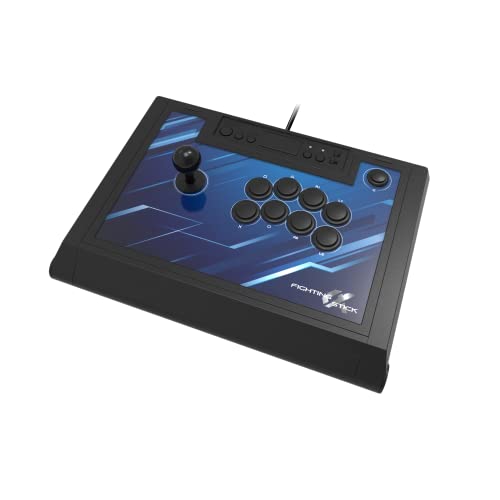
- Arcade-style stick listed for PlayStation 5, PlayStation 4, and PC.
- Opens for customization and maintenance, with replaceable top-panel artwork.
- Includes Hayabusa buttons and joystick.
Best For: A fighting-game fan who prefers arcade controls.
13. BenQ TH671ST Short-Throw Projector
Bring Gameplay to a Bigger Screen
BenQ TH671ST Short-Throw Projector

- Native 1080p projector with a listed brightness of 3000 lumens.
- Can project a 100-inch image from five feet and supports images up to 300 inches.
- Includes HDMI connectivity and is listed for use with gaming consoles and laptops.
Best For: A gamer with room for a large projected image and a compatible source.
Choosing a Secret Santa Gift for a Gamer
Start with the person’s setup and habits rather than guessing their favorite game. A desk gamer may appreciate a mouse pad, mouse, keyboard, speakers, or monitor light. Someone who plays multiplayer games may get more use from a headset with a flip-to-mute microphone. For a player who shares clips or streams, a capture card or programmable keypad can support that hobby. A fight stick is a more specialized pick, best suited to someone who already enjoys fighting games or arcade-style controls.
When you do not know their exact setup, choose an accessory with a clear, easy-to-check fit. A desk mat or speakers may be simpler to place than a monitor or chair, which require space and may need adjustments. Larger gifts such as a projector or gaming chair can be thoughtful, but they depend on room layout and the recipient’s existing equipment. If possible, ask a mutual friend what platform or kind of gaming they use without giving away the surprise.
Budget and Gift Scale
Secret Santa budgets vary, so match the scale of the gift to the agreed limit. Smaller workspace additions, such as an extended mouse pad, can be useful without asking the recipient to reorganize a room. A mouse, keyboard, or headset is a more personal upgrade because preferences for shape, feel, and controls vary. Big items like chairs, monitors, and projectors make sense when the group has agreed on a higher limit and you know there is room for them.
Consider whether the gift needs anything else to be useful. A capture card depends on a source device, a compatible computer, and recording software. A projector needs a suitable surface and enough distance; its listing gives five feet as the throw distance for a 100-inch image. Speakers require a place for both the main units and subwoofer. Checking those practical details helps avoid giving a technically appealing item that is awkward to set up.
Compatibility and Personalization
Check the product’s listed connections against the gamer’s devices. The monitor offers HDMI and DisplayPort, with its highest listed refresh rate available through DisplayPort. The portable monitor uses USB-C or Mini HDMI, and its USB-C single-cable use depends on the connected device supporting video output. The capture card requires a USB 3.0 port for USB 3.0 operation and lists a range of consoles and computers. These details can make a difference even when a product broadly mentions gaming compatibility.
Personal touches can come from choosing a useful feature that suits their style. The keyboard includes two keycap sets and customizable lighting; the mouse has programmable buttons and selectable lighting; the macro pad allows custom icons on its LCD keys. For a more restrained desk, a mouse pad or speakers may fit into an existing setup without asking them to change how they play. Avoid assuming a specific color preference or game unless you know it.
Timing and Last-Minute Decisions
For a last-minute decision, prioritize gifts whose fit is easiest to confirm: a desk mat, speakers with familiar connections, or a mouse for a PC user you know well. For more specialized gear, quickly verify the platform, ports, screen size, and available space before buying. Plan time for setup on gifts that need assembly or software configuration, such as the chair or macro pad. A short note explaining why you picked the item can make even a practical accessory feel personal.
If uncertainty remains, think about what would be enjoyable without changing the recipient’s routine. Good Secret Santa gift ideas for gamers do not have to feature Christmas designs or match a particular game. A useful upgrade for their desk, audio, controls, or shared play space can make a thoughtful Christmas gift when it fits the person and the equipment they already use.