
The best productivity gifts help someone work in a way that suits their routine, whether that means clearer notes, a tidier desk, or a more flexible setup. These ideas range from small workspace helpers to substantial equipment for home offices and study spaces.
Productivity Gifts for Work, Study, and Focus
1. VIWOODS AiPaper E Ink Tablet with Stylus
A Paper-Like Space for Notes
VIWOODS AiPaper E Ink Tablet with Stylus

- 10.65-inch E Ink screen for reading documents and ebooks with reduced glare.
- Included stylus supports handwriting, PDF annotation, sketches, and document markup.
- Reading and note tools include summarizing, translation, and meeting-note organization.
Best For: A student or professional who prefers handwritten notes and long-form reading
2. Maxtek 72 x 48-Inch Magnetic Glass Whiteboard
Room to Map Out Big Projects
Maxtek 72 x 48-Inch Magnetic Glass Whiteboard

- Large frameless glass writing surface suits planning, brainstorming, and teaching.
- Mounts vertically or horizontally and includes markers, an eraser, and strong magnets.
- Designed for strong neodymium magnets; ordinary refrigerator magnets may not hold firmly.
Best For: A team lead or visual planner with suitable wall space
3. Anker Prime 14-in-1 Dual-Monitor Dock
A Simpler Hub for Desk Devices
Anker Prime 14-in-1 Dual-Monitor Dock

- Combines connections for charging, data transfer, audio, Ethernet, and displays.
- Dual HDMI supports two displays, with output depending on the laptop’s DisplayPort version.
- Supports USB-C, USB4, and Thunderbolt; check operating system and laptop compatibility.
Best For: A laptop user connecting multiple displays and peripherals
4. TRALT Ergonomic Office Chair with Adjustable Lumbar
A More Supportive Desk Seat
TRALT Ergonomic Office Chair with Adjustable Lumbar
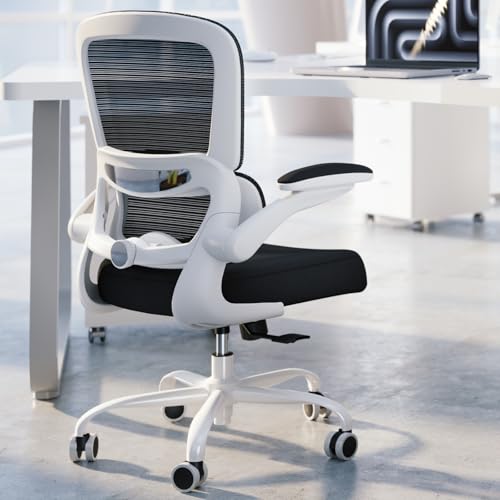
- Adjustable lumbar support lets the user change the support depth.
- Breathable mesh back and high-resilience molded foam seat are specified in the product notes.
- The notes list a 17.7–21.7-inch seat-height range and a 19.7-inch seat width.
Best For: Someone who spends extended time working at a desk
5. FLEXISPOT EN1 Electric Standing Desk, 48 x 24 Inches
Flexible Sit-Stand Work Surface
FLEXISPOT EN1 Electric Standing Desk, 48 x 24 Inches
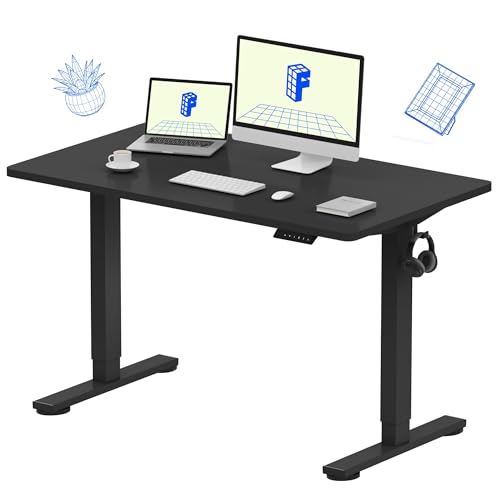
- Electric height adjustment spans about 28.9 to 46.5 inches, with four memory presets.
- One-piece desktop measures 48 by 24 inches and supports up to 176 pounds, per the notes.
- Designed for laptop, monitor, and accessory setups; includes cable clips and a headphone hook.
Best For: A remote worker or student who wants to alternate sitting and standing
6. HUANUO FlowLift Dual Monitor Desk Mount
Clear More Space Below Two Screens
HUANUO FlowLift Dual Monitor Desk Mount

- Adjustable arms fit monitors from 13 to 32 inches, within the listed weight and VESA limits.
- Supports tilt, swivel, rotation, and height adjustment for positioning screens.
- Mounts by clamp or grommet; check desk material, thickness, and underside clearance first.
Best For: A desk worker with two compatible monitors
7. EMEET NOVA 4K Webcam with Autofocus
A Clearer Setup for Video Calls
EMEET NOVA 4K Webcam with Autofocus

- Supports 4K at 30 frames per second, though the default resolution is 1080p.
- Includes autofocus, automatic light adjustment, dual microphones, and a privacy cover.
- USB connection and compatibility notes cover major meeting apps and several operating systems.
Best For: A remote professional or frequent video-call participant
8. JADENS Wireless Thermal Shipping Label Printer
A Practical Tool for Packing Orders
JADENS Wireless Thermal Shipping Label Printer

- Prints monochrome labels thermally without ink or toner, using roll or fanfold labels.
- Connects by USB, with Bluetooth printing support varying by computer or mobile device.
- Made for shipping and other labels, with media widths from about 1.57 to 4.1 inches.
Best For: An online seller or small business owner who ships packages
9. Univivi 36-Inch Under-Desk Cable Tray
A Tidier Route for Desk Cables
Univivi 36-Inch Under-Desk Cable Tray

- 36-inch fabric tray is designed to hold and conceal adapters, sockets, and cables.
- Installs with clamps or screws, with built-in ties to secure items in the tray.
- Check desk dimensions and leave at least 5.3 inches of edge clearance if drawers or a back rod are present.
Best For: Someone setting up or tidying a home office
10. Yodoit 15.6-Inch Portable FHD Monitor
A Second Screen That Travels
Yodoit 15.6-Inch Portable FHD Monitor

- 15.6-inch 1920 x 1080 IPS display has a matte finish and built-in speakers.
- Connects by USB-C or by Mini HDMI with a separate USB power connection, depending on the device.
- Includes a smart cover and is designed for laptop work, travel, and presentations.
Best For: A traveler or laptop worker who wants an extra screen away from home
11. Redragon K671KS Wireless Mechanical Keyboard
A Customizable Typing Upgrade
Redragon K671KS Wireless Mechanical Keyboard
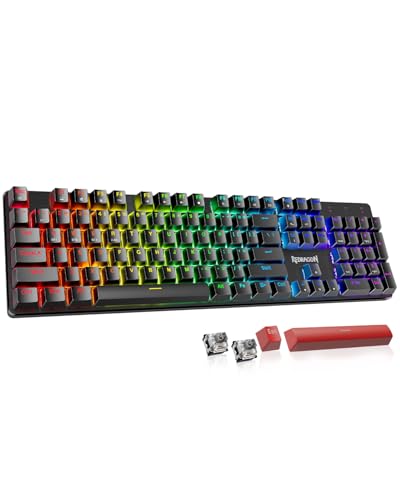
- Connects by USB-C, Bluetooth, or 2.4 GHz wireless, with switching among up to five devices.
- Hot-swappable switches, spare switches, and programmable macros allow some customization.
- Includes adjustable RGB backlighting and PBT keycaps.
Best For: A writer, programmer, or frequent computer user who enjoys mechanical keyboards
12. Nulea M501 Wireless Trackball Mouse
A Different Way to Move the Cursor
Nulea M501 Wireless Trackball Mouse

- Thumb-operated trackball moves the cursor without moving the mouse across the desk.
- Connects to up to three devices using Bluetooth or the included USB receiver.
- Rechargeable design has six buttons; the buttons are not programmable.
Best For: A computer user interested in a trackball and compact desk setup
13. BOHON LED Desk Lamp with USB-C and Wireless Charging
Task Lighting with Charging Built In
BOHON LED Desk Lamp with USB-C and Wireless Charging

- Offers five color temperatures, stepless dimming, and a flexible lamp neck.
- Includes USB-A and USB-C ports plus a 12-watt wireless charging panel.
- Wireless charging may be affected by thick phone cases; the lamp also has a 30-minute timer.
Best For: A desk worker upgrading a home workspace or study area
14. KVIDIO Over-Ear Active Noise-Canceling Headphones
A Quieter Listening Space
KVIDIO Over-Ear Active Noise-Canceling Headphones

- Active noise cancellation and transparency mode suit changing work or study settings.
- Battery-life claims are up to 40 hours with noise cancellation or 70 hours in standard mode.
- Includes Bluetooth, a USB-C charging cable, and a 3.5 mm audio cable.
Best For: A student or remote worker focusing in shared spaces
15. Lawei Two-Pack Adjustable Document Holders
Keep Reference Pages in View
Lawei Two-Pack Adjustable Document Holders

- Two holders fold flat and include a removable document clip and clear line guide.
- Seven tilt positions adjust the viewing angle while reading, typing, or transcribing.
- Sized for letter, legal, and A4 documents; each is listed to hold up to 150 sheets.
Best For: A student or professional who refers to printed pages while typing
16. LG 34-Inch Curved UltraWide WQHD Monitor
One Wide View for Many Tasks
LG 34-Inch Curved UltraWide WQHD Monitor

- 34-inch curved display has 3440 x 1440 resolution and a 21:9 aspect ratio.
- OnScreen Control supports workspace splitting and Picture-by-Picture from two sources.
- USB-C offers up to 65W power delivery; the stand adjusts for height and tilt.
Best For: A multitasker who keeps several documents or apps open
17. SanDisk Extreme Portable 2TB SSD
Portable Space for Work Files
SanDisk Extreme Portable 2TB SSD
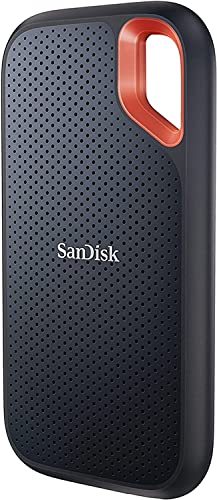
- 2TB portable solid-state drive connects over USB and supports USB 3.2 Gen 2.
- The supplied notes list read speeds up to 1050 MB/s and write speeds up to 1000 MB/s.
- Includes password protection with 256-bit AES hardware encryption and a carabiner loop.
Best For: A photographer, creator, or professional managing large files
18. Amazon Basics 200-Sheet Auto-Feed Cross-Cut Shredder
A Paperwork Reset for the Home Office
Amazon Basics 200-Sheet Auto-Feed Cross-Cut Shredder

- Auto-feed tray handles up to 200 sheets; manual feed handles up to 10 sheets.
- Cross-cut output is listed as P-4, with a pull-out 8.5-gallon bin.
- Includes anti-jam auto reverse and an automatic-feed run time of up to 60 minutes before cooldown.
Best For: A home-office worker who regularly disposes of sensitive paperwork
Choosing Productivity Christmas Gifts for This Recipient
Start with the recipient’s daily friction point. Someone who reads, annotates, and plans may use an E Ink tablet or a document stand more often than another screen. A person with a fixed home office might benefit from a whiteboard, cable tray, or adjustable desk. For a remote worker who moves between locations, a portable monitor, webcam, or headphones may fit more naturally.
Think about the whole setup before choosing a large item. A monitor arm needs compatible VESA holes, screen size and weight, and a desk that can accept its clamp or grommet mount. A docking station depends on the laptop’s USB-C, USB4, or Thunderbolt support and video capabilities. For a monitor, verify the available ports and whether the recipient has enough desk space. These checks make productivity Christmas gift ideas more useful because the gift can work within the tools and room the recipient already has.
Match the Gift to Your Budget
Smaller workspace accessories can make thoughtful gifts without changing someone’s entire setup. A document holder, trackball, desk lamp, or cable tray can address a specific routine. Headphones and keyboards are more personal because comfort, sound preferences, typing feel, and layout vary, so look for clear compatibility details and consider the recipient’s known preferences.
Furniture and large displays are bigger commitments. Before selecting a chair or standing desk, measure the room and consider the recipient’s height, sitting habits, and available floor space. A whiteboard also needs a suitable wall and a plan for mounting. An ultrawide monitor can consolidate several open windows, but it needs a desk wide enough to accommodate its footprint. If dimensions or preferences are uncertain, a smaller accessory tied to a real work habit is often easier to choose confidently.
Check Compatibility and Personalization
Compatibility is often the most important part of a tech gift. For a dock, check the laptop’s operating system, USB-C video support, and how many external screens it can drive. The Anker dock notes different dual-display behavior on macOS and does not support Linux. For portable monitors, confirm the laptop or phone has the required video output, or that an HDMI connection and separate power arrangement will work.
Personal fit matters as much as technical fit. Chairs, keyboards, pointing devices, and headphones all depend on comfort and preference. Consider whether the recipient already likes mechanical keys or trackballs, and whether an adjustable chair fits the person and desk. A lamp or organizer is easier to personalize around a room’s color and layout. When in doubt, choose a gift that supports an existing habit instead of asking the recipient to adopt a new workflow.
Timing and Last-Minute Decisions
For Christmas shopping, leave time to check measurements, ports, desk construction, and mounting needs. A large desk, chair, whiteboard, or monitor can require planning and room rearrangement. Smaller items such as a document holder, keyboard, lamp, or headphones may be simpler decisions, but verify the recipient’s device connections and preferences before ordering. Product listings can change, so review current details and delivery estimates directly when you shop.
If time is short, focus on a need the recipient has already mentioned: paper clutter, crowded laptop screens, video-call setup, or a desk covered in cables. A practical gift earns its place by fitting naturally into the workday. The strongest productivity Christmas gift ideas are the ones that make a familiar task easier and feel comfortable to use after the holiday season.