
A useful gaming gift can improve a player’s desk, add a new way to play, or make voice chat and streaming easier. The right choice depends on their devices, available space, and the games they enjoy.
Gaming Accessory Gifts for 2026
1. Electric Standing Gaming Desk with Cable Management
A Full Setup Upgrade
Electric Standing Gaming Desk with Cable Management

- 60 × 30-inch height-adjustable surface with three saved presets.
- Flip-top cable panel, two storage baskets, desk pad, and clamp power strip are included.
- Supports up to 250 pounds and adjusts from 27.7 to 45.5 inches.
Best For: A PC gamer refreshing a home gaming or work space.
2. ELABEST X100 Ergonomic Mesh Chair with Footrest
A More Adjustable Gaming Seat
ELABEST X100 Ergonomic Mesh Chair with Footrest

- Includes adjustable lumbar support, a headrest, and flip-up armrests.
- Three-stage recline pairs with an extendable footrest.
- Breathable mesh and adjustable seat height suit a desk setup.
Best For: A desk-based gamer with room for a full-size chair.
3. KYY 15.6-Inch Portable 1080p Monitor
Extra Screen for Gaming on the Go
KYY 15.6-Inch Portable 1080p Monitor

- 15.6-inch 1080p display with a 60Hz refresh rate.
- USB-C and mini-HDMI connections support compatible devices, including laptops and consoles.
- Foldable cover doubles as a stand; cables and a screen protector are included.
Best For: A gamer who travels or wants another screen for a compatible device.
4. HUANUO Single Monitor Arm
A Flexible Monitor Position

- Fits monitors weighing 4.4 to 19.8 pounds with 75 × 75 or 100 × 100 VESA patterns.
- Adjusts with tilt, swivel, and rotation.
- Includes clamp and grommet mounting options.
Best For: A gamer with a compatible monitor and desk who wants to reposition the screen.
5. Redragon K668 Hot-Swap RGB Gaming Keyboard
A Customizable Keyboard Gift
Redragon K668 Hot-Swap RGB Gaming Keyboard

- Full-size wired keyboard with hot-swappable switch sockets.
- Includes RGB lighting modes and two sets of keycaps.
- Four shortcut keys can be reassigned with the software.
Best For: A PC gamer who enjoys personalizing a keyboard and desk setup.
6. EasySMX X05Pro Wireless Gaming Controller
A Controller for Multiple Devices
EasySMX X05Pro Wireless Gaming Controller

- Compatible with Windows PC, Switch, Android, and iOS; the listing excludes Xbox and PlayStation.
- Connects by USB-C, 2.4G wireless, or Bluetooth.
- Features quiet buttons, programmable top buttons, and Hall Effect joysticks.
Best For: A gamer who plays on more than one listed compatible device.
7. TIDALSOIL Extended RGB Gaming Mouse Pad
A Colorful Desk Mat
TIDALSOIL Extended RGB Gaming Mouse Pad

- 31.5 × 11.8-inch surface fits a keyboard and mouse.
- Offers 12 RGB lighting modes and remembers the last selected mode.
- USB powered, with a non-slip rubber base and stitched edges.
Best For: A gamer who wants a larger mouse area and desk lighting.
8. Redragon M656 Wireless Gaming Mouse
Cable-Free Mouse Control
Redragon M656 Wireless Gaming Mouse
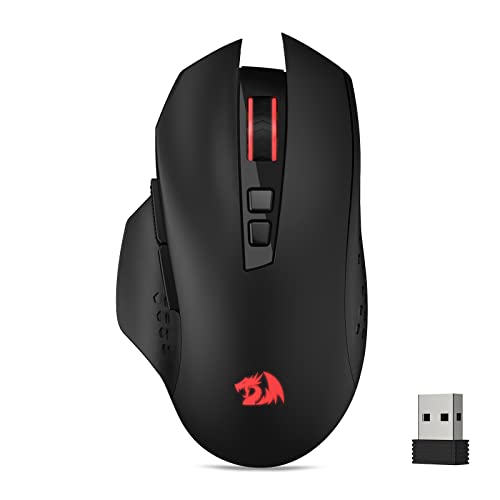
- Connects to a PC through a 2.4GHz wireless receiver.
- Offers five adjustable DPI levels from 1,000 to 4,000.
- Seven buttons can be programmed; one AA battery is required and not included.
Best For: A PC gamer who prefers wireless mouse movement and customizable buttons.
9. Anker 8-in-1 USB-C Docking Station
More Connections at the Desk
Anker 8-in-1 USB-C Docking Station

- Adds dual HDMI, USB-A, Ethernet, card-reader, and USB-C charging connections.
- Can connect one display at up to 4K 60Hz or two at up to 4K 30Hz.
- Requires a compatible USB-C laptop; charger and USB-C cable for pass-through charging are not included.
Best For: A gaming laptop owner connecting peripherals and displays at a desk.
10. Logitech G29 Racing Wheel and Pedals
A Driving Game Upgrade
Logitech G29 Racing Wheel and Pedals
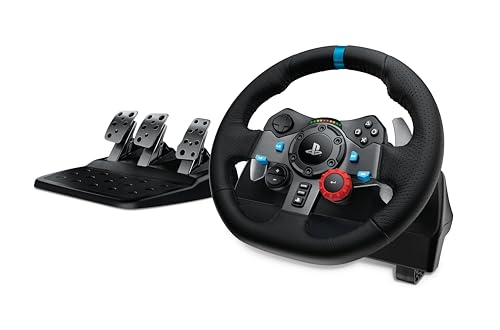
- Compatible with PS5, PS4, and PC gaming titles.
- Includes a force-feedback wheel and pressure-sensitive pedals.
- The wheel offers 900-degree lock-to-lock rotation and adjustable pedal faces.
Best For: A racing-game fan with space for a wheel and pedals.
11. Logitech G X56 HOTAS Flight Controller
For Flight and Space Sim Pilots
Logitech G X56 HOTAS Flight Controller
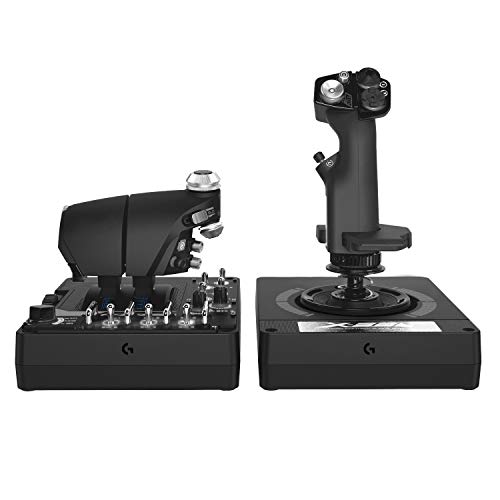
- Includes a joystick and twin throttles for PC use.
- Features an adjustable four-spring system and throttle friction adjustment.
- RGB lighting can be customized with software; two USB 2.0 ports are required.
Best For: A PC gamer who enjoys flight simulators or space-flight games.
12. WD_BLACK P40 1TB Portable Game Drive SSD
Portable Game Library Storage
WD_BLACK P40 1TB Portable Game Drive SSD

- Provides 1TB of external solid-state storage over USB 3.2.
- The listing describes compatibility with PlayStation, Xbox, PC, and Mac, with console game-use limits varying by model.
- Includes USB-C to USB-A and USB-C to USB-C cables.
Best For: A gamer who wants portable storage for games and other large files.
13. BenQ ScreenBar Pro Monitor Light
Task Lighting That Sits on the Monitor
BenQ ScreenBar Pro Monitor Light

- Adjustable brightness and color temperature with touch controls.
- Motion sensor switches the light on nearby and off after five minutes away.
- USB-C powered or usable with the included adapter; fits listed monitor thicknesses and curves.
Best For: A desk-based gamer who wants task lighting without using desktop space.
14. LIANGSTAR USB Desktop Microphone
A Voice Chat and Streaming Upgrade
LIANGSTAR USB Desktop Microphone

- Omnidirectional USB microphone with a desktop stand and flexible positioning.
- One-button mute and automatic color-changing lighting are included.
- Listing says it works with PC, Mac, PS4, and PS5.
Best For: A gamer, streamer, or remote player who wants a dedicated microphone.
How to Choose a Gaming Accessory Christmas Gift
Start with what the recipient plays and how they use their space. A racing wheel or flight controller suits someone who already spends time in driving or flight simulators; these are specialized gifts that need room and a compatible platform. For a broader PC setup upgrade, a keyboard, mouse, monitor arm, or desk mat can fit into everyday play. A microphone is a practical pick for regular voice chat or streaming, while a portable monitor or SSD can help someone who moves between locations or devices.
Think about the problem the gift should solve. A docking station reduces the effort of connecting a laptop to accessories. A monitor arm can free up desk area and adjust screen position. A standing desk changes the whole play space, so it calls for more planning than a keyboard or controller. Match the scale of the gift to what you know about the recipient: small accessories are easier to fit into an established setup, while furniture and specialized controls benefit from a conversation about space and preferences.
Set a Budget That Fits the Gift
Gaming accessory gift ideas span small desk additions and major equipment upgrades. Choose a spending limit before comparing features, then focus on the benefit that matters most. For a modest refresh, consider the extended RGB mouse pad, microphone, or wireless mouse. A keyboard or monitor arm can be a more substantial everyday upgrade. A monitor, chair, desk, docking station, storage drive, racing wheel, or flight controller may represent a larger purchase and could be worth coordinating with family or the recipient.
Remember to account for items the recipient may need to use the gift. The Redragon mouse requires an AA battery that is not included. The Anker dock needs a compatible USB-C laptop, and its pass-through charging setup calls for a 100W power adapter and USB-C cable, which are not included. Racing and flight controls need suitable space, and a monitor arm needs a desk edge or grommet area that supports its mounting method. These details can affect the total cost and usefulness.
Check Compatibility and Personalization
Compatibility is one of the most important checks when choosing gaming accessories. Confirm the recipient’s console, computer, and connection types before buying. The EasySMX controller lists Windows PC, Switch, Android, and iOS compatibility, and explicitly excludes Xbox and PlayStation. The Logitech G29 is listed for PS5, PS4, and PC, while the X56 is a PC flight controller that requires two USB 2.0 ports. For the portable monitor, verify the device has a compatible USB-C or HDMI output and that the necessary connection is available.
For desk accessories, measure before choosing. Compare a monitor’s weight, size, and VESA pattern with the HUANUO arm’s supported range, then check whether the desk works with its clamp or grommet mount. Check the chair’s footprint and the standing desk’s dimensions against the available room. Personal preferences matter too: keyboard layout and lighting, mouse shape, controller feel, and whether someone wants a wired or wireless setup are all individual choices. If you are unsure, a quick question about their current equipment can help you choose confidently without spoiling the surprise entirely.
Timing and Last-Minute Decisions
For a Christmas gift, leave time to check model compatibility and room measurements before ordering. Larger items may require arranging a delivery window and clearing space, while smaller accessories are easier to wrap and store. Avoid relying on an assumed delivery date; check current retailer estimates and policies when making the purchase.
If the holiday is close, prioritize gifts with fewer setup dependencies. A mouse pad, keyboard, microphone, or portable monitor may be simpler to match than a full desk, chair, or specialized simulator control, provided you know the recipient’s platform. Keep packaging and receipts available in case a fit or compatibility issue comes up. A well-matched gaming accessory makes a thoughtful Christmas gift because it connects directly to the way someone plays, creates, or spends time at their desk.