
Thoughtful desk gifts can make work, study, and creative time feel more comfortable and organized. These picks range from small workspace upgrades to larger additions, so consider the recipient’s desk space and daily habits.
Desk Accessory Gifts to Make Work and Study More Comfortable
1. Ergonomic Office Chair with Adjustable Lumbar Support
A Comfort Upgrade for Long Desk Days
Ergonomic Office Chair with Adjustable Lumbar Support

- Adjustable lumbar support, headrest, and 3-way armrests let the recipient tailor the fit.
- Mesh back and contoured seat are designed for home, office, or gaming use.
- Reclines from 90° to 120° and includes tilt-lock positions.
Best For: Remote worker or student setting up an everyday desk
2. Anker Prime 14-in-1 Laptop Docking Station
A Hub for a Multi-Device Workspace
Anker Prime 14-in-1 Laptop Docking Station

- Combines 14-in-1 connectivity with ports for peripherals and displays.
- Supports dual displays through HDMI; supported resolution depends on the laptop connection.
- Compatible with USB-C, USB4, and Thunderbolt laptops that support DP Alt Mode and Power Delivery.
Best For: Laptop user who connects several desk peripherals
3. Fanttik E2 Ultra Electric Precision Screwdriver Set
A Handy Kit for Small Tech Repairs
Fanttik E2 Ultra Electric Precision Screwdriver Set

- Includes 50 precision bits and five adjustable torque settings.
- Rechargeable by USB-C, with magnetic bit storage in the case.
- Designed for small electronics and precise items, not large furniture or appliances.
Best For: Maker or tinkerer who repairs small electronics at a desk
4. REIBII Desktop Bookshelf with 8 Shelves
Vertical Storage for a Crowded Desk
REIBII Desktop Bookshelf with 8 Shelves

- Eight open compartments and two fabric drawers organize books and small items.
- Upper dividers are adjustable, and shelves can be left out for taller objects.
- Measures 37 inches wide by 10 inches deep; measure the desktop before choosing.
Best For: Student, reader, or collector with limited shelf space
5. HUANUO Adjustable Single Monitor Arm
A Flexible Screen Positioning Upgrade
HUANUO Adjustable Single Monitor Arm

- Fits monitors weighing 4.4 to 19.8 pounds with 75x75mm or 100x100mm VESA patterns.
- Offers tilt, swivel, and 360-degree rotation for adjusting screen position.
- Mounts with a C-clamp or grommet; check tabletop fit and underside clearance.
Best For: Computer user seeking a more flexible monitor position
6. YEELIGHT Monitor Light Bar with Remote
Screen-Mounted Light for Focused Tasks
YEELIGHT Monitor Light Bar with Remote
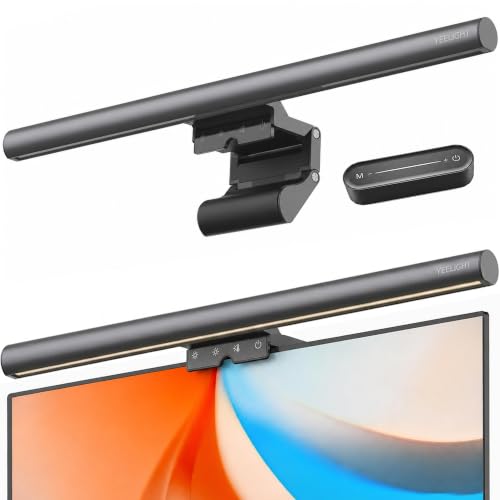
- Adjusts brightness and color temperature from 2700K to 6500K, with a remote control.
- Retractable clip fits monitors from 0.3 to 1.1 inches thick, including flat and curved screens.
- USB-powered design sits on the monitor rather than using a desk lamp base.
Best For: Desk worker who spends long hours at a computer
7. OTUS Brass Adjustable Architect Desk Lamp
A Warm-Toned Lamp with Flexible Positioning
OTUS Brass Adjustable Architect Desk Lamp

- Gesture control switches the lamp on and off; touch controls adjust brightness and color.
- Offers 12 brightness levels and three color temperatures: 3000K, 4000K, and 6500K.
- Adjustable arm raises to 29 inches and sits on a weighted base without a clamp.
Best For: Design-minded desk user who values task lighting
8. Compact Under-Desk Walking Pad Treadmill
A Movement Option for the Home Office
Compact Under-Desk Walking Pad Treadmill

- Nine automatic incline levels range up to 12%.
- The display tracks speed, calories, time, distance, and incline level.
- The product notes describe walking while working; check room and desk clearance before use.
Best For: Home-office worker looking to add walking to the day
9. Sennheiser Profile USB Microphone Kit
A Ready-to-Arrange Desktop Audio Setup
Sennheiser Profile USB Microphone Kit

- The bundle includes a USB condenser microphone, boom arm, pop filter, and cleaning cloth.
- Microphone features include a mute button, gain control, and headphone output.
- Connects by USB-C and is described for podcasting, streaming, calls, and voice recording.
Best For: Remote meeting participant, podcaster, or voice-chat user
10. Full-Grain Leather Desk Pad, Dark Brown, XL
A Broad Surface for Work and Play
Full-Grain Leather Desk Pad, Dark Brown, XL

- The 35.4-by-15.7-inch mat has a smooth leather surface for mouse use.
- Non-slip leather backing helps keep the mat in place on the desk.
- Its 3mm profile is made from genuine full-grain leather.
Best For: Professional or design-minded person who appreciates leather
11. AULA F75 Pro Wireless Mechanical Keyboard
A Customizable Keyboard for Daily Typing
AULA F75 Pro Wireless Mechanical Keyboard

- Connects by Bluetooth 5.0, 2.4GHz wireless, or USB-C wired connection.
- Hot-swappable base supports 3-pin or 5-pin switches for customization.
- The 75% layout includes arrow keys and a knob for lighting or media controls.
Best For: Writer, programmer, or keyboard enthusiast
Choosing Desk Accessory Christmas Gifts for This Recipient
Start with the recipient’s daily routine. Someone who works at a computer for hours may appreciate a chair, monitor arm, or screen light bar. A person whose desk doubles as a hobby space could use the precision screwdriver set or mechanical keyboard. For someone whose work involves calls or recordings, the microphone kit has a clear role. Storage and a desk mat can suit people who already have their main equipment but want a more settled workspace.
Think about the scale of the gift as well. A lamp or mat is a relatively straightforward addition, while a chair, bookshelf, or treadmill takes more room and may require assembly or a conversation about fit. For larger items, a discreet check of the recipient’s setup can prevent a well-meant gift from becoming difficult to place.
Set a Budget That Fits the Gift’s Role
Desk gifts span small accessories and substantial equipment. Choose a budget by deciding whether you want to improve one daily task or make a larger change to the workspace. A desk mat, light, or small repair kit can be a focused upgrade; a chair, docking station, or walking pad is a more significant purchase with more practical considerations.
Compare what the item helps the recipient do rather than counting features alone. For example, a docking station makes sense when someone regularly connects several peripherals; a monitor arm is useful when screen positioning is a recurring issue. A gift is more thoughtful when it addresses a real routine than when it simply adds another gadget to the desk.
Check Compatibility, Space, and Personalization
Before choosing tech, confirm the devices it needs to work with. The docking station requires a compatible laptop connection and operating system; its display behavior differs on macOS, and the listing says it is not compatible with Linux. The monitor arm depends on the screen’s weight, VESA pattern, and the desk’s thickness and underside clearance. For the monitor light bar, measure the screen edge to check whether the clip fits.
Furniture and larger workspace gifts also need a tape measure. The desktop bookshelf is 37 inches wide and 10 inches deep, and its listing specifically recommends checking the desktop first. A chair should suit the user’s space and preferred sitting setup. A walking pad needs adequate floor and desk clearance, with room for the user to walk safely. For personal touches, consider color and material: the brass lamp brings a warm finish, while the dark brown leather mat has a more understated look.
Timing and Last-Minute Decisions
Order early when the gift needs measurement, setup, or compatibility checks. That gives you time to confirm monitor mounting details, laptop ports, or available space and to arrange assembly if needed. Avoid relying on delivery dates or availability assumptions; verify current details with the seller before placing an order.
For a last-minute choice, prioritize items that fit a known setup and are easy to explain or wrap, such as a desk mat or small screwdriver set. If you’re uncertain about fit, a short conversation about the recipient’s monitor, laptop, or desk dimensions is more useful than guessing. Christmas gifts for a workspace can be practical and personal at once: match the item to a familiar habit, then choose the finish or feature that feels most like the person who will use it.