
A useful computer accessory can make a workday, creative project, or gaming session more comfortable and organized. This guide includes options for different desks, devices, and routines.
Computer Accessory Christmas Gift Ideas
1. XPPen Artist 13.3 Pro V2 Drawing Tablet
A Creative Canvas for Her Desk
XPPen Artist 13.3 Pro V2 Drawing Tablet

- 13.3-inch full-laminated FHD display supports a natural drawing workflow.
- Battery-free stylus includes tilt support and replacement nibs.
- Connects to a computer and supports major creative software.
Best For: A digital artist, illustrator, or design student who creates on a computer.
2. Wireless Charging RGB Mouse Pad with Phone Stand
A More Organized Gaming Desk
Wireless Charging RGB Mouse Pad with Phone Stand

- Large mouse mat combines a smooth surface with a foldable phone stand.
- Charging areas support compatible Qi phones and wireless earbuds.
- Selectable RGB lighting adds color without taking extra desk space.
Best For: Someone who wants a tidier desk and a place to charge compatible devices.
3. Acer 13-in-1 USB-C Docking Station
A Hub for Her Laptop Setup
Acer 13-in-1 USB-C Docking Station

- Includes HDMI, DisplayPort, USB, Ethernet, audio, and card-reader connections.
- Supports three independent displays on compatible Windows laptops.
- Includes a 110W adapter for laptop charging through the USB-C host port.
Best For: A laptop user connecting several peripherals or external screens.
4. HUANUO Dual Monitor Stand
A Flexible Two-Screen Workstation

- Arms fit 13–32-inch monitors within the stated weight and VESA limits.
- Screens tilt, swivel, rotate, and raise for adjustable positioning.
- C-clamp or grommet mounting frees desktop space and guides cables.
Best For: A home-office user with two compatible monitors and a suitable wooden desk.
5. EMEET NOVA 4K Webcam
A Clearer Video-Call Camera

- Supports 4K video after changing the default 1080p setting in software.
- PDAF autofocus and automatic light adjustment help keep the image clear.
- Dual microphones, a privacy cover, and USB plug-and-play connection are included.
Best For: Someone who joins video calls, streams, or records online content.
6. SABLUTE Ergonomic Wireless Keyboard and Mouse
A Comfort-Minded Typing Set
SABLUTE Ergonomic Wireless Keyboard and Mouse

- Full-size split keyboard has a cushioned wrist rest and four tilt legs.
- Keyboard switches between Windows and Mac layouts.
- Rechargeable mouse has palm and thumb rests; the combo uses 2.4GHz wireless.
Best For: A frequent typist who wants a more comfort-focused desk setup.
7. LYMAX Monitor Light Bar with Wireless Controller
Focused Light for a Small Desk
LYMAX Monitor Light Bar with Wireless Controller

- Adjustable color temperature ranges from 2900K to 6000K.
- Designed to light the desk while limiting screen reflection and glare.
- Mounts on compatible monitors and leaves desk surface clear.
Best For: A desk worker who wants adjustable task lighting without a separate desk lamp.
8. Redragon K668 Hot-Swap RGB Keyboard
A Customizable Keyboard Gift
Redragon K668 Hot-Swap RGB Keyboard

- Full-size 108-key wired keyboard includes four shortcut keys.
- Hot-swap sockets accept many 3-pin or 5-pin switches without soldering.
- Includes RGB lighting modes, adjustable feet, and two keycap sets.
Best For: A computer enthusiast or frequent typist who enjoys customizing her setup.
9. HUION Keydial Mini Programmable Keypad
Shortcuts at Her Fingertips
HUION Keydial Mini Programmable Keypad

- 18 programmable keys and a dial can be assigned creative-software shortcuts.
- Bluetooth connection and a slim, one-handed design support portable use.
- Works with Mac and Windows; shortcut setup requires compatible software.
Best For: A digital artist, editor, or productivity-minded user with repeat tasks.
10. BENFEI Adjustable Laptop Stand with USB-C Hub
A Raised Laptop Workstation
BENFEI Adjustable Laptop Stand with USB-C Hub
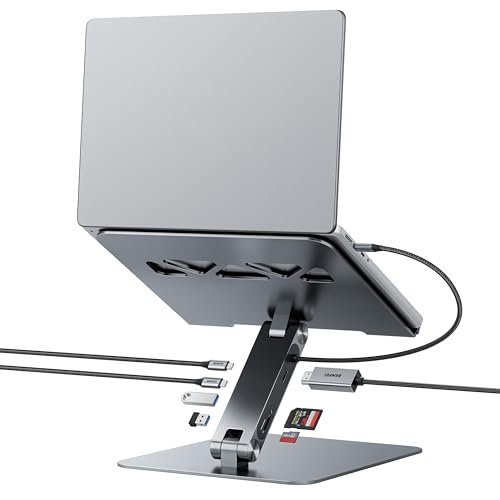
- Adjustable stand height ranges from 68mm to 178mm.
- Hub includes HDMI, SD and Micro SD readers, USB-C, and USB-A ports.
- Aluminum stand has anti-slip silicone; USB-C pass-through supports up to 85W charging.
Best For: Someone who works from a laptop and wants a more organized desk.
11. ProtoArc EM11 NL Vertical Wireless Mouse
A Different Grip for Desk Work
ProtoArc EM11 NL Vertical Wireless Mouse
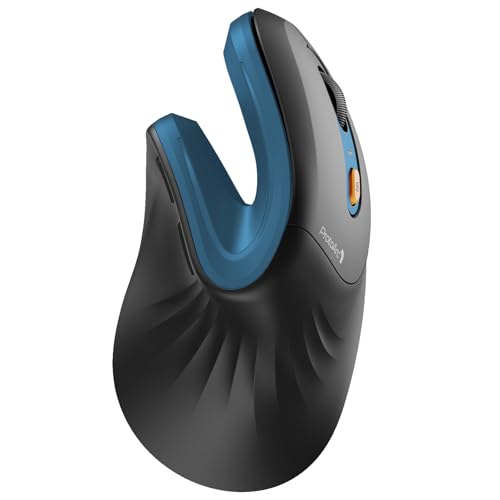
- 58-degree vertical design is made for small to medium hands.
- Connects to up to three devices through Bluetooth and 2.4G USB-A.
- Rechargeable mouse has adjustable DPI and quiet left and right buttons.
Best For: A computer user who wants to try a vertical mouse shape.
12. ROOFULL External CD DVD Drive
13. KVIDIO Hybrid Active Noise-Canceling Headphones
A Quieter Listening Companion
KVIDIO Hybrid Active Noise-Canceling Headphones

- Over-ear headphones offer active noise cancellation and transparency mode.
- Battery life is listed up to 40 hours with ANC or 70 hours in standard mode.
- Includes a USB-C charging cable and a 3.5mm audio cable for wired use.
Best For: Someone who works in shared spaces, travels with a laptop, or listens at her desk.
14. CMTECK USB Computer Microphone G009
A Desktop Mic for Clearer Chats
CMTECK USB Computer Microphone G009

- USB microphone has a mute button and LED status indicator.
- Flexible gooseneck adjusts its position, while the compact base saves desk space.
- Designed for Windows and Mac use without driver installation.
Best For: A remote worker, podcaster, or gamer who wants a desktop microphone.
15. LG 34-Inch UltraWide Curved Monitor
A Wider View for Her Workspace
LG 34-Inch UltraWide Curved Monitor

- 34-inch curved WQHD screen provides a 21:9 workspace for multiple windows.
- Connections include USB-C, two HDMI ports, DisplayPort, and USB ports.
- Stand adjusts for height and tilt; Reader Mode reduces blue light.
Best For: A multitasker or home-office user with room for a larger display.
How to Choose for Her Computer Setup
Start with how she uses her computer. An illustrator or photo editor may appreciate the XPPen drawing display or HUION shortcut keypad, while someone who spends much of the day in calls may get more use from the webcam or desktop microphone. For a general desk upgrade, consider the light bar, ergonomic keyboard-and-mouse set, vertical mouse, or monitor stand. A gamer may enjoy the RGB mouse mat or customizable mechanical keyboard.
Think about what would make her routine easier, rather than choosing by category alone. A recipient who already likes her keyboard may prefer a small accessory, such as a programmable keypad or monitor light. Someone who often moves between laptop and desk could benefit from a hub or adjustable stand. A large monitor or dual-screen arm can be useful, but needs enough desk space and a compatible setup.
Match the Gift to Your Budget
Small desk accessories such as a light bar, microphone, or programmable keypad can be thoughtful choices when you want a focused upgrade. Mid-sized purchases such as an ergonomic mouse, keyboard, or charging desk mat can change the feel of everyday computer use. A docking station, drawing display, or ultrawide monitor represents a larger workstation change, so make sure it suits the recipient’s existing devices and habits.
The most satisfying computer accessory Christmas gift ideas for women are often practical additions to something she already uses. Consider whether she has mentioned cable clutter, an awkward laptop position, too many windows on one screen, or a desire to draw, record, or type more comfortably. A specific need can help guide the choice more than a broad assumption about what a woman might like.
Check Compatibility and Personalization
Before choosing a hub or dock, check the laptop’s USB-C capabilities and operating system. The Acer dock’s multi-display support depends on laptop and graphics compatibility, and its extended desktop arrangement differs on macOS. The BENFEI stand hub also depends on the laptop’s USB-C support for video and power functions. For a drawing display, remember that it connects to a computer; it is not described as a standalone tablet.
Monitor accessories need a closer fit check. The HUANUO arms require screens within the specified size and weight ranges, VESA mounting holes, and a compatible wooden desk. The light bar fits monitors within its stated thickness range. For the external disc drive, confirm that the recipient uses a supported computer; it does not work with Chromebooks, phones, tablets, or Blu-ray discs.
Personal touches can be simple: choose a color that suits her desk, pair the gift with a note about a creative project, or select a tool that matches software she already uses. For a mouse or keyboard, consider hand fit, available desk space, and whether she prefers wireless or wired accessories. Product notes give helpful limits, but checking the actual laptop or monitor model is the safest way to avoid a mismatch.
Timing and Last-Minute Decisions
For a planned Christmas gift, check compatibility early, especially for monitor mounts, docks, and display equipment. A small accessory may be easier to fit into an existing setup, while a large monitor or arm benefits from knowing desk dimensions and available ports first. If you are deciding closer to the holiday, pick a gift whose role is easy to confirm from what you already know about her computer routine.
A last-minute choice can still feel personal when it responds to something she does every day. If she works in a dim room, a monitor light bar is a direct fit; if she keeps discs or old files, an external drive may be useful. A wireless mouse or headset can suit a mobile routine, while a charging mat can help organize a desk. Keep the recipient’s device compatibility and workspace in view, and choose the accessory that best supports her own way of working, creating, or relaxing at the computer.