
A useful computer gift can improve a desk setup for work, gaming, or creative projects. This list ranges from small everyday add-ons to substantial workstation upgrades, so consider the recipient’s devices and available desk space.
Computer Accessory Gifts for Men
1. UGREEN DXP2800 2-Bay NAS Enclosure
For a Growing Digital Library
UGREEN DXP2800 2-Bay NAS Enclosure

- Centralizes computer backups, photos, videos, and other files across devices.
- Supports two HDD bays and two M.2 NVMe SSD slots; drives are sold separately.
- Works with Windows, macOS, Android, and iOS devices.
Best For: A tech enthusiast or creator managing files across several devices.
2. INNOCN 34-Inch Ultrawide Monitor
For a Wider Work and Play View
INNOCN 34-Inch Ultrawide Monitor

- The 21:9 display offers room for side-by-side windows and editing timelines.
- Supports up to 180Hz refresh rate and Adaptive-Sync for gaming.
- Includes HDMI and DisplayPort connections, plus an adjustable stand.
Best For: A gamer, editor, or multitasker with room for a large monitor.
3. TRALT Ergonomic Mesh Office Chair
For Longer Desk Sessions
TRALT Ergonomic Mesh Office Chair
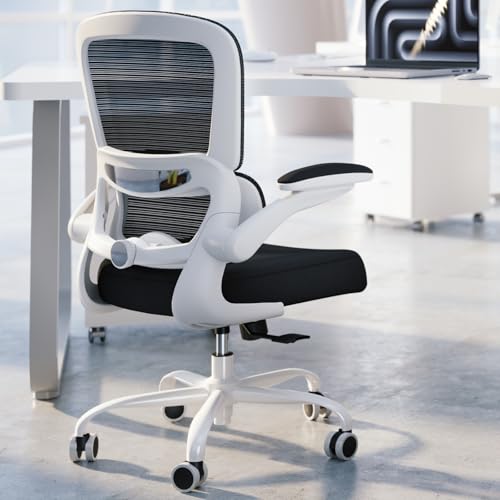
- Adjustable lumbar support lets the user customize back support.
- Breathable mesh backrest and molded foam seat are designed for desk use.
- Seat height adjusts from 17.7 to 21.7 inches.
Best For: Someone who works or games at a desk for extended periods.
4. intpw Powered 9-Port USB Hub
For a More Connected Desk

- Adds USB-C and USB-A ports for connecting desk accessories.
- Includes two USB-C PD 45W charging ports; they do not transfer data.
- The powered hub does not support video output.
Best For: A laptop or desktop user connecting multiple USB accessories.
5. HUANUO Dual Monitor Desk Mount
For a Two-Screen Setup
HUANUO Dual Monitor Desk Mount

- Fits two monitors 13–32 inches, each weighing 4.4–19.8 pounds.
- Requires compatible VESA 75x75 or 100x100 mounting holes.
- Attaches with a clamp or grommet mount to a suitable wooden desk.
Best For: A two-monitor user whose screens and desk meet the fit requirements.
6. EMEET NOVA 4K Autofocus Webcam
For Clearer Video Calls
EMEET NOVA 4K Autofocus Webcam

- Supports up to 4K at 30 frames per second; the default resolution is 1080p.
- Dual built-in microphones and a physical privacy cover are included.
- Connects through USB Type-A and works with services including Zoom and Teams.
Best For: A remote worker, online educator, or streamer with a USB Type-A port.
7. Nylavee Bluetooth Desktop Speakers
For a Fuller Desk Sound
Nylavee Bluetooth Desktop Speakers
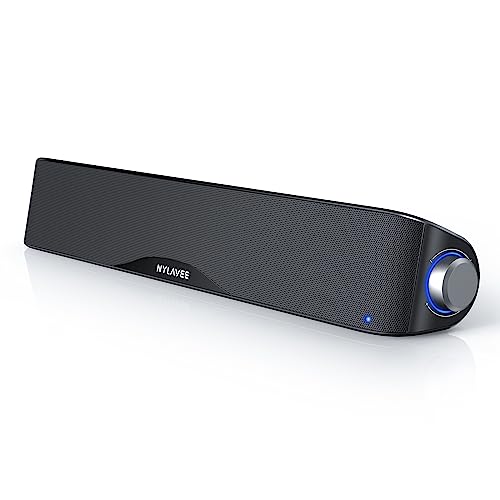
- Connects by Bluetooth 5.0 or 3.5mm AUX cable.
- USB-powered design has no built-in battery.
- A side knob operates the soundbar functions.
Best For: A desktop listener or gamer who wants speakers at the desk.
8. Univivi 36-Inch Under-Desk Cable Tray
For Taming Desk Cables
Univivi 36-Inch Under-Desk Cable Tray

- A 36-inch fabric tray holds and hides cables and power adapters under a desk.
- Installs with clamps or screws and includes built-in ties.
- Measure desk edges first; clearance is needed for clips and nearby drawers or rails.
Best For: Someone tidying a home office or gaming desk with suitable clearance.
9. FIFINE AmpliGame AM8 USB/XLR Microphone
For Streaming and Voice Recording
FIFINE AmpliGame AM8 USB/XLR Microphone

- Connects by USB for plug-and-play use or by XLR with a separate cable and audio interface.
- USB mode includes tap-to-mute, a headphone jack, and controllable RGB lighting.
- The maker suggests placing the mic 2–6 inches from the audio source.
Best For: A gamer, podcaster, or creator recording voice at a computer.
10. UGREEN 13-in-1 Thunderbolt 4 Dock
For a Laptop-Based Workstation
UGREEN 13-in-1 Thunderbolt 4 Dock

- Provides Thunderbolt 4, USB-A, USB-C, Ethernet, card-reader, audio, and display connections.
- Supports dual 4K at 60Hz displays through Thunderbolt 4 and DisplayPort 1.4.
- Compatible with Thunderbolt 4/3, USB4, and USB-C computers; check display connection needs.
Best For: A laptop user building a multi-display desk setup.
11. SanDisk 2TB Extreme Portable SSD
For Portable Project Storage
SanDisk 2TB Extreme Portable SSD
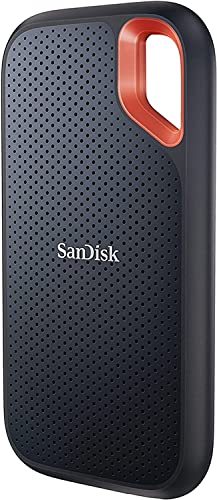
- Offers 2TB of external storage with USB 3.2 Gen 2 connectivity.
- Rated for up to 1050MB/s read and 1000MB/s write speeds; host devices can affect performance.
- Includes a carabiner loop and password protection with hardware encryption.
Best For: A creator or computer user who carries large files between locations.
12. CyberPower CP1500PFCLCD UPS
For Backup Power at the Desk
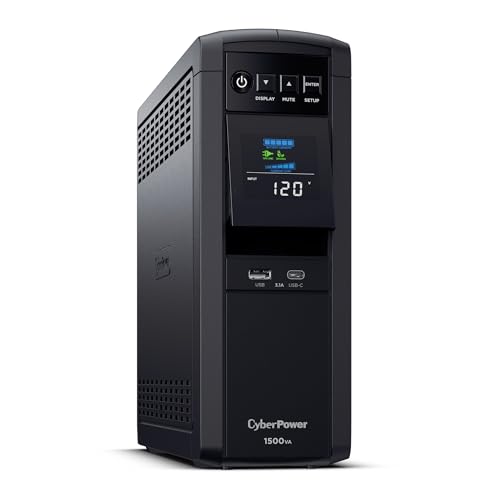
- Provides 1500VA/1000W sine-wave battery backup for computers and network devices.
- Has 12 outlets: six with battery backup and surge protection, and six surge-protected.
- A color LCD displays battery and power conditions.
Best For: A home-office or gaming setup where a power interruption could disrupt work.
13. Logitech MX Master 4 Wireless Mouse
For Precise Everyday Control
Logitech MX Master 4 Wireless Mouse

- Offers Bluetooth or USB-C dongle connectivity and customizable haptic feedback.
- MagSpeed scroll wheel, programmable buttons, and thumb scroll support varied workflows.
- Right-hand ergonomic shape includes quiet clicks.
Best For: A daily computer user who values customizable controls and a shaped mouse.
How to Choose a Computer Accessory Christmas Gift
Start with how he uses his computer. A remote worker may get more daily use from a webcam, microphone, docking station, or comfortable chair. A gamer could appreciate a wider monitor, speakers, storage, or a cable tray that clears desk clutter. For a creator handling video, photography, or audio, consider the portable SSD, NAS enclosure, or microphone. Ask what slows down his current setup: too few ports, cramped screen space, messy cables, or limited backup storage. A gift that addresses a specific annoyance often feels more personal than a novelty.
Think about the scale of the upgrade, too. Some gifts change the whole workstation, while others fit into an existing setup with little rearranging. A chair, ultrawide monitor, NAS, and UPS need meaningful space and may involve setup. A mouse, webcam, speakers, or portable drive generally take less room. For bulky gifts, consider the desk dimensions and whether the recipient would welcome a larger piece of equipment.
Set a Budget That Fits the Upgrade
Computer accessory Christmas gift ideas for men span a wide range of costs. Smaller additions, such as a USB hub or cable tray, can solve a concrete desk problem without replacing major equipment. A mouse, webcam, speakers, SSD, or microphone can be a mid-sized upgrade depending on the setup. Monitors, chairs, docking stations, NAS devices, and battery backups are bigger investments and may require other compatible equipment.
For a NAS, remember that the listed enclosure is diskless: its hard drives or SSDs are sold separately. Think through the full setup cost before choosing it. For the microphone, XLR use requires a separate cable and an audio interface or mixer; USB mode is the simpler route. This distinction helps match the present to both budget and experience level. There is no need to pay for features he will not use.
Check Compatibility and Personalization
Before choosing a connection-based gift, identify the computer and accessories he already owns. The docking station supports Thunderbolt 4/3, USB4, or USB-C computers, while its dual-display support depends on using supported display connections. The powered USB hub adds ports but does not provide video output, and its PD ports charge compatible devices without transferring data. These details matter when the goal is a specific setup improvement.
For a dual monitor mount, check each screen’s size, weight, and VESA mounting pattern, then confirm the desk material, thickness, and underside clearance. The cable tray also needs enough clear space along the desk edge for its clips. For a webcam, note that 4K is not the default resolution and requires changing the setting through camera software or an app. For a portable SSD, check the computer’s ports and expected workflow. Personalize the gift by pairing it with a note about the problem it solves, such as making calls easier or organizing a crowded workstation.
Timing and Last-Minute Decisions
If Christmas is close, favor an accessory that fits a setup you already understand. A mouse, speakers, webcam, or external drive may be easier to select when you know the computer’s available connections. For larger purchases, verify dimensions and compatibility before deciding; uncertainty can turn a generous gift into a project the recipient must troubleshoot.
Also consider setup time. A desk mount, cable tray, chair, monitor, or NAS may require assembly, positioning, or configuration. A hub or dock still needs the right host connection and display arrangement. If choosing a complex upgrade late, include a simple note that frames it as a planned workstation improvement and leave time for the recipient to choose how it fits. The best computer accessory Christmas gift is one he can use in his real setup, whether that means a tidier desk, easier calls, faster access to files, or more comfortable daily work.