
A useful gaming gift can improve a familiar setup, make multiplayer easier, or bring favorite games beyond the desk. Start with how the recipient plays and what their current setup can support.
19 Christmas Gifts for Gamers
1. Portable 2TB External SSD
More Room for a Game Library

- Offers 2TB of external storage for games and other files.
- Connects over USB and is listed as compatible with PS4, PS5, Xbox, and computers.
- Its pocket-sized aluminum design suits a gaming bag or desk.
Best For: Players who need extra space for downloaded games and files.
2. 34-Inch Curved Ultrawide Monitor
A Wider View of the Game
34-Inch Curved Ultrawide Monitor

- Displays at 3440 × 1440 resolution with a 200Hz refresh rate.
- The 1500R curve and 21:9 screen create a broad desktop view.
- Includes two HDMI 2.1 ports, DisplayPort, and an adjustable stand.
Best For: PC gamers with desk space for a large ultrawide display.
3. Big-and-Tall Gaming Chair
A Roomier Desk Seat

- Features a wide seat and backrest, with height-adjustable armrests.
- Includes a footrest, reclining function, and built-in lumbar support springs.
- The chair requires assembly and is designed for indoor use.
Best For: Gamers seeking a wider chair for long desk sessions.
4. 2.1 Desktop Speakers with Subwoofer
Desktop Audio with Added Bass
2.1 Desktop Speakers with Subwoofer

- Pairs stereo desktop speakers with a dedicated subwoofer.
- Connects through USB, AUX, or Bluetooth 5.4.
- Eight RGB lighting modes and a rotary control are built in.
Best For: PC players who want desktop speakers for games, movies, and music.
5. USB/XLR Gaming Microphone Kit
A Voice Chat Upgrade

- Includes a dynamic microphone, boom arm, and foam windscreen.
- Supports USB and XLR connections; the listed compatibility includes PS4, PS5, PC, and laptops.
- USB mode provides tap-to-mute, headphone monitoring, mix control, and RGB lighting.
Best For: Streamers and gamers who want a dedicated mic for chat or recording.
6. Curved Monitor Light Bar
A Softer-Lit Gaming Desk

- Designed for 34-inch-plus curved screens or large flat displays.
- Adjusts front-light brightness and color temperature, with 15 RGB backlight modes.
- Its foldable dual-light design and clamp leave desk space open.
Best For: Gamers with a large monitor who want adjustable desk lighting.
7. Acer 9-in-1 USB-C Dock
A Laptop Desk Setup Hub

- Provides two HDMI ports, USB-A and USB-C ports, and SD and MicroSD slots.
- Supports up to 100W input and delivers up to 90W laptop charging when supported.
- Requires a full-featured USB-C port with DisplayPort Alternate Mode for video output.
Best For: Laptop gamers connecting compatible devices to a multi-screen desk.
8. Acer Tri-Mode Wireless Gaming Headset
Flexible Audio for Multiplayer
Acer Tri-Mode Wireless Gaming Headset

- Offers 2.4GHz wireless, Bluetooth, and 3.5mm wired connections.
- The detachable microphone is designed for voice chat and calls.
- The product listing states up to 40 hours of battery life.
Best For: Gamers who play across compatible consoles, PC, or mobile devices.
9. Redragon 108-Key Hot-Swap Keyboard
A Customizable Full-Size Keyboard
Redragon 108-Key Hot-Swap Keyboard

- Uses a wired, full-size layout with 108 keys and RGB backlighting.
- Its hot-swap sockets accept listed 3-pin or 5-pin switches without soldering.
- Includes two sets of keycaps and four shortcut keys.
Best For: PC gamers who like customizing a mechanical keyboard.
10. ChillCore Laptop Cooling Pad
An Elevated Laptop Play Surface

- Fits laptops listed between 15.6 and 19.3 inches and has nine fans.
- Eight height settings let the user adjust the laptop angle.
- The pad includes RGB lighting, two USB ports, and an LCD fan-speed display.
Best For: Laptop gamers who want an adjustable stand with built-in fans.
11. Redragon M810 PRO Wireless Mouse
Wireless Control with Remappable Buttons
Redragon M810 PRO Wireless Mouse

- Connects through a 2.4GHz receiver and has eight programmable buttons.
- Offers five onboard DPI levels, configurable with software.
- The rechargeable battery is listed for up to 45 hours in eco mode.
Best For: PC gamers who want wireless control and configurable buttons.
12. WALI Adjustable Monitor Arm
A Flexible Screen Position

- Supports compatible screens up to 34 inches, subject to size, weight, and VESA limits.
- Extends, tilts, swivels, and rotates to adjust screen position.
- Mounts with a desk clamp or grommet base; check desk fit before buying.
Best For: Gamers who want to raise a compatible monitor and clear desk space.
13. Extra-Large Gaming Desk Mat
More Space for Mouse and Keyboard

- Measures 31.5 by 15.7 inches to cover a broad area of the desk.
- The non-slip rubber base and stitched edges help keep the mat in place.
- Its coated fabric surface is described as washable and wipe-clean.
Best For: PC gamers who want a shared surface for mouse and keyboard.
14. HORI PlayStation Fighting Stick Alpha
Arcade-Style Fighting Controls
HORI PlayStation Fighting Stick Alpha
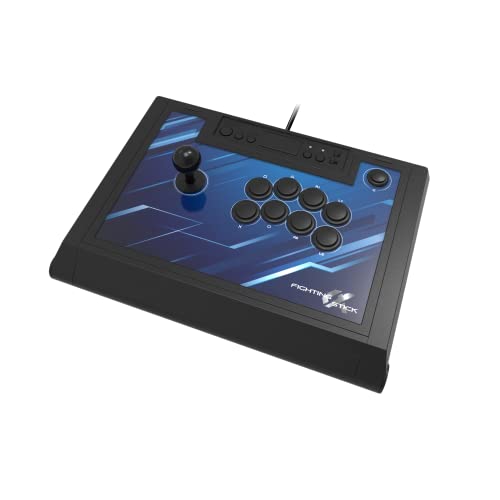
- Works with PlayStation 5, PlayStation 4, and PC, according to the listing.
- The fight stick opens for maintenance and customization.
- Its top-panel artwork is replaceable.
Best For: Fighting-game fans who prefer an arcade-style controller.
15. ASUS ROG Xbox Ally Handheld
PC Games to Take Along

- Features a 7-inch 1080p touchscreen with a 120Hz refresh rate.
- The listing describes access to PC games from Xbox, Steam, Epic, and Windows libraries.
- Includes 16GB RAM, a 512GB SSD, and three months of Xbox Game Pass Premium.
Best For: Players who want a handheld device for compatible PC games on the go.
16. Kytok Game Storage Tower
A Neater Console Game Collection

- Designed to hold up to 80 game cases or cartridges in a vertical or horizontal arrangement.
- The listing names PS5, PS4, Xbox, and Nintendo Switch formats; Xbox 360 cases and DVDs do not fit.
- Can be placed on a desk or floor, or wall-mounted.
Best For: Console players who want to organize game cases and accessories.
17. Keychron C0 HE 8K Gaming Keypad
18. Logitech G29 Racing Wheel and Pedals
A More Hands-On Racing Setup
Logitech G29 Racing Wheel and Pedals

- The wheel and pedals are listed for PS5, PS4, and PC games.
- Includes force feedback, pressure-sensitive pedals, and 900-degree rotation.
- The steering wheel has a leather cover and stainless steel paddle shifters.
Best For: Racing-game fans who want wheel-and-pedal controls.
19. GL.iNet Flint 2 Wi-Fi 6 Router
A Home Network Upgrade
GL.iNet Flint 2 Wi-Fi 6 Router

- Supports Wi-Fi 6 and includes two 2.5G and four 1G Ethernet ports.
- Offers access point, guest network, and QoS features in the listing.
- The setup notes recommend updating the firmware initially.
Best For: Gamers looking for flexible wired and wireless home networking.
How to Choose a Christmas Gift for a Gamer
Start with the way the person plays. A PC gamer may get more use from a keyboard, mouse, microphone, monitor arm, or desk mat; a console player may appreciate extra storage, a fight stick, or a game organizer. For someone who moves between devices or rooms, consider the handheld, headset, or laptop stand. If you are unsure what they already own, a small comfort or organization upgrade is often easier to fit into an established setup than a major piece of hardware.
Think about the everyday friction the gift could solve. A full drive, crowded desk, laptop at an awkward angle, or need to share a room can point toward a storage device, monitor arm, cooling pad, or speakers with multiple connection options. Ask yourself whether the item addresses something the recipient has mentioned, rather than choosing solely by the number of features in the listing.
Set a Budget That Fits the Role
The list spans small desk accessories and substantial electronics. A large mat, monitor light, or game tower can be a practical standalone present. A monitor, chair, handheld, or racing wheel is a larger commitment and makes sense when you know it suits both the recipient and their space. For an expensive item, consider coordinating with family or friends so the gift can be chosen together.
Price alone does not determine whether a gift feels personal. A compact keypad for someone who enjoys tuning controls, or a fighting stick for a person devoted to arcade-style games, can show that you noticed how they play. For someone whose preferences are less clear, a useful setup accessory may be a safer fit than specialized controls.
Check Compatibility and Personalization
Before buying a gaming accessory, identify the recipient’s platform and connection needs. The listings specify different combinations: some devices work with PCs and PlayStation, while others name Xbox, Switch, or mobile devices. Confirm the exact model and connection type, since a USB-C dock, wired controller, or wireless headset depends on supported ports and devices. For a dock that sends video, the laptop’s USB-C port needs DisplayPort Alternate Mode. A gaming monitor also needs enough desk space and suitable output connections from the computer or console.
Physical fit matters too. Check the size and weight of a monitor before choosing an arm, along with its VESA mounting pattern and the desk’s thickness and underside. Measure the available area for a wide monitor, chair, cooling pad, or large mouse mat. If choosing a game storage tower, consider the formats the player collects; this one is described as not fitting Xbox 360 cases or DVDs.
Personalization can make practical gifts feel more considered. The full-size Redragon keyboard includes alternate keycaps and configurable lighting; the Keychron keypad allows key mapping and RGB changes. The HORI fight stick has replaceable top-panel artwork. These options make sense when the recipient enjoys adjusting a setup. If they prefer a simple plug-in experience, favor a product whose controls and connections match what they already use.
Plan Timing and Last-Minute Choices
For Christmas, leave time to confirm fit and learn the recipient’s preferences before ordering. Larger gear may require clearing desk or floor space, assembling a chair, or rearranging cables. Check the seller’s current delivery details directly; product descriptions alone do not establish arrival dates. For gifts that depend on a specific console, laptop, monitor, or game library, verify that information early.
When time is short, choose something you can identify as compatible and useful without guessing about a major upgrade. A desk mat, organized storage, or familiar-platform accessory may be simpler to select than a monitor or networking device. If you cannot confirm the technical details, a card explaining the intended gift and allowing the gamer to help choose the exact model can keep the present personal while avoiding a poor fit.