
The best wireless photo printers make it simple to turn phone images into physical prints without connecting to a traditional computer. This roundup covers compact dye-sublimation and ZINK models alongside versatile all-in-one inkjet printers.
Whether you want 4×6-inch keepsakes, pocket-size stickers, or a home printer that also scans and copies, these options cover different budgets, print sizes, and portability needs.
Best 10 Wireless Photo Printers Picks for 2026
Best Bundle
Canon SELPHY CP1500 Wireless Photo Printer Kit

- Includes 108 sheets and three color cartridges
- Wi-Fi printing from phones, tablets, and computers
- Water-resistant 4x6 dye-sublimation photos
Best For: Home printing, events, scrapbooking, and gifts
Best Docking Design
KODAK Dock Plus 4x6 Photo Printer
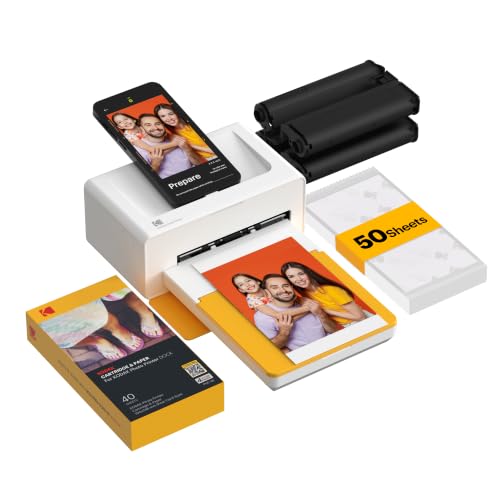
- Dock connects to and charges compatible phones
- 4PASS prints include protective lamination
- Bluetooth app supports photo editing
Best For: Desktop smartphone printing and family photo projects
Best Starter Supply
Liene M100 4x6 Wireless Photo Printer

- Includes 100 sheets and three color cartridges
- Direct Wi-Fi hotspot needs no outside network
- Supports up to five connected devices
Best For: Shared smartphone printing and everyday 4x6 photos
Best All-in-One
Epson Expression Photo XP-8800

- Six-color photo ink for detailed borderless prints
- Fast 4 x 6-inch photo printing
- Wi-Fi, scanning, and copying included
Best For: Home photo printing plus everyday scanning and copying
Best Portable Pick
Liene Amber M110 Bluetooth Photo Printer

- Prints 4 x 6-inch photos and 3-inch stickers
- Bluetooth pairing for convenient phone printing
- Includes 80 sheets and two cartridges
Best For: Portable smartphone photo and sticker printing
Best for Family Use
HP Envy Photo 7975 Wireless Photo Printer

- Borderless photo printing for home projects
- Automatic duplexing and 35-sheet document feeder
- Print, scan, copy, and mobile connectivity
Best For: Families printing photos, schoolwork, and household documents
Creative Pocket Pick

- Vibrant 2x3-inch dye-sublimation sticker prints
- Includes 50 sheets and five cartridges
- AI tools, frames, stickers, and group printing
Best For: Creative travelers, parties, and scrapbook projects
Simple Sticker Value

- Zero-ink ZINK 2x3-inch sticky-back photos
- Bluetooth and NFC support for iOS and Android
- Rechargeable battery prints up to 25 photos
Best For: Beginners, crafts, selfies, and casual snapshots
Home-Size Photo Pick

- Vibrant borderless 4x6-inch dye-sublimation prints
- Protective finish resists water, scratches, and fading
- Built-in Wi-Fi connects up to five devices
Best For: Home users and families printing larger photos
Best Bundle – Canon SELPHY CP1500 Wireless Photo Printer Kit
If you want wireless photo printers with supplies ready to go, this Canon SELPHY CP1500 bundle is a practical choice. It includes 108 sheets of 4×6 photo paper, three color ink cartridges, and a cleaning cloth, while dye-sublimation printing produces water-resistant, fingerprint-resistant photos.
Best For: Home photo printing, events, scrapbooking, journaling, and gifting.
Pros:
- Includes 108 sheets of paper, three cartridges, and a cleaning cloth.
- Wi-Fi connectivity supports printing from smartphones, tablets, and computers.
- Produces vibrant, durable 4×6 prints with a compact design.
Cons:
- Prints are limited to a maximum 4×6-inch media size.
- Designed for printing only, without scanning or copying functions.
This bundle stands out for reducing the need to purchase initial supplies separately. Choose it when convenience and a generous starter supply matter as much as wireless printing.
Best Docking Design – KODAK Dock Plus 4×6 Photo Printer
Among wireless photo printers, the KODAK Dock Plus is a convenient desktop option for smartphone users. Its integrated dock supports a direct connection and phone charging, while Bluetooth and the companion app make it easy to edit and print 4×6 photos.
Best For: Smartphone-based home printing, albums, gifts, and family events.
Pros:
- Integrated docking station can connect to and charge a compatible phone.
- 4PASS dye-sublimation printing adds a protective lamination layer.
- App supports cropping, editing, and customization on iOS and Android devices.
Cons:
- Uses Bluetooth rather than Wi-Fi connectivity.
- Print speed is approximately 55 seconds per photo.
- Designed for 4×6-inch prints only.
The Dock Plus is a strong fit if you prefer a stable desktop station and print mainly from a phone. Its dock and app simplify everyday photo printing, though it is less flexible for computers or other connection types.
Best Connectivity – Canon SELPHY CP1500 Wireless Compact Printer
This Canon SELPHY CP1500 is one of the more versatile wireless photo printers for users who want multiple ways to print. It supports Wi-Fi, USB, memory cards, and USB flash drives, and its built-in 3.5-inch display lets you review and edit images before printing.
Best For: Home users who want flexible connections, portable printing, and creative editing features.
Pros:
- Supports Wi-Fi, USB, memory cards, and USB flash drives.
- Built-in 3.5-inch display enables viewing, editing, and filter effects.
- Dye-sublimation prints are dry, water-resistant, and designed to last up to 100 years.
Cons:
- Optional battery back is required for battery-supported portable use.
- Maximum media size is 4×6 inches, with additional smaller formats supported.
- Print-only design does not include scanning.
Choose this model when connection flexibility is a priority. It is particularly useful for households that print from different devices, while the display adds control without requiring every edit to happen on a phone.
Best Starter Supply – Liene M100 4×6 Wireless Photo Printer
The Liene M100 is a practical pick among wireless photo printers for users who want a substantial starter pack. It includes 100 sheets and three color cartridges, creates laminated 4×6 dye-sublimation photos, and uses its own Wi-Fi hotspot so phones can connect without relying on another network.
Best For: iPhone, Android, and PC users printing shared family photos, ID photos, or everyday memories.
Pros:
- Includes 100 sheets of 4×6 paper and three color cartridges.
- Built-in Wi-Fi hotspot provides a direct connection without another network.
- Supports up to five simultaneous device connections.
- App offers borders, filters, brightness, contrast, and ID-photo features.
Cons:
- Uses proprietary Liene cartridges.
- Prints are limited to 4×6-inch media.
- Users need to ensure the cartridge clicks into place before printing.
The M100 makes sense for households or small groups that want to print from several phones. Its included supplies and direct hotspot connection are convenient, but ongoing cartridge compatibility is specific to Liene.
Best All-in-One – Epson Expression Photo XP-8800
The Epson Expression Photo XP-8800 is a versatile choice among wireless photo printers for home users who want detailed, borderless photos alongside everyday scanning, copying, and document printing. Its six-color Claria Photo HD ink system, touchscreen, separate paper trays, and Wi-Fi Direct support make it practical for creative projects and routine tasks.
Best For: Home users who want high-quality photo printing with built-in scanning and copying.
Pros:
- Prints borderless photos up to 8.5 x 11 inches with six-color ink.
- Produces 4 x 6-inch photos in as fast as 10 seconds.
- Includes separate plain-paper and photo-paper trays plus rear specialty-paper feed.
- Supports wireless printing, Wi-Fi Direct, scanning, and copying.
Cons:
- Uses Epson Genuine Cartridges exclusively according to the supplied product notes.
- Its all-in-one design is less portable than a dedicated compact photo printer.
The XP-8800 stands out when print quality and versatility matter more than portability. It is a strong fit for photo enthusiasts who also need a capable home office printer.
Best Portable Pick – Liene Amber M110 Bluetooth Photo Printer
The Liene Amber M110 is one of the most travel-friendly wireless photo printers for smartphone users. Its Bluetooth connection, compact design, and dual tray support let you print either 4 x 6-inch photos or 3 x 3-inch sticker sheets without relying on a traditional printer setup.
Best For: Phone users who want portable 4 x 6-inch photos and square sticker prints.
Pros:
- Supports both 4 x 6-inch photo paper and 3 x 3-inch sticky-backed sheets.
- Bluetooth pairing is designed to complete in about 13 seconds.
- Dye-sublimation prints have a laminated surface resistant to water, scratches, fingerprints, and fading.
- Includes 80 sheets and two cartridges.
Cons:
- Prints only up to 4 x 6 inches, limiting larger photo projects.
- Requires Liene-compatible 4 x 6-inch and 3 x 3-inch cartridges.
- Print speed is listed at one page per minute.
Choose the M110 for casual mobile printing, scrapbooking, and sharing physical memories. Its specialized paper formats and portability are more compelling than multifunction features.
Best for Family Use – HP Envy Photo 7975 Wireless Photo Printer
The HP Envy Photo 7975 is a practical wireless photo printer for busy households that need more than photo output. It combines borderless photo printing with automatic two-sided printing, an automatic document feeder, a separate photo tray, and mobile connectivity for home documents, schoolwork, and creative projects.
Best For: Families seeking a multifunction home printer for photos, documents, scanning, and copying.
Pros:
- Prints high-quality, true-to-screen borderless photos.
- Includes automatic duplex printing and a 35-sheet automatic document feeder.
- Offers separate photo and main paper handling.
- Supports Wi-Fi and mobile printing with a color touchscreen.
Cons:
- The included three-month Instant Ink trial becomes paid unless canceled.
- At 17.9 pounds, it is less portable than compact photo printers.
- Its listed color speed is up to 10 pages per minute, so it is geared toward home use rather than high-volume printing.
The Envy Photo 7975 is a well-rounded option when a household printer must handle photos and paperwork equally well. Its ADF and automatic duplexing give it an advantage over photo-only models.
Creative Pocket Pick – Liene Pearl N200 Pro
The Liene Pearl N200 Pro is a strong choice for shoppers seeking wireless photo printers that combine portable sticker printing with creative app features. Its dye-sublimation process produces 2×3-inch color prints, while Bluetooth connectivity supports iOS and Android smartphones.
Best For: Travelers, parties, scrapbookers, and users who want adhesive photos with built-in creative tools.
Pros:
- Dye-sublimation printing delivers vibrant 2×3-inch color photos.
- Includes 50 sheets of adhesive paper and five cartridges.
- App offers AI styles, background removal, frames, stickers, watermarks, and timestamps.
- Supports quick pairing, multiple devices, and up to 27 stickers per charge.
Cons:
- Prints are limited to the compact 2×3-inch format.
- Battery capacity is limited to about 27 stickers per full charge.
- Designed for smartphone printing rather than laptops or desktop computers.
The N200 Pro stands out among wireless photo printers for its combination of dye-sublimation output, sticker paper, and extensive app-based customization. Choose it if creative, portable prints matter more than larger photo sizes.
Simple Sticker Value – KODAK Step Instant Printer
The KODAK Step is an easygoing option among wireless photo printers, using Bluetooth or NFC to turn smartphone images into peel-and-stick 2×3-inch prints. Its ZINK technology requires no ink cartridges, making it convenient for quick projects and casual use.
Best For: Users who want a compact, beginner-friendly printer for stickers, crafts, selfies, and social-media photos.
Pros:
- ZINK paper uses embedded dye crystals, so separate ink cartridges are unnecessary.
- Produces moisture-, tear-, rip-, and smudge-resistant 2×3-inch sticky-back photos.
- Works with iOS and Android devices through Bluetooth or NFC.
- Rechargeable battery prints up to 25 photos per full charge.
Cons:
- Prints are limited to the small 2×3-inch size.
- The listed initial page print time is 60 seconds.
- Its output is intended for casual instant prints rather than larger photographs.
Choose the KODAK Step if convenience and zero-ink operation are your priorities. The included starter paper, lightweight design, and editing app make it particularly approachable for crafts and everyday snapshots.
Home-Size Photo Pick – Liene M100 4×6 Photo Printer
The Liene M100 is a practical choice for shoppers comparing wireless photo printers that produce standard 4×6-inch photos at home. Its thermal dye-sublimation system adds a protective layer, and the built-in Wi-Fi hotspot lets compatible devices connect without relying on a home network.
Best For: Families and home users who want larger borderless prints from phones, computers, or multiple connected devices.
Pros:
- Prints vibrant, borderless 4×6-inch color photos using dye-sublimation technology.
- Protective finishing helps guard prints against water, scratches, and fading.
- Built-in Wi-Fi hotspot supports up to five connected devices simultaneously.
- Works with iOS, Android, Windows, laptops, and PCs; includes 20 sheets and one cartridge.
Cons:
- Less pocket-friendly than the smaller portable 2×3-inch models.
- Uses cartridges and dedicated glossy photo paper.
- Printing is managed through the Liene app, which adds an extra setup step.
The M100 is the better fit when a full 4×6-inch photo matters more than maximum portability. Its direct Wi-Fi connection and multi-device support also make it useful for shared household printing.
How We Picked These Wireless Photo Printers
We selected models based on print quality, connection options, portability, running costs, supported paper sizes, setup experience, and overall usefulness for common photo-printing tasks. The lineup includes dedicated 4×6-inch printers, compact sticker and snapshot models, and multifunction inkjet printers for households that need more than photo printing.
We also considered included paper and ink, since starter supplies can significantly affect the value of a photo printer. App compatibility and practical mobile features were weighed alongside hardware specifications.
Quick Comparison
| Printer type | Best for | Typical strengths |
|---|---|---|
| 4×6-inch dye-sublimation | Albums and framed prints | Consistent color, durable output, dedicated photo workflow |
| Mini ZINK or sticker printer | Journaling and casual snapshots | Small size, low-maintenance printing, adhesive media |
| Portable Bluetooth printer | Travel and events | Battery-friendly convenience and phone-first operation |
| Wireless inkjet all-in-one | Home offices and families | Photo printing plus scanning, copying, and document support |
Key Buying Factors for Wireless Photo Printers
Print Size and Image Quality
Choose a dedicated 4×6-inch printer if you primarily want standard photo prints. Dye-sublimation models generally produce smooth gradients and protective finishes, while ZINK printers are better suited to smaller, informal images and stickers. An inkjet is more flexible, especially when you need borderless sizes or document printing.
Wireless Connection and Apps
Check whether the printer uses Wi-Fi, Bluetooth, or both. Wi-Fi is useful for shared home printing and often supports larger files, while Bluetooth is convenient for direct phone-to-printer connections. Confirm compatibility with your phone’s operating system and review the companion app’s editing, collage, and layout tools.
Media and Operating Costs
Compare the price per print rather than focusing only on the printer’s purchase price. Some models use integrated cartridges and paper packs, while inkjets require separate ink replacement and may be less economical for occasional photo-only use. Consider whether you want glossy, adhesive, or multiple paper sizes.
Portability and Maintenance
For travel, check dimensions, weight, power requirements, and whether a battery is included. Dedicated photo printers typically need fewer maintenance tasks than inkjets, but all models benefit from regular use and careful paper storage.
Who Should Buy Which Wireless Photo Printers?
Choose a 4×6-inch dye-sublimation model if you want reliable, album-ready prints from a phone with minimal setup. These are the strongest general choices for family photos, parties, and gifts.
Choose a mini ZINK or sticker printer if portability and fun formats matter more than large, highly detailed prints. They suit journaling, scrapbooking, labels, and casual sharing.
Choose a wireless inkjet all-in-one if photo printing is only one part of your needs. These models make more sense for a home office or family that also prints documents, scans, and copies.
Choose a bundled printer pack if you want to start printing immediately and prefer having paper and consumables included. Before buying, verify the exact sheet count, cartridge arrangement, and replacement-pack pricing.