
Wireless drawing tablets make digital illustration, photo editing, note-taking, and design work more flexible by reducing cable clutter without sacrificing precise pen control.
We compare 10 standout options, from compact Bluetooth pads for beginners to larger models and Android-ready devices for artists who want more workspace or mobility.
Best 10 Wireless Drawing Tablets Picks for 2026
Versatile Wireless Pick

- 8.5-by-5.31-inch active area
- Battery-free pen with 4,096 pressure levels
- Bluetooth, USB-A, four ExpressKeys, and included software access
Best For: Students and creators wanting a balanced medium wireless tablet
Large-Surface Starter

- 10-by-6.25-inch drawing area
- 16,384 pressure levels with 60-degree tilt
- Eight shortcut keys and broad device compatibility
Best For: Beginners seeking a spacious tablet for learning digital art
Compact Wireless Choice

- 6-by-3.7-inch active area
- Battery-free 4,096-level pressure-sensitive pen
- Bluetooth, USB-A, and four ExpressKeys
Best For: Portable digital art, note-taking, and classroom use
Minimalist Mobile Pick

- 10-by-6.25-inch workspace with Bluetooth
- Up to 24 hours of use per charge
- 8,192 pressure levels and mobile-device support
Best For: Mobile artists wanting a clean, spacious wireless setup
Best Wireless Dial Tablet

- Bluetooth or USB-C connectivity
- 16,384 pressure levels with tilt support
- Dial plus eight customizable keys
Best For: Artists who want tactile controls and a large pen-tablet workspace
Best All-in-One Wireless Tablet

- Android 14 tablet with 8 GB RAM and 128 GB storage
- 11.45-inch matte display with 2200-by-1440 resolution
- Portable design includes battery-free Pro Pen 3
Best For: Creators who want to draw without a separate computer
Best Compatible Wireless Tablet

- Bluetooth 5.0 wireless connection
- 8192 pressure levels with 60-degree tilt
- Works with Windows, Mac, Chrome OS, Linux, and Android
Best For: Users who need broad operating-system and software compatibility
Best with Extra Features

- Bluetooth connectivity for compatible Mac and Windows computers
- 4096 pressure levels with a battery-free pen
- Compact design with four customizable ExpressKeys
Best For: Limited desk spaces and everyday drawing or photo editing
Flexible Connectivity Pick
- Bluetooth 5.0 and wired USB-C connection options
- 16384 pressure levels with 60-degree tilt support
- Eight customizable shortcut keys and broad OS compatibility
Best For: Cross-platform creative work and online teaching
Mobile-Ready Upgrade
- Bluetooth 5.0 with up to 13 hours of wireless work
- 16384 pressure levels, tilt support, and eight shortcut keys
- Adjustable Android mapping helps reduce screen distortion
Best For: Portable Android drawing and mobile creative workflows
Versatile Wireless Pick – Wacom Intuos Medium
The Wacom Intuos Medium is a strong all-around option for shoppers comparing wireless drawing tablets. Its 8.5-by-5.31-inch active area, battery-free pen, Bluetooth connectivity, and four ExpressKeys provide a practical balance of workspace and portability for digital art, photo editing, design, and document markup.
Best For: Students, teachers, and creators who want a dependable medium-size tablet with wireless or USB connectivity.
Pros:
- Battery-free EMR pen with 4,096 pressure levels for precise, pen-on-paper-style control.
- Bluetooth and USB-A connectivity support flexible use at a desk or away from it.
- Four ExpressKeys provide convenient shortcuts, and software plus online training are included after registration.
Cons:
- The included connection cable uses USB-A, which may require an adapter with newer devices.
- The medium format is less compact than a small tablet for frequent travel.
The Intuos Medium is a sensible choice when you want more drawing room than a compact tablet without moving to a larger, less portable setup. Its broad software compatibility and included learning resources add value for newer and experienced users alike.
Large-Surface Starter – XP-Pen Deco 01 V3
The XP-Pen Deco 01 V3 stands out among wireless drawing tablets for its expansive 10-by-6.25-inch workspace and beginner-friendly design. Its battery-free 16K stylus, tilt support, eight customizable keys, and Android compatibility make it well suited to learning digital drawing across compatible devices.
Best For: Beginner and amateur artists who prioritize a generous drawing area and customizable shortcuts.
Pros:
- 16,384 pressure levels and up to 60 degrees of tilt support smooth lines and shading.
- Eight customizable keys work for right- or left-handed users.
- Supports Windows, macOS, ChromeOS, Linux, and Android 10 or later, with USB-C connectivity and adapters included.
- Includes a pen stand, replacement nibs, glove, and protective film.
Cons:
- The supplied notes describe USB-C wired connectivity rather than Bluetooth wireless operation.
- Android use requires the appropriate app and screen-mapping setup for best results.
Choose the Deco 01 V3 if workspace matters more than cable-free operation. Its large active area and extensive accessory bundle give beginners room to grow, while the compatibility range makes it adaptable to several computer and mobile setups.
Compact Wireless Choice – Wacom Intuos Small
The Wacom Intuos Small is a compact option for shoppers seeking wireless drawing tablets for smaller desks, classrooms, or travel. It combines a 6-by-3.7-inch active area with a battery-free 4K pen, Bluetooth, four ExpressKeys, and support for creative, education, writing, and remote-work tasks.
Best For: Students, teachers, and mobile creators who prefer a lightweight tablet for everyday digital work.
Pros:
- Bluetooth and USB-A connections allow wireless or direct use.
- Battery-free pen offers 4,096 pressure levels for controlled strokes.
- Compact 8.82-ounce design is easier to carry than a medium-size tablet.
- Works with Mac, Windows, and ChromeOS and supports software access and training after registration.
Cons:
- The smaller active area provides less room for broad gestures and detailed work.
- The included cable uses USB-A, which may need an adapter with some modern devices.
The Intuos Small is a practical fit when portability and desk space take priority. It offers the same core wireless convenience and battery-free pen approach as the larger Intuos format, but with a more travel-friendly working area.
Minimalist Mobile Pick – HUION Inspiroy Frego Medium
The HUION Inspiroy Frego Medium offers a clean, key-free surface for shoppers comparing wireless drawing tablets with mobile flexibility. Its 10-by-6.25-inch workspace, Bluetooth connection, rechargeable battery, battery-free stylus, and support for Android and iPhone or iPad apps make it a versatile option for drawing on the go.
Best For: Artists who want a spacious, minimalist tablet with Bluetooth and mobile-device support.
Pros:
- Bluetooth or USB-C connectivity provides flexible setup options.
- Rechargeable battery offers up to 24 hours of use after a 2.5-hour charge.
- 10-by-6.25-inch workspace, 8,192 pressure levels, and 60-degree tilt support suit detailed drawing.
- Symmetrical design, curved edges, wrist rest, and built-in pen holder support portable use.
Cons:
- The minimalist design has no physical shortcut keys on the tablet.
- Bluetooth compatibility varies by operating system, and iPhone or iPad use depends on compatible apps.
- The stylus has two programmable side keys but requires charging the tablet itself for wireless use.
The Inspiroy Frego Medium is appealing if you want a clean drawing surface rather than a tablet crowded with controls. Its long stated battery life and mobile support make it particularly useful for artists who move between computers, Android devices, and compatible iOS apps.
Best Wireless Dial Tablet – GAOMON WH851
The GAOMON WH851 is a strong option among wireless drawing tablets for artists who want a generous 8-by-5-inch workspace, shortcut controls, and flexible wired or Bluetooth connectivity. Its battery-free pen supports high pressure sensitivity and tilt detection for detailed digital work.
Best For: Digital artists, illustrators, students, and designers who want a dial-equipped tablet for drawing, animation, annotation, or e-signatures.
Pros:
- Bluetooth 5.0 and USB Type-C wired connectivity provide flexible setup options.
- Battery-free AP519 pen offers 16,384 pressure levels and 60-degree tilt support.
- Central dial and eight customizable keys can speed up zooming, scrolling, and brush adjustments.
- Works with Windows, macOS, and Android devices.
Cons:
- It is a pen tablet without a built-in display, so it requires a compatible computer or smartphone screen.
- The listed operating-system details specify wired support for Windows 7 or later and macOS 10.12 or later.
Choose the WH851 if tactile controls and maximum pen sensitivity matter more than having an integrated screen. Its adjustable aspect ratio and long stated battery life make it especially practical for extended, flexible sessions.
Best All-in-One Wireless Tablet – Wacom MovinkPad 11
The Wacom MovinkPad 11 stands apart from traditional wireless drawing tablets because it is a complete Android 14 drawing device. With an 11.45-inch display, built-in storage, and an included Pro Pen 3, it lets you sketch without connecting to a separate computer.
Best For: Mobile artists, note-takers, students, and creators who want a portable drawing tablet with its own screen and operating system.
Pros:
- All-in-one Android 14 design includes 8 GB of memory and 128 GB of storage.
- 11.45-inch, 2200-by-1440 display has matte etched glass for a paper-like drawing feel.
- Battery-free Pro Pen 3 provides 8,192 pressure levels, three buttons, and replacement nib storage.
- At 1.3 pounds, it is designed to fit easily into a bag or backpack.
Cons:
- Its 8,192 pressure levels are lower than the GAOMON WH851’s listed sensitivity.
- The all-in-one format may be more than needed for users who already have a computer and display.
The MovinkPad 11 is the most self-contained choice in this group. Its display, Android software, storage, and portable build make it convenient for drawing away from a desk, while the matte surface helps reduce glare and fingerprints.
Best Compatible Wireless Tablet – XP-Pen Deco MW
The XP-Pen Deco MW is a practical pick among wireless drawing tablets for users who need broad device and software compatibility. Its Bluetooth 5.0 connection, battery-free X3 stylus, and eight shortcut keys support a streamlined setup for drawing, design, online teaching, and related tasks.
Best For: Beginners, students, and creators who use multiple operating systems or popular applications such as Photoshop, Illustrator, Krita, GIMP, or Blender.
Pros:
- Bluetooth 5.0 supports cable-free drawing and a cleaner workspace.
- Battery-free X3 stylus offers 8,192 pressure levels and 60-degree tilt support.
- Eight customizable shortcut keys include tactile bumps for easier identification.
- Supports Windows, macOS, Android, Chrome OS, Linux, and many major art programs.
Cons:
- It has an 8-by-5-inch active area and no built-in display.
- The listed pressure sensitivity is lower than the GAOMON WH851’s 16,384 levels.
The Deco MW makes the most sense when compatibility is your priority. It offers a familiar pen-tablet format, useful shortcut controls, and extensive operating-system support without requiring a display-integrated design.
Best with Extra Features – Wacom Intuos CTL4100WLK0
The renewed Wacom Intuos CTL4100WLK0 is a practical choice among wireless drawing tablets for artists, students, and photo editors working with limited desk space. Bluetooth connectivity, a battery-free pen, and four programmable ExpressKeys provide a straightforward setup for compatible Windows, macOS, and ChromeOS computers.
Best For: Compact desktop setups, beginners, drawing, painting, and photo editing.
Pros:
- Bluetooth connectivity works with compatible Mac and Windows computers.
- 4096 pressure levels provide control for drawing, painting, and photo editing.
- Compact design includes a 6.0 x 3.7-inch active area and supports left- or right-handed use.
- Four customizable ExpressKeys and a battery-free pen are included.
Cons:
- As a renewed product, condition may vary from a new tablet.
- The active area is smaller than that of larger drawing tablets.
- Wireless use is limited to compatible computers listed in the specifications.
This Wacom is a sensible space-saving option if you value a familiar brand, simple wireless operation, and customizable shortcuts over a larger working surface or higher pressure-sensitivity count.
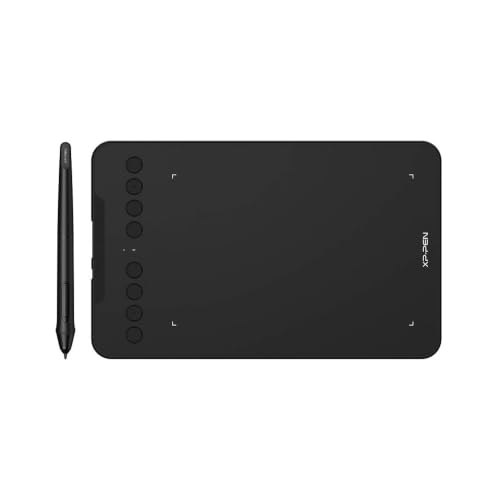
Flexible Connectivity Pick – XP-Pen Deco mini7W
The XP-Pen Deco mini7W is a versatile wireless drawing tablet with Bluetooth 5.0, a USB wireless option, and broad support for computers, Android devices, ChromeOS, and Linux. Its pressure-sensitive, tilt-supporting pen and eight customizable keys make it well suited to creative work and online teaching.
Best For: Multi-device users, online educators, digital artists, and mobile-compatible workflows.
Pros:
- Offers Bluetooth 5.0 and wired connectivity through USB-C.
- Battery-free pen provides 16384 levels of pressure sensitivity and 60-degree tilt support.
- Eight customizable press keys can be tailored to frequently used shortcuts.
- Supports Windows, macOS, Android, ChromeOS, and Linux.
Cons:
- The 7 x 4-inch format may feel restrictive for users who prefer a larger active area.
- Wireless setup requires the included USB dongle or Bluetooth-compatible device.
- The supplied specifications do not identify a current software-update date.
Choose this model when connection flexibility and cross-platform support matter more than a larger tablet surface. It is especially useful for switching between desktop work, Android devices, and teaching tasks.
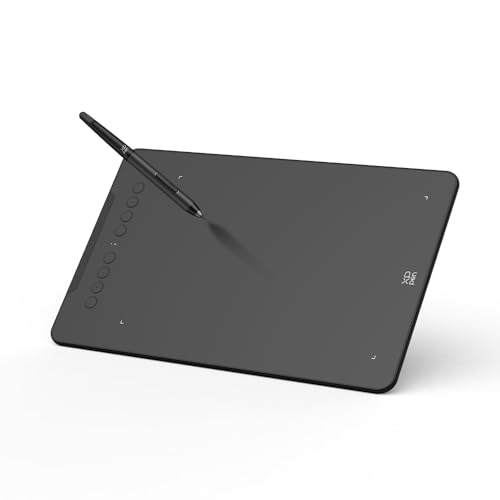
Mobile-Ready Upgrade – XP-Pen Deco mini7W V2
The XP-Pen Deco mini7W V2 stands out among wireless drawing tablets for mobile-focused creation. It combines Bluetooth 5.0, a battery rated for up to 13 hours of continuous work, an adjustable mobile active area, and eight shortcut keys for drawing, editing, and digital note-taking.
Best For: Android creators, mobile art apps, digital illustration, and portable workflows.
Pros:
- Bluetooth 5.0 supports cable-free use, with wired USB-C available for extended sessions.
- Battery-free stylus offers 16384 pressure levels and 60-degree tilt support.
- Dedicated app-based mobile mapping is designed to help prevent screen-ratio distortion on Android.
- Eight customizable keys and an L-shaped USB-C port support efficient, durable use.
Cons:
- Battery life is specified as up to 13 hours, so wireless use requires charging.
- iOS support is limited to ibis Paint according to the supplied notes.
- The product details contain conflicting pressure-sensitivity figures, listing 16384 in features but 8192 in the specifications.
This V2 is the stronger pick for creators who regularly draw on Android devices and want precise mobile mapping. Its wireless battery and broad system compatibility add portability, while the compact surface keeps it travel-friendly.
How We Picked the Best Wireless Drawing Tablets
We selected these Wireless Drawing Tablets based on connection options, active area, pen technology, pressure sensitivity, shortcut controls, compatibility, portability, and overall suitability for different creative workflows. We also considered whether each tablet includes useful software, supports battery-free pen operation, and offers a practical balance of features and price.
Specifications can vary by operating system and application, so check the manufacturer’s current compatibility list before buying, especially if you use an iPad, Android device, Chromebook, or specialized creative software.
Quick Comparison
| Best For | What to Look For |
|---|---|
| Beginners | Simple Bluetooth pairing, reliable drivers, and a comfortable medium-size work area |
| Small desks and travel | Compact dimensions, low weight, and wireless connectivity with minimal setup |
| Illustration and design | A larger active area, high pressure sensitivity, and customizable shortcut keys |
| Efficient workflows | Physical buttons, a dial, or programmable controls for zooming and brush adjustments |
| Mobile creativity | Built-in Android support, a screen, or compatibility with the devices you already use |
Key Buying Factors for Wireless Drawing Tablets
Active Area and Size
A medium or large active area gives your strokes more room and can feel more natural for detailed illustration. Smaller tablets are easier to carry and often suit photo editing, online teaching, and limited desk space.
Wireless Connection and Compatibility
Bluetooth is convenient, but verify the tablet’s supported operating systems and whether wireless mode works with your preferred software. Some models may require a wired connection for initial setup, charging, or certain devices.
Pen Performance
Battery-free styluses reduce maintenance and usually feel ready whenever you are. Pressure sensitivity helps control line weight and opacity, but tilt support, pen shape, nib availability, and tracking consistency can matter just as much in daily use.
Shortcut Controls
Express keys can speed up undo, zoom, brush sizing, and canvas rotation. A dial or wheel may be especially useful for artists who frequently adjust brush settings. Choose controls you can reach comfortably without interrupting your drawing posture.
Screen or Screenless Design
Screenless tablets are generally lighter and more affordable, while pen displays and Android drawing tablets can provide a direct-on-screen experience. A screen model may be easier for beginners, but it typically costs more and requires more attention to display quality, brightness, and battery life.
Who Should Buy Which Wireless Drawing Tablets?
Choose a compact wireless model if portability, a small workspace, or occasional editing matters most. Beginners should prioritize dependable drivers, straightforward pairing, and a medium active area over maximum pressure levels.
Illustrators and designers who work for long sessions will usually benefit from a larger tablet with customizable keys and a comfortable stylus. If shortcut-heavy workflows are important, consider a model with a dial or generous programmable controls.
For artists who want to draw away from a computer, an Android-compatible or standalone-style option is the better fit. Before ordering, confirm the included accessories, software compatibility, wireless range, and whether the tablet’s dimensions match your preferred posture and desk setup.