
The best WiFi routers can improve coverage, reduce congestion, and make faster internet plans more useful across your home. The right choice depends on your space, connected devices, broadband speed, and budget.
This roundup compares 10 current options, including WiFi 6, WiFi 6E, WiFi 7, and mesh systems, so you can choose a router that fits how your household actually connects.
Best 10 Wifi Routers Picks for 2026
Best WiFi 6E Upgrade

- Tri-band WiFi 6E with 6 GHz support
- Up to 5400 Mbps combined speed
- 2.5Gbps WAN and EasyMesh support
Best For: Homes with compatible 6 GHz devices
Best Whole-Home Mesh Value

- Coverage up to 6,500 square feet
- Connects up to 150 devices
- Three units with wired backhaul support
Best For: Large homes with dead zones
Best WiFi 7 Performance

- Tri-band WiFi 7 up to 9.3 Gbps
- Two 2.5Gbps and two Gigabit ports
- Coverage up to 2,500 square feet
Best For: Homes adopting WiFi 7 devices
Best Everyday WiFi 6 Router
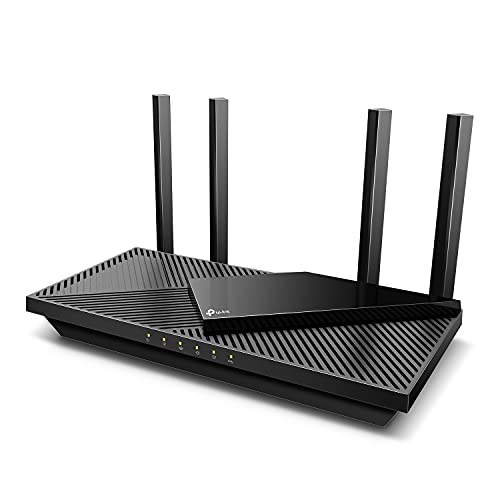
- Dual-band WiFi 6 performance
- Four external antennas with beamforming
- VPN, EasyMesh, USB 3.0, and HomeShield
Best For: Small to medium homes
Best Mesh Starter

- Covers up to 1,500 sq. ft.
- Supports 75+ connected devices
- Built-in Zigbee smart-home hub
Best For: Smaller homes seeking simple, expandable coverage
Best Wired Performance
TP-Link Archer BE230 Wi-Fi 7 Router

- Up to 3.6 Gbps combined data rate
- Two 2.5 Gbps Ethernet ports
- Covers up to 2,000 sq. ft.
Best For: High-speed internet plans and wired home networks
Best Large-Home Coverage

- Covers up to 6,600 sq. ft.
- Supports 150+ devices
- Expandable unified mesh network
Best For: Large homes with many devices and coverage gaps
Best WiFi 7 Upgrade

- Tri-band WiFi 7 with support for 320 MHz channels
- Up to 2,600 sq. ft. coverage and 120 devices
- 10 Gbps and 2.5 Gbps multi-gig ports
Best For: Large homes and multi-gig households
Best Balanced WiFi 6 Router

- WiFi 6 with OFDMA, MU-MIMO, and 1024-QAM
- Five Gigabit ports for wired devices
- AiProtection and Instant Guard VPN included
Best For: Everyday streaming, gaming, and smart-home networks
Best Budget WiFi 5 Router

- AC1200 dual-band wireless performance
- Up to 1,000 sq. ft. coverage
- EasyMesh, WPA3, and access point mode
Best For: Small homes and basic internet plans
Best WiFi 6E Upgrade – TP-Link Archer AXE75
The TP-Link Archer AXE75 is a strong choice for shoppers comparing wifi routers and wanting access to the newer 6 GHz band. Its tri-band design, 5.4 Gbps combined rating, 2.5Gbps WAN port, and WiFi 6E support are suited to busy homes with demanding streaming, gaming, and video-chat needs.
Best For: Households with compatible 6 GHz devices that want lower-latency performance and room to connect more devices.
Pros:
- Tri-band WiFi 6E with a dedicated 6 GHz band and speeds up to 5400 Mbps.
- 2.5Gbps WAN port, 160MHz support, and OFDMA help with fast, busy networks.
- Supports EasyMesh expansion, VPN server and client features, WPA3, and HomeShield basics.
Cons:
- Most internet providers require a separate modem.
- The benefits of 6 GHz depend on having compatible devices and suitable range conditions.
Choose the Archer AXE75 if you want a feature-rich standalone router with a modern wireless band and expansion options. It is especially compelling when your home already includes WiFi 6E clients or you plan to add them.
Best Whole-Home Mesh Value – TP-Link Deco X55 3-Pack
The TP-Link Deco X55 3-Pack is built for shoppers who need wifi routers that cover a large or awkwardly shaped home. Three WiFi 6 units work together to provide advertised coverage of up to 6,500 square feet, while the Deco app simplifies setup and network management.
Best For: Larger homes, multi-room layouts, and households dealing with dead zones or inconsistent coverage.
Pros:
- Three-node mesh system covers up to 6,500 square feet.
- Supports up to 150 connected devices and seamless whole-home roaming.
- Each unit has three Gigabit Ethernet ports and supports wired Ethernet backhaul.
- Deco app setup, AI-driven mesh optimization, and basic HomeShield features are included.
Cons:
- It is a dual-band WiFi 6 system rather than a tri-band or WiFi 6E model.
- A modem is required for most internet providers.
The Deco X55 makes the most sense when coverage matters more than maximum single-router speed. Ethernet backhaul support also gives you a practical way to improve performance between nodes when your home is already wired.
Best WiFi 7 Performance – NETGEAR Nighthawk BE9300
The NETGEAR Nighthawk BE9300 is aimed at shoppers seeking next-generation wifi routers for a busy connected home. Its dedicated tri-band WiFi 7 design supports up to 9.3 Gbps across the 2.4 GHz, 5 GHz, and 6 GHz bands, with coverage rated for up to 2,500 square feet and 100 devices.
Best For: Performance-focused homes with newer WiFi 7 devices, demanding streaming, gaming, and multiple simultaneous connections.
Pros:
- WiFi 7 tri-band design with a combined speed rating of up to 9.3 Gbps.
- Includes two 2.5Gbps ports and two Gigabit ports.
- Nighthawk app supports guided setup, speed tests, device pausing, and guest networks.
- Works with most cable, fiber, DSL, and satellite providers through an existing modem or gateway.
Cons:
- Coverage is rated at up to 2,500 square feet; larger homes may need a mesh system.
- The performance advantages depend on compatible WiFi 7 devices and internet service.
The BE9300 is a forward-looking standalone router for users who want fast wired connectivity and a dedicated 6 GHz lane. For a large or multi-story home, consider whether its stated coverage is sufficient before choosing it over a mesh option.
Best Everyday WiFi 6 Router – TP-Link Archer AX55
The TP-Link Archer AX55 is a practical option for shoppers comparing wifi routers for everyday home use. This dual-band WiFi 6 router combines a 2.4 Gbps-plus speed rating, four external antennas, beamforming, and Gigabit Ethernet for streaming, gaming, and general connected-device use.
Best For: Small to medium homes that want a straightforward WiFi 6 router with useful security and VPN features.
Pros:
- WiFi 6 speeds rated at 2402 Mbps on 5 GHz and 574 Mbps on 2.4 GHz.
- Four external high-gain antennas and beamforming support coverage throughout the home.
- Includes OFDMA, MU-MIMO, USB 3.0, EasyMesh, and VPN server/client support.
- HomeShield provides basic network security, parental controls, QoS, and reports.
Cons:
- Its dual-band design does not include the 6 GHz band.
- Most internet providers require a separate modem.
The Archer AX55 is a sensible middle-ground choice when you want modern WiFi 6 features without moving to WiFi 6E or WiFi 7. EasyMesh gives you an upgrade path if one router does not cover the entire home.
Best Mesh Starter – eero 6 Wi-Fi 6 Router
The eero 6 is a practical choice for shoppers comparing wifi routers for a smaller home or apartment. This single unit covers up to 1,500 square feet, supports plans up to 900 Mbps, and can handle more than 75 connected devices.
Best For: Smaller homes needing simple whole-home coverage, easy setup, and smart-home connectivity.
Pros:
- Wi-Fi 6 support with coverage up to 1,500 square feet and speeds up to 900 Mbps.
- TrueMesh technology helps reduce drop-offs and buffering while streaming, gaming, or video conferencing.
- Easy app-based setup, automatic updates, and a built-in Zigbee smart-home hub.
Cons:
- A single unit may not be enough for larger homes or areas with difficult coverage problems.
- The listed coverage and speed depend on home layout, connected devices, and network conditions.
The eero 6 stands out for its approachable setup and expandable design. It is a sensible wifi router for users who want reliable basic coverage now and the option to add compatible eero units later.
Best Wired Performance – TP-Link Archer BE230 Wi-Fi 7 Router
The TP-Link Archer BE230 is a strong option among wifi routers for users with demanding connections and several wired devices. Its dual-band Wi-Fi 7 design delivers up to 2,882 Mbps on 5 GHz and includes two 2.5 Gbps ports for faster networking.
Best For: Gigabit-plus internet users, gamers, streamers, and households that need multiple high-speed wired connections.
Pros:
- Wi-Fi 7 features including Multi-Link Operation, Multi-RUs, and 4K-QAM.
- Includes one 2.5G WAN/LAN port, one 2.5G LAN port, and three 1G LAN ports.
- Covers up to 2,000 square feet and supports up to 60 devices, with EasyMesh expansion.
- Offers app management, parental controls, IoT security, and Alexa or Google Assistant compatibility.
Cons:
- It is dual-band and does not support the 6 GHz band.
- A separate modem is required, and actual performance varies with distance, walls, and other conditions.
The Archer BE230 is particularly appealing when wired throughput matters as much as wireless speed. Its flexible 2.5G ports and broad feature set make it a capable standalone router with room for mesh expansion.
Best Large-Home Coverage – Deco 7 Wi-Fi 7 Mesh System
The TP-Link Deco 7 is designed for shoppers who need wifi routers that can cover a large property with a single, unified network. This dual-band Wi-Fi 7 mesh system covers up to 6,600 square feet, supports more than 150 devices, and can be expanded with additional Deco units.
Best For: Large homes with many connected devices and dead spots that call for seamless mesh coverage.
Pros:
- Wi-Fi 7 speeds reach up to 4,324 Mbps on 5 GHz and 688 Mbps on 2.4 GHz.
- Provides up to 6,600 square feet of coverage for more than 150 devices.
- Uses a unified network name with AI-Roaming for smoother movement around the home.
- Includes 2.5G Ethernet, app management, parental controls, and basic network security features.
Cons:
- Wireless and wired backhaul features require at least two Deco units.
- It is dual-band and does not include a 6 GHz band.
- A separate modem is required for most internet providers.
For large homes, the Deco 7’s coverage and device capacity are its main advantages. It is a better fit than a single-router setup when consistent connectivity across multiple rooms is the priority.
Best WiFi 7 Upgrade – TP-Link Archer BE600
The TP-Link Archer BE600 is a high-performance choice for shoppers comparing wifi routers for demanding homes. Its tri-band WiFi 7 design, multi-gig wired ports, and support for up to 120 devices make it well suited to fast internet plans, streaming, gaming, and newer WiFi 7 hardware.
Best For: Large households, multi-gig internet users, and homes with many connected devices.
Pros:
- WiFi 7 features include Multi-Link Operation, Multi-RUs, 4K-QAM, and support for 320 MHz channels.
- Tri-band speeds are rated up to 5,765 Mbps on 6 GHz, 2,882 Mbps on 5 GHz, and 1,032 Mbps on 2.4 GHz.
- Includes one 10 Gbps port, one 2.5 Gbps WAN/LAN port, and three 2.5 Gbps LAN ports.
- Offers stated coverage up to 2,600 square feet for up to 120 devices, plus parental and IoT security features.
Cons:
- Its WiFi 7 advantages are most useful with compatible devices and fast internet service.
- Advanced capabilities may be more than a small household needs.
The Archer BE600 stands out when speed, capacity, and wired connectivity matter more than a basic setup. It is a forward-looking option for buyers who want a powerful central router and an easy app-based management experience.
Best Balanced WiFi 6 Router – ASUS RT-AX1800S
The ASUS RT-AX1800S is a practical pick among wifi routers for everyday streaming, gaming, and smart-home use. WiFi 6, OFDMA, and MU-MIMO help it handle multiple devices efficiently, while five Gigabit ports and ASUS security tools add flexibility for home networks.
Best For: Small to medium homes wanting an affordable WiFi 6 router with security and VPN features.
Pros:
- WiFi 6 supports MU-MIMO, OFDMA, and 1024-QAM for improved efficiency and throughput.
- Offers up to 1,800 Mbps total wireless data rate, with up to 1,201 Mbps on the 5 GHz band.
- Provides one Gigabit WAN port and four Gigabit LAN ports.
- Includes subscription-free AiProtection Classic and one-click ASUS Instant Guard VPN access.
Cons:
- It is dual-band WiFi 6 rather than a newer tri-band WiFi 7 model.
- Actual speed and coverage vary with traffic, building materials, distance, and other network conditions.
For buyers who want current-generation efficiency without stepping up to premium multi-gig hardware, the RT-AX1800S offers a balanced feature set. Its AiMesh compatibility also leaves room to expand coverage with compatible ASUS equipment.
Best Budget WiFi 5 Router – TP-Link Archer A54
The TP-Link Archer A54 is a straightforward option for shoppers seeking affordable wifi routers for basic home connectivity. Its dual-band AC1200 wireless design, four external antennas, access point mode, and Tether app provide the essentials for browsing, streaming, and everyday devices.
Best For: Smaller homes and budget-conscious users with standard internet needs.
Pros:
- Dual-band wireless speeds are rated up to 867 Mbps on 5 GHz and 300 Mbps on 2.4 GHz.
- Four external antennas support coverage of up to 1,000 square feet.
- Includes WPA3 security, parental controls, guest WiFi, and access point mode.
- EasyMesh compatibility allows expansion with compatible routers or range extenders.
Cons:
- Its four wired ports use 10/100 Mbps Fast Ethernet rather than Gigabit Ethernet.
- It uses WiFi 5 and does not support the 6 GHz band.
- A separate modem is required for most internet service providers.
The Archer A54 makes sense when low cost and simple coverage are the priorities. It is less suitable for gigabit wired networking or the latest wireless devices, but it covers common home-network basics and can later join an EasyMesh setup.
How We Picked These Wifi Routers
We selected these models to cover the most common home networking needs, from affordable basic connectivity to high-performance WiFi 7 and whole-home mesh coverage. We considered wireless standard, advertised speed, band configuration, coverage approach, device capacity, ease of setup, security features, and compatibility with faster internet plans.
Advertised throughput is a theoretical maximum, not the speed every device will achieve. Real-world performance varies with walls, interference, client hardware, ISP service, and router placement.
Quick Comparison
| Best For | Recommended Type | Why It Stands Out |
|---|---|---|
| Small budgets | WiFi 5 or entry-level WiFi 6 | Lower cost for basic browsing and streaming |
| Most homes | Dual-band WiFi 6 | Strong balance of speed, range, and value |
| Busy households | Tri-band WiFi 6E or WiFi 7 | More capacity for many simultaneous devices |
| Large or difficult layouts | Mesh system | More consistent coverage across multiple rooms |
| Multi-gig internet | WiFi 7 with multi-gig Ethernet | Better headroom for newer devices and fast plans |
Key Buying Factors for Wifi Routers
Wireless Standard and Speed
WiFi 6 remains a practical choice for most households, while WiFi 6E adds access to the less-congested 6GHz band on compatible devices. WiFi 7 offers newer features and higher potential throughput, but its value is greatest when you have newer phones, computers, or a multi-gig internet plan.
Coverage and Placement
A single router may be sufficient for an apartment or compact home. Larger homes, multiple floors, and rooms separated by dense walls are better candidates for mesh WiFi. Place the main unit in a central, elevated location rather than inside a cabinet or at the far edge of the home.
Ports and Wired Connections
Check whether the router has gigabit or multi-gig Ethernet ports that match your modem, switch, gaming setup, or NAS. A fast wireless rating cannot compensate for a slower wired WAN port when your internet plan exceeds gigabit speeds.
Security and Management
Look for automatic firmware updates, current security support, guest networking, parental controls, and straightforward mobile-app management. Subscription features can be useful, but verify which protections remain free before buying.
Who Should Buy Which Wifi Routers?
- Choose an affordable dual-band router for a small home, moderate internet plan, and everyday browsing or streaming.
- Choose WiFi 6 if you want dependable performance and broad device compatibility without paying for the newest standard.
- Choose WiFi 6E or WiFi 7 if your home has heavy traffic, nearby network interference, compatible devices, or a fast multi-gig plan.
- Choose a mesh system when coverage gaps matter more than maximum speed beside the main router.
- Choose a tri-band model for demanding households with many simultaneous clients, wireless backhaul needs, or frequent high-bandwidth activity.
Before replacing your router, confirm your ISP requirements, modem compatibility, home size, and the capabilities of your most important devices. Those details usually matter more than the highest number printed on the box.