
The best Wi-Fi router with parental controls makes it easier to manage screen time, filter unsuitable content, and keep every device connected reliably. The right choice depends on your home’s size, internet speed, number of users, and comfort with network settings.
We compared 10 family-friendly routers and mesh systems across coverage, wireless standards, parental controls, security features, setup, and long-term flexibility. This guide highlights which options make the most sense for apartments, busy households, large homes, and advanced users.
Best 10 Wi Fi Router with Parental Controls Picks for 2026
Best Wi-Fi 6 Value

- Wi-Fi 6 speeds up to 1.8 Gbps
- Parental controls and QoS
- Four antennas with beamforming
Best For: Families upgrading to Wi-Fi 6
Best Mesh Coverage

- Two-unit mesh covers up to 3,800 sq. ft.
- Profiles support schedules and website blocking
- One network name with seamless roaming
Best For: Larger homes with coverage gaps
Best Advanced Security

- Wi-Fi 6 with configurable 2.5GbE port
- Threat Prevention and VLAN segmentation
- Parental controls with web filtering
Best For: Security-focused homes and home offices
Best Tri-Band Features

- Tri-band AC3200 wireless networking
- AiProtection and parental controls
- USB 2.0 and USB 3.0 ports
Best For: Large, device-heavy homes needing flexible controls
Best Value Wi-Fi 6 Pick
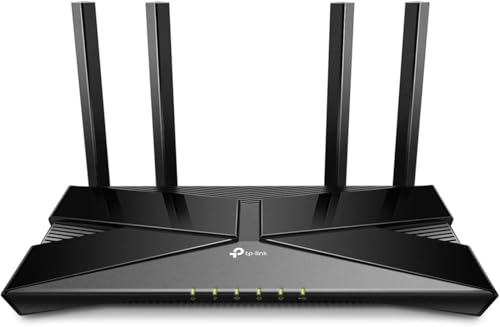
- Wi-Fi 6 with OFDMA and MU-MIMO
- Beamforming for stronger coverage
- App-based setup and control
Best For: Budget-conscious homes wanting Wi-Fi 6 and parental controls
Best Security Features

- Wi-Fi 6 with OFDMA and MU-MIMO
- Subscription-free AiProtection security
- Instant Guard secure VPN access
Best For: Families wanting security, VPN access, and parental controls
Best with Extra Features

- Wi-Fi 6 speeds up to 3 Gbps
- Lifetime HomeCare parental controls
- OFDMA and MU-MIMO for busy homes
Best For: Families wanting fast Wi-Fi 6 and built-in security
Best Budget Mesh Option

- AC1200 dual-band wireless
- Profile-based parental controls
- Mesh smart roaming and gigabit ports
Best For: Budget-conscious homes needing family controls
Best Advanced Controls

- Wi-Fi 6 speeds up to 5.4 Gbps
- Advanced parental controls and security
- VPN, Instant Guard, and AiMesh support
Best For: Power users and families wanting expandable network features
Best Wi-Fi 6 Value – TP-Link Archer AX20
The TP-Link Archer AX20 is a practical wi fi router with parental controls for households that want newer Wi-Fi 6 performance without moving to a mesh system. It supports up to 1.8 Gbps combined wireless speeds, uses OFDMA to handle multiple connected devices, and includes app-based setup and management.
Best For: Families needing a capable Wi-Fi 6 router for streaming, gaming, and everyday household connectivity.
Pros:
- Wi-Fi 6 supports faster speeds, greater capacity, and reduced congestion.
- Parental controls, QoS, and app-based management are included.
- Four high-gain antennas, beamforming, and an advanced front-end module support broad coverage.
- Works with major internet providers when paired with a compatible modem.
Cons:
- It is a traditional single-router setup rather than a whole-home mesh system.
- A modem is required for most internet service providers.
Choose the Archer AX20 if you want a straightforward Wi-Fi 6 upgrade with family-management features and Gigabit Ethernet. Its quad-core processor and coverage-focused hardware make it a balanced option for busy homes.
Best Mesh Coverage – TP-Link Deco S4
The TP-Link Deco S4 is a wi fi router with parental controls designed for homes where one router may leave dead zones. Its two mesh units cover up to 3,800 square feet, share one network name, and let devices move between nodes automatically as you travel through the house.
Best For: Larger homes that need wider, more consistent coverage and simple family-oriented network controls.
Pros:
- Two units provide up to 3,800 square feet of stated coverage.
- Seamless roaming keeps one network name and password throughout the home.
- Profiles can limit online time and block inappropriate websites.
- Supports up to 75 devices and includes four Gigabit Ethernet ports across the two units.
Cons:
- Uses Wi-Fi 5 rather than the newer Wi-Fi 6 standard.
- A modem is required for most internet providers.
The Deco S4 is a sensible choice when coverage and easy roaming matter more than the latest wireless generation. Its app-based controls make it especially useful for households managing children’s online access across multiple rooms.
Best Advanced Security – Synology WRX560
The Synology WRX560 is a wi fi router with parental controls for users who want stronger network-management and security options. Along with Wi-Fi 6 and a configurable 2.5GbE WAN/LAN port, it offers web filtering, Threat Prevention, VLAN segmentation, WPA3 support, and VPN capabilities.
Best For: Security-conscious families, home offices, and technically confident users who want detailed network controls.
Pros:
- Wi-Fi 6 and 2.5GbE connectivity support fast wireless and wired transfers.
- Parental controls and web filtering help manage family access.
- Threat Prevention, VLAN segmentation, and WPA3 provide layered security features.
- Can operate alone or be incorporated into a mesh system.
Cons:
- Its advanced feature set may be more than casual users need.
- The supplied details identify a dual-band design rather than a tri-band router.
The WRX560 stands out when parental controls are only one part of a broader network-security plan. Its high-speed port and flexible management features make it a strong fit for homes with demanding wired devices or segmented networks.
Best Tri-Band Features – ASUS RT-AC3200
The ASUS RT-AC3200 is a wi fi router with parental controls that emphasizes high-capacity tri-band networking and broad management features. Smart Connect assigns devices to suitable bands, while AiProtection with Trend Micro adds network security and parental-control tools through the ASUSWRT interface.
Best For: Large homes with many connected devices, USB-sharing needs, and a preference for detailed router controls.
Pros:
- Tri-band AC3200 networking supports multiple devices and usage demands.
- Smart Connect can automatically select a suitable band for each device.
- AiProtection with Trend Micro includes network security and parental controls.
- USB 2.0 and USB 3.0 ports support storage, printer sharing, and compatible dongles.
Cons:
- It uses Wi-Fi 5 rather than Wi-Fi 6.
- The supplied listing states that it has no warranty.
- Its feature-rich design may be excessive for smaller or simpler networks.
The RT-AC3200 remains appealing for households that value tri-band capacity, USB functionality, and extensive configuration options. Consider it when those features matter more than upgrading to the newest Wi-Fi standard.
Best Value Wi-Fi 6 Pick – TP-Link Archer AX10
If you want a wi fi router with parental controls and modern Wi-Fi 6 performance, the renewed TP-Link Archer AX10 is a practical choice. It combines dual-band speeds, OFDMA, MU-MIMO, beamforming, and app-based setup in a straightforward home router.
Best For: Budget-conscious households that want Wi-Fi 6, dependable coverage, and parental-control features without stepping up to a mesh system.
Pros:
- Wi-Fi 6 supports OFDMA, 1024-QAM, and MU-MIMO for more efficient connections across multiple devices.
- Beamforming helps focus signal strength toward connected devices for stronger coverage.
- TP-Link Tether app supports quick setup and app-based control.
- Includes four ports and WPA3 security support.
Cons:
- As a renewed product, it comes with a 90-day limited warranty.
- It is a standard dual-band router rather than a whole-home mesh system.
The Archer AX10 stands out for delivering key Wi-Fi 6 features at a typically accessible tier. Its tri-core processor and beamforming make it a sensible fit for connected homes, provided one router can cover the space.
Best Security Features – ASUS RT-AX1800S
The ASUS RT-AX1800S is a strong option when a wi fi router with parental controls also needs built-in security and VPN features. Its Wi-Fi 6 hardware supports efficient connections for gaming, streaming, and smart-home devices, while ASUS adds subscription-free AiProtection Classic and Instant Guard VPN access.
Best For: Families and connected homes that want parental controls, network security, VPN access, and several Gigabit wired connections.
Pros:
- Wi-Fi 6 uses OFDMA, MU-MIMO, and 1024-QAM for improved efficiency and throughput.
- AiProtection Classic provides subscription-free network security.
- Instant Guard offers one-click secure VPN access away from home.
- One Gigabit WAN port and four Gigabit LAN ports support wired devices.
Cons:
- Coverage and throughput vary with building materials, traffic, and network conditions.
- It is a dual-band router, not a multi-point mesh kit by itself.
With four external antennas, five Gigabit ports, and a three-year warranty, the RT-AX1800S is well equipped for a busy household. It is especially compelling if security and remote VPN access matter alongside parental controls.
Best for Whole-Home Coverage – Google WiFi 2-Pack
For larger homes, this Google WiFi two-pack is a practical wi fi router with parental controls because it uses a mesh design rather than relying on one central router. The system is rated for up to 3,800 square feet, offers app-based setup, and can be expanded with additional WiFi points.
Best For: Homes with dead zones or multiple rooms that need seamless whole-home coverage and simple parental-control management.
Pros:
- Two-unit mesh system provides coverage for up to 3,800 square feet.
- App-based setup and control are designed for straightforward management.
- Scalable system allows additional WiFi points to be added as needs grow.
- Dual-band Wi-Fi 5 supports advertised speeds up to 2.2 Gbps.
Cons:
- Uses Wi-Fi 5 rather than the newer Wi-Fi 6 standard.
- Basic firewall security is listed in the supplied specifications.
- Mesh performance depends on placement and the home environment.
The Google WiFi two-pack makes the most sense when consistent coverage matters more than having the newest wireless generation. Its scalable mesh layout and simple app control are useful for families managing devices across a larger home.
Best with Extra Features – TP-Link Archer AX50
The TP-Link Archer AX50 is a strong choice if you want a wi fi router with parental controls that can also handle busy households. Its Wi-Fi 6 support, dual-band speeds up to 3 Gbps, OFDMA, and MU-MIMO are suited to streaming, gaming, video calls, and multiple connected devices.
Best For: Families needing robust parental controls, security features, and fast Wi-Fi 6 performance.
Pros:
- Wi-Fi 6 speeds up to 3 Gbps with OFDMA and MU-MIMO.
- HomeCare includes parental controls, antivirus protection, and QoS.
- Works with major internet providers and supports Alexa.
- Includes gigabit networking and coverage for a typical home.
Cons:
- A modem is required for most internet service providers.
- The listed coverage varies between approximately 2,000 and 2,500 square feet.
The Archer AX50 combines modern Wi-Fi 6 performance with a free lifetime HomeCare subscription, making it particularly appealing when parental controls and network security matter as much as speed.
Best Budget Mesh Option – D-Link DIR-1260
The D-Link DIR-1260 is a practical wi fi router with parental controls for homes that need dependable dual-band connectivity without moving to Wi-Fi 6. It offers AC1200 speeds, high-power amplifiers, mesh smart roaming, and profile-based controls for managing children’s online activity.
Best For: Households seeking affordable coverage expansion and straightforward family controls.
Pros:
- AC1200 dual-band speeds reach up to 1,200 Mbps combined.
- High-power amplifiers and mesh smart roaming can improve coverage.
- Profile-based parental controls help manage kids’ online activities.
- Includes one gigabit WAN port and four gigabit LAN ports.
Cons:
- Uses Wi-Fi 5 rather than Wi-Fi 6.
- Its listed 5 GHz maximum is 867 Mbps, below newer high-speed models.
Choose the DIR-1260 if your priority is basic family management, wired gigabit connectivity, and broader wireless coverage rather than the latest Wi-Fi generation.
Best Advanced Controls – ASUS RT-AX5400
The ASUS RT-AX5400 is a feature-rich wi fi router with parental controls for households that want strong performance and more advanced networking options. Wi-Fi 6, a combined 5.4 Gbps data rate, built-in VPN support, AiMesh compatibility, and advanced parental controls make it suitable for gaming, streaming, and smart-home use.
Best For: Power users and families wanting advanced controls, security, VPN features, and expandable coverage.
Pros:
- Wi-Fi 6 dual-band performance with speeds up to 5,400 Mbps.
- Advanced parental controls and included lifetime internet security.
- Supports built-in VPN features, Instant Guard, and AiMesh expansion.
- Offers gigabit connectivity, USB, guest mode, and Alexa compatibility.
Cons:
- Its extensive feature set may be more than a basic home network requires.
- The supplied specifications identify gigabit LAN bandwidth rather than faster wired ports.
The RT-AX5400 stands out when parental controls are only part of the requirement. Its security tools, VPN capabilities, and AiMesh support give it more room to grow than a simpler family router.
How We Picked the Best Wi Fi Router with Parental Controls
We focused on routers and mesh systems that offer practical controls for families, not just high theoretical speeds. Our comparison considered content filtering, device profiles, scheduling, pause controls, security tools, coverage, and ease of management. We also looked at Wi-Fi generation, Ethernet capacity, multi-device performance, and whether features require a paid subscription.
The selection includes affordable Wi-Fi 5 and Wi-Fi 6 routers, whole-home mesh systems, and more advanced models with VLANs, VPN support, threat prevention, or multi-gigabit networking. Because parental-control features can vary by firmware and app version, confirm the current feature set before buying.
Quick Comparison
| Best For | Recommended Type | What to Prioritize |
|---|---|---|
| Small apartments | Single dual-band router | Simple controls, stable coverage, Wi-Fi 6 |
| Large or multi-story homes | Mesh Wi-Fi system | Node placement, seamless roaming, app controls |
| Busy family networks | Midrange or high-end Wi-Fi 6 router | Capacity, device scheduling, security tools |
| Advanced users | Feature-rich router | VLANs, multiple SSIDs, VPN, detailed management |
Key Buying Factors for a Wi-Fi Router with Parental Controls
Coverage and Placement
A powerful router cannot reliably cover every floor or dead zone. For larger homes, a mesh system such as a two-pack may provide more consistent coverage than a single router. In smaller homes, one centrally placed router is usually simpler and less expensive.
Control Features and Subscriptions
Look for device profiles, bedtime schedules, pause buttons, category filtering, usage reports, and guest-network controls. Some brands place advanced filtering or reporting behind a subscription, while others include core parental controls at no extra cost. Check whether controls work per device or only across the entire network.
Speed, Capacity, and Wi-Fi Generation
Wi-Fi 6 is generally the better choice for homes with many phones, laptops, streaming devices, and smart-home products. Match the router’s Ethernet and wireless capability to your internet plan, but do not pay for extreme throughput if your broadband connection is much slower.
Security and Administration
Built-in security, automatic updates, VPN support, and separate guest or child networks can improve safety and flexibility. Advanced tools such as VLAN segmentation are useful for experienced users, but a straightforward mobile app may be more valuable if multiple family members need to manage the network.
Who Should Buy Which Wi Fi Router with Parental Controls?
Choose a basic dual-band Wi-Fi 6 model if you want dependable performance and straightforward controls at a reasonable price. A mesh system is the better fit for large homes, thick walls, or rooms where a single router leaves weak coverage. Families with many simultaneous users should consider a stronger Wi-Fi 6 router with better capacity and more detailed profiles.
Advanced users should look for models offering multiple SSIDs, VLAN support, threat prevention, VPN features, and granular administration. If ease of setup matters most, prioritize a well-designed app and clearly explained controls over advanced specifications. Before purchasing, verify modem compatibility, available Ethernet ports, app support, and whether the parental features you need are included without a recurring fee.