
Finding the best Wi-Fi router for a large house means balancing coverage, speed, device capacity, and placement flexibility. A single powerful router may work in an open floor plan, while a mesh system is usually better for multiple floors, thick walls, or dead zones.
These 10 picks include affordable Wi-Fi 6 models, faster Wi-Fi 6E and Wi-Fi 7 routers, and multi-node mesh systems for homes ranging from roughly 2,000 to 6,000 square feet. Use the guide below to match your home’s layout, internet plan, and connected-device demands.
Best 10 Wi Fi Router for Large House Picks for 2026
Best Whole-Home Mesh

- Covers up to 6,000 square feet
- WiFi 7 speeds up to 5 Gbps
- Supports up to 70 connected devices
Best For: Large or multi-story homes needing seamless mesh coverage
Best Traditional Router
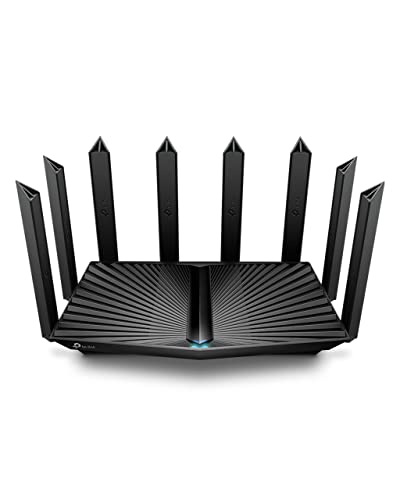
- WiFi 6 speeds up to 6,000 Mbps
- Eight high-gain antennas with beamforming
- Includes a 2.5G multi-gigabit port
Best For: 3-plus-bedroom homes preferring one expandable router
Best WiFi 7 Performance
Nighthawk BE9300 Tri-Band Router

- Tri-band WiFi 7 up to 9.3 Gbps
- Includes a dedicated 6 GHz band
- Supports up to 100 devices
Best For: Busy homes prioritizing speed within 2,500 square feet
Best 6E Mesh Coverage

- Covers up to 7,200 square feet
- WiFi 6E tri-band mesh system
- Supports up to 200 devices
Best For: Large, device-heavy homes needing broad 6E coverage
Best Single-Router Performance
TP-Link Archer AX73 WiFi 6 Router

- WiFi 6 speeds up to 5,400 Mbps
- Coverage rated up to 2,000 sq. ft.
- USB 3.0 and four gigabit LAN ports
Best For: Busy homes needing fast single-router performance
Best Whole-Home Mesh Coverage
TP-Link Deco S4 3-Pack Mesh System

- Coverage rated up to 5,500 sq. ft.
- Three units create one seamless network
- Supports up to 100 connected devices
Best For: Large homes with dead zones and multiple rooms
Best Premium Wi-Fi 7 Pick

- Tri-band Wi-Fi 7 with 320 MHz support
- Up to 2,600 sq. ft. and 120 devices
- 10 Gbps and 2.5 Gbps wired ports
Best For: Large, device-heavy homes with multi-gig internet
Best Expandable Wi-Fi 7 Value

- Dual-band Wi-Fi 7 with Multi-Link Operation
- Up to 2,400 sq. ft. and 90 devices
- Expandable through compatible EasyMesh gear
Best For: Homes seeking Wi-Fi 7 with future coverage expansion
Best Wi-Fi 6E Alternative

- Tri-band Wi-Fi 6E with a 6 GHz band
- Up to 5,400 Mbps combined throughput
- EasyMesh support for added coverage
Best For: Wi-Fi 6E homes needing tri-band capacity and expansion
Best Whole-Home Mesh – Orbi 370 WiFi 7 3-Pack
If you need a wi fi router for large house coverage, the NETGEAR Orbi 370 Series is a strong mesh option. Its router and two satellites cover up to 6,000 square feet, support up to 70 devices, and are designed to provide consistent service across multiple areas of a home.
Best For: Large or multi-story homes that need broad, seamless coverage and WiFi 7 performance.
Pros:
- Three-unit mesh system covers up to 6,000 square feet.
- WiFi 7 speeds reach up to 5 Gbps for streaming, gaming, VR, and video calls.
- App-guided setup, guest-network management, and compatibility with any internet provider.
- Supports expansion with additional Orbi 370 satellites.
Cons:
- Actual coverage varies with home construction, layout, and satellite placement.
- NETGEAR Armor security requires a separate subscription after the 30-day trial.
- Designed for use in the US only.
Choose this system when coverage is the priority and you want a ready-to-deploy mesh network. It is especially practical for homes with dead zones, multiple floors, or many simultaneously connected devices.
Best Traditional Router – TP-Link Archer AX80 AX6000
The TP-Link Archer AX80 is a practical choice if you prefer a single router for a large home rather than a multi-node system. Its eight high-gain antennas, beamforming, WiFi 6 connectivity, and 2.5G port help support fast connections across a 3-plus-bedroom house.
Best For: Households seeking a powerful single-router setup with wired multi-gig connectivity and optional OneMesh expansion.
Pros:
- WiFi 6 speeds reach up to 6,000 Mbps across both bands.
- Eight high-gain antennas with beamforming help extend coverage.
- 2.5G multi-gigabit port helps prevent the router from limiting faster internet plans.
- Supports MU-MIMO, OFDMA, VPN client features, and OneMesh range extenders.
Cons:
- A modem is required for most internet service providers.
- It is a single router, so very large or challenging layouts may need a OneMesh extender.
- OneMesh expansion requires separately purchased compatible equipment.
The Archer AX80 makes sense for buyers who want strong WiFi 6 performance without immediately committing to a mesh kit. Its expansion support also gives you a way to improve coverage later if one router does not reach every room.
Best WiFi 7 Performance – Nighthawk BE9300 Tri-Band Router
The NETGEAR Nighthawk BE9300 is built for busy households that want high-end WiFi 7 performance from a single router. Its tri-band design includes the 6 GHz band, delivers up to 9.3 Gbps across the bands, and supports up to 100 devices over up to 2,500 square feet.
Best For: Connected homes that prioritize WiFi 7 speed, tri-band capacity, and a dedicated 6 GHz lane.
Pros:
- Tri-band WiFi 7 supports aggregate speeds up to 9.3 Gbps.
- The 6 GHz band provides a separate lane for compatible high-speed devices.
- Supports up to 100 devices and includes two 2.5G Ethernet ports.
- Nighthawk app provides guided setup, speed tests, device controls, and guest-network management.
Cons:
- Coverage is rated up to 2,500 square feet, less than the supplied mesh options.
- Large or multi-story homes may benefit more from an Orbi mesh system.
- Some modem-router gateways may require bridge mode.
This router is a better fit for performance-focused households than for buyers primarily concerned with maximum physical coverage. If your home is within its stated range and includes many demanding devices, the tri-band WiFi 7 design is compelling.
Best 6E Mesh Coverage – TP-Link Deco XE75 3-Pack
The TP-Link Deco XE75 is a strong wi fi router for large house coverage when you want mesh networking and access to the newer 6 GHz band. This three-pack covers up to 7,200 square feet, supports up to 200 devices, and can use 6 GHz as a dedicated backhaul between nodes.
Best For: Large homes with many devices that can benefit from broad WiFi 6E mesh coverage and reduced interference.
Pros:
- Three-node system covers up to 7,200 square feet.
- Tri-band WiFi 6E supports aggregate speeds up to 5,400 Mbps.
- 6 GHz can serve as a backhaul or connect compatible WiFi 6E devices.
- Supports up to 200 devices with app-based setup and management.
Cons:
- The 6 GHz band is available only to compatible WiFi 6E devices when used as a client network.
- Gigabit Ethernet ports may not suit users seeking multi-gigabit wired connectivity.
- A modem is required for most internet service providers.
The Deco XE75 is a coverage-first choice with more capacity than many conventional routers. It is particularly appealing when multiple nodes are needed and your newer devices can take advantage of the 6 GHz band.
Best Single-Router Performance – TP-Link Archer AX73 WiFi 6 Router
For a large house that can be served by one centrally positioned router, the TP-Link Archer AX73 is a strong wi-fi router for large house option. Its WiFi 6 platform, six antennas, beamforming, and stated coverage of up to 2,000 square feet are designed for busy homes with streaming, gaming, and multiple connected devices.
Best For: Households wanting fast WiFi 6 performance, broad single-router coverage, and useful wired and USB connectivity.
Pros:
- Up to 5,400 Mbps dual-band WiFi performance, with 4T4R and HE160 support on 5 GHz.
- MU-MIMO and OFDMA help reduce congestion when several devices are active.
- Six antennas, beamforming, and a high-power front-end module support coverage up to 2,000 square feet.
- Includes four gigabit LAN ports plus USB 3.0 media-sharing and private-cloud support.
Cons:
- Its stated coverage may not be enough for homes substantially larger than 2,000 square feet.
- A modem is required for most internet service providers.
- Some TP-Link security and parental-control features are limited to the free tier or may involve premium service.
The Archer AX73 is the better fit when you prefer one powerful router instead of a multi-unit mesh system. For sprawling or unusually shaped homes, additional coverage equipment may still be necessary.
Best Whole-Home Mesh Coverage – TP-Link Deco S4 3-Pack Mesh System
The TP-Link Deco S4 three-pack is a practical wi-fi router for large house solution when one router cannot reach every room. Its three units work together as one mesh network, with coverage rated up to 5,500 square feet and seamless roaming under a single network name and password.
Best For: Large or multi-story homes that need broad coverage, simple roaming, and an easy mesh setup.
Pros:
- Three Deco units provide stated coverage of up to 5,500 square feet.
- Seamless roaming lets devices switch between units while using one network name and password.
- Supports up to 100 devices and offers AC1900-class dual-band WiFi.
- Each unit has two gigabit Ethernet ports and supports wired Ethernet backhaul.
Cons:
- Uses WiFi 5 rather than the newer WiFi 6 standard.
- The three-unit system requires more setup space and power outlets than a single router.
- A modem is required for most internet service providers.
For a large house with dead zones, the Deco S4’s multi-unit design is more coverage-focused than a traditional single router. It is especially appealing if simple app setup and uninterrupted movement around the home matter more than having the latest WiFi generation.
Best Compact WiFi 6 Value – NETGEAR Nighthawk RAX36 AX3000 Router
The NETGEAR Nighthawk RAX36 is a straightforward wi-fi router for large house pick for homes within its rated 2,000-square-foot range. It delivers dual-band WiFi 6 speeds up to 3 Gbps, supports up to 25 devices, and includes four gigabit Ethernet ports for wired computers, consoles, and streaming equipment.
Best For: Smaller large-home layouts or households seeking an affordable WiFi 6 router for up to 25 devices.
Pros:
- WiFi 6 AX3000 performance supports speeds up to 3 Gbps.
- Coverage is rated up to 2,000 square feet for up to 25 devices.
- Four 1-gigabit Ethernet ports support wired gaming, streaming, and computing devices.
- Includes WPA3 security, built-in VPN support, and a USB 3.0 port.
Cons:
- Its 2,000-square-foot coverage rating may be limiting for very large or multi-story homes.
- Supports up to 25 devices, fewer than the Deco S4 system’s stated capacity.
- This is a router only; a separate modem is required.
The RAX36 makes sense when you want WiFi 6 features and wired connectivity without moving to a mesh system. Choose a mesh option instead if your home extends well beyond its stated coverage area or has persistent dead zones.
Best Premium Wi-Fi 7 Pick – TP-Link Archer BE600
If you want a high-performance wi fi router for large house coverage, the TP-Link Archer BE600 is built for demanding homes. Its tri-band Wi-Fi 7 design, six antennas, beamforming, and claimed coverage of up to 2,600 square feet support up to 120 devices at once.
Best For: Large, busy households with Wi-Fi 7 devices, multi-gig internet, and heavy streaming or gaming needs.
Pros:
- Wi-Fi 7 features include Multi-Link Operation, Multi-RUs, 4K-QAM, and support for 320 MHz channels.
- Tri-band speeds reach up to 5,765 Mbps on 6 GHz, 2,882 Mbps on 5 GHz, and 1,032 Mbps on 2.4 GHz.
- Six antennas, beamforming, and up to 2,600 square feet of stated coverage help reach difficult areas.
- Includes a 10 Gbps WAN/LAN port and multiple 2.5 Gbps ports for multi-gig wired networking.
Cons:
- Its Wi-Fi 7 benefits are most useful with compatible newer devices.
- A separate modem is required for internet service.
- Advanced security and parental-control features may include service limitations or requirements.
The Archer BE600 is the strongest option here for future-focused performance and wired flexibility. It is a particularly good fit when your home has many connected devices and a multi-gig internet plan.
Best Expandable Wi-Fi 7 Value – TP-Link Archer BE400
The TP-Link Archer BE400 is a practical choice if you need a wi fi router for large house coverage without moving to a tri-band model. It offers dual-band Wi-Fi 7, six antennas, beamforming, and stated coverage of up to 2,400 square feet for as many as 90 devices.
Best For: Medium-to-large homes that want Wi-Fi 7 performance and the option to expand coverage with compatible EasyMesh equipment.
Pros:
- Wi-Fi 7 features include Multi-Link Operation, Multi-RUs, and 4K-QAM.
- Advertised speeds reach up to 5,764 Mbps on 5 GHz and 688 Mbps on 2.4 GHz.
- Six antennas and beamforming support reliable connections across up to 2,400 square feet.
- EasyMesh compatibility allows expansion with compatible routers, extenders, or wireless powerline adapters.
Cons:
- Dual-band operation lacks the dedicated 6 GHz band found on the BE600 and AXE75.
- EasyMesh is not compatible with TP-Link Deco mesh systems.
- It includes one 2.5 Gbps WAN/LAN port, one 2.5 Gbps LAN port, and three 1 Gbps LAN ports.
The Archer BE400 balances newer Wi-Fi 7 features with a simpler dual-band setup. Its EasyMesh support makes it a sensible starting point for homes that may need additional coverage later.
Best Wi-Fi 6E Alternative – TP-Link Archer AXE75
For households looking for a capable wi fi router for large house at a potentially more established Wi-Fi 6E standard, the TP-Link Archer AXE75 provides tri-band connectivity and up to 5,400 Mbps combined speeds. Its 6 GHz band adds extra bandwidth for compatible devices, while EasyMesh can help extend the network.
Best For: Homes with Wi-Fi 6E devices that want tri-band capacity, low-latency 6 GHz connections, and an upgrade path for broader coverage.
Pros:
- Tri-band Wi-Fi 6E includes 2,402 Mbps on both 6 GHz and 5 GHz, plus 574 Mbps on 2.4 GHz.
- The 6 GHz band is designed for more bandwidth, faster speeds, and near-zero latency.
- OFDMA and tri-band operation increase capacity for simultaneous device use.
- EasyMesh compatibility supports expansion with compatible routers, extenders, or wireless powerline adapters.
Cons:
- The 6 GHz benefits require compatible Wi-Fi 6E devices.
- Its wired LAN bandwidth is listed at 1,000 Mbps, limiting multi-gig wired networking.
- A separate modem is required for most internet providers.
The Archer AXE75 remains a well-rounded choice for homes that prioritize tri-band capacity and 6 GHz access over the newest Wi-Fi 7 features. Its EasyMesh support is useful when one router does not cover the entire home.
How We Picked the Best Wi Fi Router for Large House
We selected these routers and mesh systems based on coverage potential, wireless standards, band configuration, wired connectivity, ease of expansion, and value. The list includes both standalone routers and multi-unit systems because the best Wi Fi Router for Large House depends heavily on the home’s layout. Advertised coverage is a useful starting point, but walls, floors, interference, and node placement can significantly affect real-world performance.
We also considered whether each option fits a specific use case, such as gigabit internet, crowded households, gaming, streaming, or budget-conscious coverage upgrades.
Quick Comparison
| Best For | Recommended Type | Why It Stands Out |
|---|---|---|
| Large homes with dead zones | Three-unit mesh system | Extends coverage across floors and separated rooms |
| High-speed internet plans | Wi-Fi 7 router | Supports newer devices and higher wireless throughput |
| Busy family networks | Tri-band Wi-Fi 6E or Wi-Fi 7 | Provides additional spectrum and better traffic capacity |
| Value-focused upgrades | Wi-Fi 6 router or mesh | Improves performance without requiring the newest devices |
| Smaller large-home layouts | Powerful standalone router | Simple setup with fewer units to manage |
Key Buying Factors for a Wi-Fi Router for Large House
Coverage and Layout
Square-footage claims are not guarantees. A router placed near the center of an open home may cover more area than one positioned at an exterior wall. For multiple floors, masonry walls, or distant rooms, choose a mesh system or a router that supports compatible satellite units.
Wi-Fi Generation and Bands
Wi-Fi 6 remains a strong value for most households. Wi-Fi 6E adds access to the 6 GHz band, which can reduce congestion when compatible devices are nearby. Wi-Fi 7 is the most future-ready choice, but benefits are greatest when your phones, computers, and internet service can use its newer capabilities.
Backhaul and Wired Ports
Tri-band mesh systems can reserve one band for communication between nodes, while Ethernet backhaul can provide even more consistent performance. Check the number and speed of LAN and WAN ports if you use wired desktops, gaming consoles, network storage, or multi-gigabit internet.
Capacity and Management
Homes with many cameras, smart-home devices, streaming boxes, and remote workers should prioritize a router designed for numerous simultaneous connections. App-based setup, guest networks, parental controls, automatic updates, and security features can also make long-term ownership easier.
Who Should Buy Which Wi Fi Router for Large House?
Choose a mesh system if your home has dead zones, several levels, or rooms separated by dense walls. Three-pack systems are especially useful when coverage must extend well beyond the main router.
Choose a standalone Wi-Fi 6 router if your home has a fairly open layout, your plan is moderate to fast, and you want dependable performance at a lower cost. These models are also a sensible upgrade for older Wi-Fi 4 or Wi-Fi 5 equipment.
Choose Wi-Fi 6E if you have compatible 6 GHz devices and want less congestion in a busy neighborhood or household. Choose Wi-Fi 7 if you are buying for the future, have a multi-gigabit plan, or regularly transfer large files across a modern wireless network.