
Fiber internet can deliver exceptional speeds, but your router must be capable of distributing that bandwidth throughout your home. The right model can improve wireless performance, reduce congestion, and provide better coverage for phones, computers, streaming devices, and smart-home gear.
We selected 10 strong options for different needs, from affordable Wi-Fi 6 routers and gaming-focused models to high-performance Wi-Fi 7 systems and mesh kits for larger homes.
Best 10 Wi Fi Router for Fiber Internet Picks for 2026
Balanced Wi-Fi 6 Pick
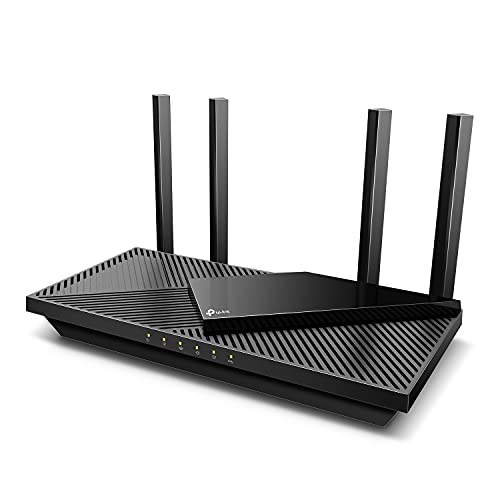
- Wi-Fi 6 dual-band performance up to 2,976 Mbps
- OFDMA and four antennas support busy homes
- VPN, USB 3.0, Alexa, and HomeShield features
Best For: Everyday streaming, gaming, and multi-device home networks
Whole-Home Fiber Choice

- Three-piece mesh coverage rated up to 6,000 sq. ft.
- Wi-Fi 7 speeds up to 5 Gbps
- Works with fiber equipment and plans up to 2.5 Gbps
Best For: Large or multi-story homes needing broad mesh coverage
Power User’s Choice

- Wi-Fi 6 speeds up to 6 Gbps with 8-stream connectivity
- Dual 2.5G ports support multi-gig fiber setups
- Advanced VPN, OpenWrt, and AdGuard Home support
Best For: Gamers and DIY users with demanding or multi-gig networks
Long-Range Streaming Pick

- Wi-Fi 6 speeds up to 5,400 Mbps
- Six antennas and beamforming support up to 2,000 sq. ft.
- OFDMA, MU-MIMO, USB 3.0, and HomeShield features
Best For: Streaming-heavy homes wanting strong single-router coverage
Best for Busy Homes
NETGEAR Nighthawk RS140 WiFi 7 Router

- Up to 5 Gbps Wi-Fi 7 throughput
- Coverage for up to 2,250 sq. ft. and 80 devices
- Includes a 2.5G port and app-based management
Best For: Device-heavy homes with fast fiber plans
Best for Wired Expansion
TP-Link Archer BE230 WiFi 7 Router

- Wi-Fi 7 with up to 3,600 Mbps combined speed
- Two 2.5G connections plus three Gigabit LAN ports
- EasyMesh-compatible with app and voice controls
Best For: Fiber homes with multi-gigabit wired devices
Best Compact Fiber Pick
NETGEAR Nighthawk RS100 WiFi 7 Router

- Up to 3.6 Gbps dual-band Wi-Fi 7
- Coverage for up to 2,000 sq. ft. and 50 devices
- 2.5G port plus three Gigabit ports
Best For: Small to medium homes with fast fiber service
Best Value 6E Pick
TP-Link AXE5400 WiFi 6E Router

- Tri-band WiFi 6E with a 6 GHz band
- Up to 5,400 Mbps and 2.5Gbps WAN
- EasyMesh, VPN, WPA3, and HomeShield features
Best For: Compatible WiFi 6E devices and busy connected homes
Best Midrange WiFi 7 Upgrade
NETGEAR Nighthawk RS300 WiFi 7 Router

- WiFi 7 speeds up to 9.3 Gbps
- Two 2.5Gbps and two Gigabit ports
- Coverage up to 2,500 square feet
Best For: Medium homes with fast plans and newer devices
Best for Large, Busy Homes
NETGEAR Nighthawk RS700S WiFi 7 Router

- WiFi 7 throughput up to 19 Gbps
- Coverage up to 3,500 square feet for 200 devices
- One 10Gbps port plus three Gigabit ports
Best For: Large households with demanding multi-gig networking needs
Balanced Wi-Fi 6 Pick – TP-Link Archer AX55
The TP-Link Archer AX55 is a practical wi fi router for fiber internet users who want Wi-Fi 6 performance, dependable coverage, and useful network controls without moving to a mesh system. Its gigabit Ethernet ports can pair well with many fiber gateways or ONT setups, though a separate modem or provider equipment may be required.
Best For: Homes that need responsive streaming, gaming, and everyday connectivity across multiple devices.
Pros:
- Wi-Fi 6 speeds up to 2,976 Mbps across the dual bands.
- OFDMA, MU-MIMO, and four high-gain antennas help manage busy networks and extend coverage.
- Includes VPN client and server support, USB 3.0, Alexa compatibility, and basic HomeShield features.
Cons:
- It is a standalone router rather than a complete mesh kit.
- Most internet providers require separate modem or gateway equipment.
The Archer AX55 is a well-rounded choice when your fiber plan and home layout are suited to one central router. Its cooling design, security tools, and gigabit ports add practical value for connected households.
Whole-Home Fiber Choice – NETGEAR Orbi 370 Wi-Fi 7
The NETGEAR Orbi 370 three-pack is a strong wi fi router for fiber internet when coverage is the priority. With a router and two satellites, it is designed to distribute Wi-Fi across larger or multi-story homes and works with existing cable or fiber provider equipment.
Best For: Large homes, multi-level layouts, and households that need broad coverage with fewer dead zones.
Pros:
- Three-unit mesh system covers up to 6,000 square feet under suitable conditions.
- Wi-Fi 7 supports speeds up to 5 Gbps and up to 2.5 Gbps plans through compatible equipment.
- App-guided setup, enhanced backhaul, automatic firmware updates, and WPA3 security simplify management.
Cons:
- It must connect to an existing modem or fiber provider device.
- NETGEAR Armor security requires a separate subscription after the 30-day trial.
- Actual coverage and speeds vary with placement, construction, devices, and internet plan.
The Orbi 370 makes the most sense when a single router cannot reliably reach every room. Its Wi-Fi 7 platform and expandable satellite design also leave room for future upgrades.
Power User’s Choice – GL.iNet Flint 2 Gaming Router
The GL.iNet Flint 2 is a capable wi fi router for fiber internet users who want multi-gigabit wired connectivity, advanced VPN options, and extensive control. Its dual 2.5G ports can make it a good fit for compatible fiber plans, while the OpenWrt-based platform suits technically confident users.
Best For: Gamers, DIY network builders, and homes with many devices or multi-gigabit fiber service.
Pros:
- Wi-Fi 6 performance is rated up to 6 Gbps, with 8-stream connectivity.
- Dual 2.5G ports support multi-gig networking and Multi-WAN configurations.
- WireGuard and OpenVPN speeds are rated up to 900 Mbps and 880 Mbps, with AdGuard Home support.
- 1GB RAM and 8GB eMMC storage support more than 100 devices and additional plugins.
Cons:
- Initial firmware updating is specifically recommended for best performance.
- Its advanced controls may require more setup knowledge than a basic home router.
- It is a single-router design, not a packaged whole-home mesh system.
Flint 2 stands out for flexibility rather than simplicity. It is especially appealing for users who want to tune VPNs, filtering, routing, and wired performance around a fast fiber connection.
Long-Range Streaming Pick – TP-Link Archer AX73
The TP-Link Archer AX73 is a high-throughput wi fi router for fiber internet that emphasizes fast wireless performance and broad single-router coverage. Its Wi-Fi 6 design, six antennas, and gigabit LAN ports make it suitable for streaming-heavy homes using a fiber gateway or other provider equipment.
Best For: Households that want strong single-router coverage for streaming, downloads, gaming, and multiple simultaneous connections.
Pros:
- Dual-band Wi-Fi 6 throughput is rated up to 5,400 Mbps.
- 4T4R and HE160 technologies support up to 4.8 Gbps on the 5 GHz band.
- Six antennas, beamforming, and high-power front-end modules support coverage up to 2,000 square feet.
- Includes OFDMA, MU-MIMO, a USB 3.0 port, parental controls, and basic HomeShield features.
Cons:
- Its wired LAN ports are gigabit, so they may limit access to faster-than-gigabit wired service.
- Coverage and wireless speeds depend on walls, distance, interference, and connected devices.
- A separate modem or provider gateway is required for most internet services.
The Archer AX73 is a sensible choice for buyers who prefer one powerful router over a mesh kit. It offers ample wireless capacity and useful household features, particularly for busy streaming and gaming networks.
Best for Busy Homes – NETGEAR Nighthawk RS140 WiFi 7 Router
If you need a Wi-Fi router for fiber internet in a busy household, the NETGEAR Nighthawk RS140 combines Wi-Fi 7 performance with coverage for up to 80 devices. It connects to an existing modem or gateway through Ethernet and supports most fiber providers, though some gateway combinations may require bridge mode.
Best For: Larger households with many streaming, gaming, video-call, and smart-home devices.
Pros:
- Wi-Fi 7 speeds up to 5 Gbps across the 2.4 GHz and 5 GHz bands.
- Coverage rated for up to 2,250 square feet and 80 devices.
- Includes one 2.5G port plus three Gigabit ports.
- Nighthawk app supports guided setup, speed tests, device pausing, and guest networks.
Cons:
- It is a router only, so a separate modem or compatible gateway is required.
- Coverage can be reduced by walls, floors, and interference; larger homes may need a mesh system.
- Real-world performance depends on the internet plan and connected devices.
The RS140 is the most capable option here for device-heavy homes and faster fiber plans. Its 2.5G connection and higher device capacity make it a practical choice when your network needs more headroom than a basic dual-band router.
Best for Wired Expansion – TP-Link Archer BE230 WiFi 7 Router
The TP-Link Archer BE230 is a flexible Wi-Fi router for fiber internet when you want multi-gigabit wired connections alongside Wi-Fi 7. It requires a separate modem for most providers, connects through Ethernet, and works with any internet service provider when paired with the appropriate modem.
Best For: Fiber users who want multiple high-speed wired ports, EasyMesh expansion, and app-based controls.
Pros:
- Wi-Fi 7 supports Multi-Link Operation, Multi-RUs, and 4K-QAM.
- Provides up to 2,882 Mbps on 5 GHz and 688 Mbps on 2.4 GHz.
- Offers one 2.5G WAN/LAN port, one 2.5G LAN port, and three Gigabit LAN ports.
- Covers up to 2,000 square feet and supports up to 60 devices.
Cons:
- It is dual-band and does not support the 6 GHz band.
- A separate modem is required for most internet providers.
- Actual speeds vary with distance, obstacles, network conditions, and device compatibility.
The Archer BE230 stands out for homes with wired gaming systems, computers, or other multi-gigabit equipment. Its EasyMesh compatibility also gives you a straightforward path to expanding coverage if the included range is not enough.
Best Compact Fiber Pick – NETGEAR Nighthawk RS100 WiFi 7 Router
The NETGEAR Nighthawk RS100 is a compact Wi-Fi router for fiber internet that supports plans up to 3.6 Gbps across its dual-band Wi-Fi 7 network. It connects to an existing modem or gateway by Ethernet and is compatible with most fiber providers, although bridge mode may be needed with some gateway combinations.
Best For: Small to medium homes with up to 50 connected devices and straightforward app-based setup.
Pros:
- Wi-Fi 7 performance up to 3.6 Gbps across the 2.4 GHz and 5 GHz bands.
- Coverage rated for up to 2,000 square feet and 50 devices.
- Includes a 2.5G port alongside three Gigabit ports.
- Nighthawk app provides guided setup, speed testing, device controls, and guest networks.
Cons:
- Requires a separate modem or compatible gateway.
- It has a lower device and coverage rating than the RS140.
- Walls, floors, interference, and connected-device capabilities can reduce real-world performance.
The RS100 is a sensible middle ground for fiber customers who want Wi-Fi 7 without stepping up to the RS140’s higher capacity. Its 2.5G port helps accommodate faster service, while the 2,000-square-foot rating suits many standard home layouts.
Best Value 6E Pick – TP-Link AXE5400 WiFi 6E Router
If you want a capable wi fi router for fiber internet without moving to WiFi 7, the TP-Link Archer AXE75 is a strong fit. Its tri-band WiFi 6E design adds a 6 GHz band, supports speeds up to 5,400 Mbps, and includes a 2.5Gbps WAN port for fast internet plans. A modem is required for most providers.
Best For: Homes with compatible WiFi 6E devices, gaming systems, and multiple simultaneous streams.
Pros:
- Tri-band WiFi 6E with a dedicated 6 GHz band and 160MHz channels.
- Up to 5,400 Mbps total wireless throughput and a 2.5Gbps WAN port.
- Supports EasyMesh expansion, VPN server and client functions, WPA3, and basic HomeShield security features.
Cons:
- WiFi 6E benefits depend on having compatible 6 GHz devices.
- Most internet service providers still require a separate modem or gateway.
The Archer AXE75 is a practical choice when you want extra 6 GHz capacity and strong everyday performance without paying for a higher-end WiFi 7 router. Its EasyMesh compatibility also leaves room to expand coverage later.
Best Midrange WiFi 7 Upgrade – NETGEAR Nighthawk RS300 WiFi 7 Router
The NETGEAR Nighthawk RS300 is a flexible wi fi router for fiber internet that pairs with an existing modem or gateway over Ethernet. Its tri-band WiFi 7 platform reaches up to 9.3 Gbps, supports up to 100 devices, and covers up to 2,500 square feet under suitable conditions.
Best For: Medium-size homes with fast fiber plans, many connected devices, and newer WiFi 7 hardware.
Pros:
- Tri-band WiFi 7 supports up to 9.3 Gbps across the 2.4GHz, 5GHz, and 6GHz bands.
- Includes two 2.5Gbps ports plus two Gigabit ports for wired connections.
- Nighthawk app supports guided setup, speed tests, device pausing, and guest networks.
Cons:
- Listed coverage is limited to up to 2,500 square feet, and larger homes may need mesh equipment.
- Existing modem-router gateways may require bridge mode.
The RS300 makes sense for shoppers who want WiFi 7 features and multi-gig wired connectivity in a more compact coverage class. It is especially appealing if your fiber gateway is already in place and you want a straightforward Ethernet-based upgrade.
Best for Large, Busy Homes – NETGEAR Nighthawk RS700S WiFi 7 Router
For a high-capacity wi fi router for fiber internet, the NETGEAR Nighthawk RS700S combines WiFi 7 with a 12-stream design, up to 19 Gbps of aggregate throughput, and coverage rated for up to 3,500 square feet. It connects to an existing modem or gateway through Ethernet and is designed for demanding households.
Best For: Large homes with up to 200 devices, multi-gig fiber, 4K or 8K streaming, gaming, and video calls.
Pros:
- Tri-band WiFi 7 supports up to 19 Gbps across all three wireless bands.
- 12-stream design is rated for up to 3,500 square feet and 200 devices.
- Includes a 10Gbps port plus three Gigabit ports for high-speed wired networking.
Cons:
- Higher capacity may be unnecessary for smaller homes or modest internet plans.
- Large or multi-story layouts may still benefit from a NETGEAR Orbi mesh system.
The RS700S is the strongest match here for households that need substantial wireless capacity and faster wired networking. Its 10Gbps port also provides more headroom for fiber plans and local network transfers than the other options in this roundup.
How We Picked the Best Wi Fi Router for Fiber Internet
We compared these routers by looking at wireless standard, maximum throughput, wired port speeds, coverage approach, device capacity, and practical features. We also considered whether each model makes sense for a particular fiber plan. A router advertised with extremely high wireless speeds may not improve a slower connection, while a model with multi-gigabit Ethernet can be important for fiber tiers above 1 Gbps.
Because home layouts and budgets vary, this list includes standalone routers, gaming-oriented hardware, Wi-Fi 6E and Wi-Fi 7 models, and a mesh system. Manufacturer coverage figures are useful for comparison, but walls, interference, construction materials, and client-device capability will affect real-world results.
Quick Comparison
- Best value: A dual-band Wi-Fi 6 router is often enough for apartments, smaller homes, and fiber plans up to gigabit speeds.
- Best for larger homes: The Orbi 370 three-pack uses mesh networking to extend coverage across multiple rooms and floors.
- Best for gaming and customization: The GL.iNet Flint 2 combines Wi-Fi 6 performance with dual 2.5Gbps ports and advanced networking controls.
- Best for newer devices: Wi-Fi 7 routers offer improved efficiency and features such as wider channels and Multi-Link Operation when supported by compatible clients.
- Best for maximum throughput: Higher-end Nighthawk models are designed for demanding multi-gigabit networks and many simultaneous devices.
Key Buying Factors for a Wi-Fi Router for Fiber Internet
Match the Router to Your Fiber Speed
Check both wireless and wired specifications. Gigabit fiber generally calls for a router with at least gigabit Ethernet, while 2Gbps or faster plans may require 2.5Gbps, 5Gbps, or faster WAN and LAN ports. Otherwise, the router can become the bottleneck.
Choose the Right Wireless Generation
Wi-Fi 6 remains a dependable choice for most homes. Wi-Fi 6E adds access to the less congested 6GHz band, but compatible devices must support it. Wi-Fi 7 is the most future-ready option, although its benefits depend on having newer phones, laptops, and other clients.
Consider Coverage and Placement
A powerful standalone router may work well in an open apartment, but a mesh system is usually more practical for large or multi-level homes. Place the main router in a central, elevated location and use wired backhaul where possible for the best mesh performance.
Review Features and Ports
Look for parental controls, guest networking, automatic updates, security tools, VPN support, and an app or interface you will actually use. Multi-gigabit Ethernet, USB ports, and advanced traffic controls can also add value for power users.
Who Should Buy Which Wi Fi Router for Fiber Internet?
Budget-conscious households should choose a capable dual-band Wi-Fi 6 router rather than paying for wireless speeds their devices cannot use. Families with many connected devices may benefit from Wi-Fi 6E or Wi-Fi 7 for better capacity and reduced congestion. Gamers and home-office users should prioritize low-latency controls, reliable wired connections, and multi-gigabit ports. Owners of large homes should consider the Orbi mesh system or another expandable setup instead of relying on one router at the edge of its coverage area. Finally, fiber subscribers with multi-gigabit plans should verify the exact WAN and LAN port speeds before buying, since wireless branding alone does not guarantee full-speed wired performance.