
Dim rooms can make video calls look grainy, soft, and uneven—even when your internet connection is excellent. The right webcam can improve image quality by combining a larger sensor, effective exposure processing, autofocus, and, in some cases, a built-in light.
We selected 10 webcams for low light across several budgets and use cases, including remote meetings, streaming, online teaching, and everyday calls. Use the buying guide below to match resolution, sensor performance, audio, and lighting features to your setup.
Best 10 Webcams for Low Light Picks for 2026
Best Balanced Low-Light Webcam
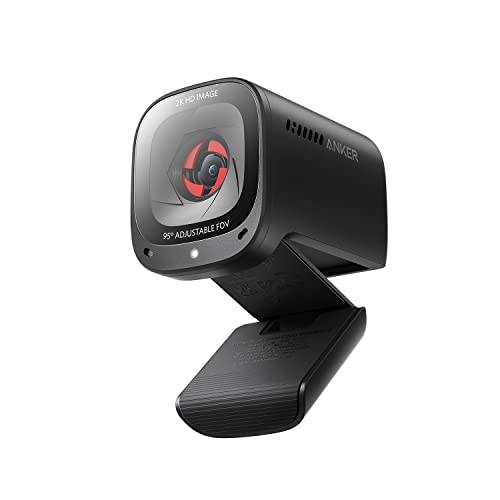
- 2K video with low-light correction
- Adjustable 65°–95° viewing angles
- AI noise cancellation and privacy cover
Best For: Home-office meetings and late-night calls
Best 4K Low-Light Webcam for Streaming

- Sony 1/2.55-inch sensor with 4K at 30 fps
- PDAF autofocus and automatic light adjustment
- 1080p at 60 fps plus noise-canceling microphones
Best For: Streaming and content creation
Best Compact 4K Webcam for Low Light

- 1/2-inch sensor for improved light capture
- AI framing and autofocus
- 40.5-gram USB-C design with noise-canceling mics
Best For: Portable work and automatic video framing
Bright Detail Pick
Galyimage 4K Webcam with Ring Light

- 4K at 30 fps and 1080p at 60 fps
- Three-color ring light with adjustable brightness
- TOF autofocus, dual noise-canceling mics, and privacy cover
Best For: All-in-one low-light video calls and streaming
Reliable 1080p Pick

- 1080p video at 30 fps with autofocus
- Automatic lighting adjustment for dim settings
- Stereo dual microphones and included XSplit VCam license
Best For: Everyday calls, streaming, and recording
Large-Sensor Creator Pick

- 1/2-inch Samsung sensor for brighter low-light video
- 4K at 30 fps, 1080p at 60 fps, and 0.2-second PDAF
- Four lighting modes, dial control, privacy cover, and vertical capture
Best For: Low-light streaming and creator setups
Best 4K Low-Light Upgrade

- 4K at 30fps with a Sony sensor
- PDAF autofocus reduces focus hunting
- Automatic low-light and exposure correction
Best For: Streamers and remote workers wanting detailed video
Best Budget Privacy Pick
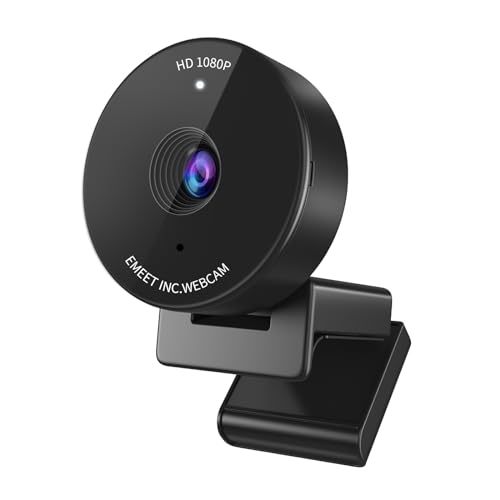
- 1080p video with low-light correction
- Physical privacy cover included
- Compact 70-degree view for personal calls
Best For: Students and home-office users on a budget
Best Premium Low-Light Flexibility

- RightLight 3 adjusts exposure and contrast
- Up to 4K video with autofocus
- Three selectable fields of view
Best For: Professionals and streamers needing adaptable framing
Best Balanced Low-Light Webcam – Anker PowerConf C200 2K
The Anker PowerConf C200 is a practical choice among webcams for low light when you want sharper-than-1080p video without adding a separate light. Its low-light correction, adjustable viewing angle, autofocus, and built-in privacy cover make it well suited to everyday calls and home-office setups.
Best For: Home-office video meetings, late-night calls, and users who want adjustable framing with 2K resolution.
Pros:
- 2K resolution captures detailed video.
- Low-light correction helps produce clearer images in dim settings.
- Viewing angle adjusts between 65°, 78°, and 95° through software.
- Dual microphones include AI noise cancellation, and the lens has an integrated cover.
Cons:
- It tops out at 2K rather than 4K.
- Its broadest 95° view may include more of the surrounding room than some users want.
The C200 offers a sensible mix of image quality, low-light performance, audio features, and privacy for general computer use. It is a strong fit if you prioritize easy framing and clear meetings over 4K capture.
Best 4K Low-Light Webcam for Streaming – EMEET S600 4K Webcam
The EMEET S600 stands out among webcams for low light with a Sony 1/2.55-inch sensor, automatic light adjustment, and 4K recording at 30 fps. Its PDAF autofocus is designed to keep subjects sharp, while 1080p at 60 fps offers a smoother option for streaming.
Best For: Streamers and content creators who want 4K detail, fast autofocus, and flexible software customization.
Pros:
- Records in 4K at 30 fps or 1080p at 60 fps.
- Automatic light adjustment helps balance shadows and highlights in dim scenes.
- PDAF autofocus is designed for faster, more stable focusing.
- Offers dual noise-canceling microphones, a built-in privacy cover, and adjustable 1080p field of view.
Cons:
- The field of view is fixed at 73° when recording in 4K.
- Advanced image and sound adjustments require EMEETLINK software.
With its larger Sony sensor and light-balancing features, the S600 is aimed at users who need more than a basic conference camera. It makes the most sense when 4K streaming quality and autofocus performance justify a more creator-focused setup.
Best Low-Light Webcam With Built-In Light – Angetube 4K Webcam With Ring Light
The Angetube 967 is one of the more self-contained webcams for low light because it combines 4K video with a built-in ring light. Three brightness levels provide quick illumination adjustments, while PDAF autofocus, dual microphones, and USB plug-and-play setup support calls and streaming.
Best For: Users who need an easy webcam-and-light solution for dim home offices, calls, or late-night streaming.
Pros:
- Supports 4K at 30 fps and 1080p at 60 fps.
- Three-level adjustable ring light adds front illumination in dark conditions.
- PDAF autofocus helps keep the subject sharp.
- Includes a privacy shutter, dual microphones, and a USB-C adapter.
Cons:
- The built-in light may be less flexible than a separate, larger lighting setup.
- USB-A is the primary connection, with USB-C supported through the included adapter.
The 967 is a convenient pick when improving room lighting should not require another accessory. Its combination of 4K capture and an integrated ring light makes it especially practical for users who want a quick setup rather than extensive lighting control.
Best Compact 4K Webcam for Low Light – OBSBOT Meet 2 4K Webcam
The OBSBOT Meet 2 uses a relatively large 1/2-inch CMOS sensor to capture more light for clearer, brighter 4K video. It also adds AI framing and autofocus, making it a useful option among webcams for low light when portability and automatic composition matter.
Best For: Mobile workers, streamers, and video callers who want a lightweight 4K webcam with automatic framing.
Pros:
- The 1/2-inch sensor is designed to improve light capture and image brightness.
- 4K UHD video provides detailed images.
- AI framing and autofocus help keep individuals or groups composed and focused.
- Compact 40.5-gram design, USB-C setup, gesture control, and dual noise-canceling microphones support portable use.
Cons:
- It relies on a computer or Mac rather than built-in storage.
- Advanced personalization requires OBSBOT Center software.
- The manufacturer notes that the webcam may become hot during use.
The Meet 2 is a strong choice if you want low-light assistance without carrying a larger camera. Its sensor, AI tools, and very light design favor flexible workspaces, though users seeking extensive manual control may need the companion software.
Bright Detail Pick – Galyimage 4K Webcam with Ring Light
If you need webcams for low light, this Galyimage model combines 4K video with a built-in ring light. Its three color-temperature settings and touch-adjustable brightness help adapt the image to different rooms, while autofocus supports clear video during calls or streams.
Best For: Streamers, remote workers, and students who want 4K resolution plus adjustable built-in lighting.
Pros:
- Supports 4K at 30 fps and 1080p at 60 fps.
- Built-in ring light offers white, natural, and warm settings with adjustable intensity.
- TOF autofocus and dual noise-canceling microphones support moving subjects and clearer speech.
- Includes a sliding privacy cover and plug-and-play USB setup.
Cons:
- The supplied details do not specify advanced control software.
- The built-in light may be less flexible than a separate external light for larger spaces.
This is a practical all-in-one choice when low-light performance, high resolution, privacy, and simple setup matter more than extensive software controls.
Reliable 1080p Pick – Logitech C920x HD Pro Webcam
The Logitech C920x is a straightforward option among webcams for low light, with automatic lighting adjustment and autofocus designed to produce bright, sharp images in dim settings. It records and streams in Full HD at 30 fps and adds stereo audio for calls and recordings.
Best For: Users who want a proven 1080p webcam for video calls, streaming, recording, or compatible Nintendo Switch 2 GameChat use.
Pros:
- Full HD 1080p video at 30 fps with autofocus.
- Automatic lighting adjustment is designed for low-light settings.
- Dual microphones capture stereo audio for calls and recordings.
- Includes a three-month XSplit VCam license for background replacement, removal, or blur.
Cons:
- No physical privacy shutter is included.
- It does not offer 4K resolution or 60 fps Full HD video.
The C920x is a sensible everyday webcam if dependable 1080p video and automatic lighting adjustment are more important than built-in illumination or 4K detail.
Large-Sensor Creator Pick – EMEET S600L 4K Webcam
For creators comparing webcams for low light, the EMEET S600L stands out with a 1/2-inch Samsung sensor that is designed to capture more light. Its ring light synchronizes with exposure and facial-detail processing, while four lighting modes and a physical dial provide hands-on control.
Best For: Streamers, podcasters, and content creators who want 4K video, a larger sensor, adjustable lighting, and flexible framing.
Pros:
- Large 1/2-inch sensor supports brighter, detailed low-light images.
- Offers true 4K at 30 fps and 1080p at 60 fps with 0.2-second PDAF autofocus.
- Ring light includes cool, warm, natural, and ambient modes with dial control.
- Supports Windows, macOS, OBS, YouTube, and Twitch, with vertical capture and flexible mounting.
Cons:
- Uses USB 2.0 connectivity.
- Some image and appearance customization requires EMEET STUDIO software.
- The 73-degree field of view is narrower than some wide-angle webcams.
With its larger sensor, coordinated ring light, and creator-focused controls, the S600L is a strong fit for polished streaming setups where lighting and framing flexibility are priorities.
Best 4K Low-Light Upgrade – Acer A640
The Acer A640 is a strong choice among webcams for low light when you want sharp 4K video, fast autofocus, and automatic exposure correction. Its Sony 1/2.8-inch sensor supports 4K at 30fps, while 2K and 1080p modes reach 60fps.
Best For: Streamers, remote workers, and callers who want high-resolution video with dependable autofocus in variable lighting.
Pros:
- 4K video at 30fps with 2K and 1080p at 60fps
- Phase Detection Auto Focus helps maintain a crisp, stable image
- Automatic low-light correction and exposure adjustment
- AI noise cancellation, physical privacy shutter, and USB-A to USB-C connectivity
Cons:
- Best clarity still requires a well-lit environment
- Does not include built-in speakers
The A640 stands out for buyers who prioritize image detail and quick focusing. It is plug and play across mainstream platforms, but its strongest performance comes with some available room lighting.
Best Budget Privacy Pick – EMEET C950
The EMEET C950 is a compact, practical option among webcams for low light, offering 1080p video at 30fps with low-light correction. Its fixed-focus design, narrow 70-degree view, and physical privacy cover suit personal calls and classes.
Best For: Students, home-office users, and anyone who wants an affordable webcam with privacy protection and straightforward video calls.
Pros:
- 1080p video at 30fps with low-light correction
- Physical sliding privacy cover
- 70-degree field of view keeps the user centered
- Built-in omnidirectional microphone and broad platform compatibility
Cons:
- Low-light correction works best when the room is still reasonably well lit
- Fixed focus offers less flexibility than autofocus
- Chrome OS compatibility may vary by version and model
The C950 focuses on the essentials rather than premium image quality. Its small viewing angle, privacy cover, and simple USB setup make it a sensible choice for individual calls in a controlled workspace.
Best Premium Low-Light Flexibility – Logitech Brio
The Logitech Brio is a premium option among webcams for low light, using RightLight 3 to adjust exposure and contrast for glare and backlighting. It combines up to 4K at 30fps with autofocus, digital zoom, adjustable framing, and dual noise-canceling microphones.
Best For: Professionals, streamers, and presenters who need adaptable framing and polished video across changing lighting conditions.
Pros:
- Up to 4K video at 30fps with autofocus and 5x digital zoom
- RightLight 3 compensates for glare and backlighting
- Three diagonal field-of-view presets: 65, 78, and 90 degrees
- Dual omnidirectional microphones with noise-canceling technology
Cons:
- Premium features may be more than basic video callers need
- Digital zoom does not provide the same detail as optical zoom
- Windows Hello support is specific to compatible Windows setups
The Brio is the most flexible pick here for mixed lighting and changing compositions. Its software controls add manual focus and color adjustments, while the attachable privacy shade provides a quick physical privacy option.
How We Picked These Webcams for Low Light
We focused on features that have the greatest effect in dim or mixed lighting: sensor size, lens performance, exposure and low-light processing, autofocus behavior, and the ability to maintain natural-looking detail without excessive noise. We also considered resolution, frame-rate options, microphone quality, privacy controls, compatibility, and setup convenience.
A 4K label alone does not guarantee a better dark-room image. A well-processed 1080p webcam can look cleaner than a high-resolution camera with a small sensor and aggressive noise reduction. The products in this roundup therefore cover both high-resolution models and practical budget options.
Quick Comparison
| Best For | Recommended Type | What to Prioritize |
|---|---|---|
| Everyday video calls | 1080p webcam | Reliable exposure, autofocus, and privacy cover |
| Streaming and recording | 4K webcam | Large sensor, clean HDMI-free USB workflow, and flexible framing |
| Very dim rooms | Webcam with light or strong processing | Adjustable illumination, low-light correction, and manual controls |
| Professional meetings | Premium 4K webcam | Accurate exposure, clear microphones, and broad software support |
| Budget setups | Basic 1080p webcam | Consistent image quality and plug-and-play compatibility |
Key Buying Factors for Webcams for Low Light
Sensor and Resolution
Sensor size often matters more than resolution when light is limited. Larger sensors generally collect more light and can produce cleaner shadows. Choose 4K if you crop, record content, or want extra detail; choose 1080p if your calls and streaming platforms use Full HD and you want to spend less.
Exposure, HDR, and Low-Light Processing
Look for low-light correction, HDR, or manual exposure controls. These features can preserve faces against bright windows and prevent the camera from constantly hunting between dark and bright areas. Software support may be required for advanced adjustments.
Autofocus and Framing
Fast phase-detection autofocus is useful when you move, demonstrate products, or sit at varying distances. AI framing can keep you centered, but it may be unnecessary for a fixed desk setup. Check whether autofocus, framing, and image controls work with your operating system and preferred apps.
Lighting and Audio
A built-in ring light can help in a genuinely dark room, but it cannot replace a well-placed desk lamp or soft key light. Examine brightness controls and glare before choosing one. Built-in microphones are convenient, while a dedicated USB or headset microphone remains preferable for professional streaming.
Mounting, Privacy, and Compatibility
Confirm that the webcam fits your monitor or laptop and supports the connection you need. A physical privacy cover is valuable for frequent remote workers. Also verify compatibility with Windows, macOS, ChromeOS, Zoom, Teams, OBS, and any required camera-control software.
Who Should Buy Which Webcams for Low Light?
Choose a budget 1080p model for routine calls, online classes, and occasional use in a moderately lit room. Choose a 4K webcam with a larger sensor if you stream, record tutorials, crop your frame, or frequently work in uneven lighting. Choose a ring-light webcam if you cannot add a separate lamp and want a simple all-in-one setup. Choose a premium autofocus or AI-framing model if you move during presentations, switch between close and wide shots, or want less manual adjustment.
For the best result, position a soft light slightly above and in front of your face, avoid placing a bright window directly behind you, and test the camera in your actual room before committing to manual settings.