
A good home studio webcam should make you look clear, sound understandable, and stay reliably framed without demanding a complicated setup. The right choice depends on your lighting, workspace, connection needs, and whether you prioritize streaming, meetings, or recording.
We compared 10 webcams for home studios across resolution, autofocus, framing, microphones, privacy features, mounting options, and overall versatility to help you choose with confidence.
Best 10 Webcams for Home Studios Picks for 2026
Best 4K Upgrade

- Up to 4K at 30 fps
- Automatic low-light exposure adjustment
- Three selectable fields of view
Best For: High-resolution streaming and professional video calls
Best Wide-Angle Value
- 1080p at 30 fps
- Wide 90° field of view
- In-camera H.264 encoding
Best For: Meetings, whiteboards, demos, and group framing
Best for Dual Views
EMEET C60E Dual-Camera 4K Webcam

- Wide-angle and telephoto cameras
- Up to 11x hybrid zoom
- Remote and software controls
Best For: Product demos, teaching, and flexible studio framing
Balanced Video & Audio
- 1080p video at 30fps with low-light support
- Dual noise-cancelling microphones
- Privacy cover and tripod-thread mounting
Best For: Everyday home-studio calls and webinars
Premium Resolution

- 4K video at 30fps and 1080p at 60fps
- RightLight 3 with HDR for varied lighting
- Autofocus and multiple field-of-view options
Best For: Recording and streaming where 4K detail matters
High-Frame-Rate Setup

- 2K video at 60fps
- Included folding aluminum tripod
- Autofocus, low-light correction, and privacy shutter
Best For: Streaming and content creation with flexible desk placement
Best 4K Focus

- 4K video at 30fps with PDAF autofocus
- Dual microphones and physical privacy cover
- 360-degree rotation with tripod support
Best For: Streamers and creators needing detailed video and fast autofocus
Best Complete Starter Kit

- 1080p video at 30fps with autofocus
- Includes monitor clip and aluminum tripod
- Dual noise-cancelling microphones and privacy shutter
Best For: Beginners wanting a flexible webcam package
Best for Video Calls

- 1080p video with an 80-degree field of view
- Automatic low-light technology and directional microphone
- Teams and Zoom certified with privacy shutter
Best For: Remote workers and learners focused on clear video conferencing
Best 4K Upgrade – Logitech Brio Ultra 4K Webcam
For home studios that need polished video for streaming and meetings, the Logitech Brio delivers up to 4K at 30 fps, autofocus, and automatic exposure adjustment. Its selectable field of view also makes it easier to frame either a tight head-and-shoulders shot or more of the room.
Best For: Creators and professionals who want high-resolution video, flexible framing, and built-in audio.
Pros:
- Up to 4K video with autofocus and 5x digital zoom
- RightLight 3 helps compensate for glare and backlighting
- Three field-of-view presets support different studio layouts
- Dual noise-canceling microphones and a privacy shutter are included
Cons:
- 4K capture is limited to 30 fps
- Uses digital rather than optical zoom
- Windows Hello support is specifically useful for compatible Windows setups
The Brio is a strong all-around choice among webcams for home studios when image detail and adaptable framing matter most. It is especially practical for users who want one compact camera for calls, streams, and presentations.
Best for Motion – EMEET PIXY Dual-Camera AI PTZ Webcam
The EMEET PIXY is designed for active home studios, combining a 4K imaging camera with AI assistance and pan-tilt tracking. It can follow movement across a wide area while offering multiple audio modes for streams, lessons, podcasts, and demonstrations.
Best For: Moving presenters, fitness creators, teachers, and streamers who need automatic tracking.
Pros:
- 4K camera pairs with PDAF and AI autofocus
- 310° pan and 180° tilt support broad movement tracking
- Gesture control and preset positions simplify operation
- Three microphones and selectable sound modes suit different recordings
Cons:
- Tripod is sold separately
- Remote control is sold separately
- Some framing controls depend on EMEET STUDIO software
Among webcams for home studios, PIXY stands out when the subject will not remain seated. Its PTZ movement, tracking, and sound modes can reduce the need for a separate camera operator or extra audio equipment.
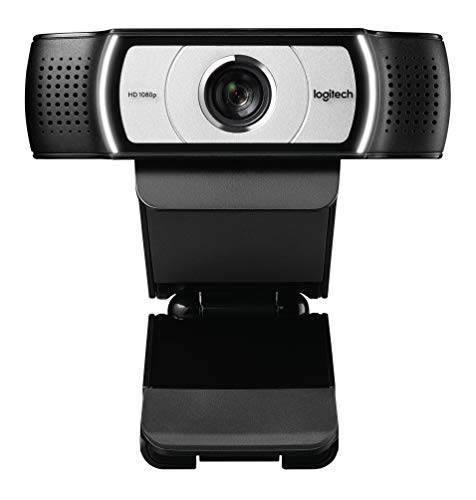
Best Wide-Angle Value – Logitech C930e 1080p Webcam
The Logitech C930e is a practical 1080p option for home studios focused on meetings, whiteboards, product demos, and group framing. Its 90-degree view captures more of the space, while in-camera H.264 encoding helps deliver smoother video with less system processing.
Best For: Work-from-home calls, presentations, and wide-room video at 1080p.
Pros:
- 1080p video at 30 frames per second
- 90-degree field of view works well for groups and demonstrations
- Pan, tilt, and 4x digital zoom provide framing flexibility
- Plug-and-play compatibility with major conferencing applications
Cons:
- Does not provide 4K resolution
- The business version ships in brown-box packaging without retail software
- USB 2.0 connectivity is older than newer USB-C designs
The C930e remains a sensible pick among webcams for home studios when broad framing and straightforward conferencing matter more than maximum resolution. Its universal clip and tripod-ready design also make repositioning simple.
Best for Dual Views – EMEET C60E Dual-Camera 4K Webcam
The EMEET C60E gives home studios both a wide-angle camera and a telephoto camera for switching between full-scene and close-up views. Remote and software controls make it useful for streams, teaching, product demonstrations, and meetings where framing needs to change without moving the camera.
Best For: Presenters who need wide shots and detailed close-ups from one setup.
Pros:
- Dual-camera design supports panoramic and telephoto views
- Up to 11x hybrid zoom with PDAF autofocus
- Remote and EMEET STUDIO controls enable live adjustments
- RGB lighting, two microphones, and tripod mounting add setup flexibility
Cons:
- Zoom is unavailable in 4K, 60 fps, and YUY2 modes
- Uses USB 2.0 Type-A connectivity
- The telephoto camera is recommended at a distance of about 13.8 inches
For webcams for home studios, the C60E is a specialized choice for creators who regularly alternate between showing the room and highlighting details. Its dual-camera layout can simplify product demos and instructional content without requiring a second webcam.
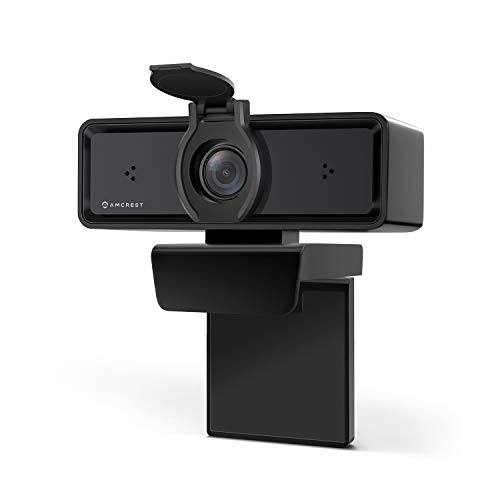
Balanced Video & Audio – Amcrest AWC2198
For shoppers comparing webcams for home studios, the Amcrest AWC2198 is a practical 1080p option with a wide viewing angle, autofocus, and built-in audio. Its low-light support and plug-and-play USB connection make it easy to add to a desktop or laptop setup.
Best For: Home-studio calls, webinars, online classes, and meetings where clear 1080p video and voice pickup matter.
Pros:
- 1080p video at 30fps with auto-white balance and low-light enhancement.
- Dual noise-cancelling microphones use 3D noise reduction for clearer conversations.
- Includes a privacy cover, monitor mounting clip, and 1/4-inch tripod thread.
- Supports Windows, macOS, Linux, Android, and popular apps including Zoom and OBS Studio.
Cons:
- Video is limited to 1080p at 30fps.
- Uses USB 2.0 connectivity.
The AWC2198 focuses on dependable everyday performance rather than high-resolution production features. It is a sensible fit for a home studio that needs straightforward setup, built-in microphones, and privacy protection.
Premium Resolution – Logitech BRIO 4K
Logitech BRIO Ultra HD Webcam for Video Conferencing Recording and Streaming (Black) (Renewed)
Check Price On AmazonThe renewed Logitech BRIO is aimed at home studios that want sharper video and more framing flexibility. It supports 4K capture at 30fps, autofocus, multiple field-of-view options, and Logitech RightLight 3 with HDR for changing lighting conditions.
Best For: Streaming, recording, and video conferencing when 4K detail, autofocus, and flexible framing are priorities.
Pros:
- Records in 4K at 30fps and supports 1080p at up to 60fps.
- RightLight 3 with HDR helps manage low light and direct sunlight.
- Autofocus and multiple field-of-view options support different studio layouts.
- Offers up to 5x digital zoom and works with Windows, macOS, and ChromeOS.
Cons:
- This is a renewed product with a listed 90-day limited warranty.
- Its 4K mode requires more storage and suitable computer or network capability.
The BRIO is the strongest resolution-focused choice in this group, especially for creators who crop or record video. Buyers should account for its renewed condition and make sure their setup can take advantage of 4K capture.
High-Frame-Rate Setup – RUWBY Pro QHD Webcam
The RUWBY Pro QHD webcam stands out for home studios that value smooth motion and flexible placement. It combines 2K resolution at 60fps with autofocus, low-light correction, dual noise-cancelling microphones, and an included adjustable tripod.
Best For: Live streaming, content creation, gaming streams, and video calls that benefit from fluid 60fps footage and adjustable desk positioning.
Pros:
- Captures 2K video at 60fps for smoother movement than standard 30fps webcams.
- Autofocus and automatic low-light correction help maintain a usable image.
- Dual microphones reduce background noise and capture voices from up to 10 feet away.
- Includes a folding aluminum tripod, privacy shutter, 360-degree rotation, and wide-angle lens.
Cons:
- Maximum resolution is 2K rather than 4K.
- Its extensive compatibility list includes older operating systems, but specific app performance may vary.
With its included tripod and 60fps capture, this model is particularly convenient for creators who move between desk-mounted calls and more deliberately framed recordings. It offers a feature-rich studio package without requiring a separate tripod purchase.
Best 4K Focus – EMEET C60E
For creators comparing webcams for home studios, the EMEET C60E stands out with 4K video, PDAF autofocus, and automatic light correction. Its 73-degree field of view keeps framing natural, while the physical privacy cover and plug-and-play USB connection simplify everyday streaming and calls.
Best For: Streamers, gamers, podcasters, and creators who want detailed 4K video and dependable autofocus.
Pros:
- Records and streams in 4K at 30fps with an 8MP CMOS sensor.
- PDAF autofocus quickly keeps moving subjects sharp.
- Dual microphones, physical privacy cover, and broad Windows/macOS compatibility.
- Flexible 360-degree rotation, tilt adjustment, and tripod support.
Cons:
- Uses USB 2.0 and has a fixed 1.5-meter cable.
- Tripod is not included.
- The 73-degree field of view may be narrower than some wide-angle alternatives.
The C60E is a strong fit when image detail and responsive focusing matter most. It is especially practical for single-person studio setups where privacy, stable framing, and clear voice pickup are priorities.
Best Complete Starter Kit – RUWBY Pro HD Webcam
The RUWBY Pro HD is a practical choice among webcams for home studios because it combines 1080p video, autofocus, low-light correction, and an included tripod. Its wide-angle lens can show more of a workspace, while the privacy shutter and noise-cancelling microphones support everyday recording and calls.
Best For: Home-studio beginners, remote workers, students, and streamers who want a webcam with flexible mounting included.
Pros:
- 1080p video at 30fps provides smooth Full HD output.
- Autofocus and low-light correction help maintain a usable image.
- Dual noise-cancelling microphones capture voices from up to 10 feet away.
- Includes a sturdy, telescoping aluminum tripod and monitor clip.
Cons:
- Maximum resolution is 1080p rather than 4K.
- The 90-degree wide-angle view may include more background than some studio users prefer.
- Its broad operating-system compatibility includes older platforms, but specific feature support may vary.
With its included tripod and flexible positioning, the RUWBY is an easy all-in-one option for a developing home setup. It offers useful studio conveniences without requiring separate mounting accessories.
Best for Video Calls – Poly Studio P5
The Poly Studio P5 is a polished option for webcams for home studios centered on meetings, lessons, and calls. It pairs 1080p video with an 80-degree field of view, automatic low-light technology, a directional microphone, and certified support for Microsoft Teams and Zoom.
Best For: Home-office users, remote learners, and creators who prioritize conferencing features and straightforward setup.
Pros:
- 1080p HD video with vivid color rendering and an 80-degree field of view.
- Automatic low-light technology and a directional microphone support clearer calls.
- Integrated privacy shutter and built-in USB port for a Bluetooth headset or speakerphone.
- Includes monitor mounting, tripod readiness, and a removable camera head for documents.
Cons:
- It offers 1080p rather than 4K video.
- The integrated USB-A cable may limit cable-placement flexibility.
- Its conferencing-focused design may provide fewer creator-oriented controls than specialized streaming webcams.
The P5 is particularly compelling for a professional home office where reliable framing, privacy, and meeting-platform compatibility matter more than maximum resolution. Its mounting options also make it easy to move between desk and tripod use.
How We Picked the Best Webcams for Home Studios
We focused on the features that matter most in a compact studio setup: image resolution, frame-rate options, autofocus performance, field of view, microphone design, low-light behavior, privacy controls, and mounting flexibility. We also considered whether each camera suits a monitor, laptop, tripod, or more permanent desk arrangement.
Resolution is only part of the picture. A dependable 1080p webcam can outperform a poorly lit 4K camera, while dual-camera and AI-tracking models may be especially useful when you move around during presentations or livestreams.
Quick Comparison
| Best For | Recommended Features |
|---|---|
| Everyday meetings | 1080p video, reliable autofocus, privacy cover |
| Streaming and recording | 4K resolution, high frame rates, tripod support |
| Moving presenters | AI tracking, PTZ control, or dual-camera framing |
| Wide desk or group shots | Wide-angle lens and adjustable framing |
| Budget setups | 1080p video, built-in microphones, plug-and-play USB |
Key Buying Factors for Webcams for Home Studios
Resolution and Frame Rate
1080p is sufficient for most video calls, online teaching, and basic content creation. Choose 2K or 4K when you want sharper crops, product demonstrations, detailed recordings, or a more polished streaming image. A 60fps option can make movement look smoother, but it may require more light and greater computer bandwidth.
Framing and Autofocus
Check the field of view against your room. A standard view is usually best for one person, while a wide-angle camera helps include a second person, instruments, or a larger background. Fast autofocus is valuable if you frequently hold items up to the camera. AI tracking or PTZ features are worth considering if you present while standing or moving.
Audio, Privacy, and Mounting
Built-in microphones are convenient, but a dedicated USB or XLR microphone generally delivers better sound. Noise-cancelling mic systems can help in ordinary rooms, though they cannot fully replace acoustic treatment. A physical privacy cover is useful for laptops and shared workspaces. Finally, confirm that the camera supports your preferred monitor clip, tripod, or desk mount.
Who Should Buy Which Webcams for Home Studios?
Choose a 1080p model for routine meetings, distance learning, and a simple plug-and-play setup. Choose 2K or 4K if you record tutorials, stream regularly, or want room to crop footage without losing detail. Choose a dual-camera or AI-tracking webcam for presentations, movement-heavy demonstrations, or flexible wide-and-tight framing. Choose a renewed premium model when you want higher-end image quality at a potentially lower price, but verify the seller’s warranty and return policy.
Whichever model you select, improve the result with a front-facing light, a clean background, stable internet, and a camera positioned near eye level. These simple adjustments often make as much difference as upgrading resolution.