
Wireless video can simplify camera monitoring, live production, presentations, and multi-screen setups—but the right transmitter depends on more than advertised range. Resolution, latency, connection type, receiver capacity, and interference resistance all affect real-world performance.
This roundup compares 10 video transmitters across consumer HDMI kits, camera-focused systems, and professional SDI/HDMI workflows so you can choose a setup that fits your equipment and shooting style.
Best 10 Video Transmitters Picks for 2026
Professional Pick

- 3 km range with 1080p/60fps transmission
- Automatic frequency hopping across three bands
- SDI, HDMI, USB-C, and unlimited-receiver Broadcast mode
Best For: Professional film, broadcast, and on-set monitoring
Home Theater Value

- 1080p/60Hz transmission with claimed 0.05-second latency
- Loop-out supports a local display
- IR remote control and plug-and-play setup
Best For: Home entertainment, offices, presentations, and church displays
Production Team Pick
Hollyland Pyro H Wireless Video System

- 4K/30 input and 1080p/60 support over HDMI
- Up to 1,300 feet with 60 ms latency
- Supports four receivers, app monitoring, and UVC streaming
Best For: Film crews, live streaming, and collaborative monitoring
Flexible Multi-Source Option

- 4K decode with 1080p/60 output
- Up to 360 feet outdoors with dual-band transmission
- One receiver can support up to eight transmitters
Best For: Presentations, classrooms, events, gaming, and home entertainment
Best Multi-Device Value
Vrriis 1500FT Wireless HDMI System
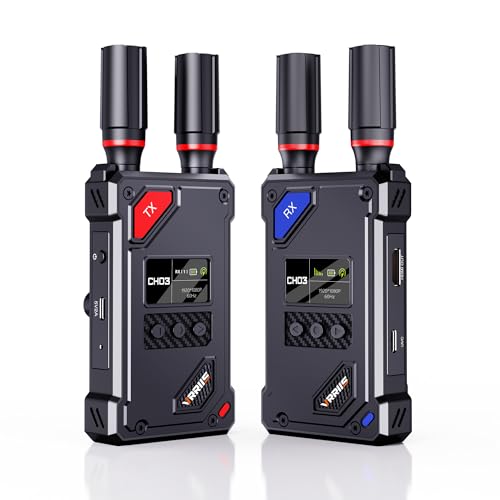
- 1500FT line-of-sight range and 0.05-second claimed latency
- 20-channel selection with LCD signal information
- UVC streaming, HDMI loop-out, and up to five receivers
Best For: Multi-screen monitoring and computer-based live streaming
Best Portable Camera Monitor
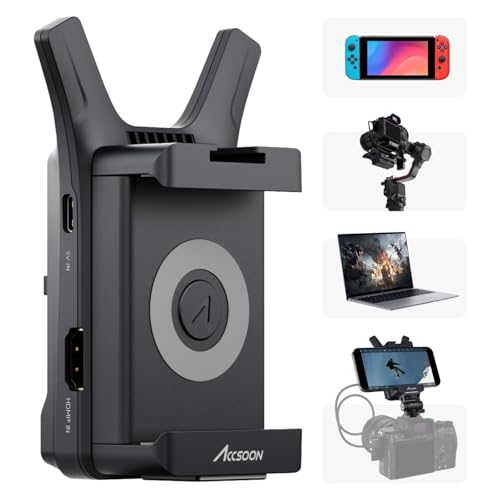
- Streams 1080p60 to up to four mobile devices
- Compact 0.15-pound aluminum design
- Accsoon SEE app supports monitoring and RTMP streaming
Best For: Mobile camera crews and multi-device monitoring
Best for Osmo Pocket 3
Vrriis Pocket 3 Wireless Video Kit

- Built-in Type-C connection for DJI Osmo Pocket 3
- UVC output supports 1080p60 PC streaming
- 20 channels, 1640FT claimed range, and five-receiver support
Best For: Pocket 3 live streaming and wireless monitoring
Best All-in-One Pick
7-Inch Monitor Wireless HDMI System
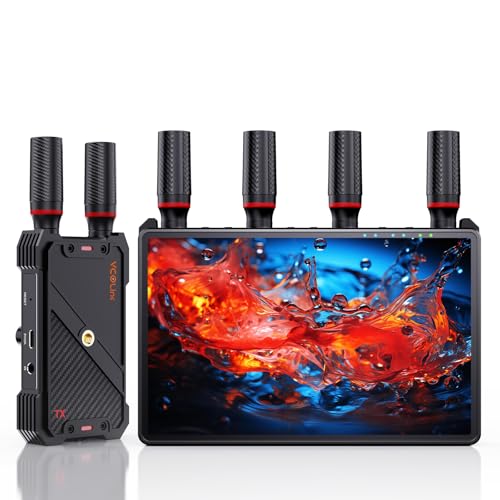
- Built-in 7-inch receiver monitor
- 1080p/60Hz with claimed <0.05s latency
- Supports up to five receivers
Best For: Collaborative filming and live production
Best Professional 4K Pick
Hollyland Mars 4K Wireless Video System

- 4K HDMI transmission up to 30fps
- 3G-SDI and HDMI inputs/outputs
- App monitoring for iOS and Android
Best For: Professional camera and broadcast workflows
Best Value Long-Range Pick

- 1080p/60Hz with stated 0.05s latency
- Claimed 1,300-foot line-of-sight range
- Loop out and dual receiver HDMI output
Best For: Flexible home, presentation, and streaming setups
Professional Pick – DJI SDR Transmission Combo
For demanding on-set monitoring, this DJI system is one of the most capable video transmitters in the group. It combines 1080p/60fps transmission, a claimed 3 km range, automatic frequency hopping, and multiple monitoring outputs for production teams working in challenging environments.
Best For: Film crews, live production teams, and users who need long-range wireless monitoring with strong interference management.
Pros:
- Supports 1080p/60fps video at up to 20 Mbps with approximately 35 ms latency.
- Automatically hops across 2.4 GHz, 5.8 GHz, and DFS bands to help avoid interference.
- Offers SDI, HDMI, USB-C, Wi-Fi, and Broadcast mode with unlimited receivers.
- Includes compatibility features for DJI Ronin RS-series stabilizers and remote camera control.
Cons:
- Its professional feature set may be more than casual home users need.
- Requires a 12V battery according to the supplied product details.
This is the strongest choice here for professional wireless video workflows, especially when range, signal resilience, and multi-person monitoring matter more than simplicity.
Home Theater Value – Vrriis Wireless HDMI Extender
This Vrriis kit is a practical option for extending an HDMI source to a TV or projector without running a long cable. Among video transmitters for home entertainment, offices, and presentations, its plug-and-play setup, loop-out port, and IR control make it especially convenient.
Best For: Home theaters, conference rooms, churches, and users who want straightforward 1080p wireless HDMI extension.
Pros:
- Supports up to 1080p at 60Hz with a claimed 0.05-second latency.
- Provides a stated open-field range of up to 1,300 feet using 2.4 GHz and 5 GHz transmission.
- Transmitter loop-out allows a local monitor to remain connected.
- IR support lets users control the HDMI source from the receiver location.
Cons:
- Walls, glass, metal, and other obstacles can substantially reduce coverage.
- The supplied details note that increasing the number of receivers reduces transmission distance.
Choose this model when simple 1080p distribution and source control are priorities. It is less focused on professional camera production than the DJI or Hollyland systems.
Production Team Pick – Hollyland Pyro H Wireless Video System
The Hollyland Pyro H is a flexible choice among video transmitters for camera crews that need higher-resolution input and shared monitoring. It supports HDMI 4K/30 input, 1080p/60 workflows, smart channel scanning, app monitoring, and transmission to up to four receivers.
Best For: Film production, live streaming, ENG/EFP work, and multi-person camera monitoring.
Pros:
- Supports HDMI video input and output up to 4K at 24, 25, or 30fps.
- Offers a claimed 1,300-foot range and 60 ms latency.
- Smart Channel Scan selects an available frequency across 2.4 GHz and 5 GHz bands.
- Supports up to four receivers, Hollyview app monitoring, loop-out, and UVC computer streaming.
Cons:
- The listed 60 ms latency is higher than the DJI system’s stated latency.
- The kit is HDMI-based, so it may not suit workflows that require SDI connectivity.
With its 4K input support and collaborative receiver options, the Pyro H is a strong middle ground for crews that need professional features without moving to a more specialized SDI system.
Flexible Multi-Source Option – 2026 Wireless HDMI Extender
This compact wireless HDMI kit is aimed at everyday display extension rather than cinema production. It decodes 4K input to 1080p/60 output, uses dual-band transmission, and supports mirror or extended-screen modes for presentations, classrooms, events, and home entertainment.
Best For: Presenters, teachers, event organizers, gamers, and households connecting multiple HDMI sources to one display.
Pros:
- Accepts 4K input while outputting smooth 1080p at 60Hz.
- Claims up to 360 feet outdoors and 165 feet indoors, with 2.4 GHz and 5.8 GHz bands.
- Supports one receiver with up to eight transmitters and up to three sets in the same environment.
- Includes automatic plug-and-play pairing, mirror and extend modes, cooling design, and an LED status display.
Cons:
- It does not output 4K; the stated output limit is 1080p/60.
- Walls can reduce transmission distance and speed.
- The supplied notes are incomplete regarding additional operating requirements.
This model stands out for flexible multi-source use and broad everyday compatibility. It is a sensible pick when 1080p output, simple setup, and expandable transmitter support are more important than professional camera features.
Best Multi-Device Value – Vrriis 1500FT Wireless HDMI System
For buyers comparing video transmitters for meetings, monitoring, projection, or live production, this Vrriis kit emphasizes range, channel flexibility, and direct computer streaming. It supports Full HD 1080p at 60Hz and includes UVC output, so you can send received footage to software such as OBS without a separate capture device.
Best For: Users who need a transmitter-and-receiver kit with long line-of-sight range, HDMI loop-out, and support for multiple receivers.
Pros:
- Rated for up to 1500 feet of line-of-sight transmission with claimed 0.05-second latency.
- Offers 20 manually selectable channels with an LCD display for signal and interference information.
- UVC output supports computer streaming through OBS, while HDMI loop-out supports local monitoring.
- Supports one transmitter with up to five receivers and several power options.
Cons:
- Walls, metal, brick, and glass can substantially reduce coverage or cause signal loss.
- Adding more receivers can reduce the wireless transmission distance.
- NP-F batteries are not included.
This is a versatile choice when your setup benefits from both a local display and computer-based streaming. Its advertised range applies to an open, unobstructed environment, so indoor users should plan around obstacles and interference.
Best Portable Camera Monitor – Accsoon CineView Nano
Among compact video transmitters, the Accsoon CineView Nano is designed for camera operators who want wireless monitoring on mobile devices. It sends a 1080p60 feed to as many as four iOS or Android devices through the Accsoon SEE app, while its small aluminum body is suited to mobile shooting setups.
Best For: Photographers and camera crews seeking a lightweight transmitter for multi-device phone or tablet monitoring.
Pros:
- Transmits to up to four iOS or Android devices using the Accsoon SEE app.
- Supports 1080p at 60 frames per second with latency of less than 0.06 seconds and a stated 150-meter range.
- Pocket-sized design weighs about 0.15 pounds and uses an aluminum housing.
- App features include monitoring, recording, RTMP live streaming, LUTs, and overlays.
Cons:
- Live streaming through the app requires a 5G network because the video feed occupies the phone’s Wi-Fi connection.
- NP-F batteries, charging cables, and HDMI cables are sold separately.
- It is a transmitter-focused mobile monitoring solution rather than a transmitter-and-receiver kit.
The CineView Nano makes the most sense when portability and app-based monitoring matter more than a traditional receiver workflow. Confirm that your devices and network setup work with the Accsoon SEE app before relying on it for live streaming.
Best for Osmo Pocket 3 – Vrriis Pocket 3 Wireless Video Kit
For DJI Osmo Pocket 3 owners comparing video transmitters, this Vrriis system is built around a direct Type-C connection and adds wireless delivery to displays or a computer. Its receiver provides UVC output for up to 1080p60 streaming, while the transmitter includes HDMI loop-out for local monitoring.
Best For: Osmo Pocket 3 users who want wireless monitoring, PC live streaming, and flexible mounting or power options.
Pros:
- Designed for the DJI Osmo Pocket 3 with a built-in Type-C transmitter connector.
- Receiver UVC output supports up to 1080p60 streaming through software such as OBS without a separate capture device.
- Offers 20 adjustable channels, status information on an LCD display, and a claimed 1640-foot line-of-sight range.
- Supports up to five receivers, HDMI loop-out, reverse charging, and 1/4-inch mounting.
Cons:
- Walls, brick, glass, and especially metal obstacles can severely reduce or block the signal.
- NP-F batteries must be purchased separately.
- Its built-in Type-C connection is specifically optimized for the Osmo Pocket 3, so other sources may require a compatible connection.
This is the most specialized option in the group and is a strong fit for Pocket 3-based broadcasts or monitoring stations. Its long-range specification is intended for clear line-of-sight use, while the UVC output adds practical value for PC workflows.
Best All-in-One Pick – 7-Inch Monitor Wireless HDMI System
For buyers who want video transmitters with built-in monitoring and room to expand, this wireless HDMI system combines a 7-inch receiver display with 1080p transmission, loop out, and support for up to five receivers. Its sub-0.05-second latency and claimed 1,312-foot line-of-sight range make it suited to filming, live production, and on-set monitoring.
Best For: Film crews, live-streaming setups, and teams that need private receiver displays plus larger HDMI monitors.
Pros:
- Built-in 7-inch HD screen reduces the need for an extra monitor.
- Supports 1080p at 60Hz with claimed ultra-low latency and long line-of-sight range.
- One transmitter can connect with up to five receivers.
- Offers HDMI loop out, IR remote control, and NP-F, USB-C, or power-bank operation.
Cons:
- An HDMI cable is not included for the external monitor output.
- Smartphone and tablet use requires a Type-C-to-HDMI cable.
- Battery operation requires compatible batteries, which are not specified as included.
This is the most feature-rich choice of the three for collaborative production. The built-in screen and multi-receiver design add convenience, while the external-display output keeps it flexible for larger viewing setups.
Best Professional 4K Pick – Hollyland Mars 4K Wireless Video System
Among video transmitters for higher-end production, the Hollyland Mars 4K stands out for combining 4K HDMI support with 3G-SDI connectivity. It transmits up to 450 feet line of sight with stated 66ms latency and adds app monitoring for iOS and Android devices.
Best For: Camera crews and production teams that need 4K workflows, SDI compatibility, and multiple monitoring options.
Pros:
- Supports video formats up to 3840×2160 at 24, 25, or 30fps through HDMI.
- Provides HDMI and 3G-SDI inputs and outputs, including 23.98, 29.97, and 59.94fps SDI output.
- Supports monitoring through connected displays and up to four app devices in specified configurations.
- Includes a color LCD, joystick controls, multiple power options, and a durable metal shell.
Cons:
- Its stated 450-foot range is based on an interference-free laboratory environment.
- It has higher stated latency than the other two systems.
- QC/PD charging and 5V/2A charging are not supported.
The Mars 4K is the strongest fit when professional interfaces matter more than maximum range or minimum latency. Its 4K and SDI support offer broader production compatibility, though buyers should account for the stated test conditions and power limitations.
Best Value Long-Range Pick – 1080p Wireless HDMI Extender
For straightforward video transmitters that prioritize reach and simple setup, this 1080p wireless HDMI kit offers plug-and-play operation, loop out, and dual HDMI output on the receiver. It claims up to 1,300 feet of line-of-sight transmission with 0.05-second latency, making it practical for cameras, laptops, set-top boxes, TVs, and projectors.
Best For: Home entertainment, presentations, streaming, and monitoring where 1080p resolution is sufficient.
Pros:
- Supports 1080p at 60Hz with stated 0.05-second latency.
- Offers loop out on the transmitter and two HDMI outputs on the receiver.
- Supports up to one transmitter and five receivers.
- Can use NP-F batteries, USB-C power, adapters, or portable rechargeable power sources.
Cons:
- Walls, metal, brick, and glass can significantly reduce the stated range.
- Adding receivers can decrease transmission distance.
- Batteries are not included.
This system is a practical choice for buyers who want long-range 1080p distribution without installing cables or software. Its flexible power options and multiple outputs are useful, but real-world range will depend heavily on obstacles and interference.
How We Picked These Video Transmitters
We evaluated these Video Transmitters by comparing their stated resolution, wireless range, latency, supported inputs and outputs, receiver options, monitoring features, and intended use. We also considered practical details such as loop-out support, UVC connectivity for computers, channel selection, multi-receiver capability, and compatibility with cameras, laptops, monitors, and streaming systems.
Advertised range is measured under ideal conditions. Walls, crowded wireless networks, antennas, line-of-sight limitations, and local regulations can reduce performance, so range should be treated as a useful comparison point rather than a guarantee.
Quick Comparison
| Best For | Look For | Why It Matters |
|---|---|---|
| Professional film and video | SDI/HDMI support, stable links, low latency | Works with production cameras and on-set monitoring |
| Wireless HDMI displays | 1080p support, loop out, simple pairing | Useful for presentations, home entertainment, and basic monitoring |
| Live streaming | UVC output, reliable channel selection | Allows compatible computers or capture software to receive video |
| Multi-screen monitoring | Multiple receivers or monitor support | Lets several viewers watch the same source |
| Compact camera rigs | Small transmitter, battery efficiency, HDMI input | Reduces weight and clutter on handheld or gimbal setups |
Key Buying Factors for Video Transmitters
Resolution, Frame Rate, and Latency
Confirm that the transmitter supports the resolution and frame rate your camera actually outputs. Some systems accept 4K input but transmit at 1080p, while others are limited to 1080p from the start. Lower latency is especially important for focus pulling, live performance, sports, and interactive presentations.
Connections and Compatibility
Check whether the system uses HDMI, SDI, USB-C, or UVC output. HDMI kits are convenient for consumer cameras, laptops, and televisions; SDI is more common in professional production. A UVC-equipped receiver can connect directly to supported computers for streaming or video calls, but software and operating-system compatibility still matters.
Range, Interference, and Reliability
Long range is useful only when the signal remains stable. Dual-band operation, manual channel selection, interference management, and a clear line of sight can make a bigger difference than the maximum distance listed on the box. For demanding shoots, prioritize consistent performance and monitoring tools over headline range.
Receiver Count and Monitoring Features
If multiple people need to view the feed, choose a system that supports several receivers or dedicated monitors. Loop-out ports are valuable when you need to feed a local display while also transmitting wirelessly. Some kits add LED status displays, remote controls, or built-in monitoring screens for easier setup.
Who Should Buy Which Video Transmitters?
Choose a professional SDI/HDMI system for commercial production, film sets, event coverage, or workflows that require dependable camera connectivity and precise monitoring. Choose a compact HDMI transmitter for gimbals, mirrorless cameras, and lightweight operator or director monitoring. Choose a UVC model if your priority is sending camera video to a computer for streaming, recording, or conferencing.
For presentations, classroom use, and general entertainment, a straightforward 1080p wireless HDMI kit with loop out is usually the most practical option. If several viewers need the same feed, focus on multi-receiver support rather than choosing solely by maximum range. Before buying, verify the source device’s connector, the display or computer’s input, supported frame rates, and whether the package includes every transmitter, receiver, cable, antenna, and power accessory you need.