
The right video switcher can make a webinar look more polished by letting you change camera angles, share presentations, add overlays, and manage multiple sources from one setup.
We selected 10 options ranging from compact HDMI switchers for solo presenters to advanced production systems with streaming, recording, touchscreen control, and SDI support.
Best 10 Video Switcher for Webinars Picks for 2026
Best Overall

- Four HDMI inputs with multiview
- Built-in streaming, recording, and audio mixing
- Transitions, keyers, and USB-C webcam output
Best For: Four-source webinars and business presentations
Best for Larger Productions

- Eight HDMI inputs and built-in preview monitor
- AUX output and automated switching features
- 18-channel digital audio mixer
Best For: Large, multi-source webinars and live events
Best for Eight HDMI Sources
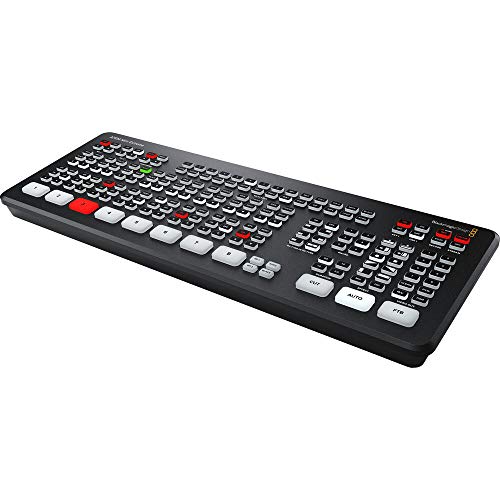
- Eight HDMI inputs
- Re-sync on every HDMI input
- Frame-rate and format conversion on every input
Best For: Large multicamera webinars with varied HDMI sources
Best All-in-One Feature Set

- Four HDMI inputs with direct Ethernet streaming
- Streams to up to three platforms
- Recording, playback, audio effects, and graphics overlays
Best For: Feature-rich webinars and multistream online events
Best All-in-One Production Hub

- Standalone switching, encoding, recording, and streaming
- HDMI, USB, and IP-source support
- Touchscreen scenes with portable power options
Best For: Integrated webinar and mobile production workflows
Best for Multi-Format Inputs

- Four SDI and four HDMI inputs
- NDI HX, playback, and portrait support
- Streams to up to three platforms
Best For: Multi-camera webinars using SDI and HDMI sources
Best Compact HDMI Option
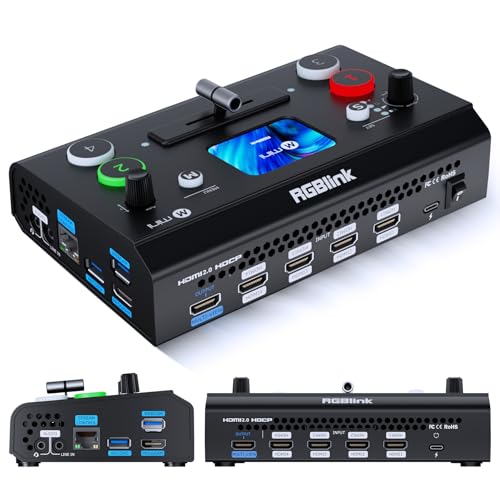
- Four HDMI inputs in a compact design
- Dual HDMI output and UVC webcam mode
- Optional recording, PTZ, and chroma key features
Best For: Small HDMI-based webinar and streaming setups
Portable Production Kit

- Four HDMI/SDI inputs with two HDMI outputs
- Built-in 14-inch multiview monitor
- AC, DC, and USB power options
Best For: Mobile multi-camera webinar production
Advanced Streaming Hub

- Supports HDMI, USB, and optional NDI HX sources
- Records to USB and SD simultaneously
- Includes audio mixing and production effects
Best For: Complex multi-camera webinars and live events
Compact Desk Switcher

- Four HDMI inputs with built-in 4-inch screen
- Zero-latency switching and 30 transitions
- PTZ control plus multiview monitoring
Best For: Compact four-camera webinar and classroom setups
Best Overall – Blackmagic ATEM Mini Pro
The Blackmagic Design ATEM Mini Pro is a practical video switcher for webinars when you need four HDMI camera inputs, built-in streaming, recording, and multiview monitoring in a compact unit. Its dedicated audio inputs and Ethernet connection make it well suited to presentations, training sessions, and other multicamera productions.
Best For: Webinars and business presentations using up to four HDMI sources.
Pros:
- Four HDMI inputs with 4-camera multiview.
- Built-in streaming, recording, and 6-input, 2-channel audio mixing.
- Supports multiple transitions, keyers, and webcam output through USB-C.
Cons:
- Limited to four HDMI video inputs.
- Does not list an integrated preview monitor.
Choose this model if you want a compact, feature-rich control surface for a conventional four-camera webinar setup without adding a separate streaming encoder.
Best for Larger Productions – Roland V-8HD
The Roland V-8HD is a strong video switcher for webinars that involve many HDMI sources, external monitoring, and more advanced routing. It combines eight HDMI inputs with a built-in preview monitor, AUX output, automated switching, graphics storage, and an 18-channel digital audio mixer.
Best For: Larger webinar, presentation, and live-event setups requiring eight HDMI sources and flexible monitoring.
Pros:
- Mixes up to eight HDMI sources in a compact design.
- Built-in multiview preview monitor with optional external display support.
- Includes AUX output, macros, preset memories, still storage, and 18-channel audio mixing.
Cons:
- Heavier and larger than the compact four-input options.
- Its broader feature set may be more than a simple webinar requires.
For production teams that need extensive HDMI connectivity and repeatable switching workflows, the V-8HD offers more routing and control flexibility than a basic webinar switcher.
Best for Eight HDMI Sources – Blackmagic ATEM Mini Extreme
The Blackmagic Design ATEM Mini Extreme is a practical video switcher for webinars that need more than four HDMI sources. It provides eight HDMI inputs, input re-sync and frame-rate conversion on all inputs, plus outputs for monitoring and production workflows.
Best For: Multicamera webinars with up to eight HDMI sources.
Pros:
- Eight HDMI video inputs for larger camera and media setups.
- Input re-sync is available on all eight HDMI inputs.
- Frame-rate and format conversion is provided on all HDMI inputs.
Cons:
- The supplied notes do not specify detailed audio-mixing features.
- Eight-input capability may be unnecessary for smaller webinars.
This model makes the most sense when source count is the priority. Its input processing can help simplify integration when multiple HDMI devices use different timing or formats.
Best All-in-One Feature Set – Osee GoStream Deck
The Osee GoStream Deck is a versatile video switcher for webinars, with four HDMI inputs, dual HDMI outputs, direct Ethernet streaming, recording, playback, and built-in audio controls. It also supports landscape or portrait streaming and can send streams to up to three platforms, making it useful for flexible online production.
Best For: Webinars and online events needing direct multistreaming, recording, graphics, and hands-on controls.
Pros:
- Supports four HDMI sources, two HDMI outputs, USB-C, Ethernet, audio connections, and SD recording.
- Can stream to three platforms and supports landscape or portrait modes.
- Includes T-bar control, macros, audio effects, playback, chroma key, PIP, and overlays.
Cons:
- Limited to four HDMI video inputs.
- Its many controls and production functions may require more setup than a basic switcher.
Pick the GoStream Deck if your webinar workflow extends beyond switching cameras. Direct streaming, recording, playback, portrait support, and graphics make it a flexible standalone production hub.
Best All-in-One Production Hub – Magewell Director One
The Magewell Director One is a strong video switcher for webinars when you want switching, streaming, recording, monitoring, and encoding in one standalone unit. Its HDMI, USB, and IP-source support makes it suitable for polished multi-camera presentations without requiring a separate computer-based production setup.
Best For: Webinar producers who need an integrated, portable system with advanced scenes, recording, and multi-destination streaming.
Pros:
- Combines switching, encoding, recording, monitoring, and streaming in one device.
- Supports HDMI, USB-A, SRT, RTMP, RTSP, NDI HX, media files, and mobile camera inputs.
- Includes a 7-inch AMOLED touchscreen, HDMI program output, and scene-based production tools.
- Supports simultaneous streaming and recording, plus DC and dual hot-swappable battery power.
Cons:
- Its broad feature set may be more than needed for simple webinar setups.
- Recording and streaming workflows require compatible storage and network connectivity.
- The integrated 4G modem requires separate 4G service.
Choose the Director One if you value a self-contained production workflow and flexibility across wired, wireless, and IP sources. It is especially compelling for teams producing recurring webinars, remote sessions, or mobile broadcasts.
Best for Multi-Format Inputs – Osee GoStream Duet
Osee GoStream Duet Multiple Camera SDI and HDMI Live Stream Video Mixer Switcher
Check Price On AmazonThe Osee GoStream Duet is a flexible video switcher for webinars that use a mix of SDI, HDMI, NDI HX, and playback sources. It offers built-in and computer-based control, multiple transition styles, and the ability to stream to up to three platforms at once.
Best For: Webinar and event teams connecting several SDI and HDMI cameras while retaining software-control and multi-platform streaming options.
Pros:
- Provides four SDI, four HDMI, USB-C, NDI HX, and SD/SSD playback source options.
- Supports landscape and portrait input and output formats.
- Offers GUI, Mac and Windows software, and Bitfocus Companion control.
- Includes key effects, PIP, DSK, multiple transitions, and up to three simultaneous streaming platforms.
Cons:
- Its SDI-focused connectivity may exceed the needs of basic HDMI-only webinars.
- Some workflows require a computer, OBS, vMix, Ethernet, or a smartphone hotspot.
- The NDI HX license requires downloading the latest firmware to unlock it.
The GoStream Duet is a practical choice when input variety matters more than an all-in-one touchscreen workflow. Its SDI and HDMI capacity gives growing webinar productions room to connect professional cameras and expand streaming options.
Best Compact HDMI Option – RGBlink Mini V3
The RGBlink Mini V3 is a compact video switcher for webinars built around four HDMI inputs, dual 1080p HDMI outputs, and USB UVC webcam mode. Its touch display and T-bar make live source changes straightforward, while recording, chroma key, logo overlays, and PTZ control are available through optional TAO Cloud activation.
Best For: Small webinar teams and creators who want a portable HDMI switcher with direct USB webcam connectivity.
Pros:
- Provides four HDMI inputs and dual HDMI outputs for program and preview.
- UVC webcam mode enables recognition on platforms such as YouTube and Facebook.
- Includes a 2.1-inch touchscreen, T-bar control, PIP layouts, and 15 transition effects.
- Supports USB recording and optional PTZ, chroma key, and logo-overlay features.
Cons:
- Some advanced functions require monthly or lifetime TAO Cloud activation.
- Recording is also listed among features requiring activation.
- A 35W-or-higher USB-C power adapter is recommended for stable performance.
The Mini V3 fits buyers who prioritize a small footprint and simple HDMI-to-webcam connectivity. Confirm the licensing requirements for the features you need, especially if recording or advanced overlays are central to your webinar workflow.
Portable Production Kit – Osee GoStream Duet Kit
If you need a video switcher for webinars that can travel between rooms or locations, the Osee GoStream Duet Kit combines switching, monitoring, and streaming connections in one portable package. Its four HDMI/SDI inputs, built-in 14-inch display, and USB connectivity make it a practical option for multi-camera webinar setups.
Best For: Mobile webinar producers who want an integrated switcher and monitor with flexible power options.
Pros:
- Includes a 14-inch 1080p monitor for multiview monitoring.
- Accepts four HDMI/SDI inputs and provides two HDMI outputs.
- Supports AC, DC, or USB power-bank operation.
- Compact approximately 5 kg design includes expandable cheese plates.
Cons:
- Its approximately 12-pound listed item weight may still be substantial for some mobile users.
- The kit may offer more hardware and mounting features than a simple fixed-desk webinar requires.
The GoStream Duet Kit is especially compelling when portability and self-contained monitoring matter. It gives webinar operators multiple connection and power choices without requiring a separate multiview monitor.
Advanced Streaming Hub – M1 4K HDMI Video Mixer
For demanding webinar productions, the M1 is a video switcher for webinars with multi-source input, recording, streaming, audio mixing, and remote control features. It supports mixed HDMI and USB sources, two-platform IP streaming, and USB streaming for workflows involving OBS, YouTube Live, Facebook, or TikTok Live.
Best For: Feature-heavy webinar and live-production setups using multiple cameras, microphones, recording destinations, and remote operation.
Pros:
- Handles 4K HDMI inputs, 1080p HDMI inputs, USB sources, and optional NDI HX input.
- Records simultaneously to USB and SD cards.
- Provides independent audio controls, delay adjustment, ALC, and noise reduction.
- Includes chroma key, luma key, PIP, DSK, logo insertion, and up to 30 transitions.
Cons:
- NDI functionality is listed as upgradeable rather than necessarily included.
- The extensive controls and production features may create a steeper setup process for beginners.
- Its feature set may be excessive for basic single-camera webinars.
The M1 stands out when a webinar workflow needs more than simple camera switching. Its audio tools, recording options, browser-based remote control, and PTZ support make it suited to complex productions, though simpler users may not need every feature.
Compact Desk Switcher – Mixer Plus 4 HDMI Switcher
The Mixer Plus is a video switcher for webinars designed for compact multi-camera desks, online classes, and Zoom or OBS productions. Its four HDMI inputs, built-in 4-inch screen, multiview display, and customizable output options provide useful monitoring and switching without a separate preview monitor.
Best For: Small webinar teams, instructors, and creators who need four-camera switching in a portable desktop unit.
Pros:
- Combines four HDMI inputs with a built-in 4-inch multiview screen.
- Offers zero-latency switching, 30 transition effects, and four scene presets.
- Supports PTZ control over VISCA IP for up to four cameras.
- Includes chroma key, luma key, PIP, DSK, logo overlay, and customizable AUX output.
Cons:
- Its four HDMI inputs do not provide the HDMI/SDI flexibility of some larger switchers.
- The 4-inch screen is convenient for basic monitoring but smaller than a dedicated production monitor.
- The listed feature set may require setup time for users unfamiliar with PTZ and multiview controls.
Mixer Plus is a strong space-saving choice for webinars that need several HDMI cameras and built-in monitoring. Its scene presets and production tools add flexibility, while the compact form keeps the control surface manageable for desk-based use.
How We Picked the Best Video Switcher for Webinars
We focused on features that matter during real-world webinars: input count and type, output resolution, switching responsiveness, streaming and recording capabilities, audio handling, monitoring, portability, and overall workflow. The list includes simple plug-and-play models as well as more advanced systems for presenters, educators, event teams, and production crews.
Because webinar setups vary widely, no single unit is ideal for everyone. A compact HDMI switcher may be the best choice for a desk-based host, while a larger production switcher can better support several cameras, remote guests, presentations, and live graphics.
Quick Comparison
- Best for compact HDMI setups: Blackmagic Design ATEM Mini Pro and ATEM Mini Extreme.
- Best for larger HDMI productions: Roland V-8HD.
- Best for integrated production: Magewell Director One.
- Best for mixed HDMI and SDI systems: Osee GoStream Duet models.
- Best for portable or budget-focused workflows: Mini V3, compact 4K switchers, and Mixer Plus models.
Key Buying Factors for a Video Switcher for Webinars
Inputs and Camera Compatibility
Count the cameras, computers, presentation feeds, and other sources you expect to connect, then add at least one spare input. HDMI is common for mirrorless cameras, webcams, and laptops. SDI is more suitable for longer cable runs and professional camera systems. Confirm that the switcher accepts the resolutions and frame rates your sources produce.
Streaming, Recording, and Output Options
Some switchers connect to a computer and rely on streaming software, while others can encode and stream directly. Built-in recording is useful for creating an immediate webinar archive or backup. Check support for your preferred platform, network connection, USB output, HDMI output, and recording media before buying.
Audio and Presentation Tools
Look for microphone inputs, audio mixing, embedded audio control, and the ability to mute or adjust sources independently. Picture-in-picture, keying, transitions, lower thirds, and still-image storage can reduce the need for additional software during a live presentation.
Control, Monitoring, and Ease of Use
Physical buttons are fast and dependable under pressure, while touchscreen or software control can expose more detailed settings. A built-in screen or multiview output helps you preview sources and confirm what viewers will see. For recurring webinars, prioritize a workflow your team can operate confidently without extensive setup time.
Resolution, Reliability, and Expansion
Choose 4K input support if you use newer cameras or want flexibility for future upgrades, but verify the actual output and streaming resolution. Reliable power, cooling, firmware support, and stable connections matter more than headline specifications when a live event cannot be repeated.
Who Should Buy Which Video Switcher for Webinars?
Solo presenters and small teams should choose a compact HDMI model with direct streaming or simple USB connectivity. Educators and online instructors may benefit from picture-in-picture, presentation input, recording, and straightforward audio controls.
Event producers and multi-camera teams should consider higher input counts, SDI compatibility, multiview monitoring, and dedicated transition controls. Users building a portable production kit should prioritize an integrated screen, compact design, recording, and fewer external devices. If you are unsure, select a model with extra inputs and a clear upgrade path rather than buying only for your current camera count.