
The right video switcher can make multi-camera streaming faster, cleaner, and easier to manage. These 10 options cover compact HDMI setups, portable productions, and more advanced SDI workflows.
Whether you stream classes, events, worship services, gaming content, or professional broadcasts, this roundup highlights the features that matter most for reliable live production.
Best 10 Video Switcher for Streaming Picks for 2026
Best Compact Pro Pick

- Four HDMI inputs with built-in multiview
- Streaming, recording, and webcam output
- Transitions, keying, and six-input audio mixer
Best For: Multicamera streams, presentations, and esports
Best Eight-Input Choice

- Eight HDMI inputs for larger setups
- Built-in monitor and AUX output
- Effects, keying, presets, and 18-channel audio
Best For: HDMI-heavy live events and broadcasts
Best All-in-One Streaming Deck

- Direct streaming to three platforms
- Records and plays files from SD or USB SSD
- Supports portrait mode, overlays, and chroma key
Best For: Podcasts, events, and multi-platform streaming
Best 4K Production Upgrade

- 4K60 input and 4K loop-through
- PTZ control for up to four cameras
- RTMP, UVC, recording, and professional audio
Best For: PTZ productions, churches, studios, and live events
Most Versatile Pro Workflow

- 4 SDI, 4 HDMI, USB-C, NDI HX, and playback inputs
- Advanced keys, PIP, DSK, and multiple transitions
- Streams to up to three platforms
Best For: Multi-camera productions needing broad source compatibility
Best Compact Touchscreen Option
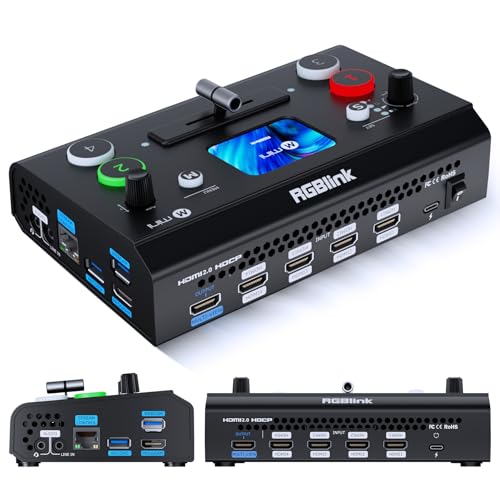
- Four HDMI inputs with dual 1080p outputs
- 2.1-inch touchscreen and T-bar control
- UVC mode, recording, PIP, and transitions
Best For: Portable, entry-level HDMI multi-camera streaming
Best for Tactile Live Control

- Four HDMI inputs plus one USB camera input
- SD-card recording with simultaneous USB streaming
- Eight assignable physical macro buttons
Best For: Church, education, and event teams needing hands-on control
Best Compact Pick
Mixer Plus 4-Input HDMI Switcher

- Four HDMI inputs with zero-latency switching
- Built-in 4-inch multiview display
- PTZ, keying, PIP, DSK, and AUX tools
Best For: Portable HDMI multi-camera streaming
Best Professional Features

- Four HDMI and four SDI inputs
- 4K60 input with 1080p60 output
- Dual streaming, recording, and PTZ control
Best For: Professional events and hybrid SDI/HDMI productions
Best Portable Kit

- Includes a 14-inch monitor and mounting plates
- Four HDMI/SDI inputs with two HDMI outputs
- AC, DC, or USB power-bank operation
Best For: Mobile multi-camera streaming and field production
Best Compact Pro Pick – ATEM Mini Pro HDMI
The Blackmagic Design ATEM Mini Pro is a practical video switcher for streaming when you need four HDMI camera inputs, built-in streaming, recording, and multiview monitoring in a compact unit. Its transition, keying, and audio features make it suitable for more than simple camera cuts.
Best For: Multicamera streams, education, business presentations, and esports events.
Pros:
- Four HDMI inputs with 10-bit 4:2:2 video support.
- Built-in streaming, recording, multiview, and six-input audio mixer.
- Includes transitions, upstream keys, and a downstream keyer.
Cons:
- Limited to four HDMI video inputs.
- USB-C recording and webcam output share the unit’s USB-C connectivity.
Choose this model if a compact workflow and established production features matter more than a large input count. It is especially well matched to creators who want hardware-based switching with built-in streaming tools.
Best Eight-Input Choice – Roland V-8HD
The Roland V-8HD is a strong video switcher for streaming and live production when eight HDMI sources are more useful than a smaller portable setup. It combines HDMI switching with a built-in preview monitor, advanced effects, flexible output routing, and an 18-channel digital audio mixer.
Best For: Live events, presentations, broadcasts, and productions using many HDMI sources.
Pros:
- Mixes up to eight HDMI sources in a compact design.
- Built-in multiview monitor plus AUX output for separate video routing.
- Includes keying, effects, macros, presets, still storage, and 18-channel audio mixing.
Cons:
- Heavier and larger than the four-input alternatives listed here.
- Its workflow is focused on HDMI sources rather than direct built-in internet streaming.
The V-8HD makes the most sense when source capacity and production control are priorities. Its automated switching, preset memories, and monitoring options can also help repeatable event workflows run more efficiently.
Best All-in-One Streaming Deck – GoStream Deck HDMI Pro
The Osee GoStream Deck is a flexible video switcher for streaming that combines four HDMI inputs with direct platform streaming, recording, playback, audio controls, and portrait or landscape output. Its physical control panel is designed for PC-free operation, while USB-C and software support add flexibility.
Best For: Podcasts, conferences, worship, weddings, panel discussions, and multi-platform streams.
Pros:
- Streams to up to three platforms through Ethernet and supports USB output for OBS or vMix.
- Records to SD cards or USB SSDs and can play MP4 files during productions.
- Offers chroma key, picture-in-picture, graphics overlays, macros, and multi-view output.
Cons:
- Video input capacity is limited to four HDMI sources.
- Some advanced workflows may require the included PC control software or companion module.
This is a compelling choice for creators who want streaming, recording, playback, and switching in one small deck. The combination of direct streaming and portrait support is particularly useful for varied online content formats.
Best 4K Production Upgrade – FoMaKo KC602 4K Mixer
The FoMaKo KC602 is a video switcher for streaming aimed at more demanding productions, pairing 4K60 input and loop-through with 1080p60 output, PTZ camera control, direct streaming, recording, and professional audio inputs. Its built-in display and hardware controls support hands-on operation.
Best For: Churches, studios, live events, and productions using 4K sources or PTZ cameras.
Pros:
- Accepts 4K60 input and provides 4K loop-through with 1080p60 output.
- Controls up to four PTZ cameras with presets and a dedicated keypad.
- Supports RTMP/RTMPS, UVC streaming, USB recording, and up to three simultaneous platforms.
- Includes XLR audio, 48V phantom power, EQ, monitoring, and audio delay controls.
Cons:
- Streaming output is specified at 1080p60 rather than 4K.
- The broad control set may be more than needed for basic two-camera streaming.
The KC602 is the most production-focused option in this group. It is a good fit when 4K signal handling, PTZ control, balanced audio, and direct streaming are worth the added feature complexity.
Most Versatile Pro Workflow – GoStream Duet
Osee GoStream Duet Multiple Camera SDI and HDMI Live Stream Video Mixer Switcher
Check Price On AmazonThe Osee GoStream Duet is a flexible video switcher for streaming when your production uses a mix of SDI, HDMI, USB-C, NDI HX, and playback sources. It combines extensive input selection with built-in control, software control, keying, transitions, and direct streaming options.
Best For: Multi-camera productions, live events, and users who need SDI and HDMI connectivity with room to scale.
Pros:
- Supports 4 SDI, 4 HDMI, USB-C, NDI HX, and SD/SSD playback sources.
- Offers chroma key, luma key, pattern key, PIP, DSK, and multiple transition styles.
- Can stream to up to three platforms through Ethernet or a smartphone hotspot.
- Supports built-in GUI, Mac and Windows software, and Bitfocus Companion control.
Cons:
- Its broad feature set may require more setup than a basic HDMI switcher.
- NDI HX functionality requires downloading the latest firmware to unlock the included license.
Choose this model when connection variety and production flexibility matter more than a minimal control surface. Its compact design and multiple control methods make it a strong fit for more advanced streaming setups.
Best Compact Touchscreen Option – RGBlink Mini V3
The RGBlink Mini V3 is a compact video switcher for streaming with four HDMI inputs, dual 1080p HDMI outputs, a 2.1-inch touchscreen, and a physical T-bar. It also supports UVC webcam mode, direct USB recording, and optional feature activation through TAO Cloud.
Best For: Entry-level creators and small multi-camera setups that want a portable HDMI switcher with touchscreen control.
Pros:
- Provides four HDMI inputs, dual HDMI outputs, and a 2.1-inch touchscreen.
- UVC webcam mode enables recognition by platforms such as YouTube and Facebook.
- Supports USB recording, PIP layouts, chroma key overlays, and 15 transition effects.
- Optional TAO Cloud activation lets users select features such as PTZ control and logo overlays.
Cons:
- Recording and selected advanced features require optional TAO Cloud licensing.
- Stable UVC streaming with OBS on Mac or PC requires the included USB 3.0 cable.
- A 35W or higher USB-C power adapter is recommended.
The Mini V3 is a practical choice for creators who value portability and straightforward HDMI connectivity. Check the licensing requirements carefully if you need recording, chroma key, or other premium functions.
Best for Tactile Live Control – GoStream Deck Pro
The Osee GoStream Deck Pro is a practical video switcher for streaming when fast physical control and simultaneous recording are priorities. It accepts four HDMI sources plus a USB camera, supports multi-source layouts, and can stream directly over Ethernet without an external computer.
Best For: Churches, schools, and live event teams that need tactile switching, local recording, and direct multi-platform streaming.
Pros:
- Connects up to four HDMI sources plus an additional USB camera.
- Records high-bitrate MP4 video to an SD card while streaming over USB.
- Streams through Ethernet to up to three platforms using its built-in encoder.
- Eight physical macro buttons support quick switching, overlays, and scene transitions.
Cons:
- Its inputs are primarily HDMI and USB, so it is less suited to SDI-based workflows.
- Some advanced productions may need external equipment for functions beyond its listed switching and streaming features.
This model stands out for operators who prefer dedicated buttons over software-only control. It is especially useful when a production needs both a local SD-card backup and a direct Ethernet streaming workflow.
Best Compact Pick – Mixer Plus 4-Input HDMI Switcher
If you need a portable video switcher for streaming, the Mixer Plus combines four HDMI inputs with a built-in 4-inch multiview screen. Its straightforward monitoring and production tools suit creators who want a compact setup for cameras, classes, events, or online broadcasts.
Best For: Portable multi-camera streaming with HDMI cameras and devices.
Pros:
- Four HDMI inputs with zero-latency switching and 30 transition effects.
- Built-in 4-inch multiview screen shows sources, program, preview, resolution, and audio meters.
- Includes PTZ control, chroma key, luma key, PIP, DSK, logo overlay, and customizable AUX output.
Cons:
- Limited to HDMI inputs rather than a mixed HDMI/SDI configuration.
- The compact 4-inch screen may be less convenient for complex productions.
This is a practical choice when portability and integrated monitoring matter more than advanced recording or network-streaming features. It offers a strong feature set for small productions without requiring a separate multiview monitor.
Best Professional Features – Tenveo PC500 Hybrid Switcher
The Tenveo PC500 is a video switcher for streaming aimed at larger, more demanding productions. It combines HDMI and SDI connectivity, onboard encoding, PTZ and NDI control, multiview monitoring, recording, and multiple streaming options in one production system.
Best For: Churches, studios, events, schools, conferences, and other professional multi-camera productions.
Pros:
- Supports four HDMI inputs, four SDI inputs, USB input, and NDI|HX3 connectivity.
- Provides 4K60 input support with 1080p60 output, USB/UVC output, and customizable HDMI and SDI outputs.
- Supports simultaneous streaming to two platforms through UVC, SRT, RTMP, RTSP, or NDI|HX3.
- Offers dual recording, playback as an auxiliary source, and PTZ control with presets and cruise tracks.
Cons:
- Its extensive feature set may be more than casual streamers need.
- Output is specified at 1080p60 even though some inputs support 4K60.
Choose this model when you need broad input compatibility, network production, and built-in recording rather than a minimal desktop switcher. Its web control and professional connectivity make it particularly adaptable for installed or event-based workflows.
Best Portable Kit – Osee GoStream Duet Kit
For mobile creators, the Osee GoStream Duet Kit is a video switcher for streaming packaged with a 14-inch monitor and mounting hardware. Its four HDMI/SDI inputs, USB connectivity, and flexible power options make it well suited to taking a multi-camera workflow on location.
Best For: Mobile live production where an integrated monitor, mounting options, and flexible power are useful.
Pros:
- Includes the GoStream Duet switcher, 14-inch 1080 × 1920 screen, fan, and three cheese plates.
- Accepts four HDMI/SDI inputs and provides two HDMI outputs for program output and multiview monitoring.
- Two USB ports support a USB camera and streaming software such as OBS, vMix, or Zoom.
- Can run from AC, DC, or a USB power bank and can supply USB DC 5V to additional devices.
Cons:
- At about 5 kg for the kit, it is less lightweight than a bare switcher.
- The supplied notes do not specify the device’s output resolution or recording format.
This kit stands out when portability means having the monitor and mounting ecosystem ready to go, not simply carrying a small box. The multiple power choices add flexibility for field work, while the HDMI/SDI inputs accommodate a wider range of cameras.
How We Picked the Best Video Switcher for Streaming
We compared these video switchers by examining input formats, supported resolutions and frame rates, switching controls, monitoring options, recording and streaming connectivity, audio handling, portability, and overall workflow flexibility. HDMI models are often the simplest choice for cameras, laptops, and consumer equipment, while SDI-capable units are better suited to longer cable runs and professional installations.
We also considered whether each switcher includes useful production tools such as picture-in-picture, transitions, multiview monitoring, chroma keying, onboard recording, USB output, and touchscreen or software control. The best fit depends less on having the most features and more on matching the switcher to your cameras, streaming platform, crew, and future upgrade plans.
Quick Comparison
| Setup type | Best match | What to prioritize |
|---|---|---|
| Single operator | Compact HDMI switcher | Simple controls, preview screen, USB streaming output |
| Two- to four-camera stream | HDMI multi-input model | Reliable switching, multiview, audio and picture-in-picture tools |
| Professional venue or event | SDI/HDMI hybrid switcher | Long cable support, scalable inputs, robust monitoring |
| Portable production | Small switcher with built-in display | Low weight, fast setup, integrated recording or streaming |
| 4K workflow | 4K-capable mixer | Input compatibility, output limits, frame-rate support |
Key Buying Factors for a Video Switcher for Streaming
Inputs and Compatibility
Count the cameras and other sources you will use now, then allow room for expansion. Check whether the switcher accepts HDMI, SDI, or both, and verify that its supported resolutions match your cameras. A 4K input does not always mean the switcher can produce a 4K stream or record in 4K.
Output and Streaming Workflow
USB output can let a switcher appear as a webcam to streaming software, while dedicated network or recording features may reduce the need for a computer. Confirm the output resolution, frame rate, connector type, and compatibility with your capture or encoding setup.
Monitoring and Control
A built-in screen or multiview output helps you check every source before going live. Physical buttons are useful under pressure; touchscreen, software, cloud, or remote control can be valuable when the switcher is mounted away from the operator.
Audio and Production Features
Look for the audio inputs and controls you actually need, including embedded HDMI audio, microphone connections, mixing, delay, and headphone monitoring. Picture-in-picture, keying, transitions, and still-image support can improve presentations, interviews, and event broadcasts.
Who Should Buy Which Video Switcher for Streaming?
Beginners and solo streamers: Choose a compact HDMI switcher with straightforward controls, USB connectivity, and a preview display. It should reduce dependence on complicated software.
Schools, churches, and small event teams: A four-input HDMI model with multiview, audio mixing, and recording support provides useful flexibility without requiring a large production crew.
Mobile creators: Prioritize a lightweight switcher with an integrated screen, fast setup, and dependable USB or recording options.
Professional producers: Choose an SDI/HDMI hybrid system when you need longer cable runs, multiple camera formats, more inputs, or a workflow that can grow over time. Before buying, confirm every camera, monitor, cable, computer, and streaming service in your signal chain is compatible.