
Choosing the best video switcher for live streaming can make a bigger difference than upgrading a camera. The right model lets you change angles smoothly, add presentations or graphics, and send a polished feed to your streaming platform.
This roundup compares 10 options ranging from compact HDMI switchers for creators and classrooms to feature-rich systems with PTZ control, recording, SDI connectivity, and built-in streaming tools.
Best 10 Video Switcher for Live Streaming Picks for 2026
Best Overall

- Four HDMI inputs with multiview
- Built-in streaming, recording, and audio mixing
- Transitions and keyers for polished productions
Best For: Education, business, esports, and multicamera streaming
Best Portable Monitor
Mixer Plus Compact Video Switcher

- Built-in 4-inch multiview display
- Four HDMI inputs with 30 transitions
- PTZ control, keying, PIP, and AUX output
Best For: Portable classes, events, YouTube, OBS, and Zoom
Best Bundle

- Four HDMI inputs and 4-camera multiview
- Includes HDMI and Cat5e cables
- Built-in streaming, recording, and audio mixing
Best For: First-time ATEM Mini Pro setups needing basic accessories
Best 4K Features

- 4K60 input and 4K loop-through
- RTMP/RTMPS, UVC streaming, and USB recording
- PTZ control plus advanced XLR audio mixing
Best For: Churches, studios, events, and advanced live productions
Best All-in-One Pick

- Standalone switching, streaming, recording, and monitoring
- HDMI, USB, IP, media, and mobile camera inputs
- AMOLED touchscreen and hot-swappable battery support
Best For: Portable, feature-rich live production without an external PC
Best for Tactile Control

- Four HDMI inputs plus a USB camera input
- Eight physical macro buttons for fast control
- Streams to up to three platforms over Ethernet
Best For: Hands-on event, church, and educational productions
Best for PTZ and Portrait Streaming
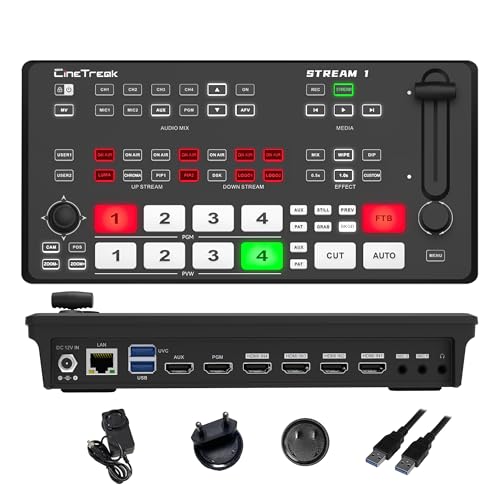
- Four HDMI inputs with AUX media access
- Built-in control for up to four VISCA PTZ cameras
- Dual RTMPS output and landscape or portrait streaming
Best For: Flexible studio, PTZ, virtual-set, and social video productions
Most Portable All-in-One Kit

- Four HDMI/SDI inputs with dual HDMI outputs
- Built-in 14-inch 1080p monitor
- AC, DC, or USB power-bank operation
Best For: Mobile productions and self-contained multi-camera streaming
Most Feature-Rich 4K Switcher

- 4K HDMI inputs plus USB, webcam, and NDI HX support
- Built-in effects, audio processing, and PTZ control
- Records to USB and SD while streaming
Best For: Feature-heavy event, concert, and multi-camera productions
Best for Professional PTZ Workflows

- Four HDMI and four SDI inputs with 4K60 support
- Certified NDI|HX3 with broad IP streaming protocols
- PTZ control, dual recording, and 5.5-inch display
Best For: Professional multi-camera, PTZ, SDI, and network productions
Best Overall – Blackmagic ATEM Mini Pro
The Blackmagic Design ATEM Mini Pro is a strong all-around video switcher for live streaming when you need four HDMI camera inputs, built-in streaming, recording, and multiview monitoring. Its transition effects, keyers, and integrated audio mixer make it suitable for polished multicamera productions.
Best For: Education, business presentations, esports, and multicamera internet or broadcast streaming.
Pros:
- Four HDMI inputs with 4-camera multiview
- Built-in streaming, recording, and 6-input audio mixing
- Includes multiple transitions plus upstream and downstream keyers
Cons:
- Limited to 1080-class HDMI switching rather than 4K production
- Requires separate cameras and HDMI cabling for a multicamera setup
This is a practical choice for creators who want a proven feature set in a compact unit. The built-in Ethernet, USB-C, and audio connections reduce the need for additional production hardware.
Best Portable Monitor – Mixer Plus Compact Video Switcher
The Mixer Plus Compact Video Switcher is a portable video switcher for live streaming that puts four-channel HDMI switching and multiview monitoring into a compact unit with a built-in 4-inch screen. It also adds scene presets, keying tools, PTZ control, and a configurable AUX output.
Best For: On-the-go multicamera streaming, online classes, events, YouTube, OBS, and Zoom productions.
Pros:
- Built-in 4-inch display for real-time multiview monitoring
- Four HDMI inputs with zero-latency switching and 30 transition effects
- Supports VISCA over IP PTZ control, keying, PIP, DSK, and logo overlays
- Configurable AUX HDMI output offers multiple signal choices
Cons:
- Does not list built-in streaming or recording functions in the supplied specifications
- Its 4-inch display may be less practical for detailed monitoring than a larger external screen
The built-in screen is the main convenience feature, especially for mobile setups where an external multiview monitor is inconvenient. Its broad switching and output options make it flexible for small live productions.
Best Bundle – ATEM Mini Pro HDMI Bundle
This ATEM Mini Pro bundle delivers the same core video switcher for live streaming features as the standalone model while adding a 6-foot HDMI cable, 7-foot Cat5e cable, and cable ties. It is a convenient starting point for a four-camera HDMI production that needs basic connectivity included.
Best For: Buyers who want an ATEM Mini Pro setup with useful HDMI, Ethernet, and cable-management accessories.
Pros:
- Four HDMI inputs with 4-camera multiview
- Built-in streaming, recording, and 6-input, 2-channel audio mixer
- Includes HDMI and Cat5e cables plus five cable ties
- Offers transitions, keyers, and USB-C webcam output
Cons:
- Accessory bundle does not include four complete camera connections
- Like the base model, it is designed around HDMI inputs rather than 4K switching
The included cables make this version more convenient than buying the switcher alone, particularly for a first setup. Compare the bundle price with the standalone unit if you already have compatible cables.
Best 4K Features – FoMaKo KC602 4K Video Mixer
The FoMaKo KC602 is a feature-heavy video switcher for live streaming with four HDMI inputs, 4K60 input and loop-through, 1080p60 output, PTZ control, and direct streaming and recording options. Its 5.5-inch display and physical control panel are designed for hands-on live production.
Best For: Churches, studios, events, and productions needing 4K input, PTZ control, RTMP/RTMPS streaming, and advanced audio mixing.
Pros:
- Supports 4K60 input and 4K loop-through with 1080p60 output
- Streams through RTMP/RTMPS and supports USB-C UVC output
- Controls up to four PTZ cameras with nine presets
- Includes XLR audio, 48V phantom power, EQ, monitoring, and multiple audio inputs
Cons:
- More complex than a basic HDMI switcher because of its extensive controls and audio features
- Output is specified at 1080p60 despite 4K input and loop-through support
- Its larger feature set may be more than small, simple streams require
The KC602 stands out when production flexibility matters more than minimal setup. Its 4K loop-through, PTZ management, direct streaming, recording, and professional audio tools make it suited to demanding live workflows.
Best All-in-One Pick – Magewell Director Mini
The Magewell Director Mini is a strong choice if you want a video switcher for live streaming that can handle production, encoding, recording, monitoring, and streaming without an external computer. Its compact design, touchscreen, multiple input types, and battery support make it especially flexible for mobile productions.
Best For: Creators and production teams needing a portable, standalone switcher for polished multi-source broadcasts.
Pros:
- Combines switching, encoding, recording, monitoring, and streaming in one device.
- Supports HDMI, USB, IP sources, media files, and mobile camera inputs.
- Built-in 5.44-inch AMOLED touchscreen supports scene control and monitoring.
- Dual hot-swappable NP-F battery slots support field production.
Cons:
- Its broad feature set may be more than simple streaming setups require.
- USB modem cellular connectivity requires a modem that is not included.
The Director Mini stands out for its combination of portability and production depth. It supports H.264 and H.265 encoding up to 1080p60, simultaneous streaming and recording, and advanced scene tools such as chroma key, graphics, webpages, and overlays.
Best for Tactile Control – Osee GoStream Deck Pro
The Osee GoStream Deck Pro is a practical video switcher for live streaming when you want physical controls, multiple HDMI sources, and direct network streaming. It can mix up to four HDMI sources plus a USB camera, while its macro buttons help streamline recurring production actions.
Best For: Churches, schools, event teams, and operators who prefer hands-on switching and hardware-based streaming.
Pros:
- Accepts up to four HDMI sources plus an additional USB camera.
- Eight physical macro buttons provide quick access to switching and overlays.
- Can stream to up to three platforms simultaneously through Ethernet.
- Supports SD card recording while streaming through USB.
Cons:
- The supplied notes do not specify supported streaming platforms or video resolution.
- Its 4.2-by-9.9-by-1.9-inch design may still require a dedicated setup space.
With direct Ethernet streaming, IP remote control, and simultaneous local recording, the GoStream Deck Pro is designed for efficient event workflows. The combination of multi-source layouts and programmable physical controls should appeal to teams that value repeatable, tactile operation.
Best for PTZ and Portrait Streaming – CINETREAK Stream 1
The CINETREAK Stream 1 is a versatile video switcher for live streaming with four HDMI inputs, an AUX media channel, PTZ control, dual RTMPS output, and support for both landscape and 9:16 portrait broadcasts. It is suited to productions that need more advanced camera and composition options.
Best For: PTZ-based productions, virtual sets, and creators who publish in both horizontal and vertical formats.
Pros:
- Provides four HDMI inputs, an AUX media channel, and PGM and AUX outputs.
- Controls up to four VISCA PTZ cameras through the built-in system.
- Supports simultaneous streaming to two destinations using RTMPS.
- Includes chroma key, luma key, PIP layouts, transitions, recording, and playback.
Cons:
- NDI functionality is described as updatable rather than included as a confirmed standard feature.
- The supplied notes specify only a one-year warranty.
The Stream 1 offers an unusually broad toolset for productions that move beyond basic camera switching. Its PTZ control, adjustable PIP layouts, 4K-capable HDMI inputs on HDMI 1 and 2, and portrait orientation support make it a flexible option for studio and social-first workflows.
Most Portable All-in-One Kit – GoStream Duet Kit
The Osee GoStream Duet Kit is a practical video switcher for live streaming when portability and an integrated monitoring setup matter. It combines four HDMI/SDI inputs, a built-in 14-inch monitor, recording and USB connectivity in a compact package that weighs about 5 kg.
Best For: Mobile productions, event streams, and creators who want a self-contained multi-camera setup with flexible power options.
Pros:
- Includes the switcher, 14-inch 1080p monitor, silent fan, and expandable cheese plates.
- Four HDMI/SDI inputs, two HDMI outputs, and two USB ports support flexible monitoring and streaming workflows.
- Can run from AC, DC, or a USB power bank, with USB power output for additional devices.
Cons:
- Its approximately 5 kg kit weight may still be substantial for lightweight travel setups.
- The supplied notes do not specify detailed transition, audio-mixing, or internal recording features.
Choose this model if you value a ready-to-carry production system over a minimal desktop switcher. The integrated screen, mounting options, and multiple power choices make it especially convenient for location-based streaming.
Most Feature-Rich 4K Switcher – M1 5-Channel Video Mixer
The M1 is a versatile video switcher for live streaming that combines 4K HDMI inputs, USB and SD recording, audio control, effects, PTZ support, and remote operation. It is designed for producers who want several production tools in one unit while outputting up to 1080p at 60 fps.
Best For: Weddings, concerts, music videos, and multi-camera streams that need overlays, chroma key, audio adjustment, and remote control.
Pros:
- Accepts multiple HDMI, USB, webcam, and NDI HX sources, with HDMI, UVC, USB, and SD recording or output options.
- Includes luma key, chroma key, logo insertion, PIP, DSK, and up to 30 transitions.
- Offers independent audio controls, delay adjustment, automatic level control, noise reduction, and dual-platform IP streaming.
- Built-in web control allows monitoring and operation from a computer or mobile device.
Cons:
- NDI is described as upgradeable rather than necessarily included in the base configuration.
- Its broad feature set may require more setup and learning than a basic HDMI switcher.
The M1 is a strong choice when production flexibility matters more than simplicity. Its combination of effects, audio tools, recording, PTZ compatibility, and remote access suits more involved live productions.
Best for Professional PTZ Workflows – Tenveo PC500
The Tenveo PC500 is a professional video switcher for live streaming with four HDMI inputs, four SDI inputs, 4K60 input support, PTZ control, NDI|HX3 certification, recording, and multiple streaming protocols. It is built for larger or more structured productions that need dedicated monitoring, switching, encoding, and camera management.
Best For: Churches, conferences, studios, schools, weddings, sports, and other productions using multiple PTZ or mixed HDMI/SDI cameras.
Pros:
- Combines 4K60 HDMI, SDI, USB, HDMI, SDI, and UVC connectivity with 1080p60 output.
- Supports PTZ pan, tilt, zoom, presets, cruise tracks, and camera discovery over the LAN.
- Streams through UVC, SRT, RTMP, RTSP, and NDI|HX3, including simultaneous streaming to two platforms.
- Supports dual recording to SD card, USB disk, or HDD and can use recordings as auxiliary sources.
Cons:
- Its professional feature set and multiple connection standards may be excessive for simple single-camera streams.
- Although it accepts 4K60 input, the listed program outputs are up to 1080p60.
The PC500 stands out for installations and productions where camera control, network workflows, and recording security are central requirements. Consider it when you need SDI and HDMI flexibility alongside integrated PTZ management.
How We Picked the Best Video Switcher for Live Streaming
We compared these switchers by looking at the inputs they support, maximum source and output resolutions, switching controls, streaming and recording features, portability, and overall suitability for different production sizes. We also considered whether each unit includes practical extras such as multiview monitoring, built-in screens, chroma keying, PTZ control, playback, or direct encoding.
Because workflows vary widely, the list includes straightforward HDMI models as well as more advanced hybrid systems. A compact switcher may be the better choice for a solo creator, while a studio or event team may benefit from SDI, redundant inputs, or simultaneous streaming and recording.
Quick Comparison
| Best For | Look For | Typical Advantage |
|---|---|---|
| Solo creators and classrooms | Compact HDMI design and simple controls | Fast setup and easy operation |
| Multi-camera events | Four or more inputs and multiview | More angles and presentation sources |
| Professional productions | SDI, PTZ control, recording, and keying | Greater flexibility and reliability |
| Mobile streaming | Built-in display, encoder, or recorder | Fewer external devices to carry |
Key Buying Factors for a Video Switcher for Live Streaming
Inputs and Source Compatibility
Count the cameras, computers, game consoles, and other sources you plan to connect now—not just what you use today. HDMI is common for consumer cameras and laptops, while SDI is preferable for longer cable runs and professional cameras. Check whether inputs are full-size, mini, or micro HDMI and whether adapters are required.
Resolution, Frame Rate, and Signal Handling
Some models accept 4K signals but output a 1080p stream. That can be perfectly practical, especially because many platforms and internet connections favor 1080p. Verify supported frame rates and whether the switcher can mix sources with different formats without interruption.
Streaming, Recording, and Monitoring
A built-in encoder can simplify direct streaming, while internal or USB recording provides a backup and lets you repurpose broadcasts. A multiview output or integrated screen is useful for checking every source before taking it live. Also confirm which connections the switcher uses for network, USB, storage, and monitoring.
Production Controls
Look for features that match your show: picture-in-picture, chroma or luma keying, transitions, still-image playback, audio mixing, PTZ camera control, and dual-platform streaming. More features are valuable only if the interface remains quick to operate during a live production.
Who Should Buy Which Video Switcher for Live Streaming?
Choose a compact HDMI switcher if you stream from a desk, teach online classes, produce interviews, or use two to four consumer cameras. It is usually the easiest and most affordable route. Step up to a model with a built-in display and encoder if you travel or want to reduce dependence on a computer. For conferences, houses of worship, sports, and larger events, prioritize four or more inputs, multiview, recording, PTZ support, and dependable SDI connectivity. Finally, choose a system with advanced keying, playback, and dual streaming when you need a more complete live production workflow rather than simple camera switching.