
The right video switcher can make an event look polished, responsive, and easy to follow across screens, livestreams, and recordings. The best choice depends on your camera inputs, resolution, crew, audio workflow, and production scale.
We’ve gathered 10 video switchers for events that cover compact streaming setups, hybrid productions, multi-camera venues, and more demanding live broadcasts. Use the guide below to narrow the list by features, connectivity, and budget.
Best 10 Video Switcher for Events Picks for 2026
Best All-Around HDMI Pick

- Four HDMI inputs with multiview
- Built-in streaming, recording, and audio mixing
- Compact design for small multicamera events
Best For: Education, presentations, esports, and small HDMI productions
Best for Larger HDMI Productions

- Eight HDMI inputs for larger setups
- Built-in preview monitor and AUX output
- 18-channel audio mixer with effects
Best For: HDMI-heavy events, presentations, and broadcasts
Best SDI Option
ATEM SDI Live Production Switcher
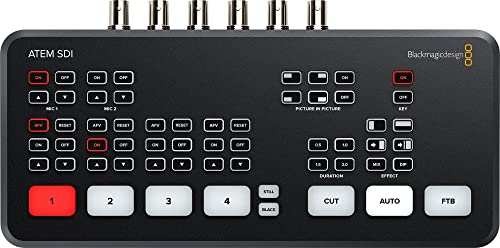
- Four 3G-SDI inputs with 10-bit HD
- Hardware format conversion on all inputs
- Ethernet control and USB-C webcam output
Best For: SDI-based broadcast-style HD events
Best for Integrated Event Streaming

- Four HDMI inputs with recording and playback
- Streams to three platforms simultaneously
- Supports overlays, keying, and portrait mode
Best For: Conferences, worship, weddings, and social streaming
Large-Scale Production
Blackmagic ATEM 2 M/E Constellation HD

- 20 SDI inputs for extensive camera coverage
- Layered production with DVE, keyers, and SuperSource
- 48-channel audio mixer and multiview monitoring
Best For: Concerts, festivals, sports, and worship productions
Flexible Streaming Setup

- Mixes SDI, HDMI, USB-C, NDI HX, and playback sources
- Supports portrait and landscape production
- Streams to up to three platforms
Best For: Mixed-source event streaming and compact production setups
Mobile All-in-One Production
Magewell Director One Live Production Switcher

- Combines switching, encoding, recording, and streaming
- 7-inch AMOLED touchscreen for direct control
- Battery support for mobile and field production
Best For: Portable HDMI events and standalone streaming workflows
Best Compact SDI Production Pick

- Four 3G-SDI inputs with format conversion
- Ethernet or USB-C internet streaming
- Six-input Fairlight audio mixer
Best For: SDI-based HD event productions and live streams
Best All-in-One PTZ Event Mixer

- HDMI, SDI, USB, and NDI|HX3 inputs
- PTZ control with presets and tracking support
- Dual-platform streaming and flexible recording
Best For: Multi-camera events with PTZ and network workflows
Best Hybrid ISO Recording Switcher

- Four HDMI and four SDI production inputs
- Eight ISO feeds plus PGM recording
- XLR audio and triple RTMP streaming
Best For: Hybrid productions needing backup footage and polished audio
Best All-Around HDMI Pick – ATEM Mini Pro
The Blackmagic Design ATEM Mini Pro is a practical video switcher for events that use up to four HDMI cameras or sources. It combines live switching, multiview monitoring, streaming, recording, and audio mixing in a compact unit.
Best For: Education, business presentations, livestreamed esports, and small multicamera productions.
Pros:
- Four HDMI inputs with 10-bit 4:2:2 video support.
- Built-in streaming, recording, multiview, and a six-input audio mixer.
- Includes useful transitions, keyers, and USB-C webcam output.
Cons:
- Limited to four HDMI video inputs.
- Does not provide SDI connectivity.
Choose the ATEM Mini Pro when you want a compact, feature-rich setup for HDMI-based event production without adding separate streaming and recording hardware.
Best for Larger HDMI Productions – Roland V-8HD
The Roland V-8HD is a video switcher for events that need eight HDMI sources, advanced effects, and flexible output routing. Its integrated preview monitor and audio mixer help streamline production from a single compact system.
Best For: Live events, presentations, broadcasts, and productions with multiple HDMI sources.
Pros:
- Supports mixing up to eight HDMI sources.
- Built-in multiview monitor, AUX output, keying, and five-layer effects.
- Includes an 18-channel digital audio mixer and automated switching features.
Cons:
- Heavier and larger than smaller four-input switchers.
- Designed around HDMI rather than SDI connections.
The V-8HD is a strong choice when an event requires more HDMI inputs, repeatable switching, graphics support, and deeper audio control in one device.
Best SDI Option – ATEM SDI Live Production Switcher
The Blackmagic Design ATEM SDI is a video switcher for events built around four 3G-SDI inputs. It offers 10-bit HD processing, hardware format conversion, Ethernet control, USB-C webcam output, and integrated audio tools for dependable live production.
Best For: Broadcast-style HD events using SDI cameras and professional cabling.
Pros:
- Four 3G-SDI inputs support 10-bit HD video.
- Built-in frame-rate and format converters help accommodate varied sources.
- Includes Ethernet control, USB-C webcam output, and a six-input audio mixer.
Cons:
- SDI connectivity is less convenient for HDMI-only cameras.
- Recording is not listed among the supplied features.
For venues using SDI cameras or longer professional video runs, the ATEM SDI offers a focused, hardware-based switching workflow with useful streaming and audio capabilities.
Best for Integrated Event Streaming – Osee GoStream Deck
The Osee GoStream Deck is a versatile video switcher for events that combines four HDMI inputs, dual outputs, recording, playback, audio controls, and direct streaming. Its hardware control panel and portrait or landscape support make it adaptable to conferences, worship, weddings, and online productions.
Best For: Events needing built-in streaming, recording, overlays, and flexible content playback.
Pros:
- Four HDMI inputs, two HDMI outputs, Ethernet, USB-C, and SD card recording.
- Can stream to three platforms and supports landscape or portrait modes.
- Provides keying, graphics overlays, macros, playback, and audio processing.
Cons:
- Its broad feature set may require more setup than a basic switcher.
- Limited to four HDMI video inputs.
The GoStream Deck suits operators who want a self-contained event workflow with direct streaming, recording, overlays, and physical controls rather than relying entirely on computer software.
Large-Scale Production – Blackmagic ATEM 2 M/E Constellation HD
For a video switcher for events with many cameras and complex live compositions, the Blackmagic Design ATEM 2 M/E Constellation HD provides substantial production capacity. Its 20 SDI inputs, multiple keyers, DVE, audio mixing, and multiview tools suit demanding live productions.
Best For: Concerts, festivals, live sports, and houses of worship requiring extensive SDI connectivity and layered switching.
Pros:
- 20 standards-converted 3G/HD/SD-SDI inputs support broad camera coverage.
- Offers up to 15 layers, DVE transitions and keyers, SuperSource, and media players.
- Includes a 48-channel digital audio mixer, multiview monitoring, talkback, and front-panel LCD control.
Cons:
- Its extensive feature set and 7.8-pound chassis may be more than smaller events need.
- Designed around SDI workflows, so compatible cameras and cabling are important.
This is the strongest fit when event coverage, input count, and compositing flexibility matter more than compactness. It is a production-oriented choice for teams that can use its broad control and monitoring features.
Flexible Streaming Setup – Osee GoStream Duet
Osee GoStream Duet Multiple Camera SDI and HDMI Live Stream Video Mixer Switcher
Check Price On AmazonThe Osee GoStream Duet is a versatile video switcher for events that combine SDI, HDMI, USB-C, network, and playback sources. It supports landscape or portrait production, multiple control options, and direct streaming to as many as three platforms.
Best For: Streamers and event crews needing a compact mixer with mixed inputs, browser-based control, and flexible online distribution.
Pros:
- Accepts four SDI, four HDMI, USB-C, NDI HX, and SD/SSD playback sources.
- Provides multsource layouts, PIP, DSK, luma, chroma, and pattern key effects.
- Supports Ethernet or smartphone-hotspot streaming and up to three platforms simultaneously.
Cons:
- NDI HX functionality requires the latest firmware to unlock the included license.
- Its one-kilogram design may provide less physical control than larger production switchers.
GoStream Duet balances connectivity and portability for events that need more than a basic camera switcher. It is especially appealing when direct streaming, portrait output, and software-based control are part of the workflow.
Mobile All-in-One Production – Magewell Director One Live Production Switcher
The Magewell Director One combines switching, encoding, recording, monitoring, and streaming in one standalone video switcher for events. Its HDMI, USB, and IP-source support, 7-inch AMOLED touchscreen, and battery options make it practical for mobile or fixed productions.
Best For: Event teams wanting an integrated HDMI production and streaming system without a separate computer or encoder.
Pros:
- Supports up to two HDMI inputs, two USB-A inputs, three simultaneous IP sources, media files, and mobile cameras.
- Provides a dedicated HDMI program output plus a built-in 7-inch AMOLED touchscreen.
- Records and streams using H.264 or H.265 up to 1080p60, with scenes, graphics, chroma key, and overlays.
- Offers DC power and dual hot-swappable battery slots for mobile operation.
Cons:
- HDMI and USB inputs may be less suitable than a large SDI switcher for extensive camera deployments.
- The integrated 4G modem requires separate 4G service.
Director One is a strong choice when reducing equipment count is a priority. Its touchscreen workflow, recording, encoding, and wired or wireless connectivity make it adaptable for field events and streamlined streaming productions.
Best Compact SDI Production Pick – ATEM SDI Pro ISO
For event crews working with SDI cameras, the Blackmagic Design ATEM SDI Pro ISO is a focused video switcher for events that combines four SDI inputs, real-time processing, streaming, and ISO recording in a compact workflow. Its built-in controls and Mac/Windows software provide practical flexibility for live productions.
Best For: SDI-based event productions, presentations, worship services, and live streams that need dependable switching and recording.
Pros:
- Four 3G-SDI inputs include frame-rate and format converters for compatible HD sources.
- Supports direct Ethernet streaming and USB-C internet sharing for RTMP broadcasts.
- Six-input audio mixer includes compressor, gate, EQ, and adjustable analog-input delay.
- Hardware-based processing and 10-bit color precision support low-latency production.
Cons:
- Its inputs are SDI rather than HDMI, so HDMI cameras require additional conversion.
- The supplied details focus on HD/3G-SDI workflows rather than 4K output.
The ATEM SDI Pro ISO is a sensible choice when your event setup already uses SDI and you value straightforward operation, integrated audio tools, and a direct streaming path. It is less suitable for mixed HDMI systems without extra hardware.
Best All-in-One PTZ Event Mixer – Tenveo PC500
The Tenveo PC500 is a versatile video switcher for events that brings HDMI, SDI, USB, IP streaming, recording, monitoring, and PTZ control into one system. Its 5.5-inch display and broad connection options make it suited to productions that need several camera types and integrated control.
Best For: Large conferences, stage shows, worship services, sports events, classrooms, and productions using PTZ or NDI cameras.
Pros:
- Accepts four HDMI inputs, four SDI inputs, USB video, and NDI|HX3 sources.
- Supports SRT, RTMP, RTSP, NDI|HX3, and UVC streaming, including two platforms simultaneously.
- Provides PTZ control with camera detection, presets, cruise tracks, and AI-tracking support.
- Supports SD-card, USB-disk, or HDD recording and can use recordings as auxiliary sources.
Cons:
- Although some inputs support 4K60, the listed program output is 1080p60.
- The extensive feature set may require more setup and operator training than a basic switcher.
Choose the PC500 when an event workflow needs mixed HDMI and SDI connectivity, network sources, PTZ camera operation, and recording without assembling several separate devices. Its strongest advantage is breadth rather than minimalism.
Best Hybrid ISO Recording Switcher – Osee GoStream Duet 8 ISO
The Osee GoStream Duet 8 ISO is a production-oriented video switcher for events designed for teams that need both HDMI and SDI connectivity, extensive recording, and professional audio. It can record eight ISO feeds plus the program output while also supporting network sources and streaming to multiple destinations.
Best For: Hybrid-camera events, conferences, churches, podcasts, panels, and productions where ISO footage is important for editing or backup.
Pros:
- Combines four HDMI 2.0 inputs accepting up to 4K60 with four 3G-SDI inputs.
- Records eight individual ISO feeds plus the program output in H.264 or H.265.
- Includes XLR and 3.5mm audio options, phantom power, gain, EQ, compression, and delay.
- Supports NDI|HX, SRT, RTMP, UVC, browser-based overlays, and streaming to three RTMP destinations.
Cons:
- The listed video output is 1080p, despite HDMI inputs supporting up to 4K60.
- Its advanced layers, recording, and network features may be more than simple events require.
The GoStream Duet 8 ISO stands out for productions where preserving every camera angle matters. Its hybrid inputs, XLR workflow, and multi-destination streaming make it a strong fit for professional event teams willing to manage a more feature-rich system.
How We Picked the Best Video Switcher for Events
We evaluated these models for the requirements that matter most during live production: input types and counts, switching reliability, supported resolutions and frame rates, audio integration, streaming and recording tools, monitoring, portability, and ease of use. We also considered whether each unit fits a compact solo-operator setup, a mobile production crew, or a permanent venue installation.
Because event workflows vary widely, this list includes HDMI and SDI systems, hardware designed for direct streaming, ISO recording options, multiview monitoring, and larger switchers built for more complex productions.
Quick Comparison
| Best For | Look For | Typical Setup |
|---|---|---|
| Small presentations and streams | Simple HDMI inputs, USB output, compact controls | Two to four cameras |
| Hybrid events | Streaming encoder, recording, audio mixing, multiview | Cameras, slides, remote platforms |
| Large venues | SDI connectivity, long cable runs, robust switching | Several cameras and destination screens |
| Post-production flexibility | ISO recording and separate input files | Multi-camera editing after the event |
Key Buying Factors for a Video Switcher for Events
Inputs, Standards, and Resolution
Match the switcher to your cameras and sources before comparing advanced features. HDMI is convenient for nearby consumer and prosumer cameras, while SDI is generally better for longer cable runs and installed event systems. Confirm the number of inputs, connector types, supported frame rates, and whether the unit can mix different video formats without external conversion.
Streaming, Recording, and ISO Capture
If the switcher will feed an online audience, built-in encoding can simplify the signal chain. Recording support is useful for backup copies or immediate publishing, while ISO recording preserves individual camera feeds for later editing. Check storage media, file formats, recording resolution, and whether recording can continue while streaming.
Audio and Monitoring
Look for the audio connections your event requires, including embedded HDMI or SDI audio, 3.5mm inputs, XLR, or external mixer integration. A clear multiview output helps an operator monitor program, preview, audio meters, and source status without adding several displays.
Control and Reliability
Physical buttons are useful when fast, repeatable cuts matter, while touchscreen or software control can provide deeper configuration. Consider transition controls, keying, picture-in-picture, macros, tally support, power options, and the availability of backup workflows. For paid events, test the complete system with every camera, cable, display, and streaming destination before show day.
Who Should Buy Which Video Switcher for Events?
Choose a compact HDMI switcher if you run presentations, classrooms, small conferences, or simple livestreams with a limited number of nearby sources. These models are easier to transport and operate with a small crew.
Choose an all-in-one production switcher if you want switching, encoding, recording, monitoring, and audio tools in one unit. This is often the most practical option for hybrid events and solo operators who want fewer devices and cables.
Choose an SDI-focused system for larger venues, long cable runs, stage productions, houses of worship, and recurring installations. SDI connectivity can make the overall infrastructure more dependable and easier to scale.
Choose an ISO-capable model if the event will be edited into highlights, social clips, or a full replay. Individual source recordings provide more flexibility than a single program file, but they require more storage and a stronger post-production workflow.