
Choosing the right logic analyzer can make serial debugging faster, cleaner, and far less frustrating. For microcontrollers, FPGA work, and embedded bring-up, the best tools balance channel count, sample rate, memory depth, and software usability.
This roundup of usb logic analyzers focuses on practical options for common protocols like I2C, SPI, UART, and CAN, so you can match the tool to your project instead of overbuying features you will not use.
Best 10 USB Logic Analyzers Picks for 2026
High-Speed 16-Channel Pick
USB Logic Analyzer LA2016 with 16 channels and 200MHz capture

- 16 channels with 200MHz sampling
- 1Gbits deep memory for longer captures
- Auto-decodes 20+ protocols
Best For: Engineers who need broad protocol support and deep capture
Simple Entry-Level Analyzer
8-channel USB logic analyzer with 24MHz sampling
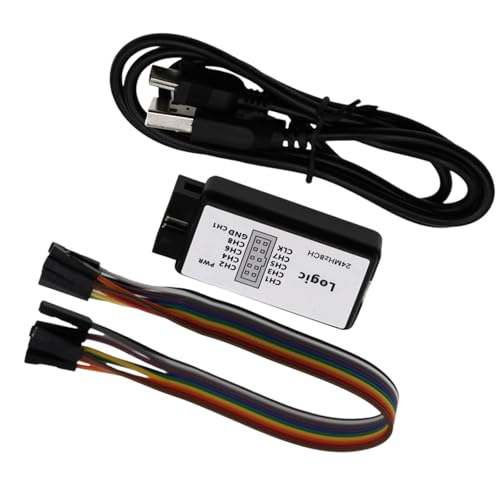
- 8 channels with up to 24MHz sampling
- Useful for UART, IIC, and SPI debugging
- Includes channel labeling and USB cable
Best For: Students and hobbyists doing basic embedded debugging
High-End Flexible Capture
DSLogic Plus with 16 channels and dual capture modes

- 16 channels with dual stream/buffer modes
- Up to 400MHz buffer capture and 256Mbits memory
- DSView software supports many decoders
Best For: Advanced users needing flexible, high-performance capture
Portable Field Analyzer
Pocket-sized 8-channel USB logic analyzer for field use
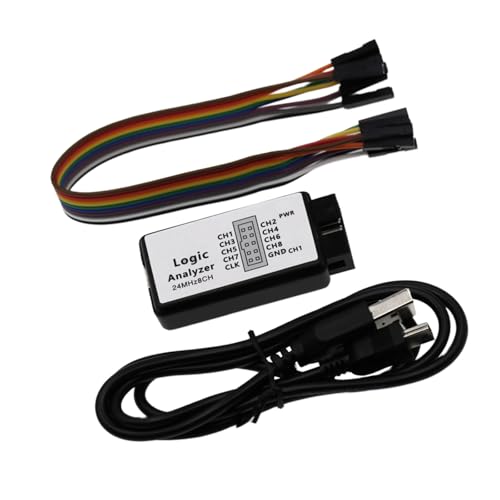
- 8-channel input with up to 24MHz
- Pocket-sized design with real-time upload
- Built for lab, embedded, and troubleshooting tasks
Best For: Portable signal checking and embedded troubleshooting
Best for Easy Setup
USB Logic Analyzer with 400MHz Sampling Rate

- 16 channels with dual-mode capture
- 400MHz sampling and 256Mbits memory
- USB Type-C; Windows, macOS, Linux support
Best For: Engineers and hobbyists needing fast multi-channel capture
Budget Protocol Debugger
24MHz 8-Channel USB Logic Analyzer

- 8 digital channels for basic debugging
- Up to 24MHz sampling rate
- Works with Saleae Logic Analyzer software and PulseView
Best For: Arduino, ARM, and FPGA users on a budget
Long-Capture Open-Source Choice
DSLogic Plus 16-Channel USB Logic Analyzer
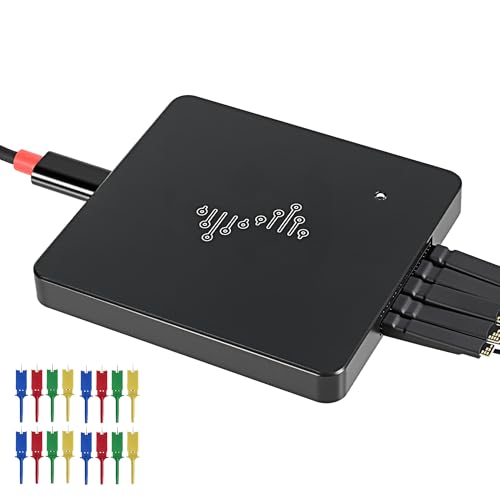
- 16 channels with stream and buffer modes
- 400MHz sampling and 16G sample depth
- Nearly 100 protocol decoders; Windows, macOS, Linux
Best For: Users needing long captures and broad decoder support
Budget-friendly pick
Compact 8-Channel 24MHz USB Logic Analyzer
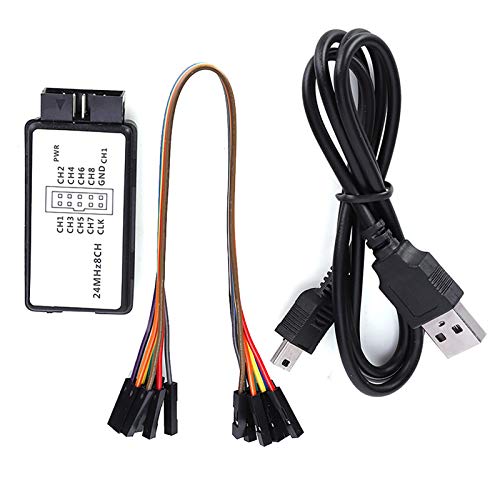
- 8 channels with 24MHz max sampling
- Works with UART, I2C, and SPI
- Small USB design for easy setup
Best For: Simple protocol debugging and portable bench use
Advanced multi-channel choice
High-Speed 16-Channel LA1010 USB Logic Analyzer

- 16 channels plus 2 PWM channels
- Up to 100MHz sampling rate
- Cross-platform software for PC analysis
Best For: Complex digital projects and multi-protocol troubleshooting
Open-source friendly option
Portable 24MHz 8-Channel Protocol Analyzer

- 8 channels with up to 24MHz sampling
- Compatible with Sigrok PulseView
- Supports 5V, 3.3V, 2.5V, and 2.0V logic
Best For: Open-source protocol decoding with common logic levels
High-Speed 16-Channel Pick – USB Logic Analyzer LA2016 with 16 channels and 200MHz capture
If you need a USB logic analyzer for deeper digital debugging, the LA2016 stands out with 16 channels, 200MHz sampling, and 1Gbits of deep memory. It is built for capturing fast, multi-signal activity without losing detail, while the included software adds automatic decoding for a wide range of common protocols.
Best For: Engineers and developers who want a high-channel-count analyzer with broad protocol support and cross-platform software.
Pros:
- 16-channel capture with 200MHz sampling and 1Gbits memory
- Auto-decodes 20+ protocols including I2C, SPI, UART, CAN, and JTAG
- Works with Windows, Mac OS, and Linux
- Includes probes, hook clips, and USB cable for a ready-to-use setup
Cons:
- Software and feature depth may be more than casual users need
- Best suited to digital debugging rather than simple one-off checks
- Portable design is useful, but still centered on PC-based analysis
The LA2016 is a strong fit if you want one of the more capable usb logic analyzers in this group, especially when capture depth and protocol coverage matter. Its combination of 16 channels, deep memory, and broad OS support makes it a practical choice for serious troubleshooting.
Simple Entry-Level Analyzer – 8-channel USB logic analyzer with 24MHz sampling
This usb logic analyzer is aimed at straightforward embedded debugging, with 8 channels and up to 24MHz sampling. It is positioned as a practical tool for UART, IIC, and SPI work, and the included channel labeling plus USB cable make it easier to get set up for everyday signal checks.
Best For: Students, hobbyists, and embedded developers who need a simple 8-channel analyzer for common bus debugging.
Pros:
- 8-channel capture with up to 24MHz sampling
- Suited to UART, IIC, and SPI debugging tasks
- Includes channel labeling and USB cable
- Built for educational, lab, and development use
Cons:
- Lower channel count than more advanced options
- Sampling rate is modest for highly demanding captures
- Product notes provide limited detail on software and protocol depth
For basic embedded troubleshooting, this model keeps the focus on core digital signal analysis instead of advanced extras. Among usb logic analyzers, it is a sensible entry-level option when you mainly need reliable capture for common buses.
High-End Flexible Capture – DSLogic Plus with 16 channels and dual capture modes
The DSLogic Plus is built for users who want more flexibility from usb logic analyzers, combining 16 channels, 400MHz buffer-mode sampling, and 256Mbits of on-board memory. Its dual-mode design lets you choose between long stream captures and higher-speed buffered captures, while DSView software adds broad protocol decoding and cross-platform support.
Best For: Advanced users who want a high-performance analyzer with both long-duration streaming and high-speed buffered capture.
Pros:
- 16 channels with up to 400MHz buffer-mode sampling
- Dual-mode operation for stream or high-speed buffer capture
- 256Mbits on-board SDRAM and up to 16G sample depth in stream mode
- DSView works on Windows, macOS, and Linux with nearly a hundred decoders
Cons:
- Higher-end features may be unnecessary for simple projects
- Software workflow may be more involved than basic analyzers
- Only 4 channels at the top 400MHz buffer rate
If you need speed, memory options, and flexible capture modes, the DSLogic Plus is one of the most capable choices here. It is especially appealing for users who want a cleaner signal path and a software stack that goes beyond basic decoding.
Portable Field Analyzer – Pocket-sized 8-channel USB logic analyzer for field use
This usb logic analyzer focuses on portable, practical data collection with 8-channel input and up to 24MHz performance. The notes emphasize real-time upload, a compact pocket-sized design, and a simple interface, which makes it a fit for hands-on circuit debugging and embedded troubleshooting.
Best For: Engineers, educators, and hardware hobbyists who want a compact analyzer for general-purpose signal checking.
Pros:
- 8-channel input with up to 24MHz sampling
- Pocket-sized design with easy-to-use interface
- Real-time data upload for live analysis
- Suited to lab testing, embedded development, and troubleshooting
Cons:
- No detailed protocol list is provided in the supplied notes
- Less channel capacity than 16-channel models
- Battery-powered design may not suit every bench workflow
If portability matters more than maximum channel count, this model offers a straightforward way to work with digital signals on the go. It keeps the feature set focused on core capture and analysis, which can be enough for many everyday usb logic analyzers use cases.
Best for Easy Setup – USB Logic Analyzer with 400MHz Sampling Rate
BINGOX USB Logic Analyzer, 16 Channels, 400MHz Sampling Rate, 256Mbit Memory, USB-C Interface
Check Price On AmazonIf you need USB logic analyzers for fast digital debugging, this 16-channel model focuses on capture speed, memory depth, and broad OS support. It is aimed at embedded development, protocol decoding, and general signal analysis where stable acquisition matters.
Best For: Engineers, students, and electronics hobbyists who want a fast, portable analyzer for multi-channel debugging.
Pros:
- 16 digital channels with dual-mode operation for flexible signal capture
- Up to 400MHz sampling rate and 256Mbits onboard memory
- USB Type-C interface for fast data transfer and reliable connection
- Compatible with Windows, macOS, and Linux
Cons:
- Product notes do not list bundled software or protocol decoder details
- Higher-spec design may be more than needed for simple UART or SPI checks
This is the most performance-focused option in the group, with stronger sampling specs than a basic entry-level analyzer. If your workflow depends on deeper captures and cleaner handling, it is a practical pick for demanding USB logic analyzers use cases.
Budget Protocol Debugger – 24MHz 8-Channel USB Logic Analyzer
This compact option covers the core needs most people look for in USB logic analyzers, especially UART, SPI, and IIC debugging. With 8 digital channels and broad software support, it suits straightforward protocol work on a tighter budget.
Best For: Arduino, ARM, and FPGA users who need a simple 8-channel analyzer for basic protocol debugging.
Pros:
- 8 digital channels for common debugging tasks
- Up to 24MHz sampling rate with multiple lower-rate options
- Compatible with Saleae Logic Analyzer software and PulseView
- Supports UART, SPI, IIC, and other standard protocols
Cons:
- Voltage range tops out at 5.5V with a 1.5V threshold, which may not fit every setup
- Lower sampling headroom than higher-end analyzers
For routine bench work, this is a straightforward and practical analyzer rather than a feature-heavy one. It makes sense when you want familiar software compatibility and enough channel count for everyday serial bus inspection.
Long-Capture Open-Source Choice – DSLogic Plus 16-Channel USB Logic Analyzer
Among USB logic analyzers, this DSLogic Plus model stands out for long captures and flexible operation. It combines 16 channels, stream and buffer modes, and support for a large decoder ecosystem, making it a strong fit for analysis work that needs both speed and duration.
Best For: Users who want a 16-channel analyzer with long sample depth and open-source support.
Pros:
- 16 channels with dual-mode support for stream and buffer capture
- Up to 400MHz sampling rate and 16G sample depth in stream mode
- 256Mbits on-board SDRAM memory with multiple buffer modes
- Compatible with Windows, macOS, and Linux, plus nearly 100 protocol decoders
Cons:
- Product notes mention adjustable threshold and shielded wires, but not bundled accessories beyond that
- Feature set may be more advanced than needed for simple one-off checks
This model is well suited to users who value capture flexibility as much as raw speed. If you need a capable USB logic analyzer for longer sessions and broad protocol support, it is the most well-rounded open-source-style option here.
Budget-friendly pick – Compact 8-Channel 24MHz USB Logic Analyzer
If you want a straightforward USB logic analyzer for basic digital debugging, this 8-channel model is built around simplicity and portability. It offers USB connectivity, 24MHz maximum sampling, and support for common protocols like UART, I2C, and SPI, making it a practical pick for small electronics and microcontroller work.
Best For: Hobbyists and technicians who need a compact, easy-to-use analyzer for everyday protocol checks.
Pros:
- 8 channels with up to 24MHz sampling for general signal capture
- Supports UART, I2C, and SPI debugging
- USB interface keeps setup simple and portable
- Small, durable build suited to bench or field use
Cons:
- Lower sampling rate than higher-end USB logic analyzers
- Best suited to simpler projects rather than dense multi-signal systems
This is a good fit if you need a lightweight tool for routine troubleshooting without a lot of complexity. It focuses on the basics, with enough performance for common digital buses and compact hardware that is easy to carry.
Advanced multi-channel choice – High-Speed 16-Channel LA1010 USB Logic Analyzer
For users who need more headroom from USB logic analyzers, the LA1010 stands out with 16 channels, two dedicated PWM channels, and a 100MHz maximum sampling rate. Its PC software is designed to visualize and decode waveforms across Windows, Mac OS, and Linux, which makes it a strong choice for more involved digital analysis work.
Best For: Engineers and advanced hobbyists working on complex multi-signal debugging across multiple operating systems.
Pros:
- 16 digital channels plus 2 PWM channels for broader signal coverage
- Up to 100MHz sampling rate, variable by channel count
- Supports Windows, Mac OS, and Linux
- Wide protocol support including UART, I2C, SPI, CAN, JTAG, LIN, and more
Cons:
- Best results require choosing sampling rates high enough for your signal frequency
- More advanced than basic analyzers, so it may be overkill for simple bus checks
This model is aimed at deeper debugging where channel count and software flexibility matter. If your work involves MCU, ARM, or FPGA projects and you want broader protocol coverage, it offers a lot of capability in a compact shell.
Open-source friendly option – Portable 24MHz 8-Channel Protocol Analyzer
This USB logic analyzer keeps things focused on practical protocol debugging with 8-channel capture, 24MHz sampling, and compatibility with Sigrok PulseView. It is a solid option if you need a portable analyzer for UART, I2C, and SPI work on microcontroller or FPGA projects, especially when logic-level compatibility matters.
Best For: Developers who want a compact analyzer with broad logic-level support for common digital buses.
Pros:
- 8 channels with selectable sampling rates up to 24MHz
- Works with open-source software like Sigrok PulseView
- Decodes UART, I2C, and SPI into readable values
- Supports 5V, 3.3V, 2.5V, and 2.0V logic levels
Cons:
- Not recommended for 1.8V systems
- 24MHz class performance is more suited to general applications than high-speed designs
Overall, this is a well-rounded pick if you value software flexibility and clean signal capture. The included EMI ferrite ring, defined input thresholds, and detailed support resources make it especially approachable for troubleshooting digital electronics.
How We Picked the Best USB Logic Analyzers
We prioritized USB Logic Analyzers that offer a useful mix of capture speed, channel count, memory depth, and protocol support. We also looked for models that fit real development workflows, including Windows compatibility, portable designs, and included cables or probes where relevant.
Because different users have different needs, we favored a range of entry-level and higher-end options rather than one “best” spec. That makes it easier to compare compact 8-channel tools against deeper-capture 16-channel models.
Quick Comparison
In simple terms, 8-channel analyzers are usually best for basic embedded debugging, while 16-channel models are better for bus-heavy boards and more complex timing analysis. Higher sample rates and larger memory help capture fast signals and longer events without missing detail.
If you mainly work with UART, I2C, and SPI, a budget-friendly model may be enough. If you debug faster buses, multiple peripherals, or timing-sensitive firmware, look for stronger memory depth and a higher sampling ceiling.
Key Buying Factors for USB Logic Analyzers
Channel Count
Choose enough channels for your current bus plus some extra headroom. Eight channels works for many microcontroller projects, but 16 channels is safer when you need to observe multiple signals at once.
Sample Rate and Memory Depth
Sample rate determines how well the analyzer can capture fast edges and short pulses. Memory depth determines how long it can record before data fills up. For real debugging, both matter; a fast analyzer with shallow memory can still miss the event you care about.
Protocol Support and Software
Most buyers of USB Logic Analyzers will want support for common embedded protocols such as UART, I2C, SPI, and sometimes CAN. Equally important is software that is stable, easy to install, and compatible with your operating system.
Physical Setup and Accessories
Included cables, probes, ferrite rings, and connector quality can affect day-to-day convenience. If you move between bench setups, portable units with a clean USB connection and durable accessories are worth considering.
Who Should Buy Which USB Logic Analyzers?
If you are a beginner or mainly work on hobbyist boards, choose a simpler 8-channel model with good protocol decoding. If you are an embedded engineer or FPGA developer, a 16-channel analyzer with deeper memory is usually the better long-term buy.
For fast or complex debugging, prioritize higher sampling rates and more memory over flashy extras. For routine serial bus work, focus on usability, solid software, and enough channels to see the whole conversation.