
Finding the right USB duplicator under $300 depends on what you need to copy, how many target drives you process at once, and whether you want a standalone workflow or computer-based control.
This roundup compares 10 affordable duplicators, cloning docks, card-copying tools, and USB hubs to help you choose a practical setup for home labs, IT work, media production, and small-business deployments.
Best 10 USB Duplicators Under 300 Picks for 2026
Best USB Flash Drive Pick

- Standalone 1-to-2 USB duplication
- Quick Copy and bit-for-bit modes
- Built-in erase and media tests
Best For: Schools, IT teams, and USB deployment
Best SATA Drive Dock
StarTech Dual-Bay SATA Duplicator
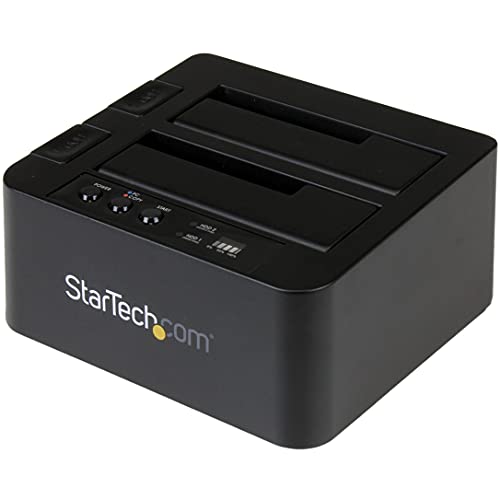
- Standalone 2.5/3.5-inch SATA cloning
- Up to 28 GB/min copying
- Also works as a USB-to-SATA dock
Best For: Drive upgrades, recovery, and IT maintenance
Best 1-to-3 USB Duplicator
Vinpower Flash Memory Duplicator
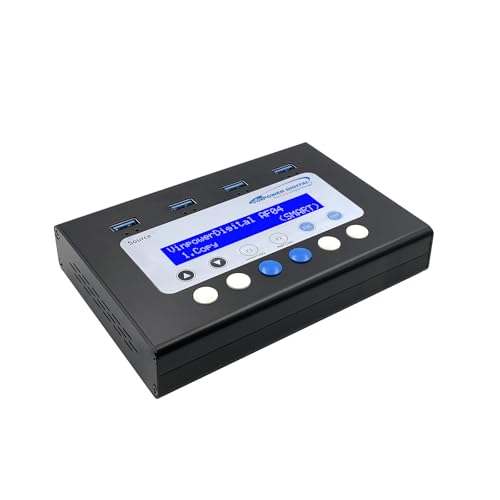
- Duplicates one USB drive to three
- Smart Copy and Raw Copy modes
- DoD erasing and read-error skip
Best For: Higher-volume USB deployment and secure reuse
Best Budget SATA Clone Dock
WAVLINK Dual-Bay USB/SATA Dock

- Offline cloning for SATA HDDs and SSDs
- Supports 2.5/3.5-inch drives up to 16TB each
- USB 3.0, UASP, and hot-swapping
Best For: Drive cloning, upgrades, and bare-disk access
Best Portable SD Card Duplicator
U-Reach SD/microSD 1-to-2 Copier

- Supports SD and microSD cards up to 1TB
- Four data-sanitization modes
- Lightweight standalone design
Best For: Portable SD and microSD duplication
Best Hard Drive Cloning Dock
WAVLINK Dual-Bay SATA Duplicator

- Clones two SATA drives offline
- Supports 2.5-inch and 3.5-inch drives
- Handles drives up to 2x20TB
Best For: SATA drive cloning and backup
Best Multi-Drive USB Duplicator

- Copies up to 10 USB drives simultaneously
- Supports USB 3.0 and USB 2.0 media
- Works with images, files, folders, or source drives
Best For: Bulk USB flash-drive duplication
Best Multi-Port Pick
16-Port USB 2.0 Duplicator Hub

- 16 powered USB 2.0 ports
- Individual status and fault LEDs
- Up to 480Mbps transfer speed
Best For: Batch USB device testing and management
Best High-Capacity Cloner
Dual-Bay SAS/SATA Drive Duplicator
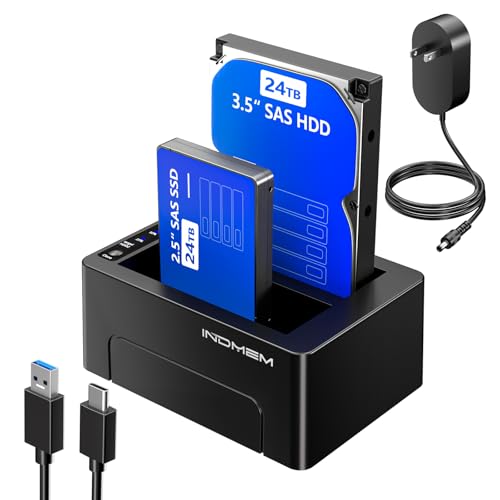
- Offline cloning without a PC
- Copies one drive to two targets
- Supports up to 48TB total
Best For: Professional drive migration and backup
Best SATA Value

- Offline SATA drive cloning
- USB 3.0 with 5Gbps interface
- Built-in USB hub and SD/TF reader
Best For: Everyday SATA upgrades and backups
Best USB Flash Drive Pick – BestDuplicator UB300 1:2
For anyone comparing usb duplicators under 300, the BestDuplicator UB300 is a straightforward standalone option for copying one USB flash drive to two targets at once. It works without a computer and offers both file-level Quick Copy and bit-for-bit Whole Media Copy modes.
Best For: IT departments, schools, businesses, and technicians distributing or backing up USB-based data.
Pros:
- Duplicates one source drive to two targets simultaneously without a PC.
- Supports Quick Copy and Whole Media Copy modes.
- Includes erase, capacity-check, device-information, and speed-test functions.
- Compact LCD-controlled design with status LEDs for each port.
Cons:
- Designed for USB 1.1 and USB 2.0 media rather than newer USB standards.
- Copy performance is best when source and target drives have similar capacities.
- Other card formats require a compatible USB card reader, sold separately.
The UB300 is a practical choice when you need simple, repeatable USB duplication in the field. Its standalone operation and media-testing tools make it especially useful for routine deployment and maintenance work.
Best SATA Drive Dock – StarTech Dual-Bay SATA Duplicator
Among usb duplicators under 300, the StarTech SDOCK2U313R stands out for users duplicating 2.5- and 3.5-inch SATA hard drives or SSDs. It performs standalone sector-by-sector cloning and can also serve as a USB-connected SATA drive dock.
Best For: IT professionals cloning SATA HDDs and SSDs, accessing bare drives, or preparing replacement disks.
Pros:
- Clones 2.5- and 3.5-inch SATA drives without a computer.
- Supports sector-by-sector copying at speeds up to 28 GB per minute.
- Works with drives of any capacity when the target is equal to or larger than the source.
- Includes USB-C/A cables, a universal power adapter, TRIM, 4Kn support, and tool-free bays.
Cons:
- Designed for SATA drives, not USB flash-drive duplication.
- IDE drives require a separate adapter.
- Sector-by-sector copying includes empty sectors and may take longer than file-level copying.
This is the most suitable option here for drive migration and maintenance rather than flash-drive distribution. Its dual-bay design and USB-to-SATA access add flexibility for professional hardware workflows.
Best 1-to-3 USB Duplicator – Vinpower Flash Memory Duplicator
If your search for usb duplicators under 300 centers on higher-volume flash-drive work, the Vinpower USBMiniDup provides three target ports and standalone operation. Smart Copy handles accessible files, while Raw Copy supports complete bit-by-bit duplication.
Best For: Organizations producing multiple bootable, software, training, firmware, or presentation USB drives.
Pros:
- Copies one USB source to three targets without a PC.
- Smart Copy and Raw Copy modes support different duplication needs.
- Includes DoD 5220.22-M-compliant USB erasing.
- Read Error Skip can bypass damaged sectors during duplication.
Cons:
- The supplied notes do not specify a maximum copy speed.
- Its three-port design is focused on USB flash media rather than SATA drives.
- Raw Copy duplicates the complete media, which may be slower than Smart Copy.
The Vinpower model is a strong fit when throughput, secure reuse, and flexible copy modes matter more than basic one-to-two duplication. Read-error handling also gives it added utility with aging USB media.
Best Budget SATA Clone Dock – WAVLINK Dual-Bay USB/SATA Dock
For shoppers comparing usb duplicators under 300 for hard-drive work, the WAVLINK dual-bay dock combines offline cloning with USB 3.0 and USB-C connectivity. It supports both 2.5- and 3.5-inch SATA HDDs and SSDs, with no drivers required for the dock.
Best For: Home users and technicians cloning SATA drives, accessing bare disks, or managing up to two large drives.
Pros:
- Supports offline cloning from a source drive to an equal- or larger-capacity target.
- Works with 2.5- and 3.5-inch SATA I, II, and III HDDs and SSDs.
- Supports USB 3.0 transfer and UASP speeds up to 6 Gbps.
- Tool-free design includes hot-swapping and automatic sleep after inactivity.
Cons:
- Offline cloning requires the target disk to be equal to or larger than the source.
- The notes specify offline cloning rather than online cloning.
- It is not compatible with M1/M2-based Macs.
The WAVLINK is a versatile dual-bay option for SATA cloning and drive access, especially when broad operating-system compatibility and high-capacity support are useful. Verify your computer platform before buying if you use an M-series Mac.
Best Portable SD Card Duplicator – U-Reach SD/microSD 1-to-2 Copier
If you need usb duplicators under 300 for camera cards, phones, or tablets, the U-Reach SD312N is a compact standalone option. It copies SD and microSD media without a computer and uses dedicated bandwidth to help avoid speed degradation during duplication.
Best For: Portable SD and microSD duplication, backup, and card sanitization.
Pros:
- Duplicates SD and microSD cards with support for capacities up to 1TB.
- Standalone, lightweight 160 g design for convenient portable use.
- Offers Quick Erase, Full Erase, DoD Erase, and DoD Erase + Compare modes.
Cons:
- Designed for SD and microSD media rather than USB flash drives or hard drives.
- Its listed read speed is 25 MB/s.
The SD312N is a focused choice when portability and secure card erasure matter more than broad media compatibility. Its dedicated design keeps the workflow simple for SD-based devices.
Best Hard Drive Cloning Dock – WAVLINK Dual-Bay SATA Duplicator
Among usb duplicators under 300, the WAVLINK ST341UA stands out for cloning SATA hard drives and SSDs. Its dual-bay design supports offline copying without a computer, while USB 3.0 with UASP provides a fast connection for file transfers and backups.
Best For: Offline cloning and storage expansion with 2.5-inch or 3.5-inch SATA drives.
Pros:
- Supports two 2.5-inch or 3.5-inch SATA I/II/III HDDs or SSDs.
- Offline clone function works without a computer and starts with a dedicated button.
- Supports up to 2x20TB drives and USB 3.0 transfer rates up to 5Gbps.
- Tool-free, plug-and-play design includes USB-A and USB-C connection options.
Cons:
- The target drive must have capacity equal to or greater than the source drive for cloning.
- It is intended for SATA drives, not SD cards or USB flash drives.
This docking station is a practical pick for drive upgrades, backups, and direct disk cloning. Its fixed bezels add stability, though users should verify drive compatibility and target capacity first.
Best Multi-Drive USB Duplicator – DupliM 1-to-10 Flash Copier
For bulk USB duplication, this computer-connected DupliM unit is a compelling option among usb duplicators under 300. It can duplicate up to 10 USB 3.0 or 2.0 flash drives simultaneously using image files, selected files, folders, or another flash drive.
Best For: Windows and Mac users producing multiple USB flash-drive copies at once.
Pros:
- Duplicates up to 10 USB 3.0 or USB 2.0 drives simultaneously.
- Works from image files, flash drives, or selected files and folders.
- Includes DupliM software for Windows and Mac OS, plus a USB 3.0 cable.
- Supports USB 3.0 SuperSpeed technology and includes U.S.-based technical support.
Cons:
- Requires a connected Windows or Mac computer rather than operating standalone.
- Requires compatible operating systems and a 1.8 GHz dual-core processor with 2GB RAM.
The DupliM is best suited to repeatable, high-volume flash-drive production where computer-based software control is useful. It offers greater throughput than a basic one-to-one copier, but setup depends on the host computer.
Best Multi-Port Pick – 16-Port USB 2.0 Duplicator Hub
For buyers comparing USB duplicators under 300, the SUNGOOYUE 16-port hub is a practical choice for connecting and testing many USB devices at once. Its powered USB 2.0 design provides 16 ports, individual status LEDs, and transfer speeds up to 480Mbps.
Best For: Offices, workshops, and production setups that need simultaneous USB device management or flash-drive testing.
Pros:
- Expands one USB connection to 16 USB 2.0 ports.
- Includes a 5V 3A desktop power adapter for stable power delivery.
- Individual blue status LEDs and short-circuit alarm indicators help monitor connected devices.
- Plug-and-play compatibility with USB 2.0, 1.1, and 1.0 devices.
Cons:
- USB 2.0 limits transfer speeds to 480Mbps.
- It is a hub and tester rather than a dedicated standalone hard-drive cloner.
- The listed warranty is 90 days.
This model makes the most sense when port count and device visibility matter more than modern USB speeds or automated drive cloning.
Best High-Capacity Cloner – Dual-Bay SAS/SATA Drive Duplicator
Among USB duplicators under 300, this dual-bay INDMEM dock stands out for offline drive cloning and broad storage support. It works with 2.5- and 3.5-inch SAS or SATA drives, and can copy one source drive to two targets simultaneously without a computer.
Best For: IT professionals and businesses handling drive migration, backup, recovery, or batch duplication.
Pros:
- Standalone one-touch cloning does not require a PC or software.
- Supports 2.5- and 3.5-inch SAS and SATA SSDs and HDDs.
- Can create two target copies simultaneously.
- Supports up to 24TB per bay, or 48TB total, according to the supplied specifications.
Cons:
- SAS or SATA drives are not included.
- Its USB connection has one port and is designed around a drive dock rather than multi-device USB expansion.
- The listing describes high-speed interfaces, but actual performance can vary by drive and operation.
With dual-target cloning, large stated capacity, and included 12V 4A power, this is the strongest fit here for professional duplication workflows.
Best SATA Value – Dual-Bay USB 3.0 Drive Cloner
This dual-bay SATA dock is a straightforward option for shoppers seeking USB duplicators under 300 for common 2.5- and 3.5-inch HDDs and SSDs. It supports standalone cloning without a PC, plus USB 3.0 file transfers and an integrated USB hub with SD/TF card reader.
Best For: Home users and technicians upgrading, backing up, or transferring data from standard SATA drives.
Pros:
- Offline cloning requires no computer, drivers, or software.
- Supports 2.5- and 3.5-inch SATA I/II/III HDDs and SSDs.
- USB 3.0 connectivity supports transfer speeds up to 5Gbps and remains backward compatible.
- Includes a USB hub and SD/TF card reader for added connectivity.
Cons:
- It supports SATA drives rather than the SAS drives supported by some specialized docks.
- The listed standalone cloning speed is up to 60Mbps.
- The notes do not specify the exact number of USB hub ports or the included power-adapter details.
Choose this dock for versatile SATA work and extra card connectivity; it offers more everyday functionality than a basic cloner while keeping the workflow plug-and-play.
How We Picked the Best USB Duplicators Under 300
We focused on the features that matter most in real-world duplication: supported media types, target-drive count, standalone versus computer-connected operation, interface compatibility, advertised transfer performance, and ease of use. The selection includes dedicated flash-drive duplicators, SD and microSD copiers, SATA cloning docks, and flexible USB-based tools.
Because product specifications and included accessories can vary, verify current port standards, drive-size compatibility, operating requirements, and whether destination media must match the source capacity before buying.
Quick Comparison
| Type | Best For | What to Check |
|---|---|---|
| Standalone USB duplicator | Repeat flash-drive copying without a computer | Source-to-target ratio and USB version |
| SD or microSD duplicator | Cameras, embedded systems, and media cards | Supported card formats and slot layout |
| Dual-bay SATA dock | Offline HDD or SSD cloning | Drive interface, capacity limits, and cloning mode |
| USB hub or computer-connected copier | Batch work controlled from a PC or Mac | Software support, power delivery, and port bandwidth |
Key Buying Factors for USB Duplicators Under 300
Media Compatibility
Start with the source and destination media. USB flash duplicators are not automatically suitable for SATA drives, while a hard-drive dock may not copy USB sticks or SD cards. Check USB-A and USB-C support, SATA I/II/III compatibility, 2.5- and 3.5-inch drive support, and SD or microSD standards as applicable.
Copy Ratio and Throughput
A 1:2 or 1:3 unit may be sufficient for occasional batches, while higher-port models can reduce handling time. Advertised speeds are usually maximum figures and depend on the source, destination drives, file structure, and connection standard. For cloning, make sure the target drive is at least as large as the source when required by the device.
Standalone Operation and Verification
Standalone duplicators are convenient for repeat jobs because they do not require a host computer. Look for clear status indicators, independent copy controls, data comparison or verification modes, and error reporting. Computer-connected solutions can offer more flexibility but may require software, drivers, or manual configuration.
Power, Cooling, and Workflow
Multiple drives can draw substantial power, particularly when using several bus-powered USB devices. Confirm the included power adapter and allow adequate ventilation. For frequent professional use, sturdy bays, fixed connectors, LED status indicators, and simple media handling can be more valuable than a higher headline speed.
Who Should Buy Which USB Duplicators Under 300?
Choose a standalone USB duplicator if you regularly create several identical flash drives and want a simple appliance-style workflow. A dedicated SD or microSD duplicator is the better fit for camera cards, navigation systems, or embedded-device media. Pick a dual-bay SATA dock when your main task is cloning or backing up 2.5-inch and 3.5-inch HDDs or SSDs.
For occasional batch copying managed from a computer, a USB hub or compact computer-connected duplicator can be more adaptable. Before ordering, match the device to your media type, required copy count, operating environment, and expected workload rather than choosing solely by the lowest price or claimed transfer rate.