
Buying the right USB duplicator can turn repetitive drive imaging, content distribution, and secure erasing into a faster, more consistent workflow. The best choice depends on target count, connection speed, supported media, and whether you need standalone operation.
This roundup compares 10 USB duplicators under $1,000, from compact one-to-two-target units to high-capacity systems designed for batch production and IT deployment.
Best 10 USB Duplicators Under 1000 Picks for 2026
Compact USB Specialist

- Standalone copying and erasing
- LCD monitoring and verification
- Two-target design for technical work
Best For: IT technicians managing USB media
Drive Docking Value
SABRENT Dual-Bay HDD/SSD Cloner

- Offline SATA drive cloning
- Supports 2.5-inch and 3.5-inch drives
- USB 3.0 dock with up to 20TB support
Best For: SATA drive cloning and storage access
Seven-Target Workhorse

- Copies to seven USB targets
- Standalone bit-by-bit duplication
- Synchronous and asynchronous modes
Best For: Recurring small-batch USB production
High-Volume Flash Copier
Vinpower 15-Target USB Duplicator

- 15 target flash-drive slots
- Asynchronous independent duplication
- Smart Copy, Raw Mode, and secure erase
Best For: High-volume flash-drive production
Flexible SATA Cloning

- Offline clones SATA drives without a computer
- Supports 2.5-inch and 3.5-inch HDDs and SSDs
- USB 3.0, UASP, and two-bay design
Best For: SATA drive cloning and everyday disk access
High-Volume USB Copying

- Copies one USB drive to seven targets
- Works without a computer or software
- Includes erasing and error-skip functions
Best For: Batch USB deployment and secure media reuse
Compact Two-Target Copying

- Duplicates one USB drive to two targets
- Offers quick and bit-for-bit copy modes
- Includes testing, verification, and erase tools
Best For: Portable small-batch USB 1.1 and 2.0 duplication
Best Multi-Port Value
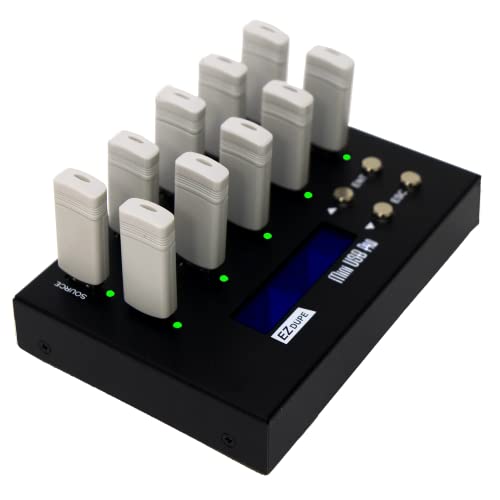
- Copies to nine USB devices at once
- Quick-copy and sector-by-sector modes
- Includes two erase functions
Best For: Batch USB copying for offices and small production environments
High-Speed Seven-Target Pick
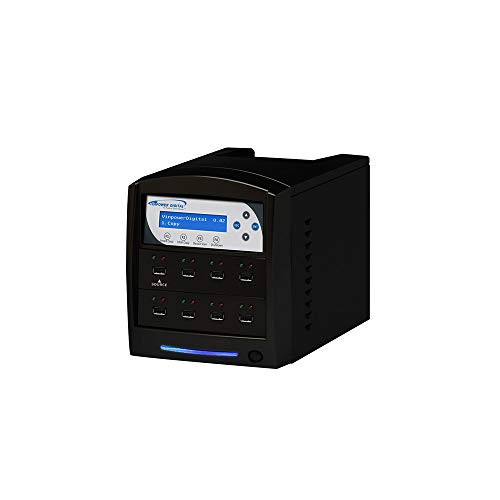
- Copies to seven USB targets
- Supports USB 1.0, 2.0, and 3.0
- Adds secure erase and source prescan
Best For: USB-only duplication workflows requiring media checks
Most Versatile Sanitizer
StarTech.com 1:1 Drive Duplicator

- Handles USB and SATA HDDs or SSDs
- Offers four copy and five erase modes
- Includes Copy & Compare verification
Best For: IT and refurbishment work across USB and SATA drives
Compact USB Specialist – StarTech 1:2 USB Duplicator
For technicians comparing USB duplicators under 1000, the StarTech USBDUP12 is a compact standalone option for copying and erasing two USB drives at a time. It supports system-and-file copying, sector-by-sector cloning, several erase modes, and LCD-guided operation without a computer.
Best For: IT professionals who need a small duplicator for USB boot media, drive sanitation, and occasional team distribution.
Pros:
- Duplicates or erases USB 3.0 and USB 2.0 flash media without a computer.
- Offers file-level, sector-by-sector, quick-erase, single-pass, and three-pass overwrite modes.
- LCD, activity/error LEDs, bad-sector scanning, and Copy & Compare verification aid monitoring.
- Asynchronous copying can keep the workflow moving for source content under 64 MB.
Cons:
- Its two-target capacity is smaller than higher-output duplicators.
- The asynchronous mode is limited to source content under 64 MB.
- External USB devices may require their own power source.
The StarTech stands out when a compact footprint and erase controls matter more than volume. Its 1.5 GB/min rate and verification features make it a practical choice for routine technical work.
Drive Docking Value – SABRENT Dual-Bay HDD/SSD Cloner
Among USB duplicators under 1000, the SABRENT EC-HD2B is a dual-bay SATA drive dock that also performs offline cloning. It accepts standard 2.5-inch and 3.5-inch hard drives or SSDs, supports drives up to 10TB, and connects over USB 3.0 when used as a computer accessory.
Best For: Users who need one device for offline SATA drive cloning, drive reading, and general desktop storage access.
Pros:
- Supports two standard 2.5-inch or 3.5-inch SATA drives.
- Performs offline cloning without drivers or a computer.
- Supports hard drives up to 10TB and SATA I, II, and III devices.
- USB 3.0 connectivity offers transfer speeds up to 5Gbps with UASP support.
Cons:
- It is designed for SATA hard drives and SSDs rather than USB flash-drive duplication.
- Offline cloning is listed at up to 60Mbps, below its USB 3.0 interface rate.
- It has two drive bays, so it is not intended for high-volume multi-target copying.
The SABRENT is a versatile pick if your duplication tasks center on SATA storage rather than thumb drives. Its dock functionality adds everyday usefulness beyond offline cloning.
Seven-Target Workhorse – Systor 1:7 USB Duplicator
The Systor SYS-USBD-7 is a strong contender among USB duplicators under 1000 for users who need seven target ports in a standalone desktop unit. It performs bit-by-bit copies at up to 2GB per minute and supports both synchronous and asynchronous workflows.
Best For: Small businesses, technicians, and media teams that regularly create multiple identical USB flash drives.
Pros:
- Copies one source to up to seven USB targets without a computer or software.
- Uses bit-by-bit duplication for detailed source replication.
- Supports USB 1.1, 2.0, and 3.0 flash drives.
- Copy speed remains the same even when the number of loaded drives increases, according to the supplied specifications.
Cons:
- At 10 pounds, it is less portable than compact two-target units.
- Its listed transfer rate is up to 33MB/s, so it is not positioned as a high-speed USB 3.x copier.
- USB Type-C drives require an adapter.
Choose the Systor when seven simultaneous targets provide a meaningful productivity gain. Its standalone design, asynchronous support, and service coverage make it suitable for recurring duplication work.
High-Volume Flash Copier – Vinpower 15-Target USB Duplicator
For buyers evaluating USB duplicators under 1000, the Vinpower USBDBL is built for high-volume flash-media copying with 15 target slots. It operates without a PC, supports asynchronous duplication, offers Smart Copy and Raw Mode, and includes secure erasing for USB drives.
Best For: Production environments that need to duplicate many flash drives independently and handle varied removable-media formats with optional adapters.
Pros:
- Provides 15 target slots for larger duplication batches.
- Patented asynchronous duplication lets finished drives be replaced independently.
- Smart Copy handles accessible content while Raw Mode performs bit-by-bit duplication.
- Secure erase is designed to prevent recovery of erased USB-drive content.
Cons:
- Its 11-pound form factor is less convenient for mobile use.
- SD, microSD, CompactFlash, and other flash formats require a corresponding Interface Adaptor Module add-on.
- The supplied specifications list a one-year warranty.
The Vinpower is the most capacity-focused option in this group. Its 15-target layout and independent asynchronous operation are especially useful when minimizing interruptions is more important than keeping the unit compact.
Flexible SATA Cloning – WAVLINK Dual-Bay HDD Dock
If you need usb duplicators under 1000 for occasional hard-drive cloning, the WAVLINK dual-bay dock offers a practical two-drive setup. It supports 2.5- and 3.5-inch SATA HDDs and SSDs, with offline cloning that works without additional software.
Best For: Home users and technicians cloning or accessing two SATA drives at a time.
Pros:
- Supports 2.5-inch and 3.5-inch SATA HDDs and SSDs.
- Offline cloning works from a source disk to a target disk without a computer.
- USB 3.0 and UASP support provide faster transfers than standard USB 3.0 alone.
- Tool-free installation, hot-swapping, and Windows, macOS, and Linux compatibility make setup straightforward.
Cons:
- Offline cloning requires the target disk to have equal or greater capacity than the source.
- It does not support online cloning.
- Not compatible with M1- or M2-based Macs.
This dock is more versatile than a dedicated flash-drive duplicator because it handles internal SATA storage as well as drive access. Its two-bay limit and platform restriction are worth considering before purchase.
High-Volume USB Copying – Vinpower 1-to-7 Duplicator
For usb duplicators under 1000 that can handle larger batches, the Vinpower 1-to-7 standalone unit copies one USB drive to up to seven targets without a PC. Its portable power options and error-handling features suit both office and field work.
Best For: IT teams, event organizers, schools, and businesses distributing USB content in larger batches.
Pros:
- Duplicates USB drives to up to seven targets without a computer or software.
- Smart Copy, Raw Copy, and Read Error Skip provide flexible copying options.
- Built-in DoD 5220.22-M erasing supports secure USB media reuse.
- Can run from a wall outlet or compatible USB-C PD power bank.
Cons:
- USB 3.0 connectivity is required for the supported interface.
- Daisy-chain cables are not included.
- Its 1-to-7 capacity may be more than needed for occasional, small-batch copying.
The Vinpower stands out when throughput and portability matter. Raw copying and Read Error Skip add useful flexibility, while daisy-chaining compatible units can expand capacity for larger deployments.
Compact Two-Target Copying – BestDuplicator UB300
The BestDuplicator UB300 is a compact choice among usb duplicators under 1000 when two target drives are enough. It operates independently of a computer and offers both quick data copying and bit-for-bit whole-media duplication.
Best For: Technicians, schools, and small offices that need portable two-drive USB duplication.
Pros:
- Copies one USB flash drive to two targets simultaneously.
- Supports Quick Copy and Whole Media Copy modes.
- Includes capacity checks, device information, speed tests, and erase functions.
- LCD controls, status LEDs, and a portable design simplify field use.
Cons:
- Designed for USB 1.1 and USB 2.0 media rather than USB 3.0 duplication.
- Its two-target capacity is limited for larger production runs.
- Additional memory-card duplication requires a compatible USB card reader sold separately.
This model is best suited to straightforward, small-batch flash-drive work. Its testing and erase tools add value for deployment workflows, but users handling newer high-speed media or larger batches may prefer a USB 3.0 model with more target ports.
Best Multi-Port Value – EZ Dupe 1-to-9 USB Duplicator
If you need a practical USB duplicator under 1000 for producing several copies at once, the EZ Dupe MiniUSB Pro offers nine target ports in a compact standalone design. It supports USB 1.0, 2.0, and 3.0 media, with both quick-copy and sector-by-sector duplication modes.
Best For: Offices, educators, and small production environments that need simultaneous USB copying and basic data erasure.
Pros:
- Copies to up to nine USB devices simultaneously.
- Supports quick copying and whole-media, sector-by-sector duplication.
- Includes two erase functions and supports external USB-powered hard drives up to 2TB.
- Standalone operation requires no computer.
Cons:
- Copy speed is listed at about 2GB per minute.
- External hard drives must have their own power source.
- Designed for USB media rather than SATA drives.
Choose this model when port count and straightforward operation matter more than the highest advertised throughput. Its nine-target layout provides a useful balance for routine batch duplication.
High-Speed Seven-Target Pick – Vinpower Digital USBShark
Vinpower Digital USBShark Standalone USB Flash Drive Duplicator - 7 Targets (High Speed)
Check Price On AmazonFor buyers comparing USB duplicators under 1000, the Vinpower Digital USBShark provides seven target ports and standalone operation. Its smart-copy mode is intended to copy accessible content quickly, while bit-by-bit duplication supports complete data-format coverage.
Best For: Users who need a dedicated seven-target USB duplicator with secure erasure and source-drive checking.
Pros:
- Duplicates to seven target USB devices.
- Supports USB 3.0, 2.0, and 1.0 devices.
- Offers smart copy and bit-by-bit duplication options.
- Includes secure erase and a prescan feature for physical reading errors.
Cons:
- The supplied notes do not specify a warranty.
- Its listed weight is 10 pounds, making it less portable than compact alternatives.
- There is no stated support for SATA drives.
The USBShark is a focused choice for USB-only workflows. Its seven targets, prescan capability, and secure erase features make it suitable when verification and media handling are important.
Most Versatile Sanitizer – StarTech.com 1:1 Drive Duplicator
If your USB duplicators under 1000 shortlist includes hard-drive tools, the StarTech.com SU2DUPERA11 stands out for cross-interface copying and erasure. This standalone unit works with USB flash drives and 2.5- or 3.5-inch SATA HDDs or SSDs, with an LCD menu for selecting modes.
Best For: IT departments and refurbishers that need one-to-one USB and SATA duplication, drive wiping, and verification.
Pros:
- Supports USB flash drives plus 2.5- and 3.5-inch SATA HDDs and SSDs.
- Provides four duplication modes and five erase modes.
- Offers Copy & Compare to verify completed clones.
- Includes a two-year warranty and toolless drive handling.
Cons:
- Only supports one target drive at a time.
- Some interfaces, including IDE, mSATA, and M.2 SATA, require separately sold adapters.
- USB copying is listed at up to 2.4GB per minute, slower than the SATA rate.
This is the strongest fit when flexibility and secure sanitization matter more than multi-target production. Its broad drive support and erase choices make it a capable general-purpose service tool.
How We Picked the Best USB Duplicators Under 1000
We focused on practical capabilities that affect real-world copying and erasing: simultaneous target count, advertised transfer speed, USB and SATA compatibility, standalone operation, source-to-target workflow, and support for verification or sanitization. We also considered whether each device suits occasional office use, recurring IT deployment, media production, or larger batch jobs.
The selection includes dedicated flash-drive duplicators, USB hard-drive cloners, and dual-bay docking stations. Because advertised speeds depend on the source, targets, file sizes, and interface, treat throughput claims as a performance ceiling rather than a guarantee.
Quick Comparison
- Small batches: One-to-two-target duplicators are compact and easier to operate.
- Higher-volume work: Seven-, nine-, or 15-target systems can reduce hands-on time when many drives must be prepared.
- Hard-drive cloning: Dual-bay docks and hybrid duplicators are better suited to SATA HDDs and SSDs.
- Data removal: Choose a model with dedicated erase or sanitization functions if drives will be reused or resold.
- Interface flexibility: USB 3.x and USB-C support can improve compatibility and reduce bottlenecks with newer computers and storage devices.
Key Buying Factors for USB Duplicators Under 1000
Target Count and Workflow
Target count is the clearest capacity decision. A 1:2 unit works well for occasional duplication, while a 1:7, 1:9, or 1:15 system is more efficient for repeated deployments. More ports generally mean a larger footprint and potentially higher power requirements.
Media Compatibility
Confirm whether the duplicator supports USB flash drives only or also SATA hard drives and SSDs. A flash-focused unit may be simpler, whereas a hybrid device offers broader utility for technicians managing multiple storage formats.
Speed and Verification
USB 3.0 or newer interfaces can shorten transfers, but the slowest drive in the chain often controls actual performance. Verification features are valuable when bootable media, operating-system images, or business-critical files must be copied reliably.
Erasing and Security
If drives contain confidential data, look for dedicated erase or sanitizer modes and review the supported overwrite process. A duplicator should fit your organization’s data-destruction policy rather than being selected on speed alone.
Who Should Buy Which USB Duplicators Under 1000?
Choose a compact 1:2 duplicator for occasional backups, small office deployments, or low-volume flash-drive preparation. Choose a multi-target model when you regularly create several identical USB drives and want to reduce operator time. Choose a dual-bay dock if your work centers on cloning or accessing 2.5-inch and 3.5-inch SATA drives. Choose a hybrid USB/SATA duplicator when one tool must handle both flash media and internal drives. Finally, prioritize sanitization controls if the main goal is secure reuse, disposal, or redeployment of storage devices.