
USB duplicators can help small businesses create multiple drive copies, prepare training media, distribute promotional content, or securely erase reusable flash storage without relying on a separate computer for every batch.
This roundup compares 10 standalone and PC-based options by copy capacity, speed, supported workflows, portability, and business-friendly features so you can choose a system that fits your workload and budget.
Best 10 USB Duplicators for Small Businesses Picks for 2026
Best Compact Pick
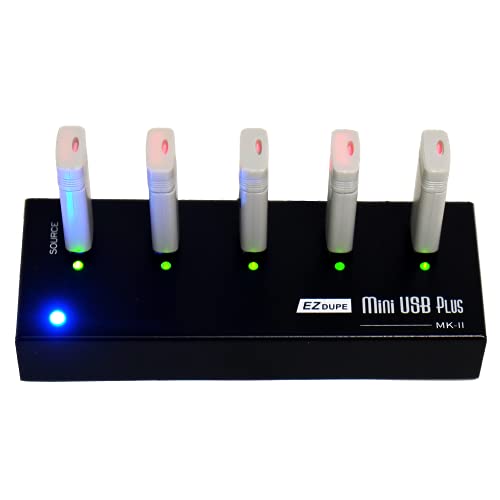
- Copies to four USB drives simultaneously
- Standalone, computer-free operation
- Up to 2.5GB/min copy speed
Best For: Portable, low-volume business duplication
Best High-Volume Standalone

- Supports up to 15 target drives
- Synchronous and asynchronous copy modes
- Lifetime technical support
Best For: Larger batch duplication without a computer
Best for IT Workflows

- Duplicates and erases up to 15 drives
- Includes sector-by-sector copy mode
- LCD monitoring and copy verification
Best For: IT teams managing cloning and drive sanitation
Best PC-Based Capacity

- Copies to 16 target USB drives
- Uses USB 3.0 technology
- Includes Drive Manager software
Best For: Fixed PC-based duplication workstations
Best High-Capacity Pick
EZ DUPE USB Cyclone 1-to-15 Duplicator

- Duplicates up to 15 USB devices at once
- Supports multiple copy and erase modes
- Works with flash drives, HDDs, and SSDs
Best For: Higher-volume duplication and secure drive erasure
Best Compact Starter
BestDuplicator UB300 1-to-2 USB Duplicator

- Copies one USB drive to two targets
- Includes copy, erase, and media-test tools
- Compact standalone LCD operation
Best For: Light-duty office and field duplication
Best Portable Pro
Vinpower 1-to-7 USB Duplicator and Eraser

- Copies to seven USB targets without a PC
- Supports Smart, Raw, and error-skip copying
- Can use compatible USB-C PD power banks
Best For: Mobile deployment, events, and field-service duplication
Best All-Around Capacity

- Duplicates up to five USB drives standalone
- Includes cloning, erasing, and verification modes
- Supports USB 3.0, 2.0, and 1.1 media
Best For: Small IT teams handling varied USB duplication and sanitizing tasks
Best Compact 1:3 Option
Vinpower Standalone USB Duplicator
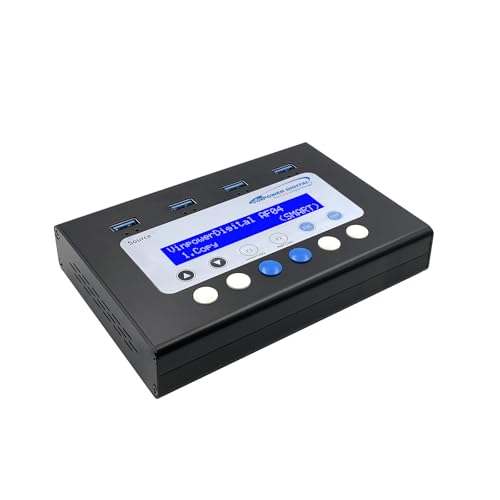
- Copies up to three USB drives without a PC
- Offers Smart Copy and bit-by-bit Raw Copy
- Adds DoD erasure and Read Error Skip
Best For: Small offices needing compact duplication and drive-reuse features
Best for Larger Batches

- Duplicates up to seven USB drives standalone
- Includes sector copying, erasure, and Copy & Compare
- Provides 128 MB asynchronous-copy memory
Best For: IT teams distributing USB media in larger batches
Best Compact Pick – EZ Dupe Mini USB Plus MK II
For small businesses that need usb duplicators for small businesses without adding a computer to the workflow, the EZ Dupe Mini USB Plus MK II is a compact, standalone option. It copies to up to four USB drives simultaneously, supports USB 1.0, 2.0, and 3.0 media, and offers asynchronous copying for ongoing batches.
Best For: Small offices, trainers, and teams that need portable four-drive duplication.
Pros:
- Standalone operation requires no computer.
- Copies to up to four USB drives at once.
- Updated version supports drives above 2TB and offers up to 2.5GB/min copy speed.
Cons:
- Four-target capacity is lower than larger desktop duplicators.
- External USB storage devices may require their own power source.
Its small 6-by-2.3-by-0.8-inch design and support for power banks make it convenient for mobile or space-constrained setups. It is a practical fit when portability matters more than maximum output volume.
Best High-Volume Standalone – Systor 1-to-15 USB Duplicator
The Systor 1-to-15 is designed for small businesses that regularly need usb duplicators for small businesses with higher batch requirements. Its standalone design supports up to 15 target drives, while synchronous and asynchronous modes provide flexibility for different production workflows.
Best For: Teams producing larger batches of identical USB drives without a computer.
Pros:
- Supports up to 15 USB targets.
- Performs bit-by-bit duplication from the source drive.
- Copy speed remains up to 2GB/min even as the number of loaded drives increases.
- Includes one-year parts, three-year labor, and lifetime technical support.
Cons:
- USB Type-C drives require an adapter.
- Its 33MB/s transfer rate is below the stated speed of some newer models.
With both synchronous and asynchronous copying plus hot-swappable operation, this model suits repeatable production work. Choose it when capacity and support coverage are more important than compact size.
Best for IT Workflows – StarTech 1:15 USB Duplicator
The StarTech 1:15 combines USB duplication with drive erasing, making it a versatile choice for small businesses seeking usb duplicators for small businesses and IT operations. It supports system and file copying, sector-by-sector cloning, multiple erase methods, and LCD-based monitoring.
Best For: IT technicians and teams that need to clone, verify, or sanitize multiple USB drives.
Pros:
- Duplicates or erases up to 15 USB drives without a computer.
- Supports file-system copying and sector-by-sector copying.
- Offers quick erase, single-pass, and three-pass overwrite modes.
- Copy-and-compare verification, LCD controls, and error indicators aid monitoring.
Cons:
- System and file copy speed is listed at 1.5GB/min.
- Asynchronous copying is limited to source content under 128MB.
- At 3.9 pounds, it is less portable than compact duplicators.
This is the strongest choice when drive sanitation and verification are as important as duplication. Its upgradeable firmware and broad copy-format support also make it suitable for more technical environments.
Best PC-Based Capacity – Nexcopy SuperSpeed 16-Target
The Nexcopy SSUSB160PC is a PC-based option for small businesses that need usb duplicators for small businesses with a 16-target workflow. It uses USB 3.0 technology, works with the included Nexcopy Drive Manager software, and is designed to copy at the maximum transfer speeds of the connected flash drives.
Best For: Businesses comfortable using a computer for high-capacity USB 3.0 duplication.
Pros:
- Supports 16 target USB drives.
- Uses USB 3.0 technology for high-speed copying.
- Includes Nexcopy Drive Manager software.
Cons:
- Requires a PC, unlike standalone alternatives.
- The supplied notes do not specify a copy-speed figure.
- Its 12-pound weight makes it less convenient to move.
This model is best suited to a fixed workstation where software control and target capacity matter. It can be a strong production choice for teams that already have a compatible PC and want to leverage USB 3.0 performance.
Best High-Capacity Pick – EZ DUPE USB Cyclone 1-to-15 Duplicator
For small businesses that need to produce many copies at once, this USB duplicator supports up to 15 target devices and works with USB 1.0 through USB 3.1 flash drives and external HDDs or SSDs. Its standalone operation, multiple copy modes, and drive-erasing options make it a flexible choice for routine deployment and media management.
Best For: Small businesses handling higher-volume USB duplication, drive cloning, or secure erasure without a computer.
Pros:
- Copies to up to 15 USB devices simultaneously with independent bandwidth per channel.
- Supports full, essential-file, partitioned, and percentage copy modes.
- Includes quick, full, DoD 3-pass, and DoD 7-pass erase modes.
- Works with USB flash drives and external HDDs or SSDs, with support beyond 2TB.
Cons:
- Its 7-pound weight makes it less portable than compact duplicators.
- Maximum listed transfer speed is 45 MB/s, depending on the connected USB media.
This is the most capable option here for businesses that need many copies per batch and broader storage-device support. Choose it when capacity and erasure flexibility matter more than portability.
Best Compact Starter – BestDuplicator UB300 1-to-2 USB Duplicator
The BestDuplicator UB300 is a straightforward option for small businesses that only need two copies per batch. This standalone USB duplicator offers quick or bit-for-bit copying, basic media tests, and an LCD interface without requiring Windows, Mac, or other computer software.
Best For: Small offices, technicians, schools, and field users making one or two USB copies at a time.
Pros:
- Duplicates one source USB drive to two target drives simultaneously.
- Offers Quick Copy and Whole Media Copy modes for different duplication needs.
- Includes capacity checks, device information, speed tests, and erase functions.
- Compact, lightweight design weighs about 6.72 ounces.
Cons:
- Limited to two target drives per batch.
- Designed for USB 1.1 and USB 2.0 media rather than newer USB 3.x devices.
- Other card formats require a compatible USB card reader sold separately.
For occasional duplication and basic flash-drive quality checks, the UB300 keeps the workflow simple and portable. Its two-target limit makes it better suited to light-duty office use than larger deployment runs.
Best Portable Pro – Vinpower 1-to-7 USB Duplicator and Eraser
Businesses that distribute bootable drives, firmware, training materials, or event content may appreciate this 1-to-7 standalone USB duplicator. It supports Smart Copy, Raw Copy, and Read Error Skip, while USB-C PD power-bank compatibility adds flexibility for on-site work where an outlet is unavailable.
Best For: IT teams, event organizers, field-service staff, and businesses distributing USB content away from a desk.
Pros:
- Copies one source drive to up to seven targets without a PC or software.
- Offers Smart Copy, bit-for-bit Raw Copy, and Read Error Skip options.
- Can run from a wall outlet or compatible USB-C PD power bank.
- Supports daisy-chaining compatible units for larger duplication batches.
Cons:
- Daisy-chain cable is not included.
- Its 1-to-7 capacity is lower than the 1-to-15 EZ DUPE option.
- Read Error Skip can bypass bad sectors, but does not repair damaged media.
This model balances useful batch capacity with unusually practical portability. It is a strong fit for mobile deployment and distribution workflows, especially when recovery-aware copying and secure erasure are valuable.
Best All-Around Capacity – StarTech 1:5 USB Duplicator
For small businesses that need practical usb duplicators for small businesses, the StarTech USBDUP15 provides five target ports, standalone operation, and both duplication and erasure modes. It supports USB 3.0, 2.0, and 1.1 flash media, with system-and-file or sector-by-sector copying.
Best For: IT technicians and small teams creating several bootable, deployment, or shared-data USB drives at once.
Pros:
- Copies to up to five USB drives without a computer.
- Offers system/file copy, whole-drive cloning, quick erase, and one- or three-pass overwriting.
- Copy-and-Compare verification, error scanning, and an LCD menu support more controlled workflows.
- Asynchronous copying lets you replace completed drives without interrupting copies when source content is under 64 MB.
Cons:
- The asynchronous mode is limited to source content under 64 MB.
- External USB devices may need their own power source.
- Its five-target capacity may be slower for larger batch jobs than a higher-port model.
The USBDUP15 is a flexible choice when a small business wants one device for routine duplication, verification, and secure drive reuse. Its standalone design keeps the workflow simple, while the supported file systems and sector-by-sector mode cover a range of media tasks.
Best Compact 1:3 Option – Vinpower Standalone USB Duplicator
The Vinpower USBMiniDup is a compact standalone option for businesses that need usb duplicators for small businesses without connecting a PC. Its Smart Copy and Raw Copy modes cover file-based and bit-by-bit duplication, while DoD 5220.22-M erasure and Read Error Skip add useful data-management features.
Best For: Small offices, educators, healthcare teams, and other organizations duplicating or securely retiring a few USB drives at a time.
Pros:
- Duplicates up to three USB drives without a computer.
- Smart Copy handles accessible files, while Raw Copy supports complete bit-by-bit cloning.
- DoD 5220.22-M erasure helps prepare drives for reuse, recycling, or disposal.
- Read Error Skip can bypass damaged sectors to recover more readable data from aging media.
Cons:
- Its three-port design has lower batch capacity than the StarTech alternatives here.
- The supplied notes do not specify a copying speed.
- Raw copying can be less selective than Smart Copy when only certain files are needed.
Choose the Vinpower when compact size and flexible handling matter more than maximum port count. The combination of standalone duplication, secure erasure, and error skipping makes it particularly useful for mixed day-to-day USB workflows.
Best for Larger Batches – StarTech 1:7 USB Duplicator
When a small business regularly prepares several drives at once, the StarTech USBDUPE17 is a strong usb duplicators for small businesses candidate with seven target ports. It works standalone, supports USB 3.0 and 2.0 media, and combines cloning, comparison, error scanning, and drive-erasure functions.
Best For: IT departments and technicians distributing bootable drives, software, firmware, or standardized data to larger groups.
Pros:
- Handles up to seven target USB drives in one batch.
- Supports system/file copying and sector-by-sector duplication for different file formats.
- Provides quick erase plus single-pass and three-pass overwriting aligned with DoD/NIST SP 800-88 Rev. 1 Clear guidance.
- Its 128 MB asynchronous-copy memory allows finished drives to be replaced without stopping when source content is under 128 MB.
Cons:
- At 2.3 pounds, it is less lightweight than the compact Vinpower model.
- Asynchronous copying is limited to source content under 128 MB.
- External USB storage may require separate power.
The USBDUPE17 makes the most sense when batch throughput is a priority. Its seven-port layout reduces repeated copy cycles, while the erase, verification, and diagnostic options give IT staff more control over deployment and media retirement.
How We Picked the Best USB Duplicators for Small Businesses
We focused on practical factors that affect day-to-day production: the number of target ports, stated transfer speed, standalone versus computer-based operation, USB version, display and controls, portability, and support for drive erasing or verification. The list includes compact 1-to-2 and 1-to-4 units for occasional jobs, as well as higher-capacity 1-to-15 and 16-target systems for frequent batches.
Product names and specifications can vary by revision, so confirm current manufacturer details before purchase. Real-world throughput may also depend on the source drive, target media, file sizes, and whether the duplicator verifies data after copying.
Quick Comparison
| Best For | Recommended Capacity | What to Prioritize |
|---|---|---|
| Occasional office or field use | 1:2 to 1:4 | Compact design, simple controls, portability |
| Routine small-batch production | 1:5 to 1:7 | Speed, verification, clear status display |
| High-volume duplication | 1:15 or 16 targets | Parallel processing, sustained throughput, cooling |
| Media reuse and compliance workflows | Any suitable capacity | Secure erase modes, verification, logging |
Key Buying Factors for USB Duplicators for Small Businesses
Target Count and Workflow Size
Choose capacity based on your normal batch, not an occasional peak. A two- or four-target model uses less space and may cost less, while a 1-to-15 system can reduce labor when you regularly prepare many identical drives.
Speed and USB Compatibility
Check the advertised gigabytes-per-minute rate and USB generation, but treat both as maximums. USB 3.0 models are generally better suited to faster media, whereas USB 2.0 units may be adequate for modest files and lower-volume work.
Standalone Operation
Standalone duplicators work without a host computer, which can simplify production and free staff workstations. PC-based systems may offer more control, reporting, and integration with existing processes, but they require a compatible computer and software setup.
Copy Integrity and Erasing
Look for data comparison or verification features when accuracy matters. If drives will be reused, consider models with multiple erase modes and confirm that those modes meet your organization’s security requirements.
Physical Design and Support
For mobile teams, prioritize compact construction and straightforward controls. For permanent production areas, consider cooling, power requirements, warranty coverage, replacement parts, and manufacturer support.
Who Should Buy Which USB Duplicators for Small Businesses?
Choose a compact 1-to-4 duplicator if you create occasional client, classroom, event, or field-media batches. A 1-to-5 or 1-to-7 unit is a balanced choice for offices and small production teams that duplicate drives every week. Businesses preparing large orders should move to a 1-to-15 or 16-target system to reduce hands-on time. Choose a PC-based model when centralized control, software workflows, or reporting matters more than portability. Finally, prioritize a unit with robust erase and verification functions if you routinely recycle customer, employee, or promotional USB drives.