
Schools often need to prepare identical USB drives for software distribution, classroom resources, testing environments, presentations, or IT deployments. The right duplicator can reduce repetitive copying while helping staff produce consistent, usable media.
This roundup compares 10 standalone USB duplicators across different target counts, speeds, erasing features, and control interfaces. Use the buying guide below to match capacity and workflow to your school’s needs.
Best 10 USB Duplicators for Schools Picks for 2026
Best Portable Pick
EZ Dupe Mini USB Plus MK II 1-to-4 Duplicator
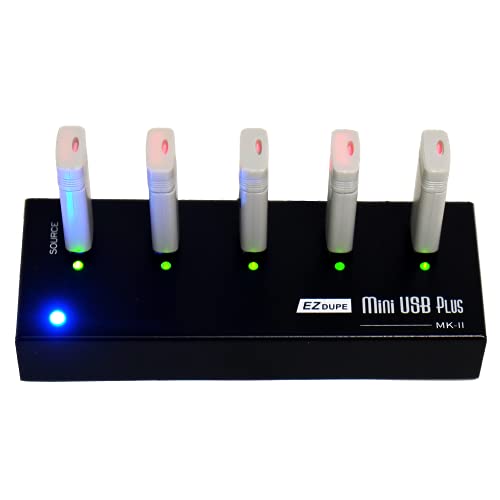
- Copies to four USB drives simultaneously
- Standalone and portable design
- Up to 2.5GB-per-minute copy speed
Best For: Portable classroom and small-batch USB duplication
Best High-Volume Pick
Systor 1-to-15 USB Duplicator and Sanitizer

- Handles up to 15 drives at once
- Bit-by-bit standalone duplication
- Up to 2GB-per-minute transfer rate
Best For: School IT departments preparing large USB batches
Best Verification and Sanitizing Pick
StarTech 1-to-7 USB Duplicator and Eraser

- Duplicates and erases up to seven drives
- Includes copy-and-compare verification
- Supports multi-pass overwrite modes
Best For: IT teams managing, verifying, and sanitizing USB media
Best Mid-Size Desktop Pick
Systor 1-to-7 USB Duplicator and Sanitizer

- Copies to seven drives simultaneously
- Standalone bit-by-bit duplication
- Supports synchronous and asynchronous modes
Best For: School offices with moderate recurring duplication tasks
Best High-Capacity Pick

- 15 target ports with no computer required
- Copy, compare, erase, and overwrite modes
- LCD monitoring and error scanning
Best For: School IT teams managing boot drives and USB sanitization
Best Format Flexibility

- Supports USB 1.0 through 3.1 media
- Four copy modes and four erase modes
- Handles flash drives and external HDDs
Best For: Schools working with mixed USB and external-drive formats
Best Compact Batch Option
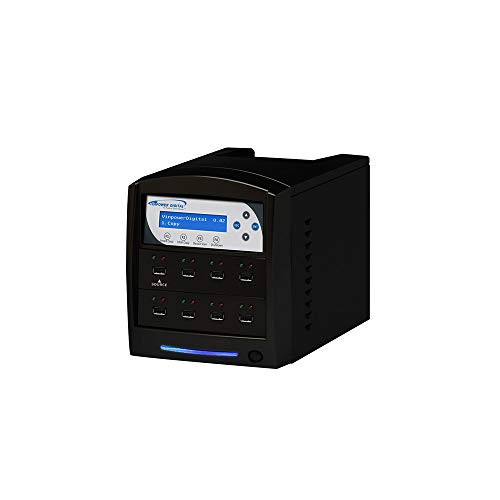
- Seven USB target ports
- Standalone Smart Copy and bit-by-bit modes
- Source prescan and secure erase
Best For: School technicians handling smaller verified copy batches
Best Touchscreen Choice
EZ Dupe SOHO Touch 1-to-10 USB Duplicator
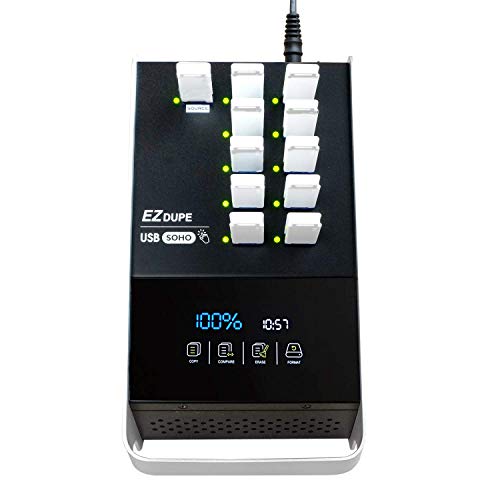
- Touchscreen controls for copy, compare, format, and erase
- Supports USB 2.0, 3.0, and 3.1 flash media
- Up to 10 target drives and 35MB/s duplication
Best For: Schools wanting simple, standalone USB management
Best for Bulk Deployment
Vinpower USBDBL 15-Target USB Duplicator

- 15 target slots for larger duplication batches
- Standalone operation needs no PC
- Asynchronous copying plus Smart Copy and Raw Mode
Best For: School IT teams preparing many drives at once
Best for IT Versatility
StarTech 1-to-5 USB Duplicator and Eraser

- Copies and erases up to five USB drives
- Sector, file, and system copy modes
- LCD monitoring with Copy-and-Compare verification
Best For: School technicians managing deployment and drive sanitization
Best Portable Pick – EZ Dupe Mini USB Plus MK II 1-to-4 Duplicator
For schools needing usb duplicators for schools in different classrooms or storage areas, the EZ Dupe Mini USB Plus MK II is a compact, standalone option. It copies to up to four USB drives at once, supports USB 1.0, 2.0, and 3.0 media, and can run from a power bank or USB power source.
Best For: Schools that need a portable duplicator for small-to-medium batches of flash drives.
Pros:
- Standalone operation requires no computer.
- Copies up to four USB drives simultaneously.
- Updated copy speed reaches up to 2.5GB per minute.
- Supports asynchronous copying, allowing finished drives to be replaced while other copies continue.
Cons:
- External USB devices may need their own power source.
- Its four-drive capacity is smaller than larger desktop models.
Its compact design and flexible power options make this a practical choice for teachers or IT staff who need to move between rooms. The four-port limit is best suited to modest distribution runs rather than large-scale school-wide production.
Best High-Volume Pick – Systor 1-to-15 USB Duplicator and Sanitizer
The Systor 1-to-15 is built for schools that regularly prepare many USB drives at once. This standalone duplicator performs bit-by-bit copies, supports synchronous and asynchronous modes, and can copy at speeds up to 2GB per minute.
Best For: School IT departments distributing the same content to large batches of USB drives.
Pros:
- Supports up to 15 USB drives in one duplication cycle.
- No computer or software is required.
- Bit-by-bit copying helps reproduce source-drive contents.
- Copy speed remains the same when the number of loaded drives increases, according to the supplied specifications.
Cons:
- USB Type-C drives require an adapter.
- Its larger 15-drive format is less convenient for occasional or mobile use.
With the largest target capacity in this group, the Systor is a strong fit when minimizing repeated copy cycles matters. Its warranty includes one year of parts, three years of labor, and lifetime technical support.
Best Verification and Sanitizing Pick – StarTech 1-to-7 USB Duplicator and Eraser
For usb duplicators for schools that also need drive cleanup and verification, the StarTech 1:7 model combines duplication, erasing, and diagnostic features. It works without a computer and offers LCD monitoring, copy-and-compare verification, and multiple erase modes.
Best For: School IT professionals who need to clone, verify, erase, and reuse USB drives.
Pros:
- Duplicates or erases up to seven USB drives.
- Supports system/file copying and sector-by-sector copying.
- Offers quick erase and single- or three-pass overwrite modes.
- LCD, LEDs, and copy-and-compare tools help monitor results.
Cons:
- Asynchronous copying is limited to source content under 128MB.
- Its listed copy speed is 1.5GB per minute, slower than the Systor models.
- External USB storage may require its own power source.
This model is more than a basic copier, making it useful when schools must prepare boot drives, verify duplicates, or sanitize old media. Its seven-drive capacity balances batch handling with a feature set aimed at technical users.
Best Mid-Size Desktop Pick – Systor 1-to-7 USB Duplicator and Sanitizer
The Systor 1-to-7 gives schools a desktop-sized solution for routine USB distribution without stepping up to a 15-drive system. It is standalone, supports bit-by-bit copying, and offers synchronous and asynchronous copy modes at up to 2GB per minute.
Best For: Schools with recurring but moderate USB duplication needs.
Pros:
- Copies to up to seven USB drives simultaneously.
- Operates without a computer or software.
- Supports USB 1.1, 2.0, and 3.0 flash drives.
- Includes hot-swappable functionality and optional support for 2.5-inch external hard drives.
Cons:
- USB Type-C drives need an adapter.
- The desktop unit weighs 10 pounds, so it is not designed for frequent transport.
This is a sensible middle ground for a school technology office: more capacity than a portable four-port unit, but fewer ports and less bulk than the 15-drive Systor. Its included warranty provides three years of labor, one year of parts, and lifetime technical support.
Best High-Capacity Pick – StarTech 1:15 USB Duplicator
For schools comparing usb duplicators for schools, the StarTech USBDUPE115 offers 15 target ports, standalone operation, and multiple copying and erasing modes. It supports USB 2.0 and 3.0 flash media and can verify completed clones with Copy & Compare.
Best For: School IT teams creating boot drives, distributing files, or sanitizing multiple USB devices.
Pros:
- Duplicates to up to 15 USB drives without a computer.
- Supports file, sector-by-sector, quick-erase, and overwrite modes.
- LCD status display, error scanning, and Copy & Compare verification.
- Asynchronous copying can keep a workflow moving for source content under 128 MB.
Cons:
- Its asynchronous mode is limited to source content under 128 MB.
- External USB devices may need their own power source.
- The listed write rate is approximately 1.5 GB per minute.
This is a versatile choice when a school needs both mass duplication and drive-erasing tools in one unit. Its LCD controls and verification features are useful for repeatable administrative workflows.
Best Format Flexibility – EZ DUPE USB Cyclone 1:15
The EZ DUPE USB Cyclone is a practical option for schools that need to copy different types of USB media and external drives. Its standalone design supports USB 1.0 through 3.1 devices, multiple copy modes, and four erase modes.
Best For: Schools handling mixed USB flash drives, external HDDs, and large-capacity storage.
Pros:
- Provides 15 target slots and operates without a computer or software.
- Supports USB 1.0, 2.0, 3.0, and 3.1 flash media and external HDDs.
- Offers essential-files, full, partitioned, and percentage copy modes.
- Includes quick, full, DoD 3-pass, and DoD 7-pass erase modes.
Cons:
- Its listed transfer rate is up to 45 MB per second per USB slot.
- The unit weighs 7 pounds, making it less convenient to relocate.
- The manufacturer warranty is listed as one year.
Choose this model when compatibility and erase options matter more than a compact footprint. Independent bandwidth design and slow-drive alerts can help maintain a consistent batch-copy process.
Best Compact Batch Option – Vinpower USBShark 7-Target
Vinpower Digital USBShark Standalone USB Flash Drive Duplicator - 7 Targets (High Speed)
Check Price On AmazonFor schools seeking usb duplicators for schools with a smaller target count, the Vinpower Digital USBShark provides seven USB copy bays and fully standalone operation. Smart Copy, bit-by-bit duplication, secure erase, and source prescanning cover common media-management tasks.
Best For: School technicians who need verified USB duplication in smaller batches.
Pros:
- Copies to seven target USB devices without requiring a PC.
- Supports USB 1.0, 2.0, and 3.0 devices.
- Offers Smart Copy, bit-by-bit duplication, and secure erase.
- Prescans the source for physical reading errors.
Cons:
- It has fewer target ports than the 15-port alternatives.
- The supplied notes do not list a manufacturer warranty.
- Its listed weight is 10 pounds.
The USBShark is a sensible fit when seven simultaneous copies are enough and source checking is a priority. Its broad USB compatibility and secure-erasure feature make it useful for routine school IT tasks.
Best Touchscreen Choice – EZ Dupe SOHO Touch 1-to-10 USB Duplicator
For schools seeking usb duplicators for schools, the EZ Dupe SOHO Touch offers a straightforward way to copy, compare, format, and erase USB flash media. Its touchscreen interface and support for USB 2.0, 3.0, and 3.1 drives make it practical for recurring administrative or classroom technology tasks.
Best For: Schools that value simple touchscreen operation and need a compact duplicator for daily USB workflows.
Pros:
- Touchscreen menu simplifies copying, comparing, formatting, and erasing.
- Supports all file formats, file sizes, and USB flash-drive capacities.
- Designed for daily use with lightweight, heavy-duty construction.
- Copies at up to 35MB per second according to the supplied specifications.
Cons:
- Provides up to 10 target ports, so it is less suited to very large duplication runs than higher-capacity units.
- Its touchscreen-focused interface may be more functionality than schools need for occasional copying.
The SOHO Touch is a balanced option when ease of use matters as much as duplication capability. It is especially appealing for school staff who want standalone controls without relying on a separate computer.
Best for Bulk Deployment – Vinpower USBDBL 15-Target USB Duplicator
The Vinpower USBDBL is built for schools that need to prepare many USB drives at once. Its 15 target slots, standalone operation, and asynchronous duplication allow staff to copy independently to multiple drives without using a PC.
Best For: District IT teams and school technology departments handling larger batches of USB drives.
Pros:
- Copies to 15 target flash drives simultaneously.
- Standalone design requires no computer to operate.
- Asynchronous duplication lets drives copy independently without sacrificing stated speed or quality.
- Offers Smart Copy, Raw Mode, and secure erase functions.
Cons:
- At 11 pounds, it is substantially less portable than smaller duplicators.
- Additional adapters are required to work with SD, microSD, CF, and other alternative flash formats.
- Its larger capacity may be unnecessary for schools with only occasional USB-copying needs.
With the highest target count in this group, the USBDBL is the strongest fit for repeat deployment projects. It also adds useful data-handling flexibility through Raw Mode and secure erasure.
Best for IT Versatility – StarTech 1-to-5 USB Duplicator and Eraser
The StarTech 1:5 USB Flash Drive Duplicator combines drive cloning with erase and verification tools, making it a versatile choice for school IT departments. It supports USB 3.0 and 2.0 media, operates without a computer, and includes an LCD menu for monitoring performance and drive conditions.
Best For: School technicians who need both USB deployment and controlled drive sanitization.
Pros:
- Duplicates or erases up to five USB drives without a computer.
- Supports system, file, and sector-by-sector copy modes.
- Includes quick erase, single-pass, and 3-pass overwrite options.
- Copy-and-Compare can verify cloned drives after duplication.
Cons:
- Its five-target capacity is lower than the other duplicators in this roundup.
- Asynchronous mode is limited to source content under 64MB.
- External USB devices may require their own power source.
The StarTech model is a practical all-rounder for schools that care about verification and secure retirement of USB media. Its lower port count is offset by broad copy modes, overwrite options, and a two-year warranty.
How We Picked These USB Duplicators for Schools
We selected models that support standalone operation, allowing staff to copy or erase USB media without relying on a computer for every batch. The lineup includes compact units for smaller offices and higher-capacity systems designed for labs, district IT departments, and frequent deployments.
We also considered target count, advertised transfer speed, USB compatibility, source-to-target copying, verification or sanitization features, display controls, and the practical demands of repeated school use. Because performance can vary by source files, drive quality, and USB generation, advertised speeds should be treated as benchmarks rather than guaranteed results.
Quick Comparison
| School Need | Best Fit | Why It Matters |
|---|---|---|
| Small batches or occasional use | 1-to-4 or 1-to-5 models | Lower footprint and simpler operation |
| Department-level deployment | 1-to-7 or 1-to-10 models | Balances throughput and workspace needs |
| Large IT or district batches | 1-to-15 models | Copies more drives per cycle |
| Secure media reuse | Models with sanitizer or eraser functions | Helps prepare drives for reassignment |
| Frequent staff operation | LCD or touchscreen controls | Improves visibility and reduces setup errors |
Key Buying Factors for USB Duplicators for Schools
Target Count and Workload
Choose the number of simultaneous target drives based on your typical batch size, not just the largest possible project. A smaller unit may be easier to store and sufficient for a teacher or building-level technician, while 10- or 15-target systems can save substantial time during district-wide rollouts.
Speed and Drive Compatibility
Check the advertised transfer rate and confirm that the duplicator supports the USB media your school already uses. Faster hardware does not eliminate bottlenecks caused by slow flash drives, large files, or many small files. Mixing drive capacities or performance levels can also affect results.
Copy, Verify, and Erase Functions
For operating-system installers, testing tools, or standardized classroom media, verification features can help identify failed copies. Sanitizing and erasing options are useful when drives are reassigned between students, departments, or school years, but confirm which erase methods the device provides.
Ease of Use and Maintenance
Standalone operation should be straightforward for authorized staff. Look for clear menus, readable displays, accessible ports, and durable construction. Establish a labeling, testing, and storage process so completed drives are not confused with blank or source media.
Who Should Buy Which USB Duplicators for Schools?
Teachers and small school offices that duplicate only a few drives at a time should favor compact 1-to-4 or 1-to-5 systems. Building IT teams with recurring software or instructional-media deployments will generally benefit from 1-to-7 or 1-to-10 models. District technology departments and repair centers should consider 1-to-15 units when batch volume justifies the larger footprint.
If your school regularly reuses loaner drives or handles sensitive data, prioritize a model with dedicated erase or sanitization functions. For multiple operators, LCD or touchscreen navigation can make the workflow easier to standardize. Regardless of model, keep a verified master drive, use matched target media when possible, and test a sample from every completed batch before distribution.