
Reliable USB duplication is about more than copying files quickly. For testing, fulfillment, archiving, and IT operations, the right duplicator should produce consistent results while making verification and drive sanitization straightforward.
This roundup compares 10 standalone USB duplicators across different target counts, transfer speeds, control interfaces, and workspace needs, helping you choose a practical match for your verification workflow.
Best 10 USB Duplicators for Data Verification Picks for 2026
Best for Verified Cloning

- Copy & Compare verifies cloned drives
- Supports file and sector-by-sector copying
- Includes erasing and bad-sector scanning
Best For: Technicians needing verified two-drive duplication
Best for Seven-Drive Batches

- Duplicates up to seven drives simultaneously
- Uses bit-by-bit copy mode
- Supports synchronous and asynchronous copying
Best For: Batch duplication for business and technical workflows
Best Portable Option
EZ Dupe 1:4 Mini USB Plus MK II
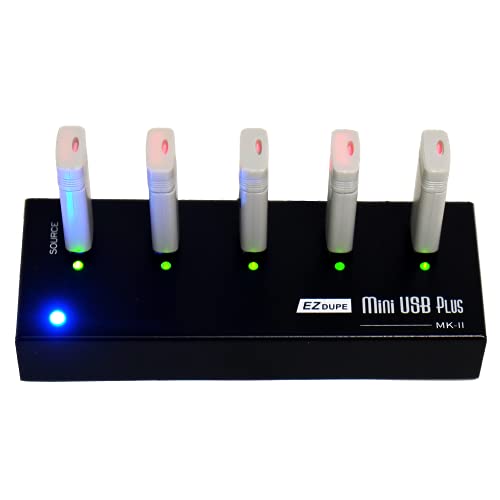
- Copies to four drives simultaneously
- Compact standalone design needs no computer
- Supports asynchronous copying and USB power
Best For: Portable four-drive duplication
Best for High-Volume Production

- Handles up to 15 target drives
- Performs bit-by-bit duplication
- Supports synchronous and asynchronous modes
Best For: Recurring large-batch USB production
Best for Verified 1-to-7 Copying

- Copy & Compare verifies cloned drives
- Supports file and sector-by-sector copying
- Includes multiple erase and overwrite modes
Best For: IT professionals managing up to seven USB drives
Best Touchscreen Workflow

- Touchscreen simplifies copy and compare tasks
- Source Analysis displays drive information
- Duplicates up to ten USB drives
Best For: SOHO users and small teams
Best for High-Volume Asynchronous Duplication
Vinpower USBDBL 15-Target Duplicator

- Copies to 15 USB targets independently
- Raw Mode supports bit-by-bit duplication
- Secure Erase helps prevent data recovery
Best For: High-volume IT and production workflows
Fast Multi-Drive Verification

- Copies to five USB drives without a computer
- Copy & Compare checks clones against the source
- Includes error scanning and several erase modes
Best For: IT teams preparing and verifying multiple USB drives
Practical Two-Drive Testing

- Copies one USB drive to two targets
- Provides capacity and read/write speed tests
- Supports quick or bit-for-bit copying
Best For: Small teams checking and duplicating USB 1.1 or 2.0 media
Flexible Standalone Cloning
- Copies to two targets without a computer
- Supports content-only copying to save time
- Works with expanded media through compatible accessories
Best For: Portable two-target cloning with flexible media connections
Best for Verified Cloning – StarTech 1:2 USB Duplicator
For technicians seeking USB duplicators for data verification, the StarTech USBDUP12 combines standalone cloning with a built-in Copy & Compare function. It supports system/file copying, sector-by-sector duplication, drive erasing, and error or bad-sector scanning without requiring a computer.
Best For: IT technicians and small teams that need two-way duplication with post-copy verification.
Pros:
- Copy & Compare verifies cloned drives against the source.
- Supports FAT16/32, NTFS, Linux ext2, ext3, and ext4 for system/file copying.
- Offers sector-by-sector copying, quick erase, and single- or three-pass overwrite modes.
- Asynchronous copying lets users replace finished drives without stopping the process.
Cons:
- Copies to only two target drives at a time.
- Asynchronous mode requires source content under 64 MB.
- External USB storage may need its own power source.
Its LCD status display, activity and error LEDs, and verification controls make this a practical choice when confirming duplicate integrity matters as much as copying speed.
Best for Seven-Drive Batches – Systor 1:7 USB Duplicator
The Systor SYS-USBD-7 is a standalone option for USB duplicators for data verification when producing up to seven copies per cycle. It performs bit-by-bit duplication and supports both synchronous and asynchronous operation, with no computer or software required.
Best For: Businesses and technicians that regularly duplicate seven USB drives in a batch.
Pros:
- Supports up to seven USB targets at once.
- Bit-by-bit copy mode is suited to exact source duplication.
- Copy speed is listed at up to 2GB per minute, or 33MB per second.
- USB 1.1, 2.0, and 3.0 flash drives are supported.
Cons:
- USB Type-C drives require an adapter.
- The unit weighs 10 pounds, making it less portable.
- The supplied notes do not specify a dedicated post-copy comparison feature.
With consistent listed transfer speed even as the number of loaded drives increases, the SYS-USBD-7 favors repeatable medium-volume production over compact portability.
Best Portable Option – EZ Dupe 1:4 Mini USB Plus MK II
The updated EZ Dupe Mini USB Plus MK II offers a compact way to handle USB duplicators for data verification. It works without a computer, supports USB 1.0 through 3.0 flash drives, and can copy to four targets simultaneously using asynchronous operation.
Best For: Mobile users and small teams that need four-drive duplication from a compact standalone unit.
Pros:
- Copies to up to four USB flash drives at the same time.
- Updated version lists speeds up to 2.5GB per minute or 45MB per second.
- Supports asynchronous copying so completed drives can be replaced during a batch.
- Can use a power bank or USB power source.
Cons:
- The listed one-year manufacturer warranty is shorter than some alternatives.
- External USB storage requires its own power source.
- The supplied notes do not identify a dedicated copy-comparison feature.
Its small size, broad USB compatibility, and flexible power options make the Mini USB Plus MK II convenient for on-site duplication, though buyers specifically requiring built-in comparison should look for that feature separately.
Best for High-Volume Production – Systor 1:15 USB Duplicator
For large batches, the Systor SYS-USBD-15 is a standalone choice among USB duplicators for data verification, with capacity for 15 target drives. It uses bit-by-bit duplication and offers synchronous and asynchronous copy modes without requiring a computer or software.
Best For: Organizations producing large sets of identical USB drives in recurring batches.
Pros:
- Supports duplication to up to 15 drives at once.
- Bit-by-bit copying is designed for exact source replication.
- Lists transfer speeds up to 2GB per minute, or 33MB per second.
- Hot-swappable operation supports ongoing batch workflows.
Cons:
- USB Type-C drives require an adapter.
- Its 15-drive capacity may be excessive for occasional or small-batch use.
- The supplied notes do not specify a dedicated post-copy comparison feature.
The SYS-USBD-15 is best viewed as a production-oriented duplicator: its major advantage is throughput across many targets, while users needing explicit clone comparison should confirm that requirement before buying.
Best for Verified 1-to-7 Copying – StarTech USB Duplicator
For technicians and IT teams comparing usb duplicators for data verification, the StarTech USBDUPE17 combines standalone copying with a built-in Copy & Compare function. It handles USB 2.0 and 3.0 media, supports both file-level and sector-by-sector duplication, and provides LCD status information.
Best For: IT professionals who need to clone, verify, erase, and manage up to seven USB drives without a computer.
Pros:
- Copy & Compare verifies cloned drives against the source.
- Supports system/file copy and sector-by-sector duplication.
- Offers quick erase, single-pass, and three-pass overwrite modes.
- LCD and LED indicators show drive activity, errors, and bad sectors.
Cons:
- Asynchronous copying is limited to source content under 128 MB.
- Some external USB devices may need their own power source.
- Its seven-target capacity is smaller than larger professional duplicators.
The StarTech is a well-rounded option when verification matters as much as duplication. Its Copy & Compare workflow and broad erase modes make it particularly practical for repeatable IT tasks.
Best Touchscreen Workflow – Acumen Disc EZ Dupe 1-to-10
The Acumen Disc EZ Dupe is a standalone choice for buyers seeking usb duplicators for data verification with a simple touchscreen interface. Its Source Analysis feature and real-time LCD information help users review drive details while copying, comparing, erasing, or formatting media.
Best For: SOHO users and small teams that want touchscreen control for duplicating and checking up to ten USB drives.
Pros:
- Touchscreen operation is designed for straightforward daily use.
- Supports copy and compare functions from the same interface.
- Source Analysis provides detailed information during operation.
- Supports most file formats, file sizes, and drive capacities.
Cons:
- The supplied notes do not specify detailed erase standards or overwrite methods.
- Its listed USB interface is USB 2.0 Type A.
- The advertised transfer speed is up to 35 MB/sec., below some higher-speed duplicators.
This model emphasizes ease of use and visibility rather than advanced technical controls. It is a sensible fit for smaller-scale duplication where touchscreen operation and compare functionality are priorities.
Best for High-Volume Asynchronous Duplication – Vinpower USBDBL 15-Target Duplicator
The Vinpower USBDBL is built for larger duplication runs, with 15 target slots and standalone operation. For usb duplicators for data verification, it offers Smart Copy for accessible content and Raw Mode for bit-by-bit duplication, helping users choose between speed and exact replication.
Best For: Production environments and IT teams that need to copy or securely erase up to 15 USB drives at once.
Pros:
- 15 target slots support high-volume duplication.
- Asynchronous duplication lets targets copy independently.
- Raw Mode enables bit-by-bit duplication for accurate copies.
- Secure Erase is designed to prevent data recovery.
Cons:
- At 11 pounds, it is substantially less portable than smaller units.
- Adapters are required to use SD, MicroSD, CF, and other supported flash formats.
- The supplied notes specify a one-year warranty.
The USBDBL stands out when throughput and target capacity are more important than compact size. Its asynchronous operation and Raw Mode make it a strong choice for repeatable, high-volume copying and verification workflows.
Fast Multi-Drive Verification – 1:5 USB Duplicator
For teams evaluating USB duplicators for data verification, the StarTech USBDUP15 combines five-target duplication with Copy & Compare verification. Its standalone operation, error scanning, and support for both file-level and sector-by-sector copying make it a practical choice for repeatable drive preparation.
Best For: IT technicians and organizations that need to clone, verify, erase, or distribute data across several USB drives at once.
Pros:
- Duplicates to up to five USB drives without a computer.
- Copy & Compare verifies cloned drives against the source.
- Supports system/file copying, sector-by-sector cloning, error scans, and multiple erase modes.
- Asynchronous copying and 64 MB internal memory can streamline small-content batches.
Cons:
- Asynchronous mode is limited to source content under 64 MB.
- External USB devices may require their own power source.
- Its five-port capacity may be more than needed for occasional two-drive jobs.
The USBDUP15 is the strongest fit here when verification and throughput matter together. Its LCD controls and status LEDs provide useful operational feedback, while upgradeable firmware adds flexibility for ongoing deployment work.
Practical Two-Drive Testing – UB300 1:2 USB Duplicator
The BestDuplicator UB300 is a compact option for buyers comparing USB duplicators for data verification on USB 1.1 and 2.0 media. Alongside quick and bit-for-bit copying, it provides capacity checks, device information, speed testing, and erase functions before drives are deployed.
Best For: Schools, businesses, technicians, and field teams that need straightforward two-drive duplication and pre-deployment media checks.
Pros:
- Duplicates one source to two target drives simultaneously without a computer.
- Offers both data-only Quick Copy and Whole Media bit-for-bit copying.
- Includes capacity, device-information, read/write speed, and erase functions.
- LCD navigation and individual port LEDs make status monitoring simple.
Cons:
- Designed for USB 1.1 and USB 2.0 media rather than newer USB standards.
- Only two target ports are available.
- Additional memory-card duplication requires a compatible USB card reader sold separately.
Choose the UB300 if you want verification-oriented checks in a portable, uncomplicated unit. It is less suited to high-volume work than a five-target model, but its testing tools add useful confidence before distribution.
Flexible Standalone Cloning – USBDUP12 1:2 Duplicator
The StarTech USBDUP12 is a lightweight choice for shoppers seeking USB duplicators for data verification and flexible media workflows. It copies two targets simultaneously, can copy only the source content rather than the full volume, and supports erase operations without a computer.
Best For: Users who need a portable two-target duplicator with support for USB drives, HDDs, SSDs, or other flash media connected through compatible accessories.
Pros:
- Duplicates two target flash drives simultaneously as a standalone device.
- Content-only copying can avoid copying unused space across the entire volume.
- Can work with HDDs, SSDs, and other flash media through a USB dock, enclosure, or card reader.
- Asynchronous duplication allows one drive to continue while another is replaced.
Cons:
- It has two target ports, so it is not intended for larger duplication batches.
- Expanded media compatibility depends on separately connected docks, enclosures, or card readers.
- The supplied notes do not specify dedicated copy-verification or error-scan functions.
The USBDUP12 stands out for workflow flexibility rather than a long list of verification tools. Its content-only mode and asynchronous operation are useful for hands-on technicians, while the accessory-based design broadens the types of media it can handle.
How We Picked the Best USB Duplicators for Data Verification
We focused on standalone USB duplicators designed for repeatable flash-drive copying, comparison, and erasure without requiring a computer for every cycle. The selection includes compact two-target units, midrange systems for small production runs, and higher-capacity duplicators for labs, IT departments, and fulfillment operations.
Our comparison emphasizes stated duplication speed, number of target ports, standalone operation, display or touchscreen controls, and whether the device supports sanitization or erasure. Because real-world performance varies by source media, target drives, file sizes, and USB generation, published speeds should be treated as benchmarks rather than guarantees.
Quick Comparison
- Small batches: Two-target models are easier to place on a desk and suit occasional verification or service work.
- Growing workloads: Four- and seven-target systems balance throughput, cost, and manageable physical size.
- Higher-volume duplication: Ten- and 15-target units reduce the number of cycles needed for larger batches.
- Sanitization workflows: Models advertised with erasing or sanitizing functions are useful when drives must be cleared between assignments.
- Ease of operation: LCDs and touchscreens can simplify setup, status checks, and error handling for nontechnical operators.
Key Buying Factors for USB Duplicators for Data Verification
Target Count and Throughput
Choose the number of target ports based on your normal batch size, not only the maximum you might use. More ports can improve productivity, but they also increase the unit’s footprint and cost. A faster rated transfer speed matters most when the source contains large datasets and the target drives can sustain comparable performance.
Verification and Data Integrity
Look for clear comparison or verification modes rather than assuming every copier performs a full data check. Confirm whether verification occurs automatically after duplication, can be selected from the menu, and reports failed targets individually. For sensitive workflows, keep a written process for source-master preparation, target inspection, and post-copy validation.
Erasure and Media Compatibility
If drives will be reused, sanitization features can reduce manual preparation. Check the supported USB media types, capacity limits, file-system considerations, and erasure methods before purchase. A duplicator is not automatically a certified secure-erasure solution, so regulated environments should verify the manufacturer’s documentation and compliance requirements.
Controls, Service, and Workspace
LCD or touchscreen controls are useful when operators need visible progress and simple menu navigation. Also consider cooling, power requirements, warranty coverage, replacement parts, and how easily operators can access each port. A compact model may be preferable when the duplicator is moved between workstations.
Who Should Buy Which USB Duplicators for Data Verification?
Choose a two-target duplicator for occasional technicians, test benches, small offices, and buyers who prioritize low cost and portability. Choose a four- or seven-target model for recurring departmental jobs and moderate batch production. Choose a 10- or 15-target system when reducing operator time and duplication cycles is more important than minimizing equipment size.
For mixed duplication and reuse workflows, prioritize a model with clearly documented verification and sanitization controls. Before ordering, confirm the required target count, USB media compatibility, expected batch volume, and whether the manufacturer’s stated speed matches your data-validation requirements.