
Duplicating USB drives one at a time is slow, inconsistent, and difficult to manage at scale. The right duplicator can create multiple verified copies simultaneously while reducing hands-on work.
This roundup compares 10 USB duplicators for bulk copying, from compact four-port units to 15-target systems designed for higher-volume production, distribution, and IT workflows.
Best 10 USB Duplicators for Bulk Copying Picks for 2026
Best High-Volume Standalone Pick

- Seven target ports
- Standalone, no computer required
- Up to 2GB/min transfer speed
Best For: Computer-free batch copying for business and technician workflows
Best Touchscreen Workflow
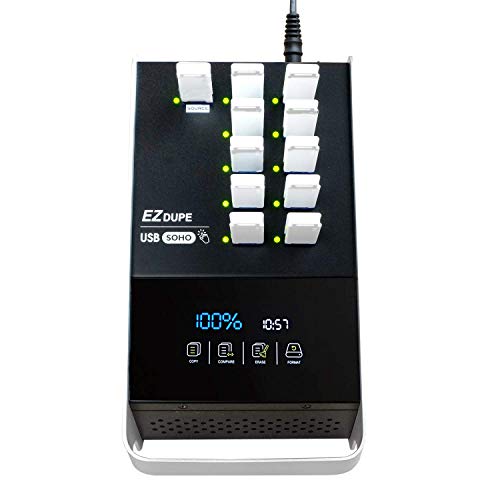
- 10-target copying
- Touchscreen controls
- Copy, compare, format, and erase
Best For: Recurring USB media management with simplified controls
Best PC-Based Capacity
SuperSpeed 16-Target Duplicator

- 16-target design
- USB 3.0 support
- Includes Drive Manager software
Best For: Large PC-managed duplication runs
Best Compact Erasing Tool

- Standalone two-target copying
- Sector and file copy modes
- Quick and overwrite erase options
Best For: Technicians handling small batches and USB sanitization
Best for Easy Setup

- 15 target ports for batch duplication
- Standalone, computer-free operation
- Up to 2GB/minute copying
Best For: Business and production teams copying large USB batches
Feature-Rich Professional Choice
Vinpower USBDBL 15-Target Duplicator

- 15 standalone USB target slots
- Independent asynchronous copying
- Smart Copy, raw mode, and secure erase
Best For: Professional duplication and secure-erasure workflows
Portable Small-Batch Option
EZ Dupe 1 to 4 Mini USB Plus MK II
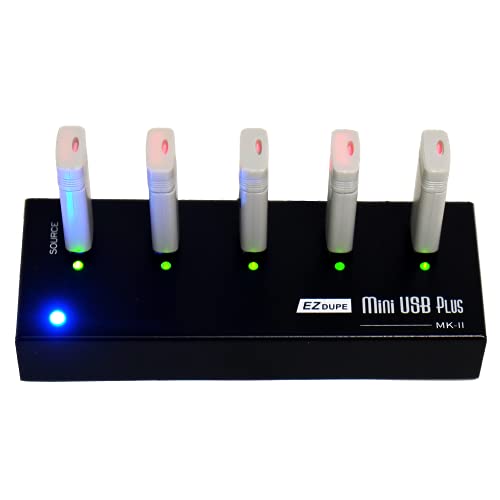
- Four simultaneous target drives
- Compact standalone design
- Up to 2.5GB/minute copying
Best For: Portable, occasional, and small-batch USB duplication
Most Portable
Vinpower 1-to-7 USB Duplicator

- Standalone copying for up to seven targets
- Smart, raw, and error-skip copy modes
- Portable power and daisy-chain expansion
Best For: Mobile teams and on-site bulk USB duplication
Best Compact Workstation
StarTech 1-to-5 USB Duplicator

- Copies or erases five USB drives
- LCD, LEDs, and Copy-and-Compare verification
- Asynchronous mode supports sources under 64 MB
Best For: Technicians handling smaller recurring USB batches
Highest Capacity
StarTech 1-to-15 USB Duplicator

- Duplicates or erases up to 15 drives
- Sector, file, and system copy modes
- 128 MB asynchronous-copy memory
Best For: High-volume professional USB production
Best High-Volume Standalone Pick – 1-to-7 USB Duplicator
For shoppers comparing usb duplicators for bulk copying, the Systor SYS-USBD-7 offers seven target ports, standalone operation, and transfer speeds up to 2GB per minute. It supports synchronous and asynchronous copying, with bit-by-bit duplication for straightforward drive cloning.
Best For: Businesses and technicians that need a computer-free duplicator for copying several USB drives at once.
Pros:
- Copies to seven USB drives simultaneously.
- Requires no computer or software.
- Supports USB 1.1, 2.0, and 3.0 flash drives.
- Includes a one-year parts, three-year labor warranty and lifetime technical support.
Cons:
- USB Type-C drives require an adapter.
- The listed storage capacity is 2GB, so capacity details should be checked against the intended media.
Its consistent stated speed when the number of loaded drives increases makes this a practical choice for repeat batch jobs, particularly where a standalone workflow matters more than computer-based management.
Best Touchscreen Workflow – SOHO Touch 1-to-10 Duplicator
The EZ Dupe SOHO Touch is a strong option for usb duplicators for bulk copying when simple controls are important. Its touchscreen menu provides copy, compare, format, and erase functions, while the 10-target design supports larger batches of USB flash media.
Best For: Users who want a touchscreen-controlled duplicator for recurring copying, verification, formatting, and erasing tasks.
Pros:
- Copies to up to 10 USB targets.
- Touchscreen interface simplifies daily operation.
- Supports USB 2.0, 3.0, and 3.1 thumb drives.
- Offers Smart Copy, data comparison, formatting, and one-touch erase functions.
Cons:
- The manufacturer warranty is one year.
- The supplied notes specify compatibility with USB flash media, so other media types should be confirmed before purchase.
With its high target count and built-in comparison and erase tools, the SOHO Touch is designed for repeatable media-management work rather than occasional one-off duplication.
Best PC-Based Capacity – SuperSpeed 16-Target Duplicator
For usb duplicators for bulk copying that fit a computer-based workflow, the Nexcopy SSUSB160PC provides 16 target ports and uses USB 3.0 technology. It is designed to copy at the flash drive’s maximum transfer speeds and includes Nexcopy Drive Manager software.
Best For: Organizations that prefer managing large duplication runs from a PC and need the highest target count in this roundup.
Pros:
- Supports up to 16 target USB drives.
- Uses USB 3.0 technology.
- Includes Nexcopy Drive Manager software.
- Designed to copy at the flash drive’s maximum transfer speeds.
Cons:
- This is a PC-based system, so it is not the choice for computer-free operation.
- The supplied notes do not specify an included warranty or standalone copy modes.
The SSUSB160PC stands out when throughput and target count take priority and a PC-controlled process is already part of the work environment.
Best Compact Erasing Tool – StarTech 1-to-2 Duplicator
The StarTech USBDUP12 is a compact standalone choice for usb duplicators for bulk copying when two target drives are sufficient. It supports system and file copying, sector-by-sector duplication, drive erasing, and copy-and-compare verification through an LCD menu.
Best For: IT technicians and support teams that need a small duplicator for boot-drive preparation, drive wiping, and verified two-drive copying.
Pros:
- Operates without a computer.
- Supports USB 2.0 and USB 3.0 flash media.
- Offers sector-by-sector copying and multiple erase modes.
- LCD menu provides drive information, performance, and error scanning.
Cons:
- Provides only two target ports.
- Asynchronous copying requires source content under 64MB.
- External USB devices may require their own power source.
This model is less suited to large simultaneous runs than the higher-port options, but its verification, sanitization, and compact standalone design make it useful for hands-on technical work.
Best for Easy Setup – Systor 1 to 15 USB Duplicator
For businesses needing USB duplicators for bulk copying, the Systor SYS-USBD-15 provides 15 target ports and operates without a computer or software. It supports synchronous and asynchronous copying, with speeds up to 2GB per minute (33MB per second).
Best For: Offices, production teams, and other users copying USB drives in larger batches.
Pros:
- Standalone operation requires no computer or software.
- Copies to up to 15 USB drives simultaneously.
- Supports bit-by-bit duplication plus synchronous and asynchronous modes.
- Includes a 1-year parts, 3-year labor warranty and lifetime technical support.
Cons:
- USB Type-C drives require an adapter.
- Its listed USB 2.0 interface may be less suitable for users expecting newer USB standards.
The Systor is a practical high-capacity choice when throughput and a 15-drive target count matter more than portability. Its sanitizer function and bit-by-bit mode also add useful flexibility for business workflows.
Feature-Rich Professional Choice – Vinpower USBDBL 15-Target Duplicator
The Vinpower USBDBL is designed for usb duplicators for bulk copying when independent target operation and data handling options are important. Its 15 slots work without a PC, while asynchronous duplication lets each target copy independently.
Best For: Professional users who need flexible USB duplication, secure erasing, and optional support for other flash-media formats.
Pros:
- Standalone design requires no PC.
- Asynchronous duplication lets targets copy independently.
- Offers Smart Copy and raw, bit-by-bit duplication modes.
- Secure erase is designed to prevent data recovery; adapter modules can support SD, microSD, and CompactFlash media.
Cons:
- Alternative flash formats require a corresponding interface adaptor module add-on.
- The supplied notes list a 1-year warranty, shorter than some competing coverage options.
Choose this model if your workflow goes beyond straightforward USB cloning. Its asynchronous operation, raw mode, and secure erase features make it a versatile professional tool, though expanding beyond USB requires additional modules.
Portable Small-Batch Option – EZ Dupe 1 to 4 Mini USB Plus MK II
For smaller jobs involving usb duplicators for bulk copying, the EZ Dupe Mini USB Plus MK II offers four target ports in a compact standalone design. It copies asynchronously at up to 2.5GB per minute or 45MB per second, depending on the connected drives.
Best For: Individuals and small teams that need a portable duplicator for batches of up to four USB drives.
Pros:
- Compact, lightweight design weighs 12.8 ounces.
- Copies up to four USB flash drives simultaneously.
- Works without a computer and supports asynchronous copying.
- Supports USB 1.0, 2.0, and 3.0 flash drives, plus compatible externally powered USB storage.
Cons:
- Four target ports provide less batch capacity than 15-target models.
- Maximum speed depends on the read/write performance of the connected drives.
- External USB devices must have their own power source.
The EZ Dupe is the most portable option in this group and a good fit for modest duplication runs. Its four-port limit makes it less appropriate for high-volume production, but asynchronous copying and flexible power options suit mobile or occasional use.
Most Portable – Vinpower 1-to-7 USB Duplicator
For usb duplicators for bulk copying that need to work away from a desk, the Vinpower Flash Memory USB Duplicator offers standalone operation, flexible copy modes, and a compact design. It can duplicate up to seven target drives without a computer and can run from a compatible USB-C PD power bank.
Best For: Field service, trade shows, events, IT teams, schools, and on-site USB distribution.
Pros:
- Copies USB drives without a PC or software.
- Supports Smart Copy, Raw Copy, and Read Error Skip for varied duplication needs.
- Built-in DoD 5220.22-M erasing helps prepare drives for reuse.
- Daisy-chaining compatible units can expand capacity to as many as 15 simultaneous copies with two units.
Cons:
- Daisy-chain cable is not included.
- Wall power or a compatible USB-C PD power bank is required.
- Raw copying and error recovery may be more capability than simple everyday duplication requires.
This is the most flexible option of the group for mobile duplication and difficult source media. Its standalone design, recovery-oriented features, and expandable capacity make it a strong choice when portability matters as much as throughput.
Best Compact Workstation – StarTech 1-to-5 USB Duplicator
The StarTech 1:5 is a practical pick among usb duplicators for bulk copying when you need a compact standalone unit for five target drives. It supports common USB media, multiple erase methods, LCD monitoring, and an asynchronous mode for replacing completed drives without stopping the workflow.
Best For: Technicians and IT professionals managing small-to-medium batches of boot drives, shared data, or sanitized USB media.
Pros:
- Duplicates or erases up to five USB drives without a computer.
- Supports USB 3.0, 2.0, and 1.1 flash drives plus USB external storage.
- Offers file/system copy, sector-by-sector copy, quick erase, and single- or three-pass overwrite modes.
- Copy-and-Compare, error scanning, LCD status information, and activity LEDs aid verification.
Cons:
- Asynchronous copying is limited to source content under 64 MB.
- Some external USB devices may require their own power source.
- Its five-target capacity is lower than the 1-to-15 model.
With a smaller footprint and a useful mix of duplication, verification, and erasure functions, this model suits organized desktop workflows. Choose it when five simultaneous targets cover your normal batch size and you value straightforward monitoring.
Highest Capacity – StarTech 1-to-15 USB Duplicator
When bulk output is the priority, the StarTech 1:15 provides fifteen target ports for usb duplicators for bulk copying. This standalone unit combines system/file and sector-by-sector duplication with several erase modes, LCD status information, and asynchronous copying for small source files.
Best For: IT departments, technicians, and organizations producing large batches of bootable, training, or distributed USB drives.
Pros:
- Copies or erases up to 15 USB drives at once.
- Supports USB 3.0 and 2.0 flash media and USB external storage.
- Includes system/file copy, sector-by-sector copy, quick erase, and single- or three-pass overwrite options.
- Copy-and-Compare, error scanning, LCD controls, and activity/error LEDs support quality checks.
Cons:
- Asynchronous copying is limited to source content under 128 MB.
- Some external USB devices may need a separate power source.
- Its larger 3.9-pound form factor is less convenient for frequent transport.
This model is the most efficient choice here for high-volume simultaneous copying. Its expanded target count can reduce handling time, while the copy, comparison, and erasure modes make it useful for repeatable professional workflows.
How We Picked These USB Duplicators for Bulk Copying
We focused on duplicators that support simultaneous USB copying rather than single-drive transfer tools. The selection includes standalone systems and a PC-based model, with attention to target count, USB generation, stated transfer speed, erasing functions, verification, usability, and portability.
Because real-world performance depends on the source drive, target media, file sizes, and data type, advertised speeds should be treated as benchmarks rather than guarantees. Features such as asynchronous copying, source-and-target compatibility, and reliable error reporting can matter as much as headline throughput.
Quick Comparison
| Best For | Recommended Configuration | Why It Matters |
|---|---|---|
| Small batches | 1:2 or 1:4 | Lower cost and a smaller footprint for occasional duplication |
| Growing production needs | 1:5 or 1:7 | A practical balance of output capacity and desk space |
| Higher-volume work | 1:10 or 1:15 | More simultaneous copies with fewer production cycles |
| Computer-managed workflows | PC-based duplicator | Useful when software control and workstation integration are priorities |
Key Buying Factors for USB Duplicators for Bulk Copying
Target Count and Workload
The number of target ports determines how many drives you can create in one cycle. Choose based on your normal batch size, not only your maximum occasional order. A smaller unit may be more economical for intermittent work, while a 10- or 15-target model can reduce labor for recurring production.
Speed and USB Compatibility
Check the stated copy rate and whether the system supports USB 2.0, USB 3.0, or newer media. The slowest component—source drive, target drives, interface, or data pattern—can limit the actual result. Mixed drive speeds may also affect consistency.
Verification and Erasing
For distribution, archiving, or business deployment, verification helps identify failed copies before they leave your workspace. Sanitizing and erase modes are valuable when reusing drives, but confirm the available erase method meets your security policy.
Standalone Controls and Workflow
Standalone duplicators with LCDs or touchscreens can operate without a computer and are usually simple to deploy. PC-based systems may be preferable when you need workstation control, centralized processes, or software-assisted management.
Capacity and Media Handling
Confirm that the duplicator supports the capacity and format of the source and target drives you plan to use. Also consider port spacing, cooling, power requirements, and whether the unit can run continuously during long batches.
Who Should Buy Which USB Duplicators for Bulk Copying?
Choose a compact 1:2 or 1:4 duplicator for occasional backups, classroom media, small software releases, or field work. A 1:5 or 1:7 model suits small businesses and service providers that need regular batches without committing to a large production unit.
For frequent distribution, retail fulfillment, training materials, or IT deployment, a 1:10 or 1:15 system can save time by completing more copies per cycle. Select the PC-based option when computer integration is more important than standalone simplicity. If secure reuse is part of the workflow, prioritize a model with clearly documented sanitization or erasure features and verification controls.