
The best teleprompters help you maintain eye contact, deliver precise wording, and record polished videos without memorizing every line. This roundup covers compact smartphone options, tablet-compatible kits, and larger systems with built-in displays.
We compare screen size, camera compatibility, setup, portability, and control options so you can choose a teleprompter that fits your workflow and shooting distance.
Best 10 Teleprompters Picks for 2026
Best Built-In Display

- Built-in 9-inch FHD display
- Shows scripts, chat, or apps
- Supports cameras and webcams
Best For: Streamers and video-call creators
Best Budget Tablet Prompter

- No-assembly aluminum design
- 12-inch reflective display
- Remote and app control
Best For: Tablet-based presentations and tutorials
Best 2-in-1 Monitor
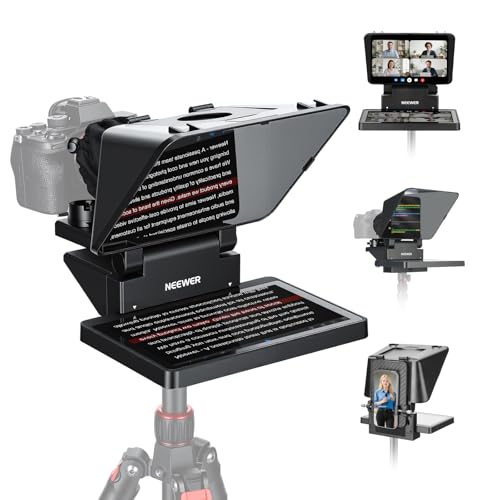
- Built-in 9-inch HD LCD monitor
- Mirrors compatible phones and computers
- Supports cameras, webcams, and phones
Best For: Streaming and video conferencing setups
Best Portable 12-Inch Kit
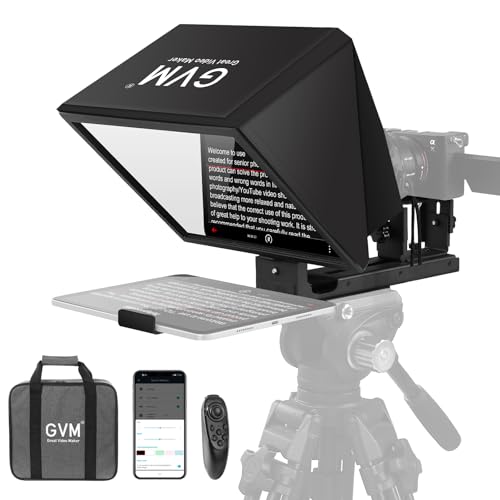
- Installation-free collapsible design
- 12-inch optical glass display
- Remote, app, and carry bag included
Best For: Portable tablet- and phone-based recording
Best All-in-One Choice

- Assembly-free design with included carrying case
- 12-inch beamsplitter with 10-foot reading range
- Arca mount, remote control, and accessory threads
Best For: DSLR and camcorder creators seeking a ready-to-use teleprompter
Best for Smartphone Creators
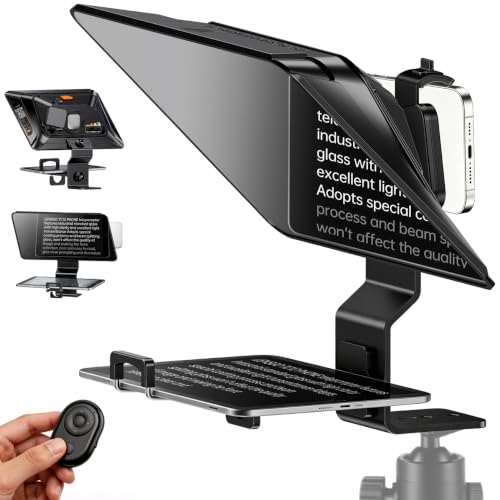
- Supports horizontal and vertical phone recording
- Fits phones, iPads, and tablets up to 7.3 inches wide
- Anti-glare glass and Bluetooth app control
Best For: On-the-go smartphone videos, TikTok, Zoom, and vlogging
Best Large-Screen Model

- 14-inch beamsplitter with 10-foot reading range
- 45-degree tilt and Manfrotto 501PL-compatible QR plate
- Supports phones, tablets, cameras, and accessories
Best For: Presentations, courses, broadcasts, and larger production setups
Best Adjustable Tablet Teleprompter

- Reflects text up to 10 feet away
- Supports phones and tablets up to 9.84 x 8.68 inches
- Includes remote, app control, and carrying case
Best For: Online teaching, vlogging, and live streaming
Best Large-Screen Teleprompter

- 17-inch glass reflects scripts up to 13 feet
- Assembly-free design with sun hoods
- Supports Manfrotto 501PL and up to 44 pounds
Best For: Studio speeches, courses, tutorials, and streaming
Best Wide-Angle Teleprompter

- Supports horizontal shooting from 24mm
- Includes nine lens adapter rings
- High-transmittance glass and Bluetooth app control
Best For: Wide-angle YouTube, TikTok, interviews, and live streaming
Best Built-In Display – Elgato Prompter
The Elgato Prompter is a premium choice for teleprompters when you want scripts, chat, or video-call content displayed directly in front of your camera. Its built-in FHD screen connects to a computer like a monitor, reducing dependence on a separate tablet or phone.
Best For: Streamers, video-call users, and creators who want a computer-controlled teleprompter with integrated display hardware.
Pros:
- Built-in 9-inch FHD display eliminates the need for an extra tablet or smartphone screen.
- Can show scripts, Twitch chat, or other computer windows through drag-and-drop control.
- Supports DSLR cameras, webcams, and smartphones, with compatibility for wide lenses.
- Works with the Camera Hub app and Stream Deck.
Cons:
- DisplayLink software is required on Mac and Android.
- Its computer-dependent setup may be more than needed for simple tablet-based prompting.
The Elgato stands out among teleprompters for its integrated monitor-style workflow and broad device compatibility. It is especially compelling for users who regularly switch between scripts, chat, and conferencing content.
Best Budget Tablet Prompter – NEEWER Basics X12B
The NEEWER Basics X12B is a practical tablet-based option for teleprompters. Its no-assembly aluminum design uses your iPad or compatible tablet to reflect scripts onto 12-inch beam-splitter glass, while the included remote and app handle scrolling controls.
Best For: Presentations, online courses, tutorials, and creators who already own a compatible tablet.
Pros:
- No-assembly design is quick to set up and folds flat for transport.
- 12-inch display area and 75% light-transmission glass keep text readable up to 10 feet.
- Included Bluetooth remote and app control scrolling, page turns, and font size.
- Includes a durable carry case for storage and protection.
Cons:
- Does not function as a monitor or provide direct on-screen self-viewing.
- Requires a separate compatible iPad or tablet for displaying scripts.
- Not intended for phone shooting.
The X12B keeps the teleprompter setup straightforward and economical by focusing on tablet reflection rather than adding an integrated monitor. It is a strong fit for users who value portability and simple remote-controlled prompting.
Best 2-in-1 Monitor – NEEWER X11
The NEEWER X11 combines a camera teleprompter with a built-in LCD monitor, making it a versatile choice for teleprompters used in streaming and video conferencing. It can mirror compatible mobile devices or serve as a second computer display, so no tablet is required for prompts.
Best For: Streamers, webcam users, and creators who want both screen mirroring and an external monitor in one setup.
Pros:
- Built-in 9-inch HD LCD monitor supports prompts without a separate tablet or phone.
- Can mirror compatible iPhone and Android devices and connect to Windows or macOS computers.
- Supports cameras, webcams, and phones, with lens threads up to 72 mm and focal lengths from 35 to 200 mm.
- Adjustable Arca-style holder and multiple mounting points support flexible positioning.
Cons:
- Some connection methods require drivers, and compatible phones must support DP protocol.
- Voice sync is not supported.
- Apps for mobile and PC use require separate downloads.
The X11 is one of the more flexible teleprompters in this group because its screen can serve prompting or general display duties. Its connectivity is capable, but buyers should confirm device protocol and driver requirements before purchasing.
Best Portable 12-Inch Kit – GVM 12-inch Teleprompter
The GVM 12-inch kit is a portable option for teleprompters that combines an installation-free collapsible frame, optical glass, wireless controls, and a carry bag. It works with compatible tablets, smartphones, and cameras for presentations, streaming, and video recording.
Best For: Mobile creators who want a foldable 12-inch teleprompter for tablet- or phone-based recording.
Pros:
- Installation-free aluminum design mounts to a tripod without complicated assembly.
- 12-inch coated optical glass provides a stated reading range of up to 15 feet.
- Supports smartphones and tablets up to 8.6 inches, plus cameras with 1/4-inch or 3/8-inch mounting screws.
- Wireless remote and iOS/Android app control scrolling, playback, and font size.
Cons:
- Requires a separate compatible smartphone or tablet to display scripts.
- At 5.68 pounds, it is heavier than some compact tablet-prompter designs.
- The supplied notes do not specify the included app’s device version requirements.
The GVM offers a well-rounded portable teleprompter package for creators who prefer reflective tablet prompting over a built-in monitor. Its foldable construction and included carry bag make it particularly useful for recording away from a permanent studio.
Best All-in-One Choice – NEEWER X12II
The NEEWER X12II is a practical choice among teleprompters for creators who want a ready-to-use setup for video recording, live streaming, online teaching, or vlogging. Its 12-inch beamsplitter provides a stated 10-foot reading range, while the included remote and app support hands-free script control.
Best For: DSLR and camcorder users who want an assembly-free teleprompter with flexible mounting and accessory options.
Pros:
- Requires no assembly and includes a hard aluminum carrying case.
- 12-inch multicoated beamsplitter offers 71% light transmission and a 10-foot reading range.
- Arca-type quick-release mount supports rapid camera changes and up to 22 pounds.
- Includes Bluetooth remote control, app support, cold shoes, and tripod mounting threads.
Cons:
- The remote requires AAA batteries, which are not included.
- Its 12-inch display may be less suitable than larger models for bigger text or displays.
Choose the X12II if convenience and mounting flexibility matter more than having the largest available screen. The rigid aluminum construction, included case, and broad accessory support make it a well-equipped option for mobile or studio setups.
Best for Smartphone Creators – LENSGO TC12P
The LENSGO TC12P is a flexible smartphone-focused option for teleprompters, especially when you record on the move. Its 14.5-inch wide-angle glass supports horizontal or vertical shooting, while the adjustable holder works with phones and tablets for YouTube, Zoom, TikTok, and vlogging.
Best For: Smartphone creators who need a portable teleprompter for walk-and-talk videos, vertical content, and remote presentations.
Pros:
- Supports horizontal and vertical shooting with quick assembly and disassembly.
- Works with smartphones, iPads, and tablets up to 7.3 inches wide.
- Large HD glass, foam light sealing, and anti-glare design help keep text clear.
- Bluetooth remote and free app support script import, smooth scrolling, and mirror mode.
Cons:
- Designed primarily for smartphone and tablet shooting rather than DSLR camera setups.
- The product information lists the glass as 14.5 inches while the device details list an approximately 11.98-inch screen size.
The TC12P stands out for creators who value portability and phone compatibility. Its adjustable design and vertical-shooting support make it especially useful for short-form content, while the larger glass can reduce the need for frequent script scrolling.
Best Large-Screen Model – NEEWER X14 III
The NEEWER X14 III is one of the more substantial teleprompters in this roundup, pairing a 14-inch beamsplitter with a sturdy all-metal frame. It is designed for recording courses, speeches, presentations, tutorials, and broadcasts, with a 45-degree tilt and support for phones, tablets, and compatible camera setups.
Best For: Presenters and video teams who want a larger reading surface, broad device compatibility, and fast tripod transfers.
Pros:
- 14-inch HD beamsplitter provides 71% light transmission and a 10-foot reading range.
- 45-degree tilt helps adjust the viewing angle for different setups.
- Upgraded QR plate is compatible with Manfrotto 501PL and locks from the top without alignment.
- Supports devices up to 8.7 inches wide and includes remote, app control, tripod threads, and cold shoes.
Cons:
- At 5.2 pounds, it is heavier than the X12II.
- The larger frame and included case may be more equipment than casual smartphone users need.
The X14 III is a strong fit when readable text and mounting versatility are priorities. Its larger beamsplitter, adjustable tilt, and quick-release system suit more demanding presentation and production workflows, while the fold-flat design helps with storage.
Best Adjustable Tablet Teleprompter – NEEWER X12
The NEEWER X12 is a practical choice for creators seeking teleprompters that support both phones and tablets. Its HD beamsplitter glass reflects text clearly from up to 10 feet, while the adjustable hood and included remote make it useful for controlled video setups.
Best For: Online teaching, vlogging, live streaming, and DSLR or phone recording with compatible lenses.
Pros:
- Supports smartphones and tablets up to 9.84 by 8.68 inches, including iPad and iPad Air models.
- Includes RT-110 remote control and iOS/Android app support for scrolling, pausing, speed changes, and page turns.
- Aluminum-alloy construction, folding design, and included carrying case aid transport and storage.
Cons:
- Not compatible with wide-angle lenses.
- Camera lens focal length must be more than 28mm.
- Not compatible with the 12-inch iPad Pro.
The X12 offers broad tablet compatibility and convenient app control in a relatively portable design. Confirm your tablet dimensions and lens focal length before buying, especially if you use a wide-angle setup.
Best Large-Screen Teleprompter – NEEWER X17 II
The NEEWER X17 II is a large-format option for creators who want teleprompters with a spacious reading area. Its 17-inch beamsplitter reflects scripts up to 13 feet away, and the integrated, assembly-free design is ready for speeches, courses, streaming, and studio recording.
Best For: Professional-looking speeches, tutorials, online courses, vlogging, and streaming setups that benefit from a large display.
Pros:
- 17-inch beamsplitter with 71% light transmittance and a 45-degree viewing tilt.
- Assembly-free integrated design with sun hoods to help prevent light leakage.
- Upgraded mount supports Manfrotto 501PL and 1/4-inch or 3/8-inch screws, with a stated 44-pound load capacity.
- Includes RT113 remote and app control for pausing, speed adjustment, and page turns.
Cons:
- At 6.6 pounds, it is less portable than compact teleprompters.
- Its tablet holder supports devices up to 9.3 inches wide, so larger tablets may not fit.
- The larger frame requires more storage space than a folding compact model.
The X17 II is suited to fixed or semi-permanent production spaces where readability and fast camera changes matter more than minimal size. Check tablet width and mounting hardware compatibility before purchase.
Best Wide-Angle Teleprompter – Desview T3
The Desview T3 is one of the more flexible teleprompters for creators using compact tablets, smartphones, and wide-angle lenses. Its coated beamsplitter is designed for high light transmission and ghost-free text, while the included adapter rings support many DSLR and mirrorless lens sizes.
Best For: YouTube, TikTok, vertical short-form video, interviews, and live streaming with DSLR, mirrorless, or smartphone cameras.
Pros:
- Supports horizontal shooting at focal lengths of 24mm or greater without vignetting, according to the supplied specifications.
- Includes nine adapter rings covering 49mm through 82mm lens threads.
- 70/30 beamsplitter glass has 26-layer optical coating, up to 97% light transmittance, and 7H hardness.
- Bluetooth remote and DESVIEW app support scrolling, playback, and text-speed adjustments.
Cons:
- Supports compact tablets up to 10 inches and 170mm wide, not 12.9-inch iPads.
- Vertical shooting requires a focal length of 35mm or above to keep the frame out of view.
- Point-and-shoot cameras without lens filter threads are not supported.
The T3 stands out for wide-angle and vertical-content flexibility, making it a strong fit for social video workflows. Verify your device size, lens thread, and intended focal length before ordering.
How We Picked the Best Teleprompters
We evaluated these Teleprompters by focusing on the features that affect real-world recording: compatibility with cameras, phones, tablets, and monitors; beamsplitter size and viewing area; mounting flexibility; portability; setup effort; and remote or app control. We also considered whether each model suits solo creators, live presenters, educators, business teams, or more demanding studio work.
A larger glass panel can make scripts easier to read from farther away, while a compact design is usually better for travel and small desks. Built-in displays simplify the setup, but tablet- and phone-compatible models may offer greater flexibility if you already own a suitable device.
Quick Comparison
| Best For | Look For | Typical Advantage |
|---|---|---|
| Travel and small setups | Compact body and smartphone support | Easy to pack and position |
| Home studios | Tablet compatibility and adjustable mounting | Flexible, cost-conscious setup |
| Professional cameras | Large beamsplitter and sturdy camera mount | Better readability at longer distances |
| Solo presenters | Bluetooth remote or app control | Simple hands-free script control |
| Fast setup | Built-in monitor or tool-free assembly | Less equipment to configure |
Key Buying Factors for Teleprompters
Screen and Glass Size
Choose the largest readable display that fits your camera, tripod, and shooting distance. Smaller units work well for close-up smartphone videos, while 14- to 17-inch systems are more comfortable for wider shots or presenters positioned farther away.
Camera and Device Compatibility
Check the supported phone or tablet dimensions, lens opening, mounting hardware, and maximum camera size. Some units are designed around smartphones or tablets, while others include stronger camera mounts, cold shoes, or Arca-type connections.
Control and Software
Bluetooth remotes and app control let you adjust scrolling speed, pause text, and move through a script without reaching toward the camera. If you record alone, these controls can be more valuable than a larger display.
Portability and Setup
Collapsible frames are useful for mobile creators and presenters who change locations. For a permanent studio, prioritize stability, glass quality, viewing angle, and compatibility with your existing tripod rather than minimizing folded size.
Reflection and Readability
A quality beamsplitter should display bright, legible text while keeping the camera view clear. Use high-contrast scripts, generous font sizes, and adequate lighting; even a good teleprompter cannot compensate for dim text or a poorly positioned screen.
Who Should Buy Which Teleprompters?
- Choose a compact smartphone or tablet model if you create short-form videos, teach online, or need a portable setup.
- Choose a built-in-screen teleprompter if you want a cleaner workflow with fewer external devices.
- Choose a 12- to 14-inch model for a versatile home studio that balances readability, camera support, and portability.
- Choose a 17-inch model for longer camera-to-presenter distances, wide framing, or professional presentation work.
- Choose remote or app control if you record independently and need to adjust scripts while staying on camera.