
The best teleprompters with remote controls help you maintain eye contact, follow a script smoothly, and record more polished videos without memorizing every line.
This roundup covers compact phone models, tablet-compatible designs, wide-angle units, and larger beam-splitter teleprompters for creators, educators, streamers, and production teams.
Best 10 Teleprompters with Remote Controls Picks for 2026
Best Overall

- 14-inch HD beamsplitter with 10-foot reading range
- Included Bluetooth remote and app control
- No assembly; folds into a carry case
Best For: Versatile video recording, courses, speeches, and presentations
Best Compact Option

- Supports phones and tablets up to 10 inches
- Includes nine lens adapter rings and phone clamp
- Bluetooth remote with DESVIEW app control
Best For: Mobile creators, short-form video, interviews, and live streaming
Best Large-Format Model

- 17-inch beamsplitter with 13-foot reading range
- Included RT113 remote and app control
- 20 kg maximum load with quick-release camera mount
Best For: Speeches, courses, streaming, and longer-distance presenting
Best Value
NEEWER BASICS X12B Teleprompter

- Economical 12-inch tablet teleprompter
- Included RT113 remote and app control
- No assembly; folds flat for transport
Best For: Budget-conscious tablet-based recording and presentations
Best for Easy Setup

- Includes Bluetooth remote and free app
- Fits phones up to 3.8 inches wide
- Works with compatible monitors and accessories
Best For: Phone-based creators, video calls, and compact recording setups
Best Built-In Monitor
NEEWER X11 2-in-1 Teleprompter

- Includes an integrated HD LCD monitor
- Mirrors supported phones and tablets
- Works as an external Windows or Mac display
Best For: Streaming, conferencing, and camera setups needing an integrated screen
Best Large-Format Pick
Desview TP150 15-Inch Teleprompter

- Accommodates tablets up to 15 inches
- Includes Bluetooth remote and free app
- Aluminum construction with carry case
Best For: DSLR, mirrorless, and camcorder productions needing a large script display
Best App Bundle
TeleprompterPAD Bluetooth Remote

- App bundle supports iOS, Android, Windows, and Mac
- Silent controls for speed, playback, and navigation
- Automatic re-pairing and smart battery-saving auto-off
Best For: Multi-platform creators using the TeleprompterPAD app
Best for Desview
RC100 Bluetooth Teleprompter Remote
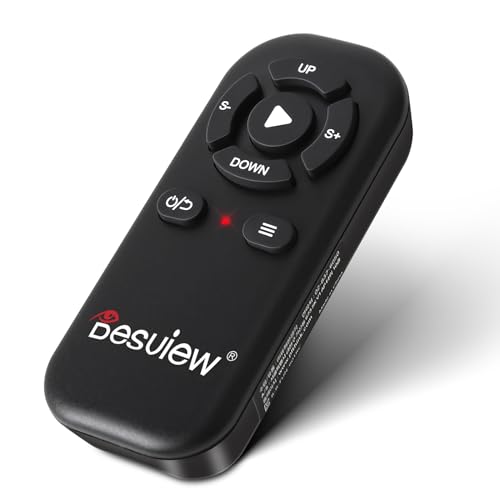
- Designed for select Desview teleprompter models
- Free Desview app supports iOS and Android
- Compact, silent design with up to 10-meter range
Best For: Desview teleprompter owners needing a replacement remote
Best Complete Kit
LENSGO TC7 9.7-Inch Teleprompter

- Includes teleprompter hardware, app, and remote control
- Supports phones, tablets, cameras, and 17mm wide-angle lenses
- Folds quickly and includes cold shoes for accessories
Best For: Portable video setups needing a complete prompting kit
Best Overall – NEEWER X14 III Teleprompter
If you want teleprompters with remote controls for courses, presentations, or regular video production, the NEEWER X14 III offers a well-rounded setup. Its 14-inch beamsplitter, included RT113 Bluetooth remote, app control, and no-assembly design make it practical for both studio and portable use.
Best For: Creators who need a versatile teleprompter for tablets, phones, DSLR cameras, speeches, and online courses.
Pros:
- No assembly required and folds flat into the included carry case.
- 14-inch HD beamsplitter supports a 10-foot reading range and 45-degree tilt.
- RT113 remote and app control scrolling, playback, page turns, speed, and font size.
- Manfrotto 501PL-compatible QR plate and multiple mounting threads support flexible setups.
Cons:
- Does not include a built-in display, so a compatible phone or tablet is required.
- At 5.2 pounds, it is less lightweight than compact teleprompters.
The X14 III is a strong middle-ground option, combining a large readable screen with convenient remote operation and useful camera-mount adjustments. Its 10 kg maximum load and accessory mounting points also make it suitable for more developed recording rigs.
Best Compact Option – Desview T3 Teleprompter
The Desview T3 is a compact choice among teleprompters with remote controls, especially for smartphone creators and smaller camera kits. It supports phones and tablets up to 10 inches, includes a Bluetooth remote, and is designed for wide-angle and vertical content without visible frame edges when properly set up.
Best For: YouTube, TikTok, Reels, interviews, and live streaming with smartphones, compact tablets, DSLR cameras, or mirrorless cameras.
Pros:
- Supports smartphones and tablets up to 10 inches and includes a phone clamp.
- Included adapter rings fit lenses from 49mm through 82mm.
- 97% light transmittance beam-splitter glass is designed for clear, ghost-free text.
- Bluetooth remote and DESVIEW app control scrolling, playback, and text speed.
Cons:
- Not designed for 12.9-inch iPads or cameras without lens filter threads.
- Horizontal shooting requires at least a 24mm focal length, while vertical shooting requires 35mm or above.
The T3 prioritizes portability and broad lens compatibility rather than a large reading surface. Its optical glass and included mounting accessories make it particularly appealing for short-form and mobile-first production.
Best Large-Format Model – NEEWER X17 II Teleprompter
For presenters who need a longer reading distance, the NEEWER X17 II is one of the more substantial teleprompters with remote controls in this lineup. Its 17-inch beamsplitter reads scripts from up to 13 feet, while the included RT113 remote and NEEWER app provide discreet Bluetooth control.
Best For: Speeches, streaming, vlogging, online courses, and setups where presenters need a larger script surface or longer reading range.
Pros:
- 17-inch beamsplitter supports clear script reading up to 13 feet away.
- Integrated no-assembly design includes sun hoods to help prevent light leakage.
- Included RT113 remote controls playback, speed, and page turns through the app.
- Supports tablets and phones up to 9.3 inches wide and accepts Manfrotto 501PL plates.
Cons:
- At 6.6 pounds, it is heavier and less compact than smaller models.
- Its larger frame may require more storage and transport space.
The X17 II makes the most sense when reading distance and screen size matter more than portability. Its 20 kg maximum load and quick-release camera mount also suit heavier, more permanent production setups.
Best Value – NEEWER BASICS X12B Teleprompter
The NEEWER BASICS X12B is a straightforward option for shoppers seeking teleprompters with remote controls without paying for unnecessary extras. It has a 12-inch beamsplitter, no-assembly construction, included RT113 remote, and foldable design for basic tablet-and-camera recording.
Best For: Budget-conscious creators using an iPad or tablet for streaming, presentations, online courses, and tutorial recording.
Pros:
- Economical design focuses on essential teleprompter functions.
- No assembly required and the unit folds flat for storage in its carry case.
- RT113 remote and app adjust playback, scroll speed, pages, and font size.
- 12-inch beamsplitter supports reading from up to 10 feet.
Cons:
- Not intended for phone shooting, despite compatibility with some smartphones as display devices.
- It does not function as a monitor or provide direct on-screen self-viewing.
- The included remote requires an AAA battery, which is not included.
The X12B is a sensible entry-level pick for scripted recording when you already have a compatible tablet and camera. It delivers the core remote-controlled prompting features in a compact, foldable aluminum-alloy design.
Best for Easy Setup – 7.7-Inch Phone Teleprompter
If you want teleprompters with remote controls for phone-based filming, this compact 7.7-inch model offers a straightforward setup for solo creators. Its beam-splitter glass reflects scripts in front of the recording lens, while the included Bluetooth remote and free iOS/Android app let you control playback without touching your phone.
Best For: YouTube videos, tutorials, product demos, live streams, video calls, and remote lessons using a smartphone.
Pros:
- Adjustable phone holder fits devices up to 3.8 inches wide.
- Bluetooth remote controls scrolling, speed, font size, and script navigation.
- Can mount to a compatible computer monitor for webcam presentations.
- Built-in cold shoe mount supports a compatible light or microphone.
Cons:
- Remote batteries are not included.
- Requires a compatible phone or monitor setup for prompting.
This is a practical choice when portability and phone compatibility matter more than a large display. The adjustable holder and accessory mount make it flexible for home recording and online presenting.
Best Built-In Monitor – NEEWER X11 2-in-1 Teleprompter
For shoppers comparing teleprompters with remote controls and integrated displays, the NEEWER X11 combines an 11-inch beam-splitter design with a built-in LCD monitor. It can mirror supported phones or tablets and connect to Windows or macOS computers, making it suited to streaming, conferencing, and camera-based setups.
Best For: Creators and presenters who want a built-in monitor for live streaming, video conferencing, or computer-based prompting.
Pros:
- Built-in HD LCD monitor reduces the need for a separate prompting phone or tablet.
- Supports screen mirroring from compatible iPhone and Android devices with DP protocol.
- Can function as an external monitor for Windows and macOS computers.
- Adjustable Arca-type holder supports horizontal and vertical positioning.
Cons:
- Some computer connections require drivers and specific ports.
- Phone mirroring compatibility is limited to devices with DP protocol.
- Voice sync is not supported.
The X11 is the most display-focused option in this group. Its connection requirements are worth checking before purchase, but the integrated monitor and adjustable mounting system can simplify a more advanced presentation or streaming rig.
Best Large-Format Pick – Desview TP150 15-Inch Teleprompter
The Desview TP150 is a large-format option for teleprompters with remote controls, accommodating an iPad or tablet up to 15 inches while working with DSLR, mirrorless cameras, and camcorders. Its included Bluetooth remote and free Desview app allow script control and speed adjustments during recording or live presentations.
Best For: Camera operators, presenters, and video teams needing a spacious tablet-based prompting surface.
Pros:
- 15-inch high-definition beam-splitter mirror supports a large viewing area.
- Compatible with DSLR, mirrorless cameras, camcorders, and tablets up to 15 inches.
- Included Bluetooth remote and app support script editing and speed control.
- Aluminum construction and included carry case support transport.
Cons:
- Remote battery is not included.
- At 4.45 kg, it is substantially heavier than compact phone models.
- Requires a separate compatible tablet or iPad for displaying scripts.
The TP150 makes the most sense when a large script display and camera compatibility are priorities. Its aluminum build and carry case add travel practicality, while the larger size and weight make it better suited to dedicated production setups than casual mobile use.
Best App Bundle – TeleprompterPAD Bluetooth Remote
For creators seeking teleprompters with remote controls, this TeleprompterPAD bundle combines a Bluetooth controller with the TeleprompterPAD app. It supports iOS, Android, Windows, and Mac, with controls for scrolling, playback, font size, speed, and mirror mode.
Best For: Creators, educators, streamers, and presenters using a compatible mirror teleprompter or standalone prompting app across multiple platforms.
Pros:
- Includes the TeleprompterPAD app with broad device support.
- Controls speed, font size, play-pause, navigation, and mirror mode.
- Silent buttons, automatic Bluetooth re-pairing, and smart auto-off.
- Uses two AAA batteries designed for extended use.
Cons:
- Full compatibility is guaranteed only with the TeleprompterPAD app.
- Supports one device at a time.
This is a practical choice when app compatibility and flexible controls matter more than a bundled teleprompter frame. Confirm that your preferred prompting software works with the remote before buying.
Best for Desview – RC100 Bluetooth Teleprompter Remote
This compact Desview RC100 is a focused option among teleprompters with remote controls, letting users manage scripts from a paired smartphone or tablet. Its three-button layout handles page turns, pausing, speed adjustments, and text or background color changes through the Desview app.
Best For: Owners of compatible Desview T2, T3, T12S, TP150, or TP170 teleprompters who want a small wireless controller.
Pros:
- Designed for listed Desview teleprompter models.
- Works with the free Desview app on iOS and Android.
- Small, lightweight, silent, and tactile.
- Offers a stated wireless range of up to 10 meters.
Cons:
- Compatibility is limited to Desview teleprompters and app use.
- Batteries are not included.
- Only three control buttons are provided.
The RC100 makes sense as a replacement or dedicated accessory for a compatible Desview setup. It is less suitable for users who need broad third-party app compatibility or advanced physical controls.
Best Complete Kit – LENSGO TC7 9.7-Inch Teleprompter
Unlike remote-only accessories, this LENSGO TC7 provides a complete teleprompter with a remote control and app. Its beam-splitter glass supports clear prompting while the TCQI app lets users adjust playback, speed, and text appearance from an iOS or Android phone.
Best For: Vloggers, online teachers, interviewers, and livestreamers who need a portable camera, tablet, or smartphone teleprompter kit.
Pros:
- Includes a 9.7-inch teleprompter with remote-control app support.
- Fits smartphones, tablets below 9.7 inches, and cameras with included adapter rings.
- Foldable design, adjustable 45-degree glass, and multiple cold shoes.
- Supports wide-angle shooting with lenses as wide as 17mm.
Cons:
- The TCQI app may require updates.
- The image-script option does not allow text-size adjustment.
- It is not a remote-only accessory for an existing teleprompter.
The TC7 is the stronger pick for shoppers who want the display hardware and remote workflow together. Its broad mounting support and foldable construction suit varied recording setups, while app limitations are worth considering before purchase.
How We Picked the Best Teleprompters with Remote Controls
We compared these models by looking at screen and glass size, device compatibility, remote-control support, mounting flexibility, portability, and the type of filming each one suits. The selection includes complete teleprompter systems, monitor-equipped designs, compact phone options, and standalone Bluetooth remotes for compatible setups.
Because advertised compatibility can vary by camera, lens, tablet, operating system, and app, check the manufacturer’s current specifications before ordering. Pay particular attention to included accessories: some products include a remote and app, while others are remote-only or require a separate display device.
Quick Comparison
- Best for larger scripts and studio work: 17-inch and 15-inch models provide more readable text and comfortable viewing at greater distances.
- Best all-purpose size: 11- to 14-inch teleprompters balance readability, portability, and compatibility with common cameras and tablets.
- Best for phones and small setups: Mini and 9.7-inch models are easier to carry and work well for social videos, online lessons, and desk-based recording.
- Best for upgrading an existing setup: Standalone Bluetooth remotes can add hands-free scrolling when the teleprompter and app already support them.
Key Buying Factors for Teleprompters with Remote Controls
Screen and Beamsplitter Size
A larger screen is easier to read from farther away, but it generally adds weight and bulk. Match the display size to your camera distance and shooting space rather than automatically choosing the largest model.
Camera, Lens, and Device Compatibility
Confirm that the mounting hardware supports your camera body, phone, tablet, or camcorder. Wide-angle lenses may require a teleprompter with a suitable opening and optical design to avoid vignetting. Tablet limits also matter: check both maximum screen dimensions and orientation.
Remote and App Controls
Look for wireless scrolling, speed adjustment, pause and play controls, and dependable range. Verify whether the remote works with iOS, Android, Windows, or Mac, and whether the included app supports your preferred script workflow.
Build Quality and Portability
Aluminum-alloy frames can provide better rigidity for frequent use, while compact plastic or lightweight designs are convenient for travel. Consider setup time, storage, tripod or stand requirements, and whether the unit can be packed without damaging the glass.
Text Readability and Viewing Distance
Check brightness, reflection control, font-size options, and the distance between the presenter and the glass. A teleprompter is only useful if the script remains clear without forcing you to squint or break eye contact.
Who Should Buy Which Teleprompters with Remote Controls?
Choose a large 15- or 17-inch model for studio presenters, corporate video, interviews, and anyone who records from several feet away. Choose a 11- to 14-inch model for creators who want a practical balance of readability and portability with a DSLR or mirrorless camera. Choose a compact phone or 9.7-inch teleprompter for short-form video, online teaching, livestreaming, and small home studios.
If you already own a compatible Desview or app-based teleprompter, a standalone Bluetooth remote may be the most economical upgrade. Before buying, confirm the exact model compatibility, battery requirements, included mounting hardware, and return policy.