
A reliable teleprompter can make videos, livestreams, presentations, and virtual meetings feel more natural without requiring expensive studio equipment. The best budget models help you maintain eye contact while keeping your script easy to follow.
We selected 10 teleprompters under 100, ranging from compact smartphone units to larger tablet-compatible designs and models with built-in displays. This guide focuses on compatibility, portability, readability, setup, and everyday value.
Best 10 Teleprompters Under 100 Picks for 2026
Best Value Aluminum Pick

- 12-inch HD reflected display
- No assembly and folds into included case
- Remote and iOS/Android app control
Best For: Tablet-based presentations, tutorials, and streaming
Best Compact Phone Option
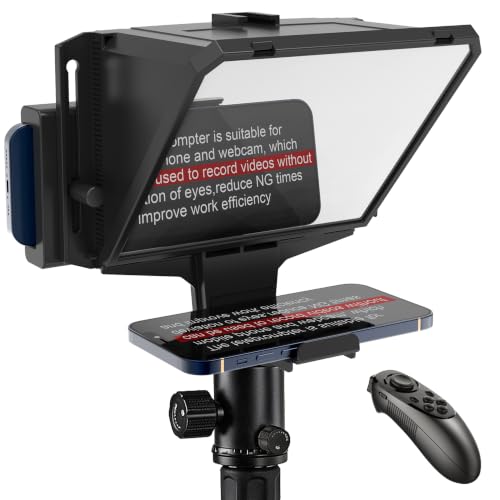
- Fits phones up to 3.8 inches wide
- Includes Bluetooth remote and free app
- Cold shoe mount for light or microphone
Best For: Phone recording, webinars, and webcam calls
Best Built-In Screen

- Built-in 9-inch FHD display
- Displays scripts or chat from a computer
- Works with cameras, webcams, and smartphones
Best For: Desktop streaming and video conferencing
Best Long-Range Tablet Kit
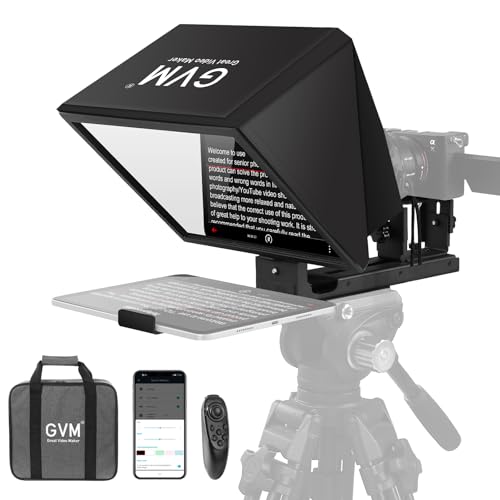
- 12-inch glass with up to 15-foot reading range
- Supports tablets up to 8.6 inches
- Folds flat and includes a carry bag
Best For: Presentations, live streams, and multi-camera setups
Best Compact DSLR Pick
AMBITFUL 7.5-Inch Mini Teleprompter

- Clear coated glass minimizes ghosting
- Works with phones and supported cameras
- Includes remote, app, rings, and tripod
Best For: Creators needing a portable phone-and-camera kit
Best Large-Screen Phone Pick
LENSGO TC12P 14.5-Inch Teleprompter
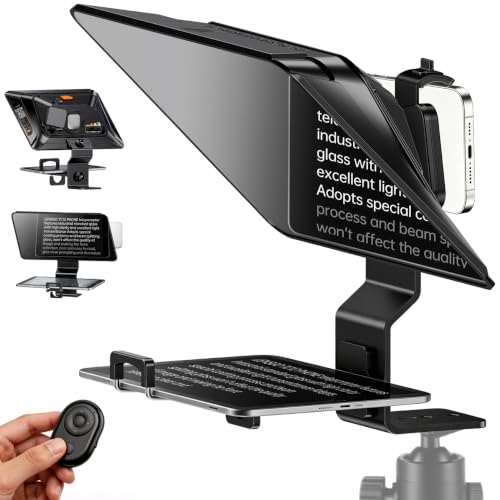
- Large glass supports phones and tablets
- Works for horizontal or vertical shooting
- Remote and app enable hands-free scrolling
Best For: Vloggers and presenters who prefer larger script text
Best Magnetic Travel Pick

- Magnetic base enables quick phone attachment
- Lightweight kit includes a mini tripod
- Remote and app support hands-free prompting
Best For: Phone-first creators who prioritize fast setup
Large-Screen Choice
Desview P13 13-Inch Teleprompter

- Supports tablets up to 13 inches
- High-definition 7H beam-splitter glass
- Includes Bluetooth remote and carry bag
Best For: Creators who want a large tablet-compatible reading area
Flexible Desktop Pick

- Supports phones and tablets up to 10 inches
- Remote adjusts playback and page controls
- Includes adapters for 49 mm to 82 mm lenses
Best For: Desktop, livestreaming, and multi-device recording setups
Portable Creator Pick
Desview P8 Foldable Teleprompter
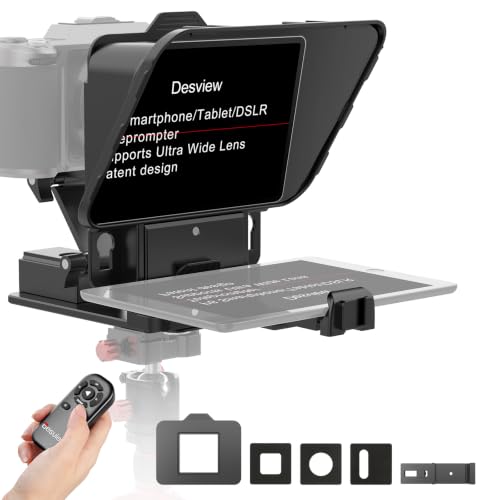
- Lightweight 920 g foldable design
- Supports portrait and landscape shooting
- Works with phones, cameras, webcams, and tablets
Best For: Mobile creators making YouTube, TikTok, or live-stream content
Best Value Aluminum Pick – NEEWER Basics X12B
For shoppers comparing teleprompters under 100, the NEEWER Basics X12B stands out with a 12-inch display, aluminum-alloy construction, and a no-assembly design. It works with an iPad or tablet and includes app and remote controls, but it is not intended for phone shooting.
Best For: Tablet-based presentations, online courses, tutorials, and streaming setups that need a portable 12-inch prompt display.
Pros:
- No-assembly, foldable design with included carry case
- 12-inch HD beam-splitter display readable from up to 10 feet
- Remote and app control for scrolling, page changes, and font size
- Adjustable platform and hood accommodate different equipment positions
Cons:
- Not for phone shooting
- AAA battery for the included remote is not included
- Does not function as a monitor or provide direct on-screen self-viewing
The X12B is a practical choice when you want a larger tablet prompt without dealing with assembly. Confirm your camera and tablet setup before buying, especially if phone-based recording is important.
Best Compact Phone Option – 7.7-Inch Mini Teleprompter
If you are shopping for teleprompters under 100 for phone recording, this 7.7-inch mini model offers a compact setup with a Bluetooth remote and free app. Its adjustable holder supports phones up to 3.8 inches wide, and it can also be positioned in front of a compatible computer monitor for webcam use.
Best For: Solo creators, online teachers, presenters, and video callers who want a small phone-based prompting setup.
Pros:
- Beam-splitter glass supports eye contact while reading
- Adjustable phone holder accommodates different phone widths
- Bluetooth remote and iOS/Android app control scrolling and font size
- Cold shoe mount supports an LED light or microphone
Cons:
- Remote batteries are not included
- Smaller 7.7-inch format may provide less reading area than larger models
- Requires a compatible monitor for the webcam setup
This mini teleprompter is a straightforward fit for phone-first recording and remote meetings. Its accessory mount and dual-phone option add flexibility, while the compact format keeps the setup manageable.
Best Built-In Screen – Elgato Prompter
The Elgato Prompter takes a different approach to teleprompters under 100 by using a built-in 9-inch display instead of requiring a separate tablet or phone screen. It connects by USB to a PC or Mac, allowing you to move windows or apps onto the display and read scripts or chat while facing the camera.
Best For: Desktop streaming, video conferencing, and creators who want a computer-controlled prompting display.
Pros:
- Built-in FHD display eliminates the need for an extra phone or tablet
- Supports scripts, Twitch chat, and other computer windows
- Compatible with DSLR cameras, webcams, smartphones, and computers
- Camera Hub app offers text and chat customization
Cons:
- Requires a PC or Mac computer and USB connection
- DisplayLink software is required on Mac, with separate Presenter software for Android
- Its desktop-oriented workflow may be less convenient for phone-only setups
Choose the Elgato if built-in display convenience matters more than a simple tablet holder. It is particularly suited to computer-based workflows, though software and desktop requirements should be checked first.
Best Long-Range Tablet Kit – GVM 12-Inch Teleprompter
For teleprompters under 100 that prioritize a larger reading area and flexible camera support, the GVM 12-inch kit combines an installation-free aluminum design with a collapsible form. It supports phones and tablets up to 8.6 inches and can be used with cameras featuring 1/4-inch or 3/8-inch mounting screws.
Best For: Presentations, live streams, and video recording where a longer reading distance and broad device compatibility are useful.
Pros:
- 12-inch optical glass provides a stated reading range up to 15 feet
- No-assembly aluminum design folds for transport
- Supports phones, tablets, DSLRs, mirrorless cameras, and video recorders
- Includes app and wireless remote control with scrolling adjustments
Cons:
- At 5.68 pounds, it is heavier than the compact mini option
- Tablet support is limited to devices up to 8.6 inches
- Remote batteries are not specified as included
The GVM is a strong fit for users who need a larger prompt surface and more camera-mount flexibility. Its heavier build favors a stable tripod-based setup over maximum portability.
Best Compact DSLR Pick – AMBITFUL 7.5-Inch Mini Teleprompter
If you’re comparing teleprompters under 100, the AMBITFUL 7.5-inch model is a practical choice for creators who want phone or camera compatibility in a small, portable kit. Its coated glass, included desktop tripod, adapter rings, and Bluetooth controls make it ready for quick indoor or on-location recording.
Best For: Smartphone, DSLR, and mirrorless-camera users who need a lightweight teleprompter for livestreams, interviews, vlogs, or video recording.
Pros:
- High-transmittance coated glass is designed to provide clear text without double images or ghosting.
- Supports smartphones and cameras with included 49–77mm adapter rings.
- Includes Bluetooth remote and app controls for scrolling, pausing, text adjustments, and screen orientation.
- Lightweight 350g design includes a mini desktop tripod and quick setup.
Cons:
- Not compatible with tablet PCs.
- Camera users need a compatible 1/4-inch tripod thread and supported adapter-ring size.
- The included desktop tripod is intended for compact setups rather than full-size studio rigs.
The AMBITFUL stands out when flexibility matters: it can work with a phone or supported DSLR/mirrorless setup while remaining easy to pack. Check your camera mount and lens diameter before buying, especially if you plan to use it beyond smartphone recording.
Best Large-Screen Phone Pick – LENSGO TC12P 14.5-Inch Teleprompter
For shoppers seeking teleprompters under 100 with a larger reading area, the LENSGO TC12P uses 14.5-inch HD beam-splitter glass and supports smartphones and tablets. Its walk-and-talk design, adjustable front panel, and Bluetooth remote make it suitable for mobile filming as well as stationary recording.
Best For: Smartphone and tablet users who want larger script text for YouTube, TikTok, Zoom, vlogging, or extended recording sessions.
Pros:
- Large 14.5-inch HD glass can fit phones or iPads up to 7.3 inches wide in landscape orientation.
- Supports horizontal and vertical shooting with quick assembly and disassembly.
- Included Bluetooth remote controls playback and scrolling speed through the TCQI app.
- Anti-glare coating, foam padding, and light seals help improve script visibility.
Cons:
- Designed for smartphone and tablet shooting rather than DSLR or mirrorless cameras.
- The larger screen may be less convenient to transport than a compact mini prompter.
- It is not water resistant.
The TC12P is a strong fit if reading comfort and device size are higher priorities than the smallest possible footprint. Its tablet support and wide glass are particularly useful for presenters who prefer larger text and fewer scroll breaks.
Best Magnetic Travel Pick – LENSGO TCQI 10P Teleprompter
The LENSGO TCQI 10P is a convenient option among teleprompters under 100 for smartphone creators who value fast setup. Its magnetic phone base, included mini tripod, 10-inch screen, and remote-controlled app are aimed at walk-and-talk videos, livestreams, Zoom calls, and everyday content creation.
Best For: iPhone and Android creators who want a lightweight, portable teleprompter for TikTok, YouTube, online instruction, interviews, or business presentations.
Pros:
- Magnetic base enables quick attachment; an included magnetic ring supports Android setup.
- Lightweight 0.8-pound kit includes a mini tripod and supports horizontal or vertical shooting.
- Coated beam-splitter glass is designed for clear reflection and high light transmission.
- TCQI app and Bluetooth remote control script playback, speed, font, and background settings.
Cons:
- Phone width is limited to under 3.82 inches.
- Android users need to install the included magnetic ring for the magnetic attachment system.
- It is designed for smartphones, not DSLR or mirrorless cameras.
The TCQI 10P emphasizes convenience over broad camera compatibility. It makes the most sense for phone-first creators who want a compact kit that can be attached quickly and controlled without touching the phone during a take.
Large-Screen Choice – Desview P13 13-Inch Teleprompter
For shoppers comparing teleprompters under 100, the Desview P13 stands out when a larger tablet-sized reading area is the priority. Its 13-inch compatibility, high-definition beam-splitter glass, remote control, and portable carry bag suit creators who want a flexible setup for cameras, conferences, or travel.
Best For: Creators who need a large reading area and support for tablets up to 13 inches.
Pros:
- Supports iPads or tablets up to 13 inches.
- 7H-hardness glass offers 70/30 visible-light transmission for clear reading.
- Works with DSLR, mirrorless cameras, camcorders, and horizontal or vertical shooting.
- Includes Bluetooth remote, free Desview app support, sun hood, and carry bag.
Cons:
- At 1.7 kg, it is heavier than more compact options.
- Designed for cameras and tablets rather than a fully self-contained display.
The P13 is a practical pick if screen size and broad camera compatibility matter more than minimizing weight. Its included remote and bag make it easier to use away from a fixed studio.
Flexible Desktop Pick – VEVOR 10-Inch Teleprompter
Among teleprompters under 100, the VEVOR 10-inch model is worth considering for desktop recording, livestreaming, and video calls. It combines an adjustable spectroscope, Bluetooth remote, tripod mounting, and a broad set of lens adapters for DSLR, webcam, and smartphone setups.
Best For: YouTube, Twitch, Zoom, and mobile creators using a compact desktop or tripod-based setup.
Pros:
- 8.8-inch spectroscope supports reading distances up to 6.5 feet.
- Works with smartphones and tablets up to 10 inches, including Android and iOS devices.
- Includes Bluetooth controls for page turning, pausing, and speed adjustment.
- Comes with lens adapters from 49 mm through 82 mm and multiple mounting accessories.
Cons:
- Its 10-inch maximum image size is smaller than the Desview P13’s tablet capacity.
- The supplied item weight is 2.2 pounds, so it is not the lightest option.
The VEVOR makes sense for buyers who value setup flexibility and included adapters. Its compatibility with wide-angle lenses over 24 mm and standard 1/4-inch tripod mounting broadens its usefulness across different recording rigs.
Portable Creator Pick – Desview P8 Foldable Teleprompter
For teleprompters under 100 aimed at mobile creators, the Desview P8 offers a lightweight, foldable design with broad device compatibility. It supports smartphones, webcams, DSLRs, action cameras, and tablets up to 10 inches, while its included remote and dual cold shoes help streamline a small recording setup.
Best For: Travel-friendly YouTube, TikTok, Instagram, and live-streaming setups.
Pros:
- Weighs 920 g and folds for easier storage and transport.
- Supports landscape and portrait shooting for standard video and short-form content.
- Multi-layer coated glass provides 70% light transmission and high reflectivity.
- Includes lens rings, phone holder, clamp, base, Bluetooth remote, and dual cold shoe mounts.
Cons:
- Tablet support is limited to devices up to 10 inches.
- The supplied specifications list a 12-inch screen size inconsistently with the stated tablet limit.
The P8 is the most travel-oriented choice in this group. Its foldable body, portrait-to-landscape switching, and accessory-friendly design make it especially practical for creators moving between short-form and conventional video.
How We Picked the Best Teleprompters Under 100
We compared these models by looking at the features that matter most in real-world recording. Key considerations included device compatibility, beam-splitter glass quality, supported screen size, camera clearance, portability, controls, and setup requirements. We also considered whether each model suits phones, tablets, webcams, mirrorless cameras, or DSLRs.
Because budget teleprompters vary significantly in design, the list includes compact smartphone options, desktop units, foldable travel models, and larger tablet-capable kits. The goal is not to identify one universal winner, but to make it easier to match a prompter to your equipment and workflow.
Quick Comparison
- Best for larger tablets: Choose a 12- or 13-inch model with generous device clearance, such as the NEEWER, GVM, or Desview P13.
- Best for phones and travel: Compact models from AMBITFUL, LENSGO, and similar designs are easier to pack and set up.
- Best for desktop recording: Look for a stable base, adjustable viewing angle, and compatibility with webcams or small cameras.
- Best for a built-in display: Elgato Prompter is designed as an integrated screen-based solution rather than a traditional tablet reflector.
- Best for flexible camera setups: Universal models with adjustable mounts provide more room for different lenses and camera bodies.
Key Buying Factors for Teleprompters Under 100
Device and Camera Compatibility
Check the supported phone, tablet, camera, and webcam dimensions before buying. A prompter may accept a large tablet but still lack enough rear clearance for a DSLR or a wide lens. If you switch between devices, prioritize adjustable mounts and broad camera access.
Glass Size and Reading Distance
Larger glass generally provides a more comfortable reading area, especially when you sit farther from the camera. Smaller models are lighter and more portable but can feel cramped for long scripts. Confirm the usable screen area rather than relying only on the advertised diagonal measurement.
Reflection, Brightness, and Text Control
Readable text depends on both the reflective glass and the brightness of the phone or tablet behind it. A remote control or compatible app makes it easier to adjust speed, pause, and scroll without reaching toward the camera. Built-in screens can simplify setup but may offer less flexibility than using your own device.
Mounting and Setup
Look for secure camera support, included adapters, and a base or tripod that matches your workspace. No-assembly and foldable designs save time, while heavier aluminum models may provide better stability. Also check whether a tripod, remote, or phone holder is included.
Who Should Buy Which Teleprompters Under 100?
Choose a compact smartphone prompter if you make short-form videos, travel frequently, or record mostly with a phone. Choose a tablet-capable model if you read longer scripts, sit farther from the camera, or want larger text. Choose a desktop-focused prompter for Zoom calls, streaming, webinars, and webcam recording. Choose an integrated-screen model if you want a cleaner, more dedicated workflow and do not need to rely on a separate tablet.
Before ordering, verify the exact supported device size, camera lens clearance, tripod requirements, and included accessories. Those details usually matter more than the headline screen size when choosing among Teleprompters Under 100.