
The best teleprompters for laptops help you maintain eye contact, deliver presentations naturally, and record smoother videos without memorizing every line. The models in this roundup range from portable setups for online teaching to larger systems built for cameras, monitors, and studio work.
Use the comparison and buying advice below to match screen size, mounting style, controls, and portability to your workflow.
Best 10 Teleprompters for Laptops Picks for 2026
Best Built-In Display

- Built-in 9-inch FHD display
- Works with PCs, Macs, webcams, and cameras
- Camera Hub customization and Stream Deck support
Best For: Streaming, video calls, and desktop-controlled prompting
Best Large-Device Support
Proaim Professional Speech Teleprompter

- Supports devices up to 17 inches
- Uses 60/40 beam splitter glass
- Includes a telescopic conference stand
Best For: Formal presentations, conferences, and broadcast setups
Best Versatile Monitor Setup
- Built-in monitor works as a second computer display
- Supports compatible phone screen mirroring
- Adjustable holder and broad camera compatibility
Best For: Creators using laptops, phones, webcams, and cameras
Best Webcam Bundle

- Includes a Full HD HDR webcam
- Built-in display needs no phone or tablet
- Camera Hub manages scripts and camera settings
Best For: Streaming, presenting, and video calls from a laptop
Best Compact Pick

- Pre-assembled, compact design
- Supports smartphones, cameras, and webcams
- Includes hood, rails, and carry bag
Best For: Portable smartphone-based webcam and camera setups
Best Large-Display Pick

- 14-inch HD beamsplitter
- Includes Bluetooth remote and app control
- Folds flat with tripod and accessory mounts
Best For: Tablet-based courses, presentations, and longer reading distances
Best Value Tablet Pick

- No-assembly aluminum-alloy construction
- 12-inch display with up to 10-foot reading range
- Includes app and quiet remote control
Best For: iPad and tablet-based courses, tutorials, and streaming
Best Portable Pick
LENSGO TC12P 14.5-Inch Teleprompter
- 14.5-inch HD coated beamsplitter glass
- Supports phones and tablets up to 7.3 inches wide
- Bluetooth remote and quick setup
Best For: Mobile creators using a phone or tablet
Best Large-Screen Option
NEEWER X17 II 17-Inch Teleprompter

- 17-inch beamsplitter for long-distance reading
- No assembly required
- Supports tablets up to 9.3 inches wide
Best For: Fixed studio, teaching, and streaming setups
Best Compact Camera Kit
LENSGO TC7 9.7-Inch Teleprompter

- Works with phones, tablets, and cameras
- Folds in one second for portability
- App control with TXT script support
Best For: Mobile creators using mixed camera equipment
Best Built-In Display – Elgato Prompter
The Elgato Prompter is a strong choice among teleprompters for laptops when you want a dedicated screen rather than relying on a tablet or phone. It connects to a PC or Mac, lets you move windows or apps onto its display, and can show scripts, chat, or video-call content.
Best For: Streamers, remote presenters, and video-call users who want integrated prompting with professional eye contact.
Pros:
- Built-in 9-inch FHD display eliminates the need for an extra mobile device.
- Supports DSLR cameras, webcams, smartphones, laptops, and personal computers.
- Camera Hub allows adjustments to text and chat appearance.
- Works with Stream Deck and offers straightforward desktop-controlled setup.
Cons:
- Mac users must download DisplayLink software.
- Android users require DisplayLink Presenter software.
- Its compact display may be less suitable for very long scripts viewed from a distance.
Choose this model if convenience and computer integration matter more than using a large external prompting surface. Its built-in display and broad camera compatibility make it especially practical for streaming and video conferencing.
Best Large-Device Support – Proaim Professional Speech Teleprompter
The Proaim Professional Speech Teleprompter is suited to buyers who need teleprompters for laptops, tablets, or monitors up to 17 inches. Its 60/40 beam splitter glass is designed to keep scripts visible while helping presenters maintain a natural line of sight.
Best For: Conferences, speeches, broadcasts, training sessions, and other formal presentations using a large laptop or monitor.
Pros:
- Supports laptops, tablets, and monitors up to 17 inches.
- 60/40 beam splitter glass is designed for clear script visibility.
- Included telescopic conference stand enables height adjustment.
- Suitable for studio and on-location professional use.
Cons:
- The supplied notes do not specify a built-in display or dedicated prompting software.
- Its professional presentation design may be more equipment than casual users need.
- Large-device compatibility can require more setup space than compact prompting systems.
This is the most presentation-focused option in the group. It makes sense when a 17-inch laptop or monitor is central to your setup and maintaining audience engagement is a priority.
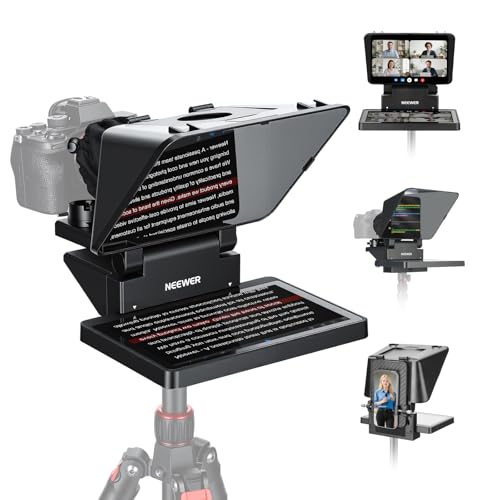
Best Versatile Monitor Setup – NEEWER X11 Teleprompter
The NEEWER X11 is a versatile option among teleprompters for laptops, combining an LCD monitor with screen-mirroring and external-display functions. You can connect it to compatible computers running Windows or macOS, mirror supported phones, or use it with cameras and webcams.
Best For: Creators who want one teleprompter for laptop display extension, phone mirroring, live streaming, and video conferencing.
Pros:
- Built-in monitor can function as a second display for Windows and macOS computers.
- Supports phone or tablet screen mirroring with the included cable on compatible devices.
- Works with cameras, webcams, and smartphones, with lens-thread support up to 72 mm.
- Adjustable Arca-type holder provides horizontal and vertical positioning.
Cons:
- Drivers may be required for USB-A/HDMI and initial HDMI computer connections.
- Phone mirroring requires a compatible DP-protocol device.
- Voice sync is not supported, and apps require separate downloads.
The X11 is a good fit when flexibility is more important than the simplest possible connection. Check your computer ports and phone compatibility before buying, since the available connection method affects setup.
Best Webcam Bundle – Elgato Prompter Camera Set
The Elgato Prompter Camera Set combines an integrated teleprompter with a Full HD webcam, making it a convenient choice among teleprompters for laptops. It is designed for PC and Mac use and supports streaming, presenting, and calls through platforms such as OBS, Zoom, and Teams.
Best For: Users who want a ready-to-use prompting and webcam package for streaming, presentations, and video meetings.
Pros:
- Includes a built-in display, so no separate phone or tablet is needed.
- Full HD 1080p60 webcam includes HDR and a slide-in privacy shutter.
- Camera Hub supports script management, contrast adjustments, crosshair overlay, and camera controls.
- Works with PC and Mac and integrates with Stream Deck.
Cons:
- Mac users need to download DisplayLink software.
- Its bundled webcam may be unnecessary if you already own a preferred camera.
- The supplied notes do not specify the display size or physical dimensions.
This set is the simplest pick for buyers starting from scratch with both a webcam and teleprompter. It offers a cohesive desktop workflow, while existing camera owners may prefer the standalone Elgato Prompter instead.
Best Compact Pick – Glide Gear TMP 75
Glide Gear TMP 75 Teleprompter - Laptop, DSLR, Smartphone - Carry Case, No Assembly
Check Price On AmazonFor shoppers comparing teleprompters for laptops and webcam setups, the Glide Gear TMP 75 is a compact option that uses a smartphone for script display. It arrives pre-assembled and includes a protective hood and carry bag for easier transport.
Best For: Webcam recordings, DSLR or mirrorless camera rigs, and users who prefer a smartphone-based teleprompter.
Pros:
- Works with smartphones, DSLRs, mirrorless cameras, and webcams.
- Pre-assembled design with 5-by-5.4-inch 70/30 beam-splitting glass.
- All-metal construction, 15mm rails, protective hood, and carry bag.
- Compact 2-pound design for portable setups.
Cons:
- Does not support iPad tablets.
- Teleprompter app is not included.
- Requires an app with a mirror-text feature.
The TMP 75 makes sense when portability and smartphone compatibility matter more than a large reading screen. Its smaller glass area is best suited to close-range webcam or camera presentations.
Best Large-Display Pick – NEEWER Teleprompter X14 III
The NEEWER X14 III is a strong choice for shoppers seeking teleprompters for laptops, tablets, and larger video-recording setups. Its 14-inch beamsplitter, adjustable tilt, included remote, and fold-flat carry case support presentations, courses, tutorials, and broadcasts.
Best For: Tablet-based scripts, longer reading distances, online courses, presentations, and professional video recording.
Pros:
- 14-inch HD beamsplitter with 71% light transmission and a 10-foot reading range.
- 45-degree tilt adjustment helps optimize the viewing angle.
- Includes RT113 Bluetooth remote for scrolling, page turns, and font-size control.
- Supports phones and tablets up to 8.7 inches wide and folds into its carry case.
Cons:
- At 5.2 pounds, it is less portable than compact models.
- Designed for tablets and phones rather than a laptop display itself.
- Not water resistant.
Choose the X14 III if clear text at a greater distance and flexible tablet compatibility are priorities. Its heavier all-metal build and tripod-mount options make it better suited to stable, more involved setups.
Best Value Tablet Pick – NEEWER BASICS X12B
For buyers looking for practical teleprompters for laptops and tablet-based recording, the NEEWER BASICS X12B focuses on essential features without extra materials. It offers no-assembly setup, a 12-inch display, remote and app control, and a foldable design.
Best For: iPad and tablet users recording online courses, presentations, tutorials, and streaming content.
Pros:
- No-assembly aluminum-alloy design with a liftable platform for camera positioning.
- 12-inch HD beamsplitter provides 75% light transmittance and a reading range up to 10 feet.
- RT113 remote and NEEWER app control scrolling, pages, playback, and font size.
- Folds flat and includes a durable carry case.
Cons:
- Not intended for phone shooting, despite supporting smartphones as script devices.
- Does not function as a monitor or provide direct on-screen self-viewing.
- Remote requires an AAA battery, which is not included.
The X12B is a sensible middle ground for tablet users who want straightforward setup and remote-controlled scripts. Confirm your camera and tablet arrangement before buying, especially if you need phone-based shooting or a self-view monitor.
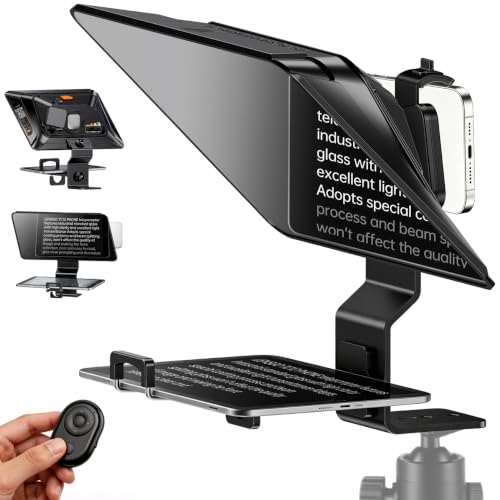
Best Portable Pick – LENSGO TC12P 14.5-Inch Teleprompter
For creators comparing teleprompters for laptops and mobile recording, the LENSGO TC12P is a portable option built around phones and tablets. Its 14.5-inch HD glass, adjustable holder, Bluetooth remote, and quick setup suit walk-and-talk videos, Zoom calls, TikTok content, and vlogging.
Best For: Mobile creators who use a smartphone or tablet and want a larger prompting surface for on-the-go recording.
Pros:
- Supports smartphones, iPads, and tablets up to 7.3 inches wide in landscape orientation.
- 14.5-inch coated glass helps provide clear text while reducing glare.
- Includes a Bluetooth remote for pausing and adjusting scroll speed through the TCQI app.
- Quick assembly, vertical or horizontal shooting, and a height-adjustable front panel improve flexibility.
Cons:
- Designed for smartphone and tablet use rather than a laptop display.
- Not water resistant.
The TC12P makes the most sense when portability and phone-or-tablet compatibility matter more than a full studio setup. Its larger glass and remote control can help reduce eye movement and interruptions during longer takes.
Best Large-Screen Option – NEEWER X17 II 17-Inch Teleprompter
The NEEWER X17 II is a substantial choice for buyers evaluating teleprompters for laptops, tablets, or camera-based productions. Its 17-inch beamsplitter, integrated design, adjustable mounting platform, and included remote are aimed at speeches, online courses, streaming, tutorials, and other fixed-camera work.
Best For: Studio, classroom, and streaming setups that benefit from a large viewing area and robust camera mounting.
Pros:
- 17-inch beamsplitter reflects scripts clearly from up to 13 feet, according to the supplied specifications.
- Integrated design requires no assembly out of the box.
- Supports tablets up to 9.3 inches or 235 mm wide and works with iOS and Android devices.
- Includes RT113 Bluetooth remote, app control, sun hoods, and a Manfrotto 501PL-compatible QR mounting system.
Cons:
- At 6.6 pounds, it is less convenient for highly portable setups.
- Its tablet-and-camera design does not indicate direct laptop-screen compatibility.
- Not water resistant.
The X17 II stands out for its large glass and heavy-duty mounting features. It is better suited to a dedicated recording position than to casual travel, especially when clear prompting at a greater distance is important.
Best Compact Camera Kit – LENSGO TC7 9.7-Inch Teleprompter
The LENSGO TC7 is a compact teleprompter for laptop-adjacent desk setups, smartphones, tablets, and cameras. It combines 9.7-inch prompting glass with app control, a fold-in-one-second design, wide-angle support, and mounting points for accessories, making it useful for teaching, interviews, livestreams, and vlogging.
Best For: Creators who want a portable teleprompter that can work with both mobile devices and camera-based recording setups.
Pros:
- Supports smartphones, tablets below 9.7 inches, and camera shooting configurations.
- TCQI app supports script entry or TXT uploads, scrolling, speed adjustment, and font or background changes.
- Folds in one second and holds the glass at a 45-degree viewing angle.
- 17mm wide-angle shooting support and multiple cold shoes accommodate varied setups and accessories.
Cons:
- The 9.7-inch display is smaller than the glass on the other listed options.
- Image-based scripts do not offer the same text-size flexibility as editable scripts.
- Not water resistant.
The TC7 is a practical middle ground for users who need portability and broad device compatibility. Its smaller footprint favors travel and desk recording, while the camera adapters and cold shoes add flexibility beyond a phone-only teleprompter.
How We Picked the Best Teleprompters for Laptops
We compared these teleprompters by looking at laptop and tablet compatibility, viewing area, beam-splitter design, mounting flexibility, remote or app control, portability, and setup requirements. We also considered whether each model suits a webcam, DSLR, mirrorless camera, smartphone, or a separate display.
A laptop-compatible teleprompter is not always designed to sit directly on every laptop. Some models use the laptop or monitor as the script display, while others include a dedicated screen or support tablets. Check the mounting method and available space before buying.
Quick Comparison
- Best integrated setup: Elgato Prompter combines a built-in screen with a creator-focused design.
- Best for larger scripts: NEEWER X14 III and X17 II offer larger viewing surfaces for presentations and longer camera distances.
- Best portable option: Glide Gear TMP 75 is designed for laptop, DSLR, and smartphone use with a carry case.
- Best tablet-friendly choices: Proaim, NEEWER Basics X12B, and LENSGO models support tablet-based prompting.
- Best webcam-ready bundle: The Elgato Prompter Camera Set adds a Full HD webcam and HDR support.
Key Buying Factors for Teleprompters for Laptops
Display and Viewing Distance
A larger beamsplitter is easier to read from farther away, making 14-inch and 17-inch designs better for studio presentations or full-body framing. Compact units are more practical for desks and close-up webcam recordings.
Screen Source and Compatibility
Confirm whether the teleprompter has a built-in display, requires a laptop or monitor, or holds a tablet or smartphone. Check supported device dimensions, connection requirements, and whether screen mirroring works with your operating system.
Camera and Mounting Support
Look for adjustable camera plates, lens openings, and mounting hardware that fit your equipment. A unit may support laptops but still require a separate tripod, camera mount, or webcam adapter.
Controls and Software
Remote controls and companion apps make it easier to pause, scroll, change speed, and adjust text while recording. App compatibility matters if you plan to use iOS, Android, Windows, or macOS devices.
Portability and Setup
For mobile teaching, sales calls, or travel, prioritize lighter construction, folding parts, and a protective case. Heavier aluminum designs can be steadier but are better suited to a dedicated desk or studio.
Who Should Buy Which Teleprompters for Laptops?
Streamers and video-call users should consider an integrated or webcam-ready model, especially when maintaining eye contact is the main goal. Online teachers and presenters may prefer tablet-compatible designs with a larger reading area and remote control.
Photographers and video creators should focus on camera mounting range, lens clearance, and beamsplitter size. Choose a larger NEEWER or Proaim unit for a studio setup, or a compact Glide Gear or LENSGO model for travel. If you want the simplest laptop-centered workflow, prioritize built-in display features and verify that your computer’s screen placement and mounting accessories are supported.