
Choosing a dependable encoder does not require a large production budget. The best streaming encoders under $200 can convert HDMI video into network streams for YouTube, Facebook Live, IPTV systems, and local distribution.
This roundup focuses on practical features that matter most at this price: resolution, codec support, streaming protocols, loop-out functionality, audio handling, and setup flexibility.
Best 10 Streaming Encoders Under 200 Picks for 2026
Best Multi-Protocol Value
URayCoder 1080p HDMI-to-IP Encoder

- 1080p at up to 60fps
- Supports four simultaneous streams
- Includes overlays and audio options
Best For: Multi-platform 1080p streaming and IPTV workflows
Best Compact 4K Flexibility
Zowietek ZowieBox Encoder/Decoder

- 4K HDMI pass-through
- Native NDI and multiple protocols
- USB-C, PoE, and tripod support
Best For: Gaming, portable production, and NDI workflows
Best 4K Protocol Support
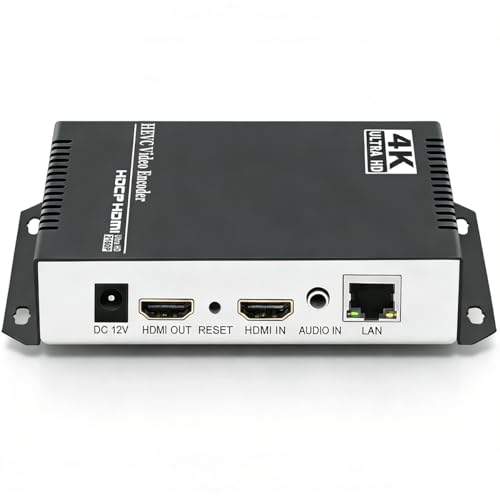
- 4K at up to 30fps
- Supports up to 120fps at lower resolutions
- Broad protocol and multi-stream support
Best For: 4K streaming and advanced network-video distribution
Best for Audio Integration
J-Tech Digital 1080p IPTV Encoder

- 1080p at 60Hz
- Embeds analog mixer audio
- Four-platform streaming and app control
Best For: Live events requiring external audio mixing
Best 4K NDI/SRT Value
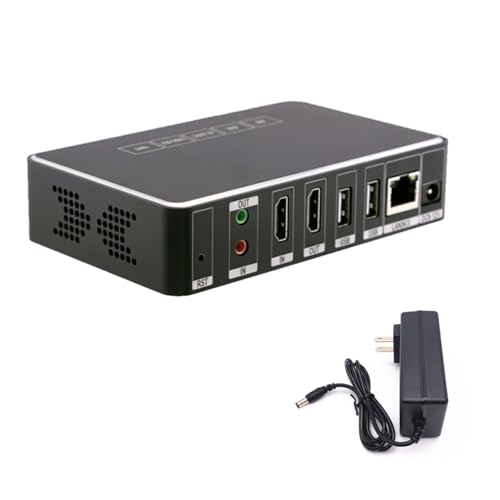
- 4K at 30 fps
- NDI and SRT support
- 8GB onboard storage
Best For: 4K streaming, content sharing, and surveillance recording
Best HDMI Loop-Out Encoder

- HDMI loop-out preview
- H.264 and H.265 encoding
- Extensive protocol and OSD controls
Best For: 1080p live production with local monitoring
Best Multi-Platform 4K Encoder

- 4K at 30 fps
- Up to four simultaneous streams
- Broad protocol and platform support
Best For: Multi-platform live streaming and customized network video output
Most Versatile 4K Encoder

- 4K@30 H.264/H.265 hardware encoding
- Multi-protocol streaming and HDMI decoding
- Multi-view, OSD, and local recording features
Best For: Church, classroom, IPTV, and live-event installations
Best Compact 1080p60 Pick

- Hardware 1080p60 H.264/H.265 encoding
- Browser setup with no PC software
- Compact design with audio and OSD support
Best For: Compact Full HD streaming and monitoring setups
Best for Multi-Platform Output

- 4K input with H.264/H.265 encoding
- Up to four simultaneous protocol outputs
- Extensive overlays and image adjustments
Best For: Multi-platform streaming, IPTV, OBS, and NVR workflows
Best Multi-Protocol Value – URayCoder 1080p HDMI-to-IP Encoder
For shoppers comparing streaming encoders under 200, this URayCoder model is a flexible 1080p option with H.265/H.264 encoding, HDMI input, and broad network-protocol support. It can send up to four streams using different protocols, making it useful for multi-platform distribution and network video workflows.
Best For: Multi-platform 1080p streaming, IPTV, OBS, and users who want extensive configuration controls.
Pros:
- Supports 1080p input and output at up to 60fps with H.265/H.264 encoding.
- Works with RTSP, RTMP(S), SRT, HLS, UDP, ONVIF, FLV, and other protocols.
- Allows logos, captions, timestamps, cropping, rotation, and audio-source adjustments.
- Can output four streams using different protocols simultaneously.
Cons:
- It is limited to 1080p rather than 4K input or output.
- The extensive settings may be more than basic users need.
This is a strong choice when protocol flexibility and branding tools matter more than 4K resolution. Its HDMI and line-in audio options also suit live productions that need more control over the source signal.
Best Compact 4K Flexibility – Zowietek ZowieBox Encoder/Decoder
Among streaming encoders under 200, the compact Zowietek ZowieBox stands out for combining 4K HDMI pass-through, IP encoding and decoding, and NDI connectivity. Its small form factor and multiple power options make it practical for gaming, events, and portable production setups.
Best For: Gamers, mobile production setups, and NDI-based workflows that need 4K pass-through.
Pros:
- Captures up to 4K with zero-lag HDMI pass-through.
- Supports NDI|HX3, NDI|HX2, NDI|HX, SRT, RTMP(S), and RTSP workflows.
- Can operate as an encoder or decoder, including UVC-to-HDMI conversion.
- Offers USB-C power, PoE, a tripod mount, LCD status display, and web control.
Cons:
- Encoder and decoder modes cannot operate simultaneously.
- Full NDI signals are not supported.
- USB capture-card functionality is not currently supported.
The ZowieBox is the most versatile option here for users who need more than a basic HDMI streamer. Its 4K pass-through and NDI support are particularly useful, but buyers should confirm that its mode limitations fit their workflow.
Best 4K Protocol Support – URayCoder 4K HDMI IP Encoder
This URayCoder is a capable pick for shoppers seeking streaming encoders under 200 with 4K support. It accepts 4K HDMI video at up to 30fps, supports high frame rates at lower resolutions, and offers an unusually broad selection of streaming and contribution protocols.
Best For: 4K live video, multi-platform distribution, and advanced network-streaming applications.
Pros:
- Supports 3840×2160 input and output at up to 30fps.
- Supports up to 120fps at 2K and lower resolutions.
- Works with RTSP, RTMP(S), SRT, HLS, WebRTC, TRTC, ICECAST, and more.
- Can produce four streams with different protocols and includes overlay tools.
Cons:
- 4K operation is limited to 30fps.
- The broad feature set may require more setup than a simple streaming solution.
Choose this model when 4K input and protocol breadth are priorities. It offers useful control over resolution, bitrate, overlays, and audio, making it better suited to technical or professional streaming environments than casual plug-and-play use.
Best for Audio Integration – J-Tech Digital 1080p IPTV Encoder
For buyers comparing streaming encoders under 200 for live events, the J-Tech Digital JTECH-ENCH4A focuses on practical 1080p streaming and audio flexibility. Its audio embedder can combine HDMI video with analog audio from a mixer, while the control app simplifies configuration.
Best For: Live events, presentations, and streams that need analog mixer audio embedded with HDMI video.
Pros:
- Supports broadcasting up to 1080p at 60Hz.
- Combines HDMI video with analog audio from an external source.
- Supports RTSP, RTP, RTMPS, RTMP, HTTP, UDP, and TS protocols.
- Can stream to four platforms simultaneously and includes mobile control apps.
Cons:
- It does not offer 4K streaming.
- The supplied details list a one-year manufacturer warranty rather than lifetime coverage.
This encoder is especially appealing when clean, separately sourced audio is central to the production. The app-based controls and customizable on-screen messaging add convenience for event operators, while 1080p60 keeps the setup focused and practical.
Best 4K NDI/SRT Value – Link Pi ENC1-V3
For shoppers comparing streaming encoders under 200, the youyeetoo Link Pi ENC1-V3 stands out when 4K capability and flexible network protocols matter. Its quad-core CPU, 2GB of RAM, and 8GB of onboard storage support 4K at 30 fps and network video storage.
Best For: YouTube streaming, content sharing, surveillance recording, and setups that use NDI or SRT devices.
Pros:
- Supports 4K video at 30 fps.
- Works with RTSP, RTMP, HLS, and UDP encoding methods.
- Includes 8GB flash storage for network video storage.
- Integrates with devices supporting NDI and SRT.
Cons:
- The supplied notes do not specify HDMI loop-out or analog audio input.
- Its broader feature set may be more than needed for basic 1080p streaming.
This is a strong fit for buyers who want 4K streaming and protocol flexibility in one compact encoder. Choose it over a simpler 1080p model when NDI, SRT, or onboard storage are part of your workflow.
Best HDMI Loop-Out Encoder – 1080p H.264/H.265 IP Encoder
Among streaming encoders under 200, this HDMI IP encoder is a practical choice for 1080p workflows that need local monitoring. It accepts HDMI up to 1080p at 60 fps, encodes up to 1080p at 30 fps, and passes the original signal to a monitor through HDMI loop-out.
Best For: Live production setups needing local preview, protocol flexibility, image controls, and optional analog audio.
Pros:
- Supports H.264 and H.265 encoding.
- Offers HDMI loop-out for on-site monitoring.
- Supports RTMP, RTSP, FLV, HLS, SRT, TS, UDP multicast, and RTC.
- Provides rotation, mirroring, cropping, overlays, bitrate, and frame-rate controls.
Cons:
- Encoding output is limited to 1080p at 30 fps.
- The supplied notes identify the brand as Generic.
- Setup includes many advanced controls that may be unnecessary for simple streaming.
Its fanless metal design, low stated power draw, web control, and HDMI loop-out make it especially useful for fixed installations and event-style monitoring. It is less suited to buyers specifically seeking 4K encoding.
Best Multi-Platform 4K Encoder – URayCoder UHE265-1L-4K
For streaming encoders under 200 that prioritize broad platform compatibility, the URayCoder UHE265-1L-4K offers 4K input and output with H.265/H.264 encoding. It can output up to four streams using different protocols, making it useful for multi-platform distribution without an additional encoder.
Best For: Creators and organizations streaming HDMI sources to multiple platforms such as YouTube, Facebook, Twitch, and Vimeo.
Pros:
- Supports 4K at 30 fps and up to 120 fps at 2K or lower resolutions.
- Supports HTTP, RTSP, RTMP(S), SRT, HLS, WebRTC, UDP multicast, and other protocols.
- Can output four streams with different protocols simultaneously.
- Includes overlays, cropping, rotation, audio-input options, and lifetime technical support.
Cons:
- The supplied details list one HDMI port.
- Advanced multi-stream configuration may require more setup than basic encoding.
- The notes do not specify HDMI loop-out.
This is the most feature-rich option here for multi-platform streaming and customizable output. Its 4K support, high lower-resolution frame rates, and broad protocol list make it a compelling choice for demanding distribution workflows.
Most Versatile 4K Encoder – 4K HDMI Encoder Decoder
For shoppers comparing streaming encoders under 200, this model stands out as a flexible 4K HDMI encoder and decoder. It supports H.264 and H.265 hardware encoding, multiple streaming protocols, HDMI loopout, local recording, and network-stream decoding for more demanding broadcast, IPTV, and event setups.
Best For: Churches, classrooms, IPTV systems, digital signage, and live productions that need 4K input plus encoder/decoder flexibility.
Pros:
- Accepts 4K video at up to 30 fps with H.264 or H.265 hardware encoding.
- Supports RTMP, RTSP, SRT, HLS, FLV, TS, RTC, and UDP Multicast workflows.
- Includes HDMI output, multi-view layouts, OSD overlays, and USB or network recording.
- Designed for continuous operation in a compact all-metal chassis.
Cons:
- Its broad feature set may be more than needed for a simple single-platform stream.
- Advanced network and IPTV configuration may require setup knowledge.
- The supplied details do not specify current software-update support.
This is the strongest choice when you want more than basic HDMI-to-stream conversion. Its decoder function, multi-view tools, recording options, and 4K support make it particularly useful for installations and production environments.
Best Compact 1080p60 Pick – BM1000 HDMI Streaming Encoder
If you want one of the more straightforward streaming encoders under 200, the BM1000 focuses on 1080p60 HDMI streaming in a palm-sized enclosure. Browser-based setup, hardware H.264/H.265 encoding, and extensive protocol support make it a practical fit for cameras, consoles, monitors, and remote video systems.
Best For: Users who need compact 1080p60 streaming for YouTube, Facebook Live, IPTV, monitoring, or digital signage without PC software.
Pros:
- Provides hardware H.264/H.265 encoding at up to 1080p60.
- Supports RTMP(S), RTSP, SRT, UDP, HTTP, HLS, WebRTC, and additional distribution protocols.
- Browser-based configuration requires no dedicated software or drivers.
- Offers HDMI embedded audio, 3.5mm audio input, and OSD text, logo, or timestamp overlays.
Cons:
- Maximum listed streaming resolution is 1080p60 rather than 4K.
- Advanced configurations require basic networking knowledge.
- The supplied specifications list a 42-watt nominal power rating, which may be higher than expected for a palm-sized unit.
The BM1000 is a sensible option for buyers prioritizing simple deployment and smooth Full HD output. Its small footprint and browser controls are useful when space is limited, while the protocol range leaves room for more specialized network workflows.
Best for Multi-Platform Output – 4K HDMI to IP Encoder
Among streaming encoders under 200, this URayCoder model is geared toward users who want broad protocol support and simultaneous distribution. It accepts 4K HDMI sources, encodes in H.264 or H.265, and can output multiple streams for platforms and systems such as YouTube, Facebook, Twitch, OBS, IPTV, and ONVIF NVR environments.
Best For: Multi-platform broadcasters, IPTV operators, OBS users, and installations needing customizable overlays and network output.
Pros:
- Supports 4K input at up to 30 fps and up to 120 fps at 2K and lower resolutions.
- Can output up to four video streams using different protocols.
- Includes RTSP, RTMP(S), SRT, HLS, WebRTC, ONVIF, and multicast compatibility.
- Provides text, scrolling captions, logos, timestamps, cropping, rotation, flipping, and mirroring controls.
Cons:
- The supplied details do not clearly specify the maximum encoded output resolution for every mode.
- Its extensive customization options may take longer to configure than a basic encoder.
- It is designed for HDMI-source workflows and does not replace a standalone camera or capture source.
This encoder is a strong fit when flexibility matters more than minimalism. Four-stream output and a wide protocol list support complex distribution plans, while the overlay and image-adjustment tools help tailor a branded or monitored feed.
How We Picked the Best Streaming Encoders Under 200
We compared these encoders by looking at the features that most affect real-world streaming: HDMI input compatibility, maximum resolution and frame rate, H.264 and H.265 support, available output protocols, audio handling, network connectivity, and ease of configuration.
Protocol support was especially important because different platforms and production systems may require RTMP, RTMPS, RTSP, SRT, HLS, UDP, NDI, or WebRTC. We also noted useful extras such as HDMI loop-out, encoder-decoder modes, app control, and support for multiple simultaneous workflows. Product listings and specifications can vary, so confirm current firmware, included accessories, and platform compatibility before buying.
Quick Comparison
For straightforward online broadcasting, prioritize an encoder with RTMPS or RTMP support and a clearly documented setup process. For lower-latency contribution feeds, SRT is more valuable. IPTV installations may benefit from HLS, UDP multicast, or RTSP support, while NDI is useful when the encoder must integrate with compatible network production software.
Models advertised as 4K may encode, pass through, or decode 4K differently. Check whether 4K refers to the input, loop-out, recording, or actual encoded stream. If your source is 1080p, a reliable 1080p60 encoder may be a better value than a unit whose headline feature is 4K compatibility.
Key Buying Factors for Streaming Encoders Under 200
Resolution and Frame Rate
Choose 1080p60 for smooth sports, gaming, and fast motion. A 4K-capable model makes sense when you need 4K input compatibility or HDMI pass-through, but verify its actual streaming output limits.
Codec and Protocol Support
H.264 offers broad compatibility, while H.265 can reduce bandwidth at similar quality when your destination supports it. RTMP or RTMPS is typically the simplest route to major platforms; SRT is preferable for unstable networks and contribution links.
Audio and Connectivity
Confirm whether embedded HDMI audio is supported and whether external audio inputs are available if your production uses a mixer. Wired Ethernet is generally more dependable than relying on Wi-Fi, especially for continuous broadcasts.
Loop-Out and Control
An HDMI loop-out lets you monitor or feed another display without adding a splitter. Web interfaces, control apps, presets, and status indicators can significantly reduce setup time.
Who Should Buy Which Streaming Encoders Under 200?
Choose a basic HDMI-to-IP encoder if you need an affordable, dedicated feed for a camera, console, signage player, or single-platform stream. Select a model with RTMPS and 1080p60 when ease of use and smooth online video are the priorities.
Choose an SRT-capable encoder for remote events, field production, or unreliable connections. IPTV operators should prioritize RTSP, HLS, UDP, and multicast support. Buyers working in software-based video environments should look for NDI or WebRTC compatibility, while users with mixed HDMI equipment may prefer a 4K model with loop-out and encoder-decoder functionality.
Finally, treat sub-$200 hardware as task-specific rather than a replacement for a full production switcher. Test your source resolution, audio path, network, and destination platform before an important live event.